

Why Whole-Document Sentiment Analysis Fails and How Section-Level Scoring Fixes It
Discover why whole-document sentiment analysis falls short and how a new open-source Python package solves it with section-level scoring.
 ·
·
Join the DZone community and get the full member experience.
Join For FreeHave you ever tried to analyze the sentiment of a long-form document like a financial report, technical whitepaper or regulatory filing? You probably noticed that the sentiment score often feels way off. That’s because most sentiment analysis tools return a single, aggregated sentiment score—usually positive, negative, or neutral—for the entire document. This approach completely misses the complexity and nuance embedded in long-form content.
I encountered this challenge while analyzing annual reports in the finance industry. These documents are rarely uniform in tone. The CEO’s message may sound upbeat, while the “Risk Factors” section could be steeped in caution. A single sentiment score doesn’t do justice to this mix.
To solve this, I developed an open-source Python package that breaks down the sentiment of each section in a PDF. This gives you a high-resolution view of how tone fluctuates across a document, which is especially useful for analysts, editors and anyone who needs accurate sentiment cues.
What the Package Does
The pdf-section-sentiment package is built around a simple but powerful idea: break the document into meaningful sections, and score sentiment for each one individually.
It has two core capabilities:
- PDF Section Extraction — Uses IBM’s Docling to convert the PDF into Markdown and retain section headings like “Executive Summary,” “Introduction,” or “Financial Outlook.”
- Section-Level Sentiment Analysis — Applies sentiment scoring per section using a lightweight model such as TextBlob.
Instead of returning a vague label for the whole document, the tool returns a JSON structure that maps each section to a sentiment score and its associated label.
This modular architecture makes the tool flexible, transparent, and easy to extend in the future.
Get Started
- Install:
pip install pdf-section-sentiment - Analyze:
pdf-sentiment --input your.pdf --output result.json - Learn more: GitHub Repository
- Share feedback or contribute via GitHub
Why This Matters: The Case for Section-Level Analysis
Imagine trying to judge the emotional tone of a movie by only watching the last five minutes. That’s what traditional document-level sentiment analysis is doing.
Documents, especially professional ones like policy reports, contracts, or business filings are structured. They have introductions, problem statements, findings, and conclusions. The tone and intent of each of these sections can differ dramatically. A single score cannot capture that.
With section-level scoring you get:
- A granular view of how tone changes throughout the document
- The ability to isolate and examine only the negative or positive sections
- Better alignment with how people read and interpret information
- The foundation for downstream applications like summarization, risk analysis or flagging emotional tone shifts
Industries like finance, law, research, and media rely on precision and traceability. This tool brings both to sentiment analysis.
How It Works, Step by Step
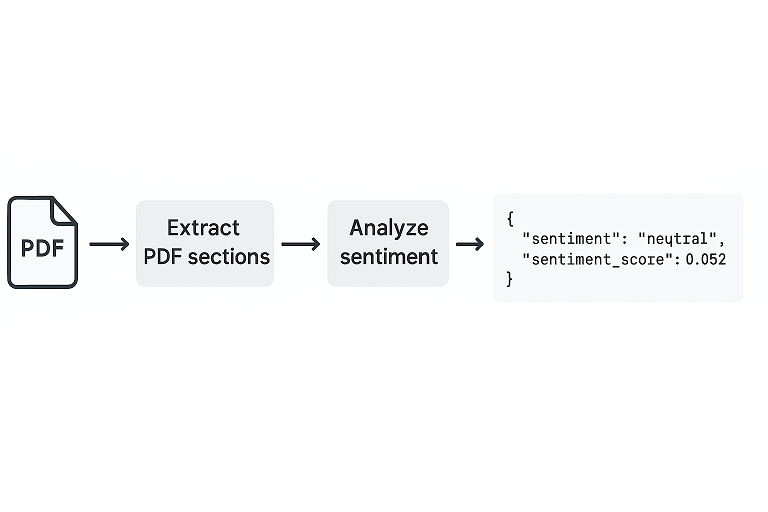
Here’s how the package operates behind the scenes:
Convert PDF to Markdown
- It uses IBM Docling to convert complex PDFs into Markdown format.
- This ensures paragraph-level fidelity and captures section headers.
Split Markdown into Sections
- LangChain’s
MarkdownHeaderTextSplitterdetects headers and organizes the document into logical sections. - These sections are stored as key-value pairs with headers as keys.
Run Sentiment Analysis
- Each section is fed to a model like TextBlob.
- It computes a polarity score (between -1 and +1) and assigns a label:
positive,neutral, ornegative.
Output the Results
- It generates a structured JSON file as the final output.
- Each entry includes the section title, sentiment score, and label.
Example output:
{

  "section": "Financial Outlook",

  "sentiment_score": -0.27,

  "sentiment": "negative"

}
This makes it easy to integrate the results into dashboards, reports or further processing pipelines.
How to Use It
the package offers two command-line interfaces (CLIs) for ease of use:
1. Extracting Sections Only
pdf-extract --input myfile.pdf --output sections.jsonThis extracts and saves all sections in a structured JSON file.
2. Extract + Sentiment Analysis
pdf-sentiment --input myfile.pdf --output sentiment.jsonThis performs both section extraction and sentiment scoring in one shot.
Installation
You can install the package directly from PyPI:
pip install pdf-section-sentimentIt requires Python 3.9 or later. Dependencies like docling, langchain-text-splitters, and textblob are included.
When to Use This Tool
Here are some concrete use cases:
- Finance professionals: Identify tone shifts in annual or quarterly earnings reports.
- Legal teams: Review long legal texts or contracts for section-specific tone.
- Policy analysts: Examine sentiment trends in whitepapers, proposals or legislation drafts.
- Content editors: Ensure consistent tone across reports, blog posts or thought leadership.
If your workflow involves making sense of long documents where tone matters, this tool is built for you.
How Sentiment is Calculated
The sentiment score is a float ranging from -1 (strongly negative) to +1 (strongly positive). The corresponding label is determined based on configurable thresholds:
score >= 0.1: Positive-0.1 < score < 0.1: Neutralscore <= -0.1: Negative
These thresholds work well in most use cases and can be easily adjusted.
Limitations and Future Work
As with any tool, there are trade-offs:
- Layout challenges: Some PDFs may have non-standard formatting that hinders clean extraction.
- Lexicon-based models: TextBlob is fast but not always semantically aware.
- Scalability: Processing very large PDFs may require batching or optimization.
Coming Soon:
- LLM-based sentiment models (OpenAI, Cohere, etc.)
- Multilingual support
- Section tagging and classification
- A web-based interface for visualizing results
Conclusion: Bringing Precision to Document Sentiment
Whole-document sentiment scoring is like painting with a broom. It’s broad and fast—but it’s also messy and imprecise. In contrast, this package acts like a fine brush. It captures tone at the level where decisions are actually made: section by section.
By using structure-aware parsing and per-section sentiment scoring, this tool gives you insights that actually align with how humans read and interpret documents.
Whether you’re scanning for red flags, comparing revisions or trying to summarize, this approach gives you the fidelity and context you need.
Opinions expressed by DZone contributors are their own.
Comments