

Selective Deployment in Azure Data Factory: A Practical Blueprint for Safer CI/CD
Implement selective deployment in Azure Data Factory to safely promote individual features without deploying the entire factory state
Join the DZone community and get the full member experience.
Join For FreePicture this: two features are being developed in parallel.
- One has already been tested in lower environments, but is still awaiting business approval
- The other is fully validated and ready to go live
Naturally, you want to release the second feature to production.
But you can’t, because your deployment model forces you to release everything together.
If you’ve worked with Azure Data Factory (ADF), this situation probably sounds familiar.
Azure Data Factory (ADF) is a cloud-based data integration service from Microsoft that helps you build and orchestrate data pipelines across systems. It works extremely well for managing data workflows — but when it comes to deployments at scale, things get tricky.
As our ADF usage grew across multiple teams and environments, we started running into a recurring problem:
- We had control over development — but very little control over what actually got deployed
- A simple pipeline fix could unintentionally introduce unrelated changes
- Parallel feature development became harder to manage
- Production releases became riskier than they needed to be
That’s when we realized: The issue wasn’t ADF itself — it was the deployment model we were relying on.
The issue wasn’t ADF itself — it was the deployment model we were relying on.
This article walks through how we addressed that challenge by implementing a selective deployment pattern, allowing us to promote only intended changes without impacting everything else.
The Real Problem: Parallel Feature Releases in ADF
Before diving into the solution, let’s look at a scenario that frequently occurs in real-world teams.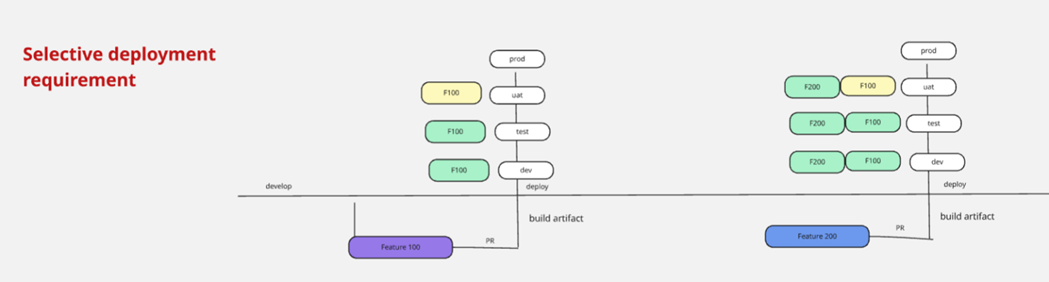
What This Diagram Represents
This diagram shows two features progressing across environments:
Feature 100
- Developed earlier, successfully deployed to Dev and Test
- Currently in UAT (User Acceptance Testing)
- Still awaiting business approval before production
Feature 200
- Developed later, successfully completed across Dev → Test → UAT
- Fully validated and ready for production
Expected Behavior
At this stage, the expectation is straightforward: “Let’s release Feature 200 to production.”
Feature 100 is still under testing, so it should remain in UAT.
What Actually Happens in ADF
Azure Data Factory follows a full-state deployment model.
That means when you deploy, you are not deploying a feature; you are deploying the entire factory state. So when you attempt to release Feature 200:
- Feature 100 gets included automatically
- You cannot isolate Feature 200
- You lose control over what reaches production
Why This Becomes a Real Problem
This isn’t an edge case; it becomes a recurring pattern in larger environments.
You’ll encounter this when:
- Multiple teams are working in parallel
- Features move at different speeds
- UAT cycles vary
- Production fixes need to be released quickly
It becomes even more complex when:
- Existing production pipelines are modified
- Partial updates are required
- Dependencies overlap across features
The Core Limitation: ADF promotes state, not intent. It does not differentiate between what is ready for production and what is still under testing.
Why We Had to Rethink Deployment
This limitation introduced real risks:
- Accidental promotion of incomplete features
- Delayed production releases
- Increased coordination overhead
- Higher chances of breaking stable pipelines
We needed a way to:
- Promote only Feature 200
- Keep Feature 100 in UAT
- Avoid impacting unrelated artifacts
- Reduce production risk
Architecture Overview
To address this challenge, we introduced a selective packaging layer between build and deployment.
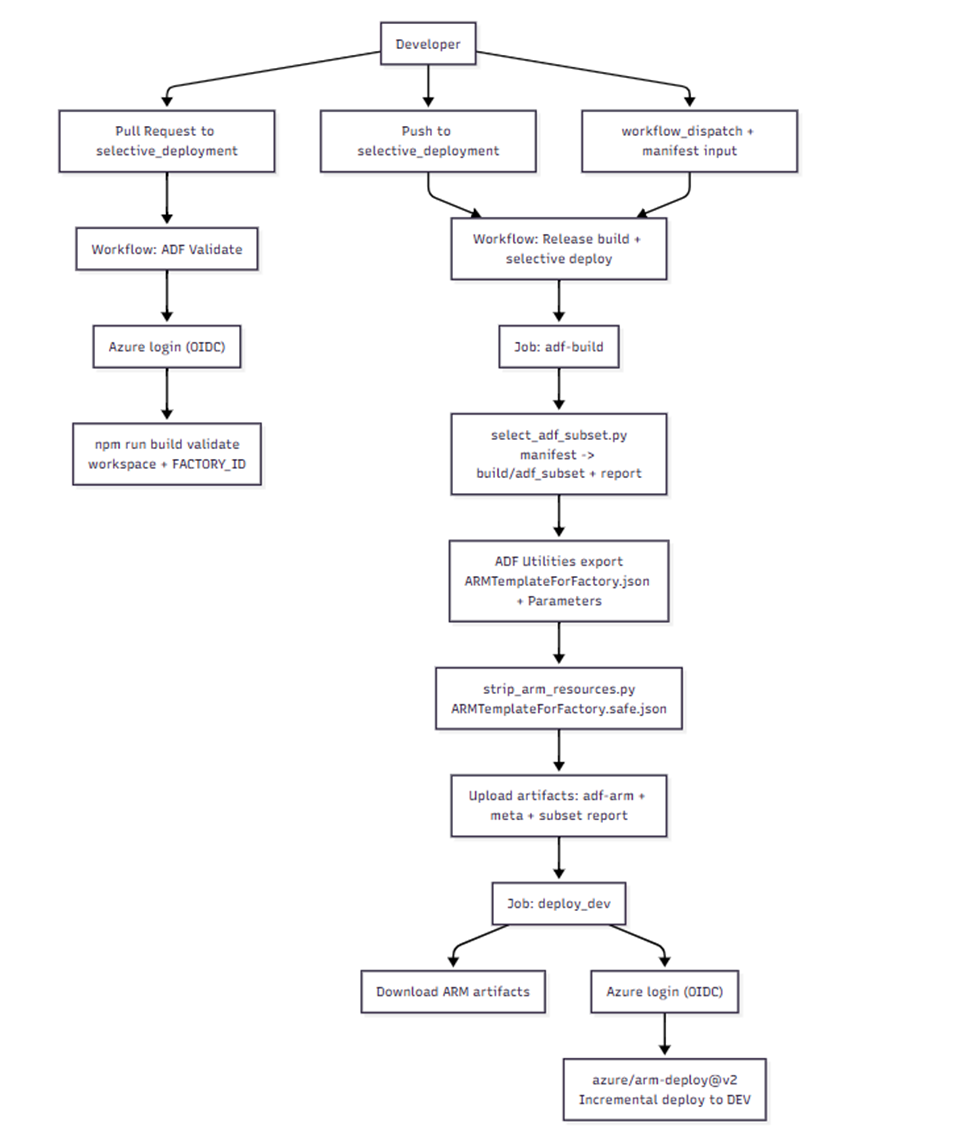
Flow
Feature Branch → PR → Validate → Selective Packaging → ARM Export → Incremental Deploy → Trigger Control
Key Idea: Instead of exporting ARM templates from the full ADF repository, we export from a filtered staging folder containing only the required artifacts.
Understanding Default ADF Deployment Behavior
Before implementing selective deployment, it’s important to understand how Azure Data Factory works by default. ADF follows a full-state deployment model.
How Default ADF Deployment Works
When you use ADF with Git integration:
- Developers work in a collaboration branch (typically
main) - Changes are committed and merged via pull requests
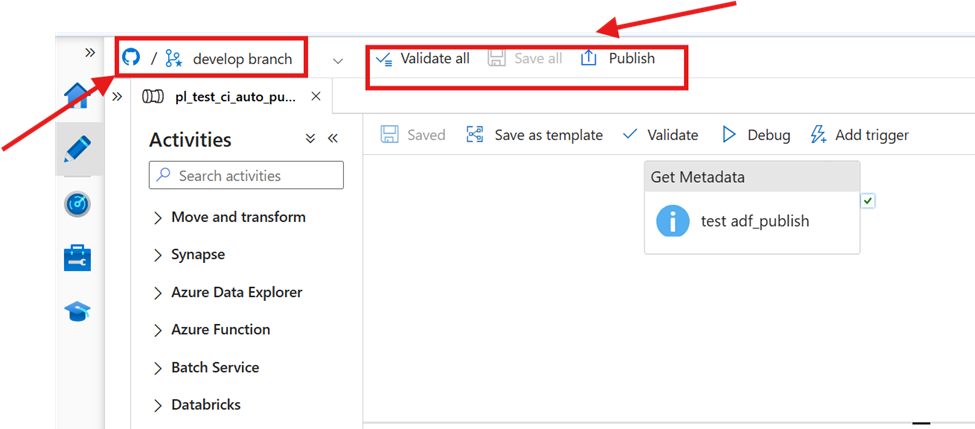
- ADF provides a Publish button in the UI
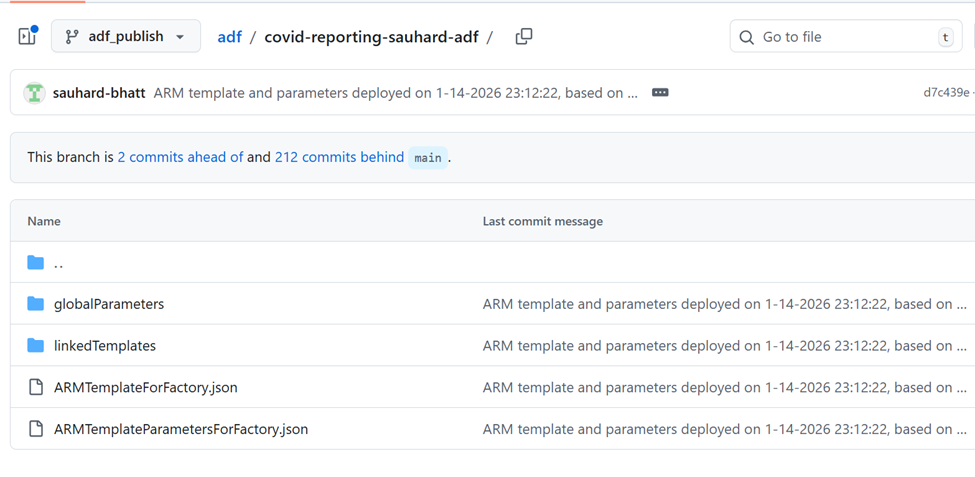
When you click Publish, ADF generates ARM templates representing the entire factory state. These templates are stored in the adf_publish branch:
In modern setups, instead of clicking Publish manually, teams often use @microsoft/azure-data-factory-utilities (npm-based export). This allows pipelines to validate ADF resources and export ARM templates programmatically.
      - name: Validate ADF resources
        run: |
          set -euo pipefail
          FACTORY_ID="/subscriptions/${{ env.SUBSCRIPTION_ID }}/resourceGroups/${{ env.RESOURCE_GROUP }}/providers/Microsoft.DataFactory/factories/${{ env.SOURCE_FACTORY_NAME }}"
npm run build validate "${{ github.workspace }}" "$FACTORY_ID" - name: Export ARM templates (CI publish)
run: |
set -euo pipefail
FACTORY_ID="/subscriptions/${{ env.SUBSCRIPTION_ID }}/resourceGroups/${{ env.RESOURCE_GROUP }}/providers/Microsoft.DataFactory/factories/${{ env.DEV_FACTORY_NAME }}"
npm run build export "${{ github.workspace }}" "$FACTORY_ID" "${{ env.ARM_OUTPUT_DIR }}"
Whether you click Publish manually or use npm export in CI/CD, the outcome is the same:
- Full factory deployment
- No control over individual features
- All changes get bundled together
Selective Deployment Layer (Core Design)
We can address this requirement and the associated challenges by introducing a workflow driven by a manifest to define the deployment scope, and a program to identify all necessary ADF dependencies for each manifest file. As a developer, I can now control which release is promoted to production, without worrying about releasing any other features that are not ready. The manifest controls which pipelines to deploy and which optional categories to include. Below is an example of a manifest file
{
  "pipelines": ["pl_ingest_population_selective"],
  "includeTriggers": false,
  "includeIntegrationRuntimes": false,
  "includeAllGlobalParameters": true,

  "includeLinkedServices": true,
  "validateLinkedServicesExist": true,

  "includeManagedVirtualNetwork": false,
  "includeManagedPrivateEndpoints": false
}
Workflow Explanation
Let's understand the crux of the selective deployment workflow now. I am working in the release branch on my feature branch directly in ADF Studio. Since ADF Studio is integrated with Git, my development changes will be saved to my branch. Here are the steps I can take to promote my change to a higher environment.
1) Validation of ADF on PR validation
This is an early validation step and a guardrail: if the PR fails, it's because objects are invalid and misaligned. This is equivalent to the "validation all" button in the ADF ui, here is this workflow
Trigger: Pull requests targeting the branch selective_deployment.
Purpose: Validate that the ADF JSON in the PR is valid in the context of the target factory.
Main steps:
- Checkout
- Set up Node.js 20
npm install- Azure login using OIDC (
azure/login@v2) - Validate with ADF Utilities:
FACTORY_ID="/subscriptions/${AZURE_SUBSCRIPTION_ID}/resourceGroups/${AZURE_RESOURCE_GROUP}/providers/Microsoft.DataFactory/factories/${DEV_FACTORY_NAME}"

npm run build validate "$GITHUB_WORKSPACE" "$FACTORY_ID"Triggers:
- Push to
selective_deployment - Manual run (
workflow_dispatch) with optionalmanifestinput - Default: deploy/manifests/release.json
This workflow has two jobs:
- Checkout (full history)
- Azure login using OIDC
- Set up Node.js 20
- Install build dependencies inside
build/(npm installinbuild) - Stage selective subset
- python scripts/select_adf_subset.py <manifest>, a code snippet below for the complete script, refer to the GitHub repository link given
-
Python
import json import re import shutil import sys from pathlib import Path from typing import Dict, Set, Tuple, List from collections import defaultdict # Your repo layout has pipeline/, dataset/, linkedService/ at ROOT. REPO_ROOT = Path(".") STAGE_ROOT = Path("build/adf_subset") RESOURCE_DIRS = { "pipeline": REPO_ROOT / "pipeline", "dataset": REPO_ROOT / "dataset", "linkedService": REPO_ROOT / "linkedService", "dataflow": REPO_ROOT / "dataflow", "trigger": REPO_ROOT / "trigger", "integrationRuntime": REPO_ROOT / "integrationRuntime", "credential": REPO_ROOT / "credential", "managedVirtualNetwork": REPO_ROOT / "managedVirtualNetwork", } # Copy these if present so ADF utilities behave the same on staged subset. ROOT_FILES_TO_COPY = [ "publish_config.json", "arm-template-parameters-definition.json", "arm_template_parameters-definition.json", "package.json", "package-lock.json", ] - Produces:
build/adf_subset/(staged tree)build/adf_subset_report.json(dependency report)- Refer to logs below (showing output of stage selective subset and debug to view output generated after select_adf_subset.py )
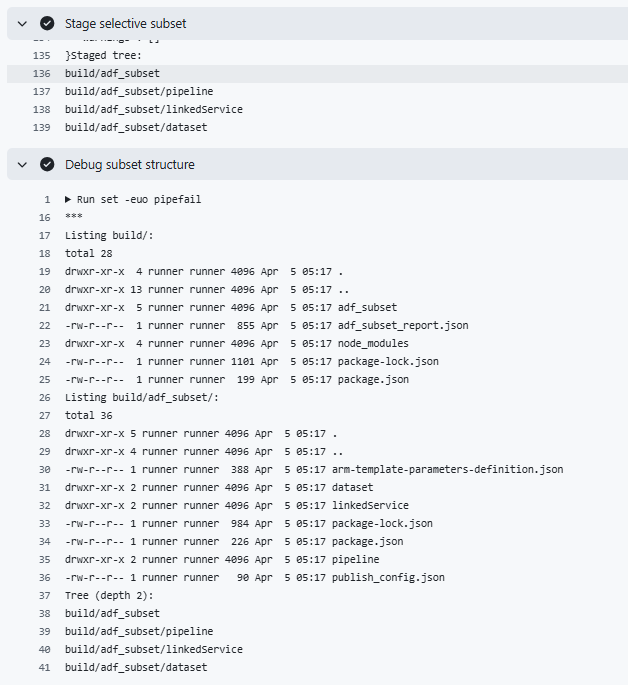
- Export ARM templates from the staged subset via ADF Utilities:
npm --prefix build run build -- export "adf_subset" "$FACTORY_ID" "ArmTemplate"- Produces:
build/ArmTemplate/ARMTemplateForFactory.jsonbuild/ArmTemplate/ARMTemplateParametersForFactory.json
- Strip infra-owned resources scripts/strip_arm_resources.py to produce a safe template:
build/ArmTemplate/ARMTemplateForFactory.safe.json- ⚠️ Note on Infrastructure Components
(Refer to the “Future Work & Next Steps” section for follow-up topics in this series)
The step above intentionally strips infrastructure-dependent components from the generated subset to avoid overwriting existing shared resources such as linked services.
This implementation focuses on developer-owned artifacts (pipelines, datasets, and triggers) and assumes that infrastructure components — such as Integration Runtimes, managed private endpoints, and linked services — are pre-provisioned and managed outside of this deployment workflow.
- Upload artifacts:
- ARM templates (
adf-arm) - metadata (
adf-release-meta) - subset report (
adf-subset-report)
- ARM templates (
- Download ARM artifact
- Azure login using OIDC
- Ensure
azData Factory extension is installed - Validate JSON files exist/parse
- Deploy via
azure/arm-deploy@v2(Incremental) to DEV RG/factory:- Template:
ARMTemplateForFactory.safe.json - Parameters:
ARMTemplateParametersForFactory.json+factoryName=<DEV_FACTORY_NAME>
- Template:
Lesson Learned
Setting up selective deployment in ADF was more than a technical task. It made us rethink our approach to deployments, ownership, and CI/CD design. Here are the main things we learned:
1. The Problem Is Not Tooling; It’s Deployment Granularity
At first, we thought the limitation came from the tools we used, like UI publish or npm export. However, both methods yielded the same result: full factory templates. The real problem was that we couldn’t control the scope of deployments, not how the templates were made.
2. Dependency Awareness Is Critical
Selective deployment only works when every dependency is found and included. We learned that:
-
Pipelines often reference multiple datasets and linked services.
-
Missing even one dependency results in deployment failure
-
You must automate dependency discovery.
3. “Incremental” Is Often Misunderstood
Incremental deployment is important, but it doesn’t work like a patch. It reapplies the full configuration for all included resources. This means:
-
Your generated templates need to be complete for all the artifacts you include.
-
If you use partial definitions, deployments can fail.
4. Separation of Concerns Is Key
Not all ADF artifacts are the same. We began to separate them into different groups:
-
Application-owned artifacts: pipelines, datasets, triggers
-
Infrastructure-owned artifacts: linked service, managed virtual networks, managed private endpoints, and integration-runtime, among others.
This separation proved crucial for safe, scalable deployments.
5. Selective Deployment Adds Complexity, But It’s Worth It
It’s true that implementing this approach brings in additional scripts, manifest management, and CI/CD complexity. But in exchange, we gained precise control over releases, reduced production risk, and faster hotfix deployments.
Future Work and Next Steps
While selective deployment solved a major gap in ADF CI/CD, it also opened up new areas for improvement and standardization.
1. Defining Infrastructure vs Application Ownership
One of the biggest follow-up areas is clearly defining ownership boundaries. In our experience:
-
Application teams should own pipelines, datasets, and triggers
-
Platform or infrastructure teams should own linked services, managed virtual networks, and managed private endpoints, among other things.
Future work can focus on:
-
Enforcing this separation in CI/CD.
-
Preventing accidental deployment of infrastructure components
-
Integrating Terraform or platform pipelines for infrastructure provisioning
2. Governance Around Linked Services
Linked services are often shared across multiple pipelines and teams. Future improvements include:
-
Centralizing linked service management
-
Using Key Vault and Managed Identity consistently
-
Preventing direct modifications through application pipelines
Opinions expressed by DZone contributors are their own.
Comments