

SelfService HR Dashboards with Workday Extend and APIs
Workday Extend enables developers to turn HCM data into secure, self-service dashboards by consuming RaaS and REST APIs directly inside Workday.
Workday Extend lets you build custom in-Workday apps that leverage Workday’s data model, UI and security. Extend apps are fully integrated into the Workday interface and can tap into Workday data via APIs and reports. In practice, a dashboard app on Extend will call Workday data services (native REST or “Report-as-a-Service” reports) behind the scenes, transform the results into chart-ready data, and render interactive charts or grids in the custom UI. The high-level architecture is:
- Data Source (RaaS/REST): Workday HCM data exposed via custom RaaS reports or built-in REST endpoints.
- Integration Layer: Workday Extend app defines an integration that invokes those services and retrieves JSON/XML data.
- Extend App & UI: The app’s UI screens (built with Extend’s UI builder or XSLT views) bind to this data, apply filters, and use chart components to display the analytics. Since Extend apps inherit Workday’s UI framework, the dashboard feels like a native Workday report.
- Security & Deployment: All data access goes through Workday’s security framework. You assign minimal permissions to the Integration System User (ISU) or API client and only expose needed field.
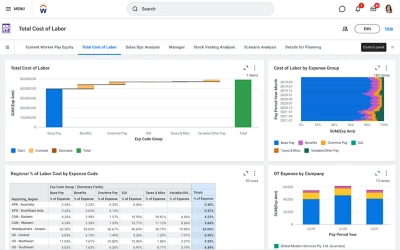
- Figure: Example Workday Prism Analytics dashboard similar visual style can be embedded in an Extend dashboard app using Workday’s UI components and data. The app fetches data via REST/RaaS and displays charts in a page.
Architecture Overview
A typical self-service dashboard app flows as follows: the Extend app launches a request then Workday’s Integration Cloud services call a RaaS or REST endpoint. For example, you might create an Advanced Custom Report Worker Summary in Workday and check “Enable as Web Service”. Workday generates a REST URL returning JSON/XML. The Extend integration invokes this URL and gets back Report_Entry XML nodes for each worker. The app’s XSLT or data mapping then picks out fields into the UI model.
Architecturally, this keeps data close to the business context: the dashboards live inside Workday. Extend apps automatically appear in Workday menus or worklets alongside standard reports. The app can also use Workday’s Orchestrations if needed to sequence multiple API calls or pre-process data before rendering. All in all, the pieces are Workday data (in HCM/FN objects) → RaaS/REST call → Extend app logic → UI screen (charts/widgets).
Using Report-as-a-Service (RaaS)
Workday’s Report-as-a-Service is a simple way to expose HR data. Any Advanced Custom Report in Workday can be marked Enable as Web Service and turned into a RESTful endpoint. You add all required fields to the report, set filters/prompts and share the report with an Integration System User. After saving, use the View URLs related action to get the JSON/XML endpoint for your report. You can even embed prompts as query parameters in the URL to fetch filtered data.
For example, a RaaS URL might look like:
https://wd2-impl-services1.workday.com/ccx/service/customreport2/MyTenant/HR/Employee_Summary
    ?SupervisorOrg={orgId}&_startDate={date}&_endDate={date}&format=json
The Extend integration can call this and receive a payload like:
<wd:Report_Data xmlns:wd="urn:com.workday.report/Employee_Summary">
  <wd:Report_Entry>
    <wd:Worker_Name>Jane Doe</wd:Worker_Name>
    <wd:Job_Title>Engineer</wd:Job_Title>
    <wd:Compensation>90000</wd:Compensation>
    <wd:Department>R&D</wd:Department>
    <!-- more fields -->
  </wd:Report_Entry>
  <!-- more entries -->
</wd:Report_Data>
Your Extend app’s XSLT or code can transform these wd:Report_Entry items into JSON for the UI chart component. For example:
<xsl:stylesheet xmlns:xsl="http://www.w3.org/1999/XSL/Transform"
                xmlns:wd="urn:com.workday.report/Employee_Summary" version="2.0">
  <xsl:template match="/wd:Report_Data">
    <DashboardData>
      <xsl:for-each select="wd:Report_Entry">
        <Employee>
          <Name><xsl:value-of select="wd:Worker_Name"/></Name>
          <Title><xsl:value-of select="wd:Job_Title"/></Title>
          <Dept><xsl:value-of select="wd:Department"/></Dept>
          <Salary><xsl:value-of select="wd:Compensation"/></Salary>
        </Employee>
      </xsl:for-each>
    </DashboardData>
  </xsl:template>
</xsl:stylesheet>
This extracts key fields into a simplified XML/JSON model that the dashboard UI can bind to. In short, RaaS makes it easy to pull Workday report data as JSON/XML for any external or Extend consumer.
Using Workday REST APIs
Workday also provides RESTful web services for core objects. Unlike RaaS, these are out-of-the-box APIs. The Workday REST API supports standard HTTP methods (GET/POST/PUT/DELETE) and returns JSON. For example, to list workers you call:
GET https://wd2-impl-services1.workday.com/ccx/api/v1/<Tenant>/workerswith OAuth2 Bearer token authorization. You obtain the OAuth token by registering an API client in Workday, then exchanging its credentials and a refresh token for an access token. Workday REST endpoints cover objects like workers, time_off_requests, departments etc. Responses include fields. This approach is useful for real-time queries or if you need to create/update records. For dashboards, you typically use GET queries and retrieve JSON that you then feed into your UI.
For example, a code snippet (pseudocode) calling a REST endpoint in an Extend app might look like
<IntegrationDefinition id="Get_Workers">
  <HttpRequest>
    <Url>https://wd2-impl-services1.workday.com/ccx/api/v1/MyTenant/workers</Url>
    <Method>GET</Method>
    <Headers>
      <Header name="Authorization" value="Bearer ${access_token}"/>
      <Header name="Accept" value="application/json"/>
    </Headers>
  </HttpRequest>
</IntegrationDefinition>
This returns JSON like:
{ "workers": [
   {"id": "123", "name": "Jane Doe", "title": "Engineer", "supervisory_org": "R&D", ...},
   ...
] }
You can bind this JSON into your Extend screen data model or transform it as needed. In summary, REST APIs give live access to Workday data using OAuth2-secured HTTP calls.
Development Best Practices
- Modular Integrations: Keep RaaS reports small and focused. For large datasets, use filters or prompt parameters so the dashboard only retrieves needed records. Consider multiple reports (or API calls) if you need different data slices.
- Efficient XSLT/Data Transforms: Write XSL or JavaScript transformations to extract and reshape only the fields you need. Use grouping or XML-to-JSON functions to simplify outputs. For large JSON, paginate the requests at the report level or limit date range.
- UI Design: Use Extend’s screen builder or custom XSL views to create charts (bar, pie, line) and tables. Allow user inputs by adding Workday prompt pickers on the screen, then re-invoke the integration with those parameters. The UI should feel native and responsive. Remember that Extend apps support responsive design for mobile.
- Error Handling: Catch and log any integration errors. For example, wrap the REST calls in an Orchestration step with try/catch, and display a friendly message if the API fails. Also validate input prompts on the client side before sending.
- Reusability: If multiple dashboards need the same base data, reuse the same RaaS report or API integration. Use Extend’s shared components or sub-flows for common logic.
Security and Governance
Workday Extend apps inherit Workday’s security model. Use this to your advantage no separate login is needed. However, the integrations that fetch data must be carefully secured:
- Integration System Users (ISUs): Create a dedicated ISU for your dashboard app. Each integration (REST call or RaaS) should use its own ISU or API client with minimal privileges. The ISU’s security group should have only Get/Put access to the specific integration services and only View access to the underlying data domains.
- Report Sharing: Only share RaaS reports with the specific ISU accounts. Do not leave RaaS open to all. Always use prompts or filters to avoid inadvertently exposing all employee data.
- OAuth Tokens: Store OAuth client secrets and tokens securely. Workday Extend can manage OAuth in its connection settings, but never hard-code tokens in UI code. Use secure credential storage or the built-in OAuth client in Extend/Orchestrate.
- Least Privilege: Avoid giving broad access. The principle is to “only let approved users and systems access your RaaS endpoints”. Review domain security policies so that even if someone had the URL, they could not get data unless in the correct security group.
- Audit & Monitoring: Workday automatically logs integration events. Set up alerts or use the Integration Reports to monitor how often the dashboard runs. Also watch performance if a RaaS report slows down, consider optimizing it.
By following Workday’s security framework, you ensure your dashboard app meets enterprise security standards. In short, treat the dashboard app just like any other Workday integration: use an ISU, scope its permissions tightly, and use HTTPS + OAuth/WS-Security on all calls.
Summary
A Workday Extend dashboard app brings analytics into the user’s flow of work by combining Workday’s data with custom UI. In practice, you expose HR data via RaaS reports or REST APIs, call them from your Extend app, and bind the results to charts. Key steps include designing optimized reports, coding the data transformation and building the screens. Leveraging Workday’s built-in integration cloud and security model means you get single sign-on, role-based access control, and real-time data all in one. With careful design you can deliver responsive, drillable self-service dashboards in Workday that give HR users up-to-date insights without ever leaving the system.
Opinions expressed by DZone contributors are their own.