

Shipping GenAI Into an Existing App: How to Integrate AI Features Without Rewriting Your Stack
Learn a repeatable pattern for safely adding GenAI to existing apps. Choose workflows, define contracts, handle latency, build fallbacks, and roll out with telemetry.
 CORE
·
CORE
·
Editor’s Note: The following is an article written for and published in DZone’s 2026 Trend Report, Generative AI: From Prototypes to Production, Operationalizing AI at Scale.
Most production applications already have an architecture, release process, and users who depend on predictable behavior. While adding a generative AI (GenAI) feature into an existing app doesn’t change any of that, it introduces uncertainties like non-deterministic outputs, increased latency due to model responses, and failure modes that look like successes but contain hallucinated responses. We tend to treat AI as a special case; however, the goal isn’t to build an AI platform but to ship a bounded feature that can improve a specific workflow without creating technical debt across the codebase.
This article provides a repeatable integration pattern that includes how to pick a workflow, define a strict contract, create a clear division of responsibilities between your app and AI logic, design for latency, build a fallback ladder that keeps the app running, and plan a staged rollout for fast iteration and rollback in case of any regressions.
Pick a Workflow That Can Ship
Not all workflows are good candidates for GenAI integration. “Shippable workflows” share three characteristics:
- Bounded inputs (what goes in)
- Reviewable output (human can verify and assess results)
- Verifiable result (if it worked or not)
In these scenarios, even if the AI service goes offline, the user should still be able to complete the workflow using manual steps. For example, consider a support ticketing app where a support representative (rep) writes a summary of the mitigation/resolution that was performed after closing an incident ticket. The AI feature generates a draft reply based on order history and other common resolution patterns, and automatically writes a summary from the conversation transcript. The rep reviews, edits if needed, and submits. If AI is unavailable, the rep can still write the summary manually, exactly as they do today.
This example has the above characteristics:
- Bounded inputs: order ID, customer messages, transcript in, and summary out
- Reviewable output: AI agent reviews and edits before submitting
- Verifiable result: draft accepted, edited, or discarded
If the AI agent fails, it’s still low risk because the bad draft takes only a few minutes to fix, it’s a slower process, but the workflow still completes, and it’s not a customer-facing mistake.
Before committing to a workflow, run it through these filters:
Table 1. Workflow filters to check
| filter | considerations |
|---|---|
|
Input clarity |
Can you specify what goes into the model? Is the data structured or easily parsed? Avoid workflows that require unbounded context. |
|
Output shape |
Is the generated response structured, or at least constrainable? Can the model return a schema (JSON) rather than prose? |
|
Latency tolerance |
Will users wait X seconds, or does this need a sub-second response? |
|
Risk tier |
What’s the blast radius? Does hallucination cause a minor inconvenience or a financial/legal catastrophe? |
Define the Feature Contract Before You Touch the Model
The contract is the most important artifact in this integration; it defines what your app sends, what it expects back, and what happens when things go wrong. Before writing a single prompt, define the contract between your app and the AI layer. This allows your frontend and backend teams to build against a scheme while the AI engineer fine-tunes the prompt. Skipping this step leads to common integration failures.
Your contract should define the following:
-
Inputs:
- Required fields: The minimum context the AI needs (e.g., incident_id, conversation_transcript).
- Optional fields: Context that improves the summary but isn’t mandatory (e.g., ticket_category, customer_tier, order_history, any previous_resolutions to consider).
- Defaults: When optional fields are missing, apply appropriate default values (e.g., ticket_category defaults to general, order_history defaults to empty []).
- Max sizes: Put a ceiling on transcript length; token budgets also matter (e.g., conversation_transcript capped at 60,000-70,000 chars, order_history limited to last 10 orders).
-
Outputs:
- Structured fields: Define the exact shape (e.g., draft_summary, confidence_score, suggested_resolution_steps[], resolution_category).
- Draft vs. final: AI outputs are always drafts so that the rep reviews and edits the summary before submitting. Never let AI post it to the incident ticket automatically.
- Metadata: For debugging and auditing, include sources like transcript message IDs, order records, matched resolution patterns, model_version, and processing_time_ms.
-
Uncertainty rules:
- Confidence is below threshold: Return status as needs review with clarifying questions. For example, if the transcript mentions multiple issues, AI asks, “Which resolution should be highlighted?”
- Context is missing: Proceed with available data and flag incomplete context as true. For example, if order history is unavailable, generate a summary from the transcript (prompt) only.
- Request is out of scope: Return status as unsupported rather than generate hallucinated responses.
-
Error categories: Errors are unavoidable. Table 2 shows different error types, their status codes, and how the end user experience should look.
Table 2. Error types, HTTP status codes, and user experiences
| error type | http code | retry | user experience |
|---|---|---|---|
|
Timeout |
504 |
Yes, only once |
“AI summary generation taking longer than expected”: show fallback UI where rep can write manually |
|
Model unavailable |
503 |
Yes, with exponential back-off policy |
“AI summary generation is temporarily unavailable”: write summary manually |
|
Rate limited |
429 |
Yes, after a delay |
“AI is throttled due to multiple requests”: wait for X time or write summary manually |
|
No context found |
422 |
No |
“Input prompt is too short”: add more details to generate a summary |
-
Versioning: Include both Contract_version and Behavior_version in every generated response. Contract version changes when schema changes, and behavior version changes when input prompt or model selection changes. This prevents silent shifts and makes it easy for your team to trace if the generated summary quality changes due to contract version or behavior version changes.
Contract template:
{
  "contract": "incident-resolution-summary",
  "contract_version": "1.3",
  "behavior_version": "2025-06-01",

  "input": {
    "incident_id":           { "type": "string", "required": true },
    "conversation_transcript": { "type": "string", "required": true, "max_length": 60000 },
    "ticket_category":       { "type": "string", "required": false, "default": "general", "enum": ["billing","technical","account","general"] },
    "customer_tier":         { "type": "string", "required": false, "default": "free", "enum": ["free","pro","enterprise"] },
    "order_history":         { "type": "array",  "required": false, "default": [], "max_items": 10 },
    "previous_resolutions":  { "type": "array",  "required": false, "default": [], "max_items": 5 }
  },

  "output": {
    "draft_summary":               { "type": "string",  "description": "Generated resolution summary -- always a draft, never auto-applied" },
    "confidence_score":            { "type": "enum",    "values": ["high","medium","low"] },
    "status":                      { "type": "enum",    "values": ["complete","needs_review","partial","unsupported"] },
    "review_required":             { "type": "boolean" },
    "resolution_category":         { "type": "string",  "description": "AI-suggested category (e.g., refund, config_change)" },
    "suggested_resolution_steps":  { "type": "array",   "items": "string" },
    "clarifying_questions":        { "type": "array",   "items": "string", "description": "Populated when status is needs_review" },
    "source_message_ids":          { "type": "array",   "items": "string" },
    "sources_used":                { "type": "array",   "items": "string", "description": "KB articles, order records, resolution patterns consulted" },
    "incomplete_context":          { "type": "boolean", "description": "true if optional inputs were missing or a tool call failed" },
    "model_version":               { "type": "string" },
    "processing_time_ms":          { "type": "integer" }
  },

  "errors": {
    "TIMEOUT":           { "http": 504, "retry": "once",              "fallback": "retry_then_manual",  "user_message": "Summary taking longer than expected... Write manually below." },
    "NO_CONTEXT":        { "http": 422, "retry": "no",               "fallback": "prompt_user",        "user_message": "Transcript too short -- add more detail." },
    "MODEL_UNAVAILABLE": { "http": 503, "retry": "backoff, max 3",   "fallback": "queue_or_manual",    "user_message": "AI summaries temporarily unavailable -- write below." },
    "RATE_LIMITED":      { "http": 429, "retry": "after Retry-After", "fallback": "throttle_or_manual", "user_message": "AI summaries limited right now -- please write manually." }
  },

  "acceptance": {
    "actions": ["accept", "edit", "discard"],
    "telemetry_event": "summary_draft_outcome",
    "track_per_confidence": true
  }
}
Choose Where AI Logic Lives: In-App vs. a Dedicated AI Service
There are two options for where to keep the AI logic: integrate the AI layer directly into your application code (in-app) or extract it to a dedicated AI service.
When in-app works:
- Single app consumes AI feature
- Small team owns both app and AI logic
- Latency from an extra network call matters
- Minimal operational overhead
When a dedicated AI service is better:
- Multiple components consume similar AI capabilities
- Separate teams own applications versus teams having AI knowledge
- Different release cadences where you want to swap models without redeploying the entire app
- Centralized cost tracking, rate limiting, and audit logging
Once you add one GenAI feature, it’s easy to use the same pattern to add multiple features within the same AI service.
Either way, the boundary matters more than the deployment topology. Your app should never construct prompts, parse raw model output, or handle tool orchestration directly. That logic belongs behind the contract interface as shown in Figure 1. General guidance: If it depends on the model, put it into the AI layer, and if it depends on the user, it goes in the application layer.
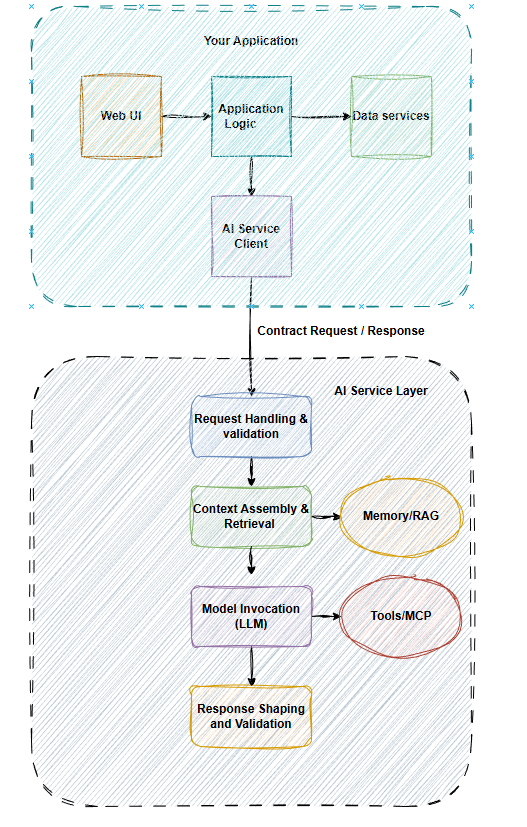
Figure 1. AI service and application boundaries
Table 3. Responsibility check between AI and app layers
| responsibility | app | ai |
|---|---|---|
|
UX states (loading, error, fallback) |
✓ |
✘ |
|
Permissions and access controls |
✓ |
✘ |
|
Workflow state and persistence |
✓ |
✘ |
|
Presentation and formatting |
✓ |
✘ |
|
Prompt construction and management |
✘ |
✓ |
|
Model selection |
✘ |
✓ |
|
Tool orchestration |
✘ |
✓ |
|
Response shaping to contract schema |
✘ |
✓ |
|
Context gathering |
✘ |
✓ |
The application layer should never see a raw model response and similarly, the AI layer (black box) should never make user experience decisions. This responsibility split allows the app to survive model swaps and prompt rewrites without changing product code.
Add Context and Tools Without Tangling the Product
The most useful AI features usually need context beyond the user’s immediate inputs (e.g., knowledge base articles, user history), and they may also invoke tools to look things up or take actions. All context retrieval and tool orchestration stays behind the AI boundary, and your app only sends the inputs defined in the contract. The AI layer decides what else it needs to complete the workflow.
Every tool the AI layer calls should have its own mini-contract (inputs, expected outputs, a failure mode). Tool outputs should use stable identifiers like record IDs, document IDs, and URLs so that the AI layer can pass citations back through the contract’s output schema. When a tool fails, the AI layer decides whether to proceed without that context, try an alternate source, or return a degraded response; this decision should never be part of the app code.
Keep Context Optional and Traceable
Design every context source as optional. If the knowledge base is down, the AI layer should still attempt a response from the direct input. However, flag the result as lower confidence, which should reflect the reduced context. If retrieval returns nothing relevant, proceed rather than block.
When the response uses external context, include source metadata in the output to show which documents or records were referenced and what tool calls were made. This makes results auditable, debuggable, and trustworthy to the rep who reviews. A sources_used field in your contract output lists this information.
Design for Latency and UX From Day One
As compared to traditional database queries, GenAI calls are usually slow. A typical LLM response takes anywhere between 2-10 seconds. Design your UX around this reality; otherwise, your application will underperform.
Table 4. Streaming vs. synchronous vs. async response modes
| mode | how it works | ux pattern |
|---|---|---|
|
Streaming |
Display text upon arrival so user can read immediately |
Typewriter effect, as user sees progress instantly |
|
Synchronous |
Wait for full response, then display all at once |
Loading indicators, and user simply waits |
|
Async |
Long operations that process in the background and notify user when complete |
High latency, “processing state” and notify user on completion (notifications) |
Timeouts are a UX decision, not an infrastructure decision. Define how you want to handle the UX for each threshold value:
- < 2 seconds: show a brief loading indicator; no special handling is needed
- 2-5 seconds: show progress context or text like “drafting summary…”; provide end users the option to cancel
- 5-10 seconds: show a “taking longer than usual...” message; offer an option to fallback or continue to wait
- > 10 seconds: trigger the fallback path automatically; log the timeout accordingly
User controls matter. Let users cancel a pending request or retry on failures. If streaming, let them stop generation early and show partial results when it’s safe. If the result is a draft, always let them review and edit it. If the user is not satisfied with the output, provide an option to regenerate accordingly.
Define the UX States Up Front
Map out every state the feature can be in before you build the UI. Table 5 shows variable states with options for the end user to see and take actions.
Table 5. Visual indicators and user actions
| ux state | visual indicator | user actions available |
|---|---|---|
|
Loading |
Spinner or progress message like “generating draft…” |
Cancel |
|
Partial |
Streaming text appears incrementally |
Cancel, Accept early |
|
Complete |
Full draft shown with confidence score |
Accept, Edit, Discard, Regenerate |
|
Fallback |
Message displays “AI is unavailable...” |
Complete task manually |
|
Error |
Display error message and guidance |
Retry, Complete task manually |
Every state needs a defined exit, or at least one action the user can take. If the user enters a state, they should be able to exit without reloading the page or losing their work.
Build a Fallback Ladder
Fallbacks are not just a single safety net; they are also a ladder that ensures a model failure isn’t a dead end, providing users with an option so that they never hit a wall.
- Clarify: If the input is ambiguous or incomplete, ask the user for more information before calling the model to prevent wasted calls and low-quality results.
- Degrade: If the model returns a low-confidence or partial result, include an appropriate message (e.g., “draft needs review”).
- Alternate path: If the primary model or tool is unavailable, try a simpler fallback using a smaller model, a template-based fill, or a cached similar result.
- Handoff: If nothing works, transition gracefully by showing the user a manual path.
Table 6. Example fallback ladder
| trigger | user experience | system action |
|---|---|---|
|
Input too short/ambiguous |
“Add more details to generate a summary” |
Clarify: prompt user before calling AI layer |
|
Low confidence |
“Please review this draft” |
Degrade: return with confidence score indicator and flag for manual review |
|
Model timeout |
“Taking longer than usual…” |
Alternate path: switch to a smaller, faster model before retrying once |
|
API/model down |
“AI summary is temporarily unavailable” |
Alternate path: return cached template or structure form for manual option |
|
Rate limits / quota exceeded |
“High demand right now; your request is queued” |
Alternate path or handoff: notify operations team |
Make sure there is always guaranteed forward progress, where every fallback ends with a user action, and the workflow can complete without waiting indefinitely.
Cases with low confidence do not mean blocking the workflow or not showing the result. Use draft language (e.g., “Here’s a starting point”) and visual indicators (e.g., yellow border), and require a manual confirmation from the user before the draft can be applied safely.
Ship Safely With Staged Releases
Don’t ship to 100% of end users on day one. Staged releases let you validate at each step in a production-like environment first before blasting the radius to all regions and users. This makes it easy to catch regressions instead of releasing and rolling back at a larger scale.
Table 7. Example rollout phases with duration and validation metrics
| Phase | audience | duration | validation |
|---|---|---|---|
|
Internal |
Internal teams, “dogfooding” |
1-2 weeks |
Use it for internal testing, fallback schemes, and latency within thresholds to find obvious breaks |
|
Canary |
5-10% of opt-in users |
1-2 weeks |
Validate at scale and monitor metrics |
|
Expanded |
25-40% of users |
2-3 weeks |
Confirm metrics hold, no latency degradation, no incidents or regressions |
|
Generally Available (GA) |
100% of users |
Ongoing |
Full release, validate models, steady-state metrics |
Every phase needs a way to disable the AI feature almost instantly, without requiring a full release or partial deployment (e.g., feature flag that reverts UI to manual path). Test the kill switch before you start the incremental rollouts.
Define and establish your rollback signals before launch. You need hard thresholds that trigger an immediate rollback, such as fallback rate climbs above a set threshold, increased latency, or escalating model costs. Beyond infrastructure or technical performance, closely look at user interaction metrics as well as whether the user’s “discard” rate is significantly higher than the “acceptance” rate.
Feature Telemetry and Pre-Release Checks
Collect telemetry and instrument these metrics from day one, not at the GA phase. Before sign-off, make sure to simulate failures (e.g., model returns garbage JSON, context is empty) and ensure that your telemetry tracks the success-to-failure ratio. Below are the key telemetry signals you should track consistently, starting from your first pre-production rollout:
- Latency: p50, p90, and p99 for the full AI service round-trip
- Timeout rate: percentage of requests exceeding threshold limits
- Fallback rate: how often users hit an issue before fallback
- User actions: accept/edit/discard ratios per confidence level
- Error distribution: counts by error category from the contract
- Cost per call: track token usage or API cost per every request
Initiate pre-release validation before incrementally deploying to the next phase:
- Contract validation: Always validate the undesirable path by sending requests with invalid edge-case inputs. Verify whether the error responses match the contract.
- Error path testing: Simulate tool failures, timeouts, and model errors. Confirm whether the fallbacks activate correctly.
- Load testing: Verify behavior under concurrent requests, particularly rate limit handling. Confirm whether latency holds at the next phase’s expected traffic volume.
- Fallback experience: Manually trigger each fallback scenario (or disable AI using kill switch). Confirm whether users can complete workflow without any issues.
Security and Compliance Touchpoints
Integrating GenAI into your app introduces specific security and compliance considerations that are worth addressing during early development stages:
- Data boundaries: Ensure that the sensitive data (e.g., PII, financials) handled by the AI layer follows your existing app’s data classification policies. Don’t send restricted data to external model APIs.
- Access controls: Make sure to route AI service calls through your app’s access control so that permissions are enforced consistently.
- Audit logging: Log every AI request and response at the boundary (inputs, outputs, error category, latency) with enough structure for auditing. Also include timestamps, user IDs, and model versions.
The Minimum Viable Integration Pattern
No longer an experiment, shipping a GenAI feature into an existing app is becoming a baseline capability for all teams that want to deliver smarter user experiences without rewriting their entire stack. You will have a repeatable way to ship your next GenAI features faster, safer, and with far fewer surprises by applying the integration pattern outlined in this article. This isn’t just an AI platform. It’s a service boundary with a contract, the same integration pattern you’d use for any external dependency that is slower and less predictable than your own code. Start with one workflow first, release it and learn from telemetry, and then decide whether the next feature needs the same boundary or a new one.
This is an excerpt from DZone’s 2026 Trend Report, Generative AI: From Prototypes to Production, Operationalizing AI at Scale.
Read the Free Report
Opinions expressed by DZone contributors are their own.