

Modern State Management: Signals, Observables, and Server Components
Signals simplify local UI state, observables handle async data flows, and server rendering improves performance by offloading work to the backend.
 CORE
·
CORE
·
Join the DZone community and get the full member experience.
Join For FreeState management is a critical aspect of modern web applications. In the Angular ecosystem, reactivity has long been powered by observables (RxJS), a powerful but sometimes complex paradigm. Angular’s recent introduction of signals provides a new, intuitive reactivity model to simplify UI state handling. Meanwhile, frameworks like React are exploring server components that push some state management to the server side.
This article compares these approaches: observables, signals, and server components, and when to use each in modern development.
Observables and RxJS in Angular
An observable represents a stream of values over time rather than a single static value. Angular makes heavy use of observables, for example, HttpClient methods return observables and NgRx uses observables for its global store. Instead of storing one value, an observable can emit a sequence of values asynchronously, and components subscribe to react to each emission.
Observables follow a push model. When a new value is available, it’s pushed to all subscribers (listeners). For example:
const count$ = new BehaviorSubject(0);
const doubleCount$ = count$.pipe(map(x => x * 2));

doubleCount$.subscribe(val => console.log('Double:', val));
count$.next(5); // Console: "Double: 10"
In the snippet above, count$ is an observable holding a number (a BehaviorSubject with an initial value) and doubleCount$ is a derived observable that always emits twice the value of count$. When we call count$.next(5), subscribers of doubleCount$ receive the new value 10.
When to use observables: Observables excel at asynchronous and event-driven scenarios. They are ideal for cases where data arrives over time, or you have multiple events to coordinate. Use observables for things like user input streams, live data updates from a server, or complex workflows that involve timing (debouncing, buffering, etc.). RxJS provides many operators to transform and combine streams, which is powerful for managing complex sequences.
Trade-offs: The flexibility of observables comes at the cost of added complexity. You must subscribe to an observable to get its values, which introduces boilerplate. Debugging a chain of observable transformations can be challenging, and the paradigm of thinking in streams has a learning curve. For a simple UI state that doesn’t truly require asynchronous streams, using observables can feel like overkill.
Signals: Fine-Grained Reactivity in Angular
Signals are a newer reactive primitive that holds a single value and notifies dependents when that value changes. A signal is like a state variable that is reactive by default. Signals use a pull-based model, where you read the signal’s value directly, and Angular tracks this. When you update the signal, any code (or template) that reads it is automatically updated on the next cycle.
For example, using signals in Angular:
import { signal, computed, effect } from '@angular/core';

const count = signal(0);
const doubleCount = computed(() => count() * 2);

effect(() => console.log('Double:', doubleCount()));
count.set(5); // Console: "Double: 10"
Here count is a writable signal initialized to 0. We define doubleCount as a computed signal that always equals count() * 2. The effect acts similarly to an observable subscription, running whenever doubleCount (and thus count) changes. When count.set(5) is called, the effect logs the new doubled value (10). All of this happens with no manual subscription or unsubscription. Angular handles dependency tracking and updates automatically.
When to use signals: Signals are great for synchronous, local state in your Angular components or services. They shine in cases like form field states, toggles, counters, selection indicators, or any scenario where you have a value that the UI directly reflects. Signals make these cases simpler by removing RxJS boilerplate. You set a value, and the UI reacts. They also enable fine-grained updates; only parts of the UI, depending on a particular signal, will update when it changes, which can improve performance.
Signals can replace many uses of BehaviorSubject or Observable for holding simple state. However, signals are not suited for sequences of events or asynchronous streams. If you need to handle an HTTP response, a timer, or a stream of user events, it’s better to use an observable for that and then update a signal with the result or use Angular’s interop helpers to bridge between them. In summary, use signals for the state, which is a single source of truth, and observables for data that evolves over time.
Server Components and Server-Side State
Server Components represent an architecture where some components run on the server instead of the client. React’s server components (RSC) are a recent example: for the first time, React components can execute entirely on the server and deliver pre-rendered HTML to the browser. The browser receives UI output (HTML/string data), not the component code, so it has less JavaScript to download and execute.
The key benefit of this approach is performance. By rendering on the server, you can keep large libraries or heavy computations out of the client bundle; only static HTML is sent down, with no need to ship those libraries to the browser. Server components are also closer to your data sources, making data fetching more efficient and keeping sensitive data or keys safely on the server. Another benefit is that the server can cache and reuse rendered results for multiple users.
However, server-side state is fundamentally different from client state. It’s ephemeral once the HTML is generated and sent to the browser; the user cannot directly trigger changes in that server-rendered UI without a round-trip to the server. In essence, server-side state is immutable during a render cycle; changing it won’t trigger re-renders in the browser. Therefore, purely server-rendered components work best for static or read-only parts of the UI.
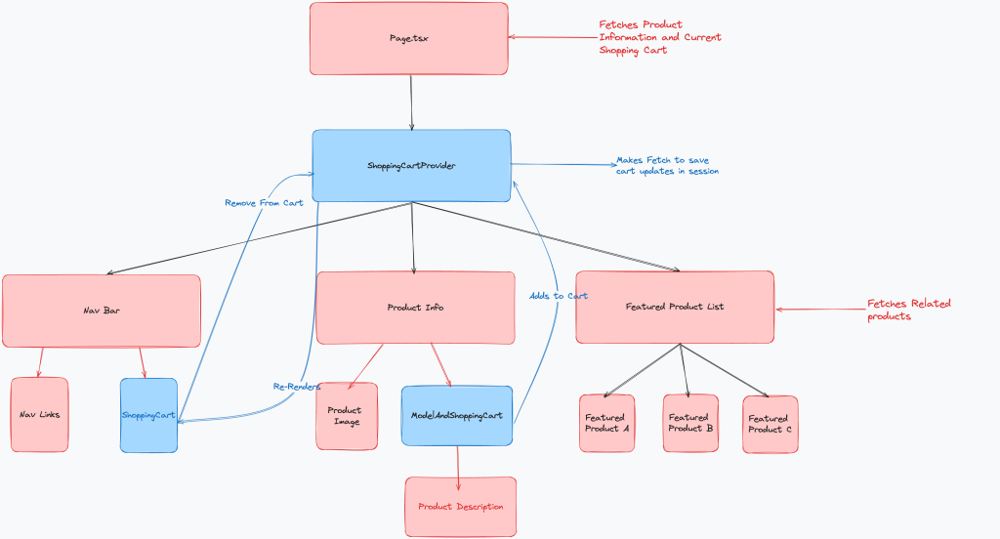
In practice, an application will mix server and client rendering. With React RSC, you might render the shell of a page and some data-heavy list via server components, then use client components for interactive pieces on that page. Angular’s analogue is traditional server-side rendering (SSR) using Angular Universal. SSR pre-renders the initial HTML on the server for a fast first paint, but after that, Angular takes over on the client with the full app.
Unlike React’s RSC, Angular’s SSR still needs to send the entire app bundle to the browser for hydration, so the performance gain is mostly on the first load. React’s Server Components push the boundary further by never sending certain component code to the client at all. Both approaches aim to improve performance by leveraging the server, but they require thinking carefully about what can be rendered ahead of time versus what needs to be interactive.
Choosing the Right Approach
Each state management strategy has strengths, and they often complement each other
- Observables (RxJS): Use for asynchronous data streams and complex event handling. If you have values that change over time or multiple event sources, observables are the go-to solution. They come with many operators for filtering and combining data streams. Be mindful to manage subscriptions to avoid leaks and keep code maintainable.
- Signals: Use for a local state that represents a single value or a snapshot of data at a time. Signals simplify cases like toggling UI elements, tracking form input values, or deriving one piece of state from another without the overhead of RxJS. They make reactive code more straightforward in these cases. In general, use signals when you don’t need the full power of observables; you’ll write less code for the same result. If an asynchronous operation is involved, you might use an observable for the async part and then update a signal with the outcome.
- Server components/SSR: Use server-driven rendering to optimize initial load and offload heavy computation from the client. In Angular, use Universal to render pages on the server for a quick first paint. The result is faster performance and less JavaScript to download. Just balance it with client-side needs; interactive parts must still use client-side state (signals or observables), so server rendering is best for content that can be largely static on load.
Conclusion
Modern applications can benefit from all three approaches. In Angular, signals and observables often work together: “Signals for local, synchronous UI state and computed values observables for asynchronous workflows and complex streams,” and Angular’s SSR can handle the initial rendering on the server. Knowing when to use each approach will help you create applications that are efficient, maintainable, and highly responsive to the user.
Opinions expressed by DZone contributors are their own.
Comments