

Building a Simple MCP Server and Client: An In-Memory Database
A basic in-memory database server using MCP, complete with an interactive client to create tables, insert data, and query it.
Join the DZone community and get the full member experience.
Join For FreeIf you've been diving into the world of AI-assisted programming or tool-calling protocols, you might have come across Model Context Protocol (MCP). MCP is an open-source standard for connecting AI applications to external systems. It is a lightweight framework that lets you expose functions as "tools" to language models, enabling seamless interaction between AI agents and your code. Think of it as a bridge that turns your functions into callable endpoints for models.
In this post, we’ll build a basic in-memory database server using MCP, with code samples to extend and learn from. We'll dissect the code step by step, and by the end, you'll have a working prototype. Plus, I'll ask you to extend it with update, delete, and drop functionalities. Let's turn your terminal into a mini SQL playground!
Background
Imagine you're building an AI agent that needs to manage data on the fly — storing user preferences, querying logs, or even simulating a tiny CRM. Traditional databases like SQLite are great, but they add overhead for quick prototypes. Enter MCP, which allows you to define tools (functions) that an AI can invoke via a standardized protocol, often over HTTP streams for real-time interaction.
Our project is a proof-of-concept in-memory database:
- Server: Exposes tools for CRUD operations (we'll implement Create, Read, and stub Update/Delete).
- Client: An interactive CLI that calls these tools asynchronously.
This setup uses asyncio for concurrency and streamable-http for efficient communication. No external DB needed — just Python dicts in memory. Perfect for learning MCP or prototyping AI tools!
Prerequisites
Before we dive in, ensure you have:
- Python 3.10+: For async/await goodness.
- Basic knowledge of asyncio: If you're new, check out the Python asyncio docs.
- Familiarity with decorators: We'll use
@mcp.toolto register functions. - A code editor: VS Code for syntax highlighting.
- No prior MCP experience required — I'll explain it all.
Environment Setup
Getting started is a breeze. Follow these steps:
-
Make a new directory, say MCP-Db. Create a Python virtual environment to install the MCP and its dependencies. To do this, open the terminal and run the following command.
Pythonpip install mcpThis pulls in the core MCP server/client and the streamable-http transport.
- Create project structure. Add two files:
- database_mcpserver.py (the server code)
- database_mcpclient.py (the client code)
Code Explanations
Let's break down the code. I'll highlight key sections with snippets and explain. Both files leverage MCP's FastMCP for the server and streamablehttp_client for the client, making tool calls feel like natural function invocations.
Server Code: database_mcpserver.py
This is the heart of our DB. It uses an in-memory dict as the database and registers tools with the @mcp.tool decorator. Add the following code snippets to the database_mcpserver.py file.
from mcp.server import FastMCP
import json
from datetime import datetime
from typing import List, Dict, Any

mcp = FastMCP("MCP Database Server")
# in-memory database to keep the article simple
database = {}- Imports: FastMCP bootstraps the server. We use datetime for timestamps and typing hints for clarity.
- Global DB: A simple dict where keys are table names, and values are dicts with columns, data (list of records), and created timestamp. This is just to keep it lightweight, no persistence.
Now, the tools, let's start with creating a table:
@mcp.tool(description="Create a new table with specified columns")
def create_table(table_name: str, columns: str) -> str:
   # Create a table with columns as comma separated string: Id,name,email'
   if table_name in database:
       return f"Table '{table_name}' already exists"

   column_list = [col.strip() for col in columns.split(',')]
   database[table_name] = {
       "columns": column_list,
       "data": [],
       "created": datetime.now().isoformat()
   }
return f"Table '{table_name}' created with columns: {column_list}"- @mcp.tool: Registers
create_tableas an invocable tool. The description helps AI agents understand their purpose. - Logic: Splits the columns string (e.g., "id, name, email") into a list. Initializes an empty data list. Returns a success message or an error if the table exists.
- Tip: In a real app, you'd add schema validation (e.g., data types).
Next, insertion:
@mcp.tool(description="Insert a new record into a table")
def insert_record(table_name: str, values: str) -> str:
   # insert values as comma separated string matching table columns
   if table_name not in database:
       return f"Table '{table_name}' does not exist"


   table = database[table_name]
   value_list = [val.strip() for val in values.split(',')]

   if len(value_list) != len(table["columns"]):
       return f"Expected {len(table['columns'])} values, got {len(value_list)}"

   record = dict(zip(table["columns"], value_list))
   record["_id"] = len(table["data"]) + 1
   record["created"] = datetime.now().isoformat()

   table["data"].append(record)
return f"Record inserted with ID {record['_id']}"- Validation: Checks table existence and value count.
- Record creation: Zips columns with values into a dict, adds an auto-increment
_id. Appends to data. - Debug prints: Handy for logging; remove in production.
Next, query tool:
@mcp.tool(description="Query data from a table with optional filtering")
def query_data(table_name: str, filter_column: str = "", filter_value: str = "") -> str:
   # query all data or filter by column=value
   if table_name not in database:
       return f"Table '{table_name}' does not exist"

   table = database[table_name]
   data = table["data"]
   # apply filter if provided
   if filter_column and filter_value:
        data = [record for record in data
               if record.get(filter_column, "").lower() == filter_value.lower()]

   if not data:
       return "no record found"

   result = f"Table {table_name} ({len(data)} records) \n"
   result += f"Columns: {', '.join(table['columns'])}\n\n"

   for record in data:
       row = f"ID {record['_id']} :"
       row += " | ".join([f"{col}={record.get(col, 'N/A')}" for col in table["columns"]])
       result += row + "\n"

   return result
Stubs for future tools, implement these to gain confidence:
# @mcp.tool(description="Update a record by ID")
# def update_record(...): …

# @mcp.tool(description="Delete a record by ID")
# def delete_record(...): …

# @mcp.tool(description="Drop/Delete a table")
# def drop_table(...): ..
Finally, launch:
# run the mcp server
mcp.run(transport="streamable-http")
Transport: "streamable-http" enables bidirectional streaming over HTTP, making it great for interactive sessions.
Client Code: database_mcpclient.py
The following is the client code, which is an async function that calls server tools.
from mcp.client.streamable_http import streamablehttp_client
import asyncio

def database_democlient():
   print("Commands: create, insert, query, update, delete...\n")
   async def run_interactive():
       async with streamablehttp_client("http://localhost:8000/mcp") as streams:
           from mcp import ClientSession
           async with ClientSession(streams[0], streams[1]) as session:


               await session.initialize()

               while True:
                   command = input("DB> ").strip().lower()
                   if command == "quit":
                       print("database session ended!")
                       break
                   elif command == "create":
                       table_name = input("Table name: ")
                       columns = input(" Columns (comma separated): ")
                       response = await session.call_tool("create_table",
                                        {"table_name": table_name,
                                         "columns": columns})
                       print(response.content[0].text)
                   elif command == "insert":
                       table_name = input("Table name: ")
                       values = input("Values (comma separated): ")
                       response = await session.call_tool("insert_record",
                                         {"table_name": table_name,
                                             "values": values})
                       print(response.content[0].text)
                   elif command == "query":
                       table_name = input("Table name: ")
                       filter_col = input(" Filter columns (optional): ")
                       filter_val = input(" Filter value (optional): ") if filter_col else ""
                       if filter_col and filter_val:
                           response = await session.call_tool("query_data",
                                           {"table_name": table_name,
                                           "filter_column": filter_col,
                                           "filter_value": filter_val})
                       else:
                           response = await session.call_tool("query_data",
                                           {"table_name": table_name})
                       print(response.content[0].text)
                   else:
                       print("Commands: create, insert, query, update, delete..., quit")
                   print()


   asyncio.run(run_interactive())

if __name__ == "__main__":
   database_democlient()
- Async setup: Uses
streamablehttp_clientto connect, thenClientSessionfor tool calls.await session.initialize()handshakes with the server. - Loop: Reads commands via
input(). For create/insert, prompts for params and calls the tool with a dict payload. - Query handling: Optional filters.
- Response parsing: Prints
response.content[0].text— MCP responses are streamed as content blocks. - Quit gracefully: Breaks the loop on "quit."
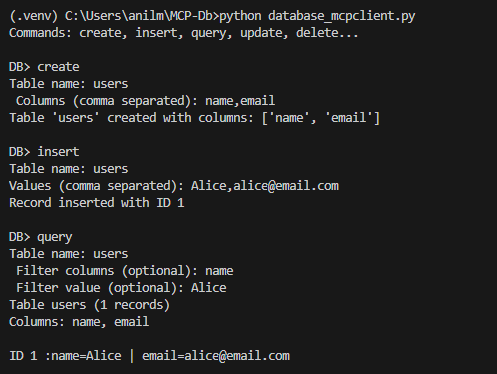
Quick test: Run server, then client. Create a "users" table with "name, email." Insert "Alice, [email protected]." Try it to see it working!
- Run the server: In one terminal, navigate to your project dir and execute:
Python
python database_mcpserver.py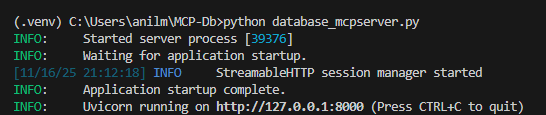
You should see output like "MCP Database Server running on http://127.0.0.1:8000." Leave this running.
- Run the client: In a second terminal, execute:
Python
python database_mcpclient.pyYou'll get a prompt:
DB>. Try commands like create, insert, or query (see below).
With that, you're wired up! The server listens on localhost:8000, and the client streams requests over HTTP.
Sample run output:
Troubleshooting:
- Firewall blocking port 8000? Change it in the client's URL.
- Import errors? Ensure MCP is installed in the same virtualenv.
Summary
We've built a fun, extensible MCP-based database: a server with core tools for table creation, insertion, and querying, paired with an async CLI client. Key takeaways:
- MCP shines for exposing tools to AI — decorators make it declarative.
- In-memory storage keeps it simple; async handles real-time vibes.
This prototype clocks in under 200 lines and runs locally. Scale it by swapping the dict for Redis.
Next Steps: Your Action Item
Ready to level up? Implement the stubbed tools! Add these to database_mcpserver.py and update the client to handle "update," "delete," and "drop" commands.
- Update record: A tool to modify a record by
_id(e.g., params:table_name,record_id, updates as dict-string). - Delete record: Remove by
_id. - Drop table: Nuke the whole table.
Test with the client, then blog your enhancements. Questions? Drop a comment below. Happy learning!
Disclaimer: The views and opinions expressed in my articles are solely my own and do not reflect the official position or endorsement of my employer or any affiliated organizations.
Opinions expressed by DZone contributors are their own.
Comments