

Soft Deletion in Hibernate: Things You May Miss
The article explains some details that stay hidden by most of the articles about soft deletion implementation using Hibernate.
Soft Deletion is a commonly used pattern in enterprise applications. Hibernate is a widely used persistence framework in the Java ecosystem. Therefore, it is not surprising that Hibernate provides a way to implement soft deletion. However, this approach has some awkward aspects, which are not highlighted by the docs and articles on that matter. In this article, we will dive into some details that you may miss.

@SQLDelete + @Where
If you Google 'soft deletion hibernate,' you’ll most likely find tutorials by Eugen Paraschiv, Vlad Mihalcea, or Thorben Janssen. They suggest using Hibernate @SQLDelete and @Where annotations which let you automatically set the deleted flag and filter by it:
@Entity
@Table(name = "article")
@SQLDelete(sql = "update article set deleted=true where id=?")
@Where(clause = "deleted = false")
public class Article {
   @Id
   @GeneratedValue(strategy = GenerationType.SEQUENCE)
   @Column(name = "id", nullable = false)
   private Long id;

   @Column(name = "deleted", nullable = false)
   private Boolean deleted = false;

   // other properties, getters and setters omitted
}
@SQLDelete takes a native SQL query that is executed whenever a Hibernate-managed entity gets deleted. @Where takes a condition and appends it to 'select' queries automatically, allowing you to filter entities based on the deleted attribute automatically.
This looks like a silver bullet, however, the devil is in the details. Plain queries will work absolutely fine, but what's going to happen with associations?
Problems With Associations
Let's think for a second, what behaviour would you expect when you fetch an entity that has an association field to a collection, where some entities were soft-deleted, or to a single soft-deleted entity? In fact, there is no wide range of options. Rather, you want deleted records to be excluded or included in the resulting dataset. And your choice may vary depending on the use case. E.g., we have a collection of items in the e-store cart. Deleting an item we would expect this to disappear from the order, right? However, deleted products should stay in the historical invoices. Isn't it a contradiction?
Let's examine how the @Where + @SQLDelete solution works for different types of associations, fetch the type and API used for executing the query. See the ER diagram below, we are going to use it for our further experiments:

The Article has a ManyToMany association to Author, OneToMany association to Comment, and a OneToOne association to ArticleDetails. The question is, what should happen if one of them is deleted but still referenced from a live entity?
OneToMany and ManyToMany
Hibernate filters out deleted entities from all ToMany associations. If you run the following code before and after marking one author entity as deleted, the number of names printed will change:
articleOptional.ifPresent(article -> {
   article.getAuthors()
           .forEach(author -> logger.info(author.getName()));
});
The good news, such behavior consistently happens regardless of the fetching type (lazy or eager) and way of calling it (via entityManager, Criteria API, Spring Data JPA, etc.).
Lazy ManyToOne and OneToOne
Let's imagine that we soft-delete an article from our example. However, we don't want to delete comments under this article, so that when recovering the article it appears back with its comments.
@Entity
@Table(name = "comment")
public class Comment {
   ...
   @ManyToOne(fetch = FetchType.LAZY)
   @JoinColumn(name = "article_id")
   private Article article;
   ...
}
Now, let's try to fetch a comment associated with the soft-deleted article:
Optional<Comment> comment = commentRepository.findById(id);
comment.ifPresent(com -> logger.info(com.getArticle().getText()));
If you add a breakpoint after the first line, you’ll see that the article is initialized with a proxy.
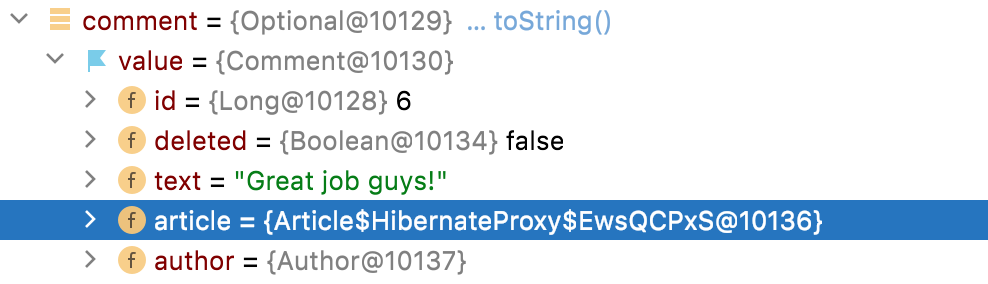
Well, this is understandable since Hibernate does not know in advance whether the entity is deleted or not. Once you call com.getArticle().getText(), the EntityNotFoundException is thrown! Is that what you would expect?
Eager ManyToOne and OneToOne
Let’s repeat the same experiment but change the fetch type to the Eager mode. Now comments get fetched with their article and no proxy is required. Hibernate knows for sure that the article is deleted. Let's run the same test:
Optional<Comment> comment = commentRepository.findById(id);
comment.ifPresent(com -> logger.info(com.getArticle().getText()));
The associated soft-deleted article is silently loaded with no exception with the deleted attribute set to true:
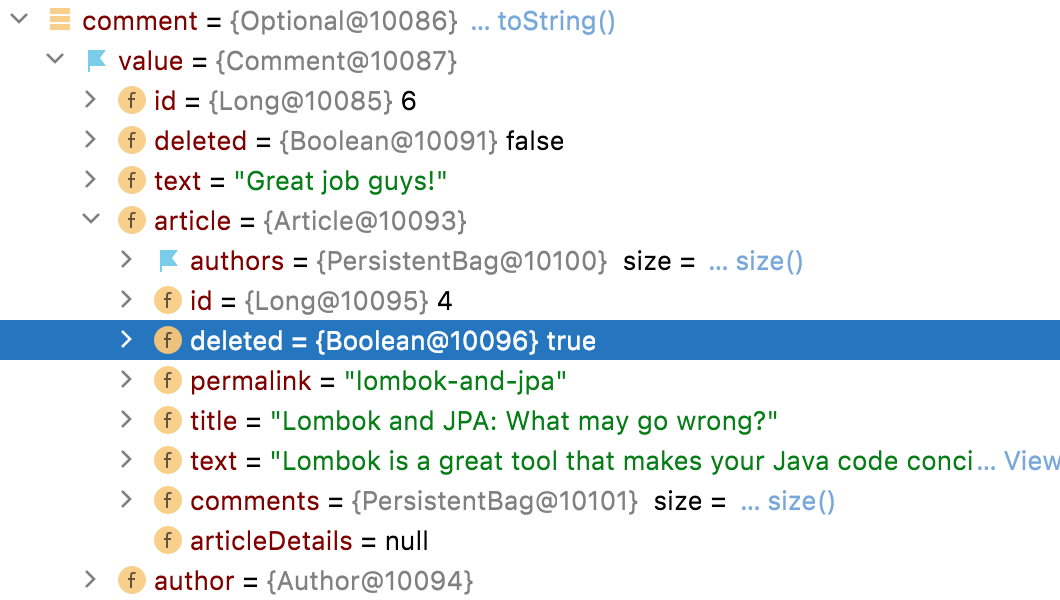
Such inconsistent behavior can be easily explained. The eager fetch type makes Hibernate join the article table right away. So, Hibernate has a choice to throw the EntityNotFoundException right away or load it normally. Since the article is loaded, the @Where mechanism is out of power, and Hibernate simply maps it to the target class.
Let's fetch a collection of comments:
Iterable<Comment> comments = commentRepository.findAll();
Now we get EntityNotFoundException again! This starts to happen again because findAll leads to separate queries for the associated Article entities, as noted here.
Any time a soft-deleted entity gets fetched by a separate query it causes the above exception. This happens because generating a separate query Hibernate applies the @Where clause, which makes it impossible to find a soft-deleted entity. Obviously, such queries always return an empty result, which, in its turn, causes EntityNotFoundException.
What's even more amusing is that you need to experiment to see how exactly Hibernate will fetch data using different APIs. So, using QueryDSL you are going to hit the same exception fetching a collection or a single entity. At the same time, criteria API returns the deleted entity for eager OneToOne but throws EntityNotFoundException for eager ManyToOne. Total mess, isn't it?
Way to Avoid EntityNotFoundException
There is a cure against the annoying EntityNotFoundException. Hibernate introduces the @NotFound annotation, which can change the behaviour from raising the exception to silently setting null into the association field.
This may look like a panacea, however, it brings a significant downside: all ToOne associations become eagerly fetched, regardless of the declared fetch type. This fact may massively impact the performance of your application.

Problems with Constraints and Indexes
Both deleted and live entities will share unique constraints and indexes. Hence, creating regular indexes will not work any longer. Let's take an example where an author has a unique login constraint. After soft-deletion, our record stays in the table, so no live author can reuse the same login of the deleted ones.
You are lucky if you use PostgreSQL and can use partial indexes:
CREATE UNIQUE INDEX author_login_idx ON author (login) WHERE deleted = false;
But if you build your application on top of MySQL, this task turns out to be unsolvable.
Conclusion
As you may see, Soft Deletion is an easy pattern to understand, but not that easy to implement. Seems there is no ideal implementation for soft deletion. At least Hibernate doesn't provide one.
In simple cases, you definitely can use @SQLDelete + @Where. However, in the case when soft-deleted entities appear in OneToOne and ManyToOne associations, you barely can count on the consistent behaviour. Simply changing the fetch type, or introducing @EntityGraph, or porting your query from Criteria API to QueryDSL or whatever else is likely to change the result: from getting the unexpected exception to the unexpected successful load of the deleted entity or even getting the unexpected null.
Opinions expressed by DZone contributors are their own.
Comments