

Development of System Configuration Management: Introduction
We replaced open-source SCM with our own. This series shares our experience, lessons, and advice for others facing the same choice.
 ·
·
Join the DZone community and get the full member experience.
Join For FreeSeries Overview
This article is part 1 of a multi-part series: "Development of system configuration management."
The complete series:
- Introduction
- Migration end evolution
- Working with secrets, IaC, and deserializing data in Go
- Building the CLI and API
- Handling exclusive configurations and associated templates
- Performance consideration
- Summary and reflections
Introduction
SCM is software that facilitates the widespread deployment of configurations across infrastructure. It is a tool that can orchestrate the parameters of computers to prepare them for the desired environment.
The necessity of SCM is recognized across a large number of computer systems. A well-organized SCM can improve the productivity of the SRE team. The larger the number of hosts, the greater the productivity it introduces. Conversely, poorly organized SCM in small infrastructures can lead to decreased productivity.
Typically, bare metal and VM-based infrastructure are suitable for deployment via SCM. While the deployment of applications using the SCM API is possible, it is not very convenient. Orchestrators like Kubernetes and Nomad are not designed to work with SCM. Infrastructure as Code (IaC) is more effective for provisioning.
As a result, on average, we have at least three different tools for configuration deployment. While this isn't necessarily detrimental, it is common practice. On the other hand, custom infrastructure providers introduce their own challenges. Consequently, any additional tools incur overhead costs related to adjustment, development, and maintenance.
My colleagues and I decided to develop our own SCM to address this issue. I authored the initial code, and then my colleagues joined me. Unfortunately, it is not an open-source system, but in this article, we will discuss the challenges we encountered during development, the solutions we found, the approaches we took, and the common principles for developing your own SCM. This information may be useful for those who face the same choice.
What I Dislike about Popular SCM
The most popular SCM in open source: Ansible, Saltstack, Puppet, Chef, CFEngine. These are good engines to use as SCM for most cases. Our case was the other.
First of all, we used Ansible and SaltStack. The primary issue connected with them is the requirement for an up-to-date version of Python and its modules on the server. This necessity can lead to increased maintenance costs.
The second issue is that most integration modules do not adapt to our specific use cases. This leads to a situation where the most commonly used features will be a file deployer, service runner, and package installer.
Overall, the user will need to describe the integration with services in all cases. If it is a straightforward case, the process will be simple. However, if it is more complex, the difficulty will increase, and users may not notice a significant difference between developing their own SCM and using an open-source SCM.
For instance, if we want to bootstrap ACL in Consul, we should perform the following steps:
- Run query to /v1/acl/bootstrap locally on the server.
- Store the obtained AccessorID and SecretID in Vault.
- Make this secret available on all servers in the cluster to enable management of ACLs through SCM.
The second example is using internal TLS certificates for mTLS:
- Generate a new certificate and key.
- Store them in the vault.
- Deploy from the vault to a group of servers.
The password deployment process is similar. These operations are bidirectional. At the start, we must generate the secret, store it in the secret storage, and then deploy it where necessary.
In traditional SCM, such cases lead to the impossibility of deploying the system with just one push to Git and a single SCM call.
Motivation to Develop a New SCM
There are many pros and cons to changing the SCM to find a better solution for us. However, based on the experience of other colleagues, each SCM has its own advantages and disadvantages. This is acceptable, as even if we develop a new one, it will also have some drawbacks. Nevertheless, we can focus our efforts on increasing the benefits of our development.
Ultimately, we identified several reasons why we believe developing a new SCM will lead us to success:
- Dissatisfaction with the old SCM: It may sound strange, but when many engineers struggle with a particular tool, they are often motivated to participate in developing and pushing for a new tool.
- Complaints about requirements and conditions: For instance, our new SCM would need to closely integrate with our private cloud and our own CMDB, taking into account the roles and host group semantics (in the future I will refer to it as hostgroup) we use in our live processes, as well as the specific open-source tools we integrate with.
- Development of new functionality: The new SCM can offer features relevant to our SRE needs that are not available in the current open-source SCM options. However, developing this codebase will require time. For instance, it can include:
- Automatic restoration of services
- IaC functionality
- Automation of cluster assembly and node joining
- Independence from irrelevant features: A new SCM, developed as ordinary software, will mitigate issues relating to security updates, unnecessary feature overload, and potential backward compatibility breaks. Specifically, the new SCM will:
- Have updates implemented only when we need them.
- Include only relevant functions (avoiding unnecessary functionality and bugs).
- Maintain backward compatibility in many cases where the open-source SCM cannot do so due to its universality and irrelevant features for us.
- Improved configurations of services: Even if we miss our goals, moving the configuration from one SCM to another allows us to eliminate irrelevant elements, remove unnecessary workarounds in service configuration, and ultimately create a cleaner configuration.
- Interest from other teams: Numerous teams are keen to learn from our experiences and may be interested in making similar decisions.
How We Envisioned an Effective SCM For Us
In our opinion, the SCM can prepare the empty host to be production-ready without the participation of engineers. SCM should create directories, manipulate files, run services, initialize and join nodes to the clusters, add users to the software, set permissions, and so on. This approach will improve the productivity of the SRE team and ensure the reproducibility of infrastructure.
Earlier, we envisioned a system that could build new services in infrastructure, from creating and pushing a single file to Git. Moreover, we wanted to unite SCM and IaC.
In our company, we use a self-developed private cloud to provision VMs. At that time, we did not have Terraform integration, and creating it from scratch was similarly labor-intensive.
In our vision, a new SCM must create VMs, connect to them, and provision them to production in just 10 minutes. We wanted to write this in Go to minimize the number of dependencies installed on each machine.
The main manifest for host groups is a simple YAML file and can be parsed by yamllint. This opens up opportunities for pre-commit checks that highlight syntax-level issues.
The next critical integration is with a persistent database to store dynamically configured parameters. We integrated it with Consul, which allows us to deploy applications dynamically by setting new versions of applications — such as changing Docker images on the fly with an API — rather than hardcoding them into files in the Git repository.
Another important aspect for us is integration with Vault, which enables the creation and retrieval of secrets and certificates for deployment on hosts. This would allow for bidirectional schemas, where our developed SCM generates secrets, automatically stores them in the Vault, and deploys them to the hosts.
From What We Started, the Development
Overview
Both IaC and SCM functionalities operate as follows:
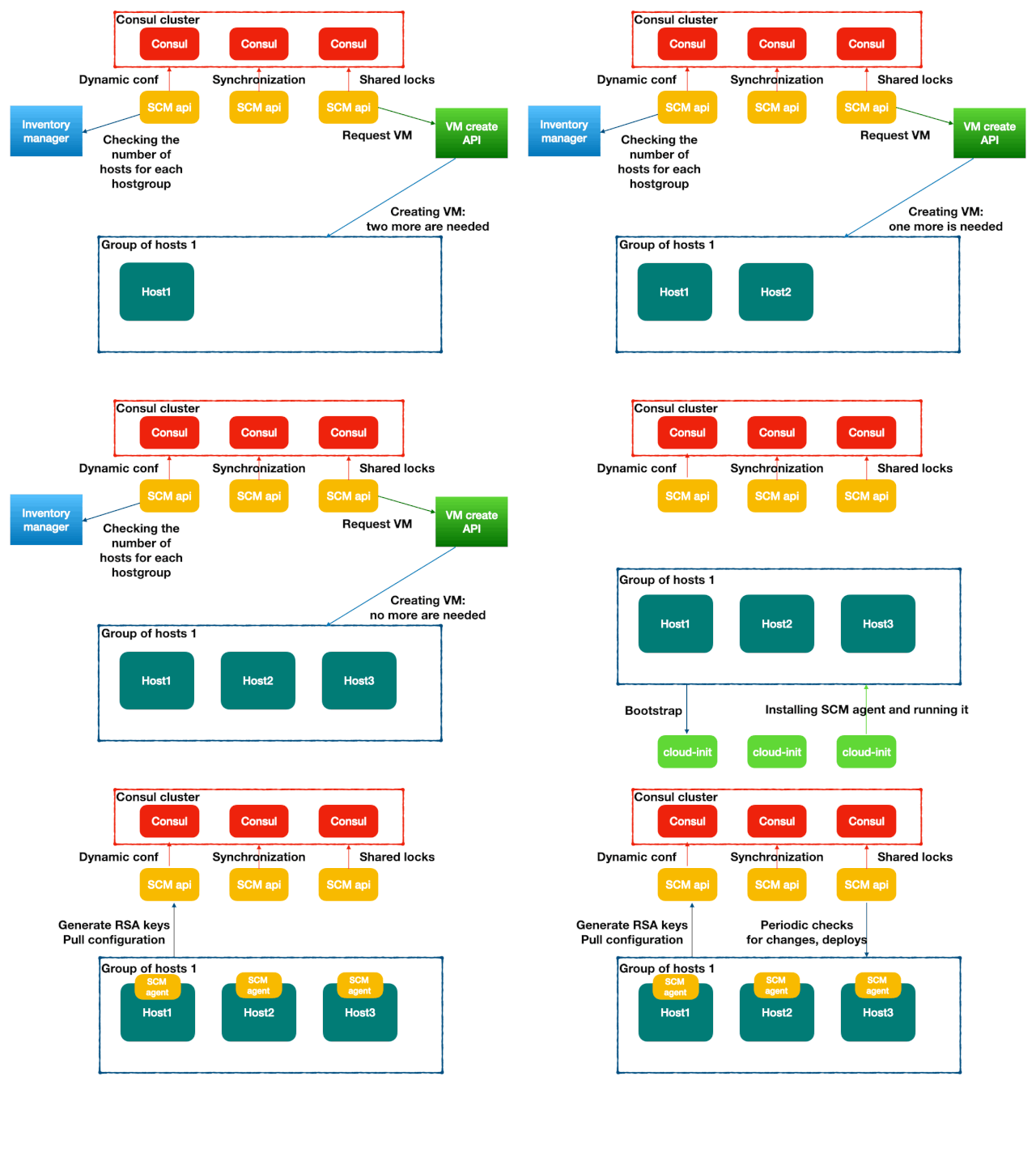
According to the scheme, the SR Engineer pushes the configuration file to Git that describes the hostgroups, including resources and the number of replicas. This file contains all configuration details for the hostgroups: resources, software, and settings.
The API periodically checks the API of the inventory manager for key fields:
- Do we have such host groups?
- If no, create this
- Do we have enough hosts in this host group?
- If no, loop to create more hosts
Once a host starts, the initial scripts (which can be the old SCM running in automatic mode, kickstarts in RHEL-based environment, or cloud-init) initiate the installation of the SCM agent. After the SCM agent starts, it registers with the SCM API and periodically retrieves its configuration. From that point onward, all hosts will be managed by the SCM agent for new configurations and deployments.
There are many sources of data. The SCM API retrieves the data from all sources and merges it. We have a default.yaml file that contains the configuration relevant for all hosts. The target configuration for a hostgroup is stored in '{hostgroup name}.yaml'. Additionally, Consul and Vault provide extra information, including dynamic configuration and secrets. Consul is an important part of SCM as it allows for dynamic configurations to be stored without requiring a push to Git, which is useful for deployments.
The SCM API includes a reverse proxy feature to route requests to Consul. This approach provides a unified access model and a single entry point for interactions with the configuration.
As a result, SCM provides an interface to store dynamic configurations in Consul while keeping static configurations on the filesystem under Git control.
There was a small service developed in Golang, consisting of three parts: the API, the agent, and the CD client. The first functionality that was developed was package installation. On CentOS 7, it uses YUM for this purpose. Our hosts were united in the host group in our resource manager (CMDB). The main idea was that the hosts in the host group must be similar or the same. The API then returned the configuration based on the determined host group of each host. Each host group had its own unique configuration, as follows:
packages:
  lsof:
    name: lsof-4.87-4
There are two main repositories:
- The SCM source code
- Configuration files that describe the hostgroup manifests for deployment
The first repository contains the source code for the SCM, which operates according to the declarative configuration specified in the second repository. It checks various files, packages, and services for compliance with specified conditions. This code also provides for complex cases developed in Golang. In SaltStack or Ansible terminology, it is referred to as roles or formulas. The second repository contains declarative configurations in YAML. In Saltstack or Ansible, it is referred to as facts or pillars/grains.
For convenience, a file containing the default settings for all hosts was introduced. This allows the option to avoid using SaltStack to deploy packages widely in the early stages of development, providing deployment opportunities for a base configuration as extensive as possible.
The first modules introduced in the SCM included:
- Directory manager
- File manager
- Command run manager
- Service manager
- Package manager
- User manager
Code Explanation
Configuration files open up opportunities for us to configure most resources on the system. These common managers had the following components:
Declarative Config Handler
It operates only with user-defined host groups via YAML files. For example, below is a piece of code that implements the file state checking logic:
func FilesDeclarativeHandler(ApiResponse map[string]interface{}, parsed map[string][]resources.File) {

    for _, file := range parsed[key] {

        if file.State == "absent" {
            FileAbsent(file.Path)
            continue
        }
        err := FileMkdir(file.Path, file.DirMode)
        if err != nil {
            logger.FilesLog.Println("Cannot create directory", err)
        }

        if file.Template == "go" {
            TemplateFileGo(file.Path, file.Data, file.FileMode, ApiResponse)
        } else if file.Symlink != "" {
            CreateSymLink(file.Path, file.Symlink, file.DirMode)
        } else if file.Data != "" {
            temp_file := GenTmpFileName(file.Path)
            ioutil.WriteFile(GenFile, data, file.FileMode)
            TemplateFileGo(file.Path, file.Data, file.FileMode)

            if CompareAndMoveFile(file.Path, GenFile, file.FileMode, file.FileUser, file.FileGroup) {
                CompareAndMoveFile(temporaryPath, file)
                FileServiceAction(file)
            }
        }
...
The API part responsible for retrieving files from the filesystem and sharing them with specific hosts is as follows:
func FilesMergeLoader() {
...
    if Fdata.From != "" {
        filesPath := conf.LConf.FilesDir + "/data/" + Fdata.From
        loadedBuffer, err := ioutil.ReadFile(filesPath)
        if err != nil {
            logger.FilesLog.Println("hg", hostgroup, "err:", err)
            continue
        }

        Fdata.Data = base64.StdEncoding.EncodeToString(loadedBuffer)
    }
...
If the 'from' field is defined, the API loads this file as a base64-encoded string into a new JSON field called data, allowing binary files to be transferred within JSON. An agent with a pull model periodically checks the API, retrieves these fields, and stores them on the hosts' destination filesystems.
This is just a small part of the functionality that allows for file configurations with parameters such as:
files:
  /path/to/destination/filesystem:
    from: /path/from/source/filesystem
    template: go
  /etc/localtime:
    symlink: /usr/share/zoneinfo/UTC
  /etc/yum.repos.d/os.repo:
    state: absent
These two parts of the code function in a similar manner:
The Git repository consists of a set of declarative configuration files and the files that must be transferred to the agents.
Two other modules operate similarly, although with slight differences. They contain significantly more logic related to their area. Almost all managers have flags for restarting or reloading services after making changes, which necessitates identifying differences before changes are made. As a result, if the SCM agent wants to create a directory, it must first check for its existence.
The "running" state of service indicates that the service must be running and enabled, while the "dead" state signifies that the service must be disabled and stopped. In our infrastructure, such an operation doesn't need to be separated, and we have not implemented functionality to distinguish between the functions that enable and run services.
The package handler workflow is illustrated in the following flowchart:
On the other hand, the package handler is similar but with its own specific requirements:
Macros for Calling Managers at the API Level
In many cases, the merger part creates declarative configurations with common elements from certain macros. The API merely enriches the main YAML declaration for each host group. In the future mentions I will refer to them as Mergers.
// ApiResponse is a JSON that contains all fields declared by the user in group.yaml
func HTTPdMerger(ApiResponse map[string]interface{}) {
    if ApiResponse == nil {
        return
    }

    // Check for the existence of the 'httpd' field. If not specified, skip since it's not a group for the httpd service.
    if ApiResponse["httpd"] == nil {
        return
    }

    // Get the statically typed struct from the main YAML
    var httpd resources.Httpd
    err := mapstructure.WeakDecode(ApiResponse["httpd"], &httpd)

    // Define the service name that should be run on the destination hosts
    httpdService := "httpd.service"
    if httpd.ServiceName != "" {
        httpdService = httpd.ServiceName
    }

    // Define the expected service state
    state := httpd.State
    if state != "" {
        // Add the service state to the response JSON
        common.APISvcSetState(ApiResponse, httpdService, state)
    } else {
        // Default to "running" if no state is specified
        common.APISvcSetState(ApiResponse, httpdService, "running")
    }

    // Define the httpd package name
    httpPackage := "httpd"
    if httpd.PackageName != "" {
        httpPackage = httpd.PackageName
    }
    // Add the package name to the response JSON
    common.APIPackagesAdd(ApiResponse, httpPackage, "", "", []string{}, []string{httpdService}, []string{})

    Envs := map[string]interface{}{
        "LANG": "C",
    }
    // Add user for the httpd service
    common.UsersAdd(ApiResponse, "httpd", Envs, "", "", "", "", 0, []string{}, "", false)

    // Add an empty directory for logs
    common.DirectoryAdd(ApiResponse, "/var/log/httpd/", "0755", "httpd", "nobody")

    // Add the Go templated file httpd.conf, which should be obtained from httpd/httpd.conf on the SCM API host from the GIT directory, and passed to /etc/httpd/httpd.conf on the destination server.
    common.FileAdd(ApiResponse, "/etc/httpd/httpd.conf", "httpd/httpd.conf", "go", "present", "root", "root", "", []string{}, []string{}, []string{httpdService}, []string{})

    Url := "http://localhost/server-status"

    // We utilize the Alligator monitoring agent to collect metrics from HTTPd. Add configuration context with httpd.
    AlligatorAddAggregate(ApiResponse, "httpd", Url, []string{})
}
As a result, the user can work in two ways:
- Declare the resources themselves.
- Declare a macro like
httpd, and everything relevant to this service is automatically enriched in the resulting response.
To create your own macros, you need to write Go code. To support, there are many functions, like common.DirectoryAdd and common.FileAdd only enriches the JSON. For example, here is an example of the FileAdd function:
func FileAdd(ApiResponse map[string]interface{}, path, from, template, state, file_user, file_group, file_mode string, restart, reload, flags, cmdrun []string) {
    if ApiResponse == nil {
        return
    }

    if ApiResponse["files"] == nil {
        ApiResponse["files"] = map[string]interface{}{}
    }

    Files := ApiResponse["files"].(map[string]interface{})

    NewFile := map[string]interface{}{
        "from":             from,
        "state":            state,
        "template":         template,
        "services_restart": restart,
        "services_reload":  reload,
        "flags":            flags,
        "cmd_run":          cmdrun,
        "file_user":        file_user,
        "file_group":       file_group,
        "file_mode":        file_mode,
    }

    Files[path] = NewFile
}

func APIPackagesAdd(ApiResponse map[string]interface{}, pkg string, Name string, Name9 string, Restart []string, Reload []string, CmdRun []string) {
    if ApiResponse["packages"] == nil {
        ApiResponse["packages"] = map[string]interface{}{}
    }

    Packages := ApiResponse["packages"].(map[string]interface{})

    if Packages[pkg] == nil {
        NewPkg := map[string]interface{}{}
        if Name != "" {
            NewPkg["name"] = Name
        }
        if Name9 != "" {
            NewPkg["el9"] = Name9
        }
        if Restart != nil {
            NewPkg["services_restart"] = Restart
        }
        if Reload != nil {
            NewPkg["services_reload"] = Reload
        }
        if CmdRun != nil {
            NewPkg["cmd_run"] = CmdRun
        }
        Packages[pkg] = NewPkg
    }
}

func APISvcSetState(ApiResponse map[string]interface{}, svcname string, state string) {
    if ApiResponse["services"] == nil {
        ApiResponse["services"] = map[string]interface{}{}
    }

    service := ApiResponse["services"].(map[string]interface{})
    _, serviceDefined := service[svcname]
    if !serviceDefined {
        service[svcname] = map[string]interface{}{"state": state}
    }
    service[svcname].(map[string]interface{})["state"] = state
}

func DirectoryAdd(ApiResponse map[string]interface{}, Path string, Mode string, User string, Group string) {
    if ApiResponse["directory"] == nil {
        ApiResponse["directory"] = map[string]interface{}{}
    }

    Directory := ApiResponse["directory"].(map[string]interface{})

    NewFile := map[string]interface{}{
        "dir_mode": Mode,
        "user":     User,
        "group":    Group,
    }

    Directory[Path] = NewFile
}

func UsersAdd(ApiResponse map[string]interface{}, UserName string, Envs map[string]interface{}, Home string, Shell string, Group, Groups string, Uid int, Keys []string, Password string, CreateHomeDir bool) {
    if ApiResponse == nil {
        return
    }

    if ApiResponse["users"] == nil {
        ApiResponse["users"] = map[string]interface{}{}
    }

    Users := ApiResponse["users"].(map[string]interface{})

    NewUser := map[string]interface{}{
        "envs": Envs,
        "home": Home,
        "shell": Shell,
        "groups": Groups,
        "uid": Uid,
        "keys": Keys,
        "genpasswd": Password,
        "group": Group,
        "create_home_dir": CreateHomeDir,
    }

    Users[UserName] = NewUser
}

func AlligatorAddAggregate(ApiResponse map[string]interface{}, Parser string, Url string, Params []string) {
    if ApiResponse["alligator"] == nil {
        return
    }

    AlligatorMap := ApiResponse["alligator"].(map[string]interface{})
    if AlligatorMap["aggregate"] == nil {
        var Aggregate []interface{}
        AlligatorMap["aggregate"] = Aggregate
    }
    AggregateMap := AlligatorMap["aggregate"].([]interface{})
    AggregateNode := map[string]interface{}{
        "parser": Parser,
        "url":    Url,
        "params": Params,
    }

    AggregateMap = append(AggregateMap, AggregateNode)
    AlligatorMap["aggregate"] = AggregateMap
}
However, the file manager has additional logic due to the necessity to load the file body into the JSON. It works well by adding the file loader at the end of scanning other mergers.
Other cases function similarly but are simpler.
For the end user, the definition:
httpd:
  state: running
Will be transformed into:
httpd:
  state: running

packages:
  httpd:
    name: httpd
    flags:
    - httpd.service


service:
  httpd.service:
    state: running

files:
  /etc/httpd/httpd.conf:
    template: go
    from: httpd/httpd.conf
    services_reload:
    - httpd.service
    user: root
    group: root

directory:
  /var/log/httpd/:
    dir_mode: "0755"
    user: httpd
    group: nobody

users:
  httpd:
    envs:
      LANG: C

alligator:
  aggregate:
  - url: http://localhost/server-status
    parser: httpd
This opens up all the opportunities of modern SCM and remains flexible enough to change parameters.
The Codebase That Operates at the Agent Level
SCM allows for custom resource definitions. This is part of the role that must be performed on destination servers within the general JSON pulled from the SCM API.
The SCM agent provides an interface with many functions to synchronize or template files, create symlinks, install packages on the operating system, and start or stop services. These functions act as wrappers that check for differences between the state declared by the SCM and the state at the host level. For example, before changing a file, the agent should check for its existence, identify differences, and synchronize that file from the SCM. This process is necessary to trigger actions related to state changes, such as running commands, restarting or reloading services, or performing other tasks.
Many configuration parameters on Linux can be transferred via files, services, packages, and so on, and in most cases, there is no need for additional custom logic. However, sometimes there are cases where certain services cannot be restarted simultaneously across multiple servers. In such instances, we can describe the logic using locks, as shown in the code below:
func HTTPdParser(ApiResponse map[string]interface{}) {
    if ApiResponse == nil {
        return
    }

    if ApiResponse["httpd"] == nil {
        return
    }

    var httpd resources.Httpd
    err := mapstructure.WeakDecode(ApiResponse["httpd"], &httpd)

    HttpdFlagName := "httpd.service"

    var Group string
    if ApiResponse["group"] != nil {
        Gropu = ApiResponse["group"].(string)
    }

    if common.GetFlag(HttpdFlagName) {
        LockKey := Hostgroup + "/" + HttpdFlagName
        LockRestartKey := "restart-" + HttpdFlagName

        if common.SharedLock(LockKey, "0", ApiResponse["IP"].(string)) {
            if !common.GetFlag(LockRestartKey) {
                common.SetFlag(LockRestartKey)
                common.DaemonReload()
                common.ServiceRestart(HttpdFlagName)
            }
        }

        if common.GetFlag(LockRestartKey) {
            if WaitHealthcheck(httpd, ApiResponse) {
                common.SharedUnlock(LockKey)
                common.DelFlag(LockRestartKey)
                common.DelFlag(HttpdFlagName)
            }
        }
    }
}
Visually, it works like this:
This is just one example of such a case, but there can be many more. For instance, as I mentioned earlier, bootstrapping Consul ACLs must also be performed on the local node. Parsers only process JSON and perform actions to bring the configuration into compliance.
Author Contributions
- Primary author: Kashintsev Georgii Developed the concept, outlined the structure, and authored diagrams as well as the majority of the content.
- Co-author: Alexander Agrytskov wrote key sections in Evolution, Unsatisfied Expectations, and Incidents. Also contributed to editing and review across all other sections to improve clarity and technical consistency. Reviewed the final draft.
Opinions expressed by DZone contributors are their own.
Comments