

Taming the Storm: How Chaotic Exploration Shapes Big Picture Event Storming
The article takes you inside a real Event Storming workshop — from chaos and debate to shared understanding of the Training Center domain.
Join the DZone community and get the full member experience.
Join For FreeHaving delved into the intricacies of event storming, its various types, and effective workshop facilitation, it’s now time to embark on our first practical example.

Initial requirements
Our customer requested that we implement a platform to support their training center. Although the list of requirements they provided was somewhat limited, it gave us a starting point for our work:
Trainings
We reviewed trainings that were ready to be conducted, and those under preparation:
- Viewing trainings by those who are interested in participation
- Adding new and modifying existing trainings
- Each training needs to have its supervisorscould
Advertisement
Activities were created to attract potential attendees to participate in a training, including:
- Webinars
- Talks on conferences
- Talks on internal events
Trainers
Trainers the Training Center works with explored the following:
- What trainings a given trainer could conduct
- What skills a trainer had
- Trainers' rates
- History of conducted trainings with received feedback
- Agreement between trainer and the Training Center
Open trainings
Training sessions anyone could join included:
- Trainings' harmonogram
- Payment
- Resignation
- Agreement with the Trainer who should conduct the training
- Group limits
- Cancellation
Dedicated trainings
Trainings organized for employees of other companies required some modifications, including:
- Training adjustments and modifications
- Conversations with the company's representative
- Non-Disclosure Agreement
This is far from the comprehensive requirements necessary for implementation. Nevertheless, armed with this initial information, we were able to propose the next steps.
Fortunately, we’re already acquainted with a tool that can deepen our understanding of the business domain: Big Picture Event Storming.
The workshop's preparation
In our conversations with the client, we'd emphasized the importance of gaining a deeper understanding of their business domain. This knowledge was essential for exploring requirements in subsequent steps and making initial architectural decisions.
We identified four key individuals to engage: Monika, Sebastian, Iza, and Marek. These domain experts held the answers we sought. Additionally, we recognized the need for a group of questioners. As a result, we invited architects, team leads, and business analysts who would play crucial roles in the software development implementation.
Our plan involved three 1.5-hour sessions scheduled for a single day. This timeframe would allow for breaks, lunch, and flexibility to accommodate any additional sessions if necessary.
The day has come
Everyone settled into the room, colorful sticky notes were ready to be filled with information, and a lengthy blank wall was cleared for our work. And, of course, snacks and drinks were on hand to ensure that hunger or thirst wouldn’t hinder our progress.
I invited everyone to introduce themselves, and then we dove into the main event: the Big Picture Event Storming.
Explaining the legend
Before we delved into exploring the domain, I introduced the primary tool we’d be using: sticky notes. As I mentioned in a previous article, I recommended building our legend incrementally. We focused on three essential types:


- Event represents anything that takes place or happens
- Hot Spot serves as a marker for issues, questions, concerns, or areas needing attention
- Opportunity represents an idea that could introduce beneficial enhancements or simplifications
I invited the group to create a few examples together to ensure everyone understood the purpose of each sticky note type. In a quick collaborative session, we generated examples for events, hot spots, and opportunities:

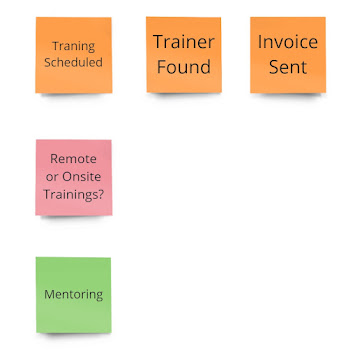
Excellent! It appeared we now shared a common understanding of our foundational building blocks.
Chaotic Exploration - Events Discovery
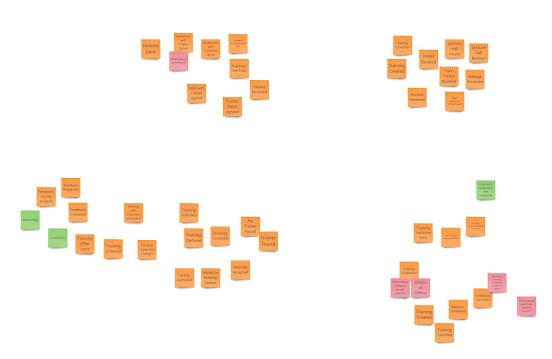
Now, I explained the purpose of our next step: to generate as many events as possible within our business domain. This was the only moment when we worked individually, which allowed everyone to focus solely on sharing the knowledge from their minds without getting bogged down in discussions or details.
I invited everyone to find free space on the wall for their sticky notes, then stand next to the wall, and share as much information as they could.
After 20 minutes, everyone was done, and this was the picture they’d collectively produced:

Chaotic Exploration - Building Common Understanding
I invited everyone to examine what we’d created so far—each person had contributed their own understanding of the business domain. While it wasn't exhaustive, it provided a solid foundation for moving forward. With diverse perspectives represented on the wall, it was time to synthesize this information into a shared understanding and knowledge.
We systematically reviewed each sticky note to ensure:
- The information was clear
- The wording was accurate
- There were no duplicates
In some cases, spotting duplicates was straightforward because we used identical phrases on the sticky notes:
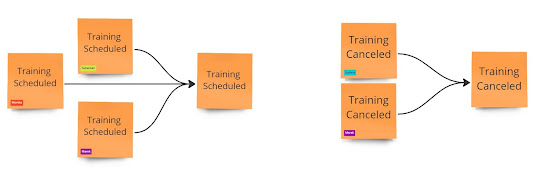

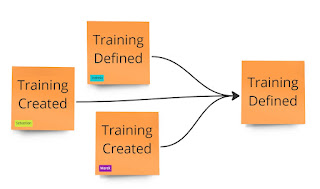
However, when we encountered the sticky notes labeled “Training Created” (placed by both Marek and Sebastian) and “Training Defined” (added by Izabela), the situation was less straightforward than before.
Initially, we assumed that these two sticky notes represented distinct concepts—after all, “creating” something isn’t necessarily the same as “defining” it. However, Izabela challenged this assumption and requested examples for both training creation and training definition.
Upon closer examination, it became evident that these events essentially conveyed the same idea. Consequently, we opted to retain the label “Training Defined,” as it better aligned with the vocabulary commonly used.

An intriguing discussion arose when we encountered the "Invoice Received" events. Before categorizing them as duplicates, I asked the authors, Monika and Sebastian, to share a few words about their sticky notes. It became clear that Monika was referring to invoices for trainers' services, while Sebastian had in mind the costs for hotels and transportation. After deliberation, we concluded that both names were accurate, and no modifications were necessary.
We ran a few examples to illustrate how the process around these events might unfold. Surprisingly, despite the lack of differences, most of the group felt uneasy about not highlighting the discussed nuances. Given that this conversation had already consumed several minutes of our time and that other events still awaited discussion, I proposed that we park this conversation and document our concerns on the sticky note designated for Hot Spots.
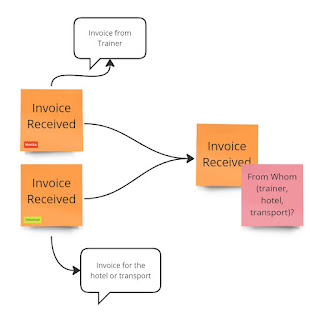

Interestingly, during our discussions, we didn't just remove sticky notes; we also added some! As we clarified terminology and explored quick examples, we stumbled upon new information.
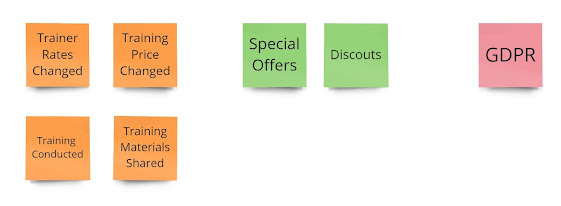

From Chaos to Clarity
Let’s step back and take another look at the wall:
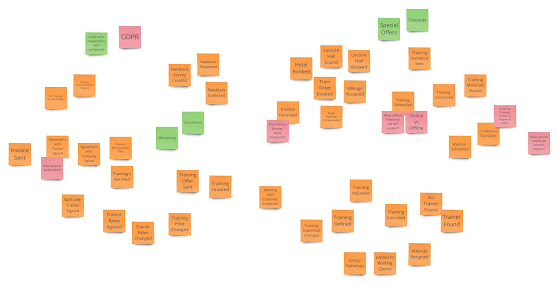

These were all the pieces of information that remained after our conversations. Was it still chaotic? Absolutely. However, the brief discussions we had during the first session served as a solid foundation for the common understanding and vocabulary we were beginning to define!
That was a well-spent 1.5 hours of our time. Then it was time for a short break—to catch up on important emails, grab a bite to eat, and recharge.
Until next time!
You can find the requirements, a link to the Event Storming session, and all previous articles in the Training Center repository on GitHub.
Published at DZone with permission of Sebastian Malaca. See the original article here.
Opinions expressed by DZone contributors are their own.
Comments