

DZone
Thanks for visiting DZone today,
Edit Profile
  • Manage Email Subscriptions
  • How to Post to DZone
  • Article Submission Guidelines
Sign Out View Profile
  • Post an Article
  • Manage My Drafts
Over 2 million developers have joined DZone.
Log In / Join
Refcards Trend Reports
Events Video Library
Refcards
Trend Reports

Events

View Events Video Library

Related

  • JMeter Plugin HTTP Simple Table Server (STS) In-Depth
  • Optimizing Database Connectivity: A Comparative Analysis of Tomcat JDBC vs. HikariCP
  • Deployment of Spring MVC App on a Local Tomcat Server
  • Java 21 Is a Major Step for Java: Non-Blocking IO and Upgraded ZGC

Trending

  • Stop Using the ATM-Didn’t-Kill-Jobs Story to Reassure Developers About AI
  • Context-Aware Authorization for AI Agents
  • How Rule Engines Transform Business Agility and Code Simplicity
  • The Vector Database Lie
  1. DZone
  2. Coding
  3. Languages
  4. Tomcat and Environment Entries

Tomcat and Environment Entries

Learn more about how to add environmental entries in Tomcat.

By 
Mohammad Nadeem user avatar
Mohammad Nadeem
·
Jul. 01, 19 · Tutorial
Likes (2)
Comment
Save
Tweet
Share
18.7K Views

Join the DZone community and get the full member experience.

Join For Free

Adding Environment Entries

Normally, in web.xml, you can add the following environment entries:

<env-entry>
  <env-entry-name>maxExemptions</env-entry-name>
  <env-entry-value>10</env-entry-value>
  <env-entry-type>java.lang.Integer</env-entry-type>
</env-entry>


However, Tomcat has a better way of doing it, thereby providing an opportunity to have different values in a different environment without modifying the deployment descriptor.

This is called context.xml, which can be placed under META-INF\ or under conf\Catalina\localhost\

Here is an example:

<Context>
  ...
  <Environment name="maxExemptions" value="10"
         type="java.lang.Integer" override="false"/>
  ...
</Context>


Reading Environment Entries

Environment Entries are relative to java:comp/env:

Reading one property

Context ctx = new InitialContext();
String url = (String) ctx.lookup("java:comp/env/url");


Reading all properties

for (Enumeration<Binding> e = ctx.listBindings("java:comp/env"); e.hasMoreElements();) {
                Binding bind = e.nextElement();
                System.out.println(bind.getName() + " : " + bind.getObject());
            }


Example

Clone the sample project and execute the following command:

mvn clean package docker:build docker:run


Note: Make sure Docker is installed beforehand.


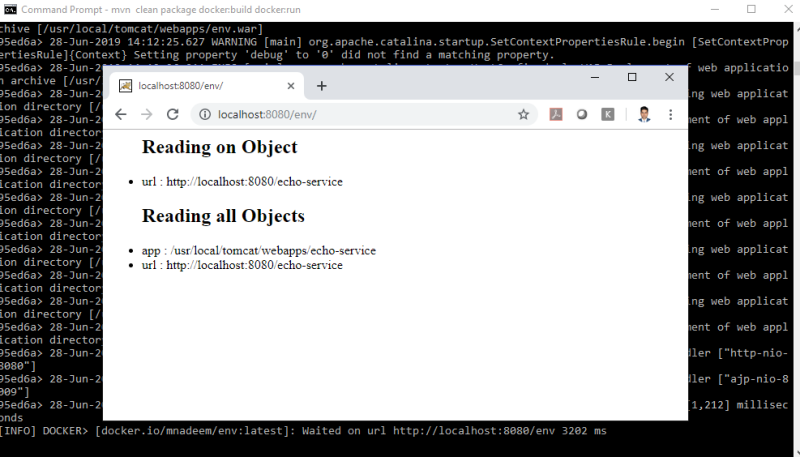
Here is the output:

Apache Tomcat

Published at DZone with permission of Mohammad Nadeem. See the original article here.

Opinions expressed by DZone contributors are their own.

Related

  • JMeter Plugin HTTP Simple Table Server (STS) In-Depth
  • Optimizing Database Connectivity: A Comparative Analysis of Tomcat JDBC vs. HikariCP
  • Deployment of Spring MVC App on a Local Tomcat Server
  • Java 21 Is a Major Step for Java: Non-Blocking IO and Upgraded ZGC

Partner Resources

×

Comments

The likes didn't load as expected. Please refresh the page and try again.

  • RSS
  • X
  • Facebook

ABOUT US

  • About DZone
  • Support and feedback
  • Community research

ADVERTISE

  • Advertise with DZone

CONTRIBUTE ON DZONE

  • Article Submission Guidelines
  • Become a Contributor
  • Core Program
  • Visit the Writers' Zone

LEGAL

  • Terms of Service
  • Privacy Policy

CONTACT US

  • 3343 Perimeter Hill Drive
  • Suite 215
  • Nashville, TN 37211
  • [email protected]

Let's be friends:

  • RSS
  • X
  • Facebook