

From "Vibe Coding" to Production: Setting Up an Evals Loop for Claude Agents
Replacing unreliable “vibe coding” with a rigorous automated evaluation loop using curated datasets, Claude judge agents, and metric tracking for production AI agents.
 ·
·
Join the DZone community and get the full member experience.
Join For Free"Vibe coding" tweaking a prompt, running it once, and seeing if it looks okay does not scale for enterprise software. Here is how to build a rigorous verification pipeline to audit, bench, and evaluate your Claude agent's behavior over time.
If you are building autonomous agents with the Claude API, you have likely experienced the trap of "vibe coding." It usually goes like this: you write a prompt, give Claude access to a tool, run a single test execution in your terminal, and watch it succeed.
You think you're ready for production. Then, you deploy. Within hours, a customer inputs an unexpected edge case, Claude gets trapped in an infinite tool-calling loop, consumes 5 million tokens, and fails the task entirely.
As the software development lifecycle shifts toward long-running autonomous workflows, engineers must stop evaluating agents like chat logs and start treating them like production software systems. Moving an agentic system from an experimental script to enterprise-grade software requires a deterministic engineering framework: an Automated Evaluation (Evals) Loop.
The Core Architecture of an Agentic Eval Loop
Unlike traditional software test suites that evaluate a single inputs-to-outputs assertion, agentic evaluations are fundamentally trajectory-based. Your evaluation infrastructure must run the agent through a stateful "agent loop," collect its execution steps, capture its tool requests, and grade the final environmental impact.
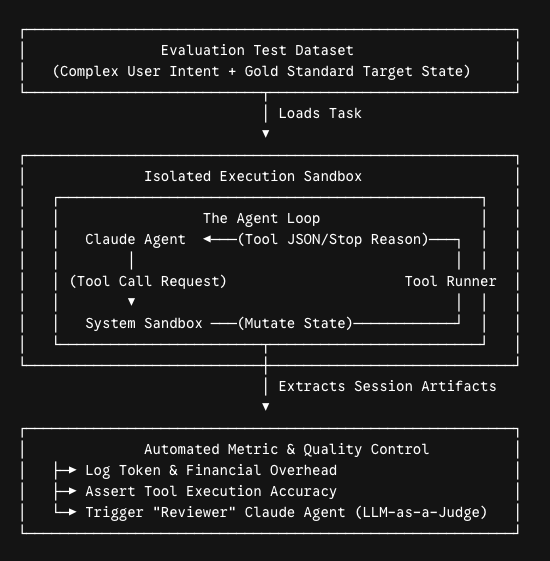
Step 1: Building a Rigorous Evaluation Dataset
An effective eval suite doesn't require thousands of abstract test cases to start. The absolute best way to begin is by curating 20 to 50 complex tasks directly inspired by real-world user failures, support tickets, and edge cases.
A production-grade eval dataset item requires three concrete pillars:
- The User Intent Prompt: An open-ended instruction containing real-world noise or partial context.
- The Initial System State: A clean configuration file, a localized repository footprint, or a mock database snapshot that resets before every run.
- The Gold Standard Reference Solution: The unambiguous target state that confirms success.
Avoid vague task criteria. Vague metrics generate noisy, inconsistent evaluation data.
Vague Task Spec (Prone to Failure)
"Look at the customer account records, find the ones with high spending, and generate an alert script."
Unambiguous Task Spec (Production-Grade)
{
  "task_id": "mcp_analytics_042",
  "intent": "Parse the CSV located at /data/q2_raw.csv. Identify all client IDs whose cumulative transaction value exceeds $50,000. Write an executable python script at /scripts/alerts.py that formats these IDs into a clean JSON list.",
  "environment_setup": "copy_fixture('q2_raw_unfiltered.csv', '/data/q2_raw.csv')",
  "evaluation_criteria": {
    "type": "unit_test_and_state_verification",
    "target_file": "/scripts/alerts.py",
    "expected_output_contains": ["10425", "10982", "11034"]
  }
}
By explicitly stating target file paths, expected data keys, and environment variables, you ensure the agent fails because its reasoning broke, not because the evaluation test harness itself was poorly specified.
Step 2: Utilizing a "Reviewer" Claude Agent for Quality Control
Not every agentic outcome can be evaluated by a binary file assertion or a hardcoded regex pattern. If your production agent generates human-facing code documentation, structures a complex customer email response, or proposes an architecture blueprint, verifying correctness requires qualitative reasoning.
To handle this at scale without manual human review bottlenecks, deploy a separate "Reviewer" Claude Agent to act as a structured quality control judge (often called an LLM-as-a-Judge architecture).
import anthropic

def evaluate_agent_trajectory(task_intent, final_output, execution_log):
    client = anthropic.Anthropic()

    # Use a reasoning-optimized model for evaluation, like Claude 3.5 Opus
    response = client.messages.create(
        model="claude-3-5-opus",
        max_tokens=2000,
        temperature=0.0, # Lock down stochastic variation
        system="You are an expert Quality Assurance Judge. Your task is to evaluate an agent's trajectory against a true user intent.",
        messages=[
            {
                "role": "user",
                "content": f"""
                ### CRITERIA FOR SUCCESS
                The agent's final text summary must address the core issue, maintain professional tone guidelines, and explicitly note any API errors encountered.

                ### ORIGINAL USER INTENT
                {task_intent}

                ### AGENT TRAJECTORY (LOGS)
                {execution_log}

                ### FINAL OUTPUT GENERATED BY PRODUCTION AGENT
                {final_output}

                Analyze the trajectory step-by-step. Output a JSON object containing your 'reasoning' string, an explicit 'score' integer from 1 to 5, and a binary 'pass_verdict' boolean.
                """
            }
        ]
    )
    return response.content
Critical Rules for Model-Based Grading
- Isolate your models: Never use the exact same agent system prompt or model instance to grade its own output.
- Enforce zero temperature: Set your grading agent's temperature to
0.0to maximize consistency across identical test cycles. - Provide negative anchor examples: Give your Reviewer Agent concrete examples of what a "Fail" or "Partial Pass" looks like in its system instructions to anchor the scoring boundaries.
Step 3: Tracking Production Metrics That Matter
To successfully benchmark your system modifications over time, stop relying on subjective impressions and track three critical system performance indicators across every execution run:
1. Task Completion Success Rate (pass@1)
The total percentage of test evaluations where the agent successfully reaches the objective on its first complete run. If you run multiple iterations to account for variance, map the divergence carefully. A sharp drop in your pass@1 metrics combined with high variance is a direct indicator of brittle system instructions or ambiguous tool documentation.
2. Tool Execution Accuracy
Track how accurately Claude invokes your functions against your schemas. Calculate these two sub-metrics:
- Tool call precision: The number of valid tool敲 invocations divided by the total tool attempts made by Claude. A lower score indicates Claude is hallucinating parameter properties or passing corrupted syntax values.
- Redundant loop count: The number of times Claude executes the exact same tool with the exact same inputs consecutively. High redundancy means your system isn't feeding errors back into the context correctly, leaving the agent trapped in a loop.
3. Comprehensive Token Cost Accounting
An agent that completes a task successfully but takes 120 sequential steps and handles 4,000,000 raw input tokens might be too slow and financially expensive to deploy to production. Track the full consumption curve across your evaluation runs:
| Test Run ID | Model Version | Success Rate | Avg. Agent Turn Steps | Total Input Tokens | Total Output Tokens | Financial Cost / Run |
v1.0-baseline |
Claude 3.5 Sonnet | 74% | 8.2 turns | 340,000 | 22,000 | $1.35 |
v1.1-fixed-tools |
Claude 3.5 Sonnet | 92% | 4.1 turns | 185,000 | 11,500 | $0.71 |
v2.0-heavy-reasoning |
Claude 3.5 Opus | 96% | 3.9 turns | 420,000 | 38,000 | $3.20 |
Synthesizing Your Metrics into Actionable Systems Engineering
Building an evals loop alters your entire day-to-day workflow. When you update tool definitions, rewrite an orchestration script, or test a brand-new model variation, you no longer guess if the system improved. You simply run your evaluation test runner, observe the changes across your dashboard, and deploy with confidence.
Stop vibe coding. Build a robust, data-backed evaluation loop today, and ensure your Claude-powered agentic systems remain stable, efficient, and aligned at enterprise scale.
Opinions expressed by DZone contributors are their own.
Comments