

Inside Zero Downtime Option (ZDO): When It Works and When It Doesn’t
ZDO can deliver near-zero downtime for S/4HANA upgrades, but only if all prerequisites are perfectly met; otherwise, it quickly reverts to a standard downtime upgrade.
 ·
·
Join the DZone community and get the full member experience.
Join For FreeIn SAP S/4HANA system maintenance, downtime is the enemy. Enter the Zero Downtime Option (ZDO), an advanced Software Update Manager (SUM) feature that promises to virtually eliminate technical downtime during upgrades or updates of ABAP-based systems. ZDO is essentially the next evolution of SAP’s shadow system upgrade strategy. It goes beyond near-zero downtime by using a bridge subsystem to keep business operations running even while the update is in progress.
The goal is to have users continue working with minimal disruption, turning what used to be hours of downtime into a seamless experience. But ZDO isn’t magic; it comes with strict prerequisites and potential pitfalls. This article dives into when ZDO works as advertised and when it doesn’t, along with troubleshooting tips for the common issues that can derail a zero-downtime upgrade.
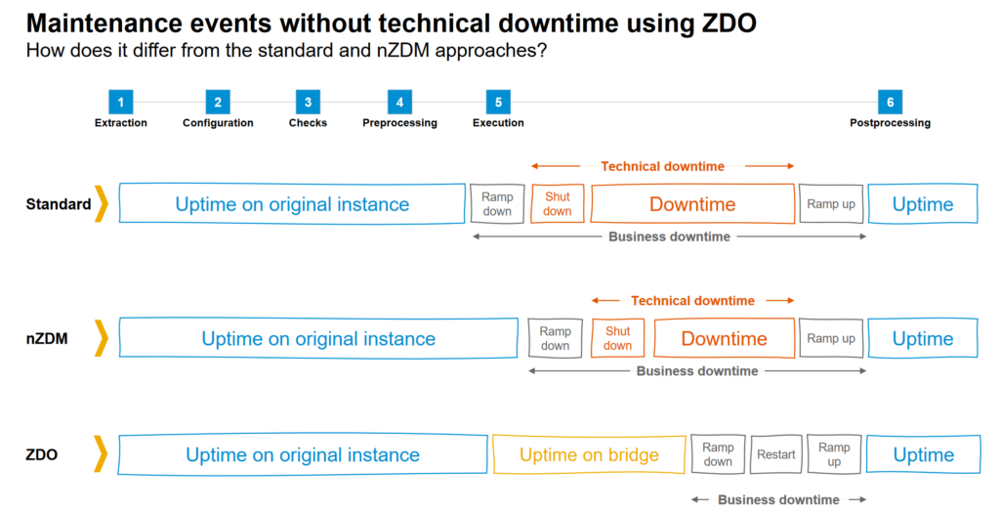
How ZDO Works at a High Level
In a traditional SAP upgrade, a shadow instance is used for some technical import steps, but the production system still needs to be taken offline for final execution. ZDO changes this by introducing a bridge subsystem that duplicates not only the code, but also select application data and settings in parallel.
As the upgrade runs, SAP spins up this bridge and keeps it in sync with the live system. Business transactions are recorded in both the main system and the bridge during the upgrade process. Crucially, during the main phase of a ZDO upgrade —
- There is no database restart and no user lockout, and users can continue their work normally. In other words, no technical downtime occurs in this phase; the system is already changing underneath while users remain active.
- A classification mechanism in SUM decides which tables and objects can be safely updated on-the-fly and which need special handling. Certain tables might be duplicated and synced via change buffers, ensuring data consistency between the old and new releases.
- Eventually, at cutover, the system performs a brief ramp-down, switch, and ramp-up to finalize the move from the original system to the updated system. This final switch is typically very short, often just a restart, meaning business downtime is minimal to none, aside from that brief restart window.
When done right, ZDO enables an update with near-zero business disruption. However, the phrase zero downtime comes with an asterisk; there are many conditions to meet, and not everything in the system can be updated in this manner. If any element violates ZDO’s constraints, the process may fall back to a standard update for those components. The remainder of this article explores those conditions in detail.
When ZDO Works: Prerequisites and Ideal Conditions
ZDO is a great option, but it only works in specific scenarios with the right preparation. Here are the key conditions and prerequisites under which ZDO thrives.
Supported Systems
ZDO is available for SAP S/4HANA (ABAP) upgrades/updates. It became generally available starting with S/4HANA 2020 and above. Older ERP systems or non-ABAP stacks are not in scope. In short, you need to be on a recent ABAP platform to even consider ZDO.
Current Software Levels
Your system must meet minimum version requirements. SAP HANA 2.0 SPS04 is required as the database for ZDO. The ABAP kernel and SUM tool must also be updated to versions that support ZDO. Essentially, both the application and DB stack need to be on a modern patch level to handle the parallel upgrade process.
SAP Notes and Patches Applied
There are numerous SAP Notes that must be applied to enable ZDO and fix known issues ahead of time. SAP provides a Note Analyzer tool that identifies required notes for ZDO. All those notes should be applied in the source system before starting the SUM run. Skipping this prep will cause SUM to halt during pre-checks or the shadow phase with a list of missing notes.
Add-On Compatibility
Your system must not have any incompatible add-ons or plugins that SUM doesn’t know how to handle in ZDO mode. Some third-party or even SAP add-ons might block a ZDO upgrade entirely. SAP maintains an Allow List of add-ons that are approved for ZDO. If an add-on is not on this list, ZDO will refuse to proceed. In practice, this means you may need to uninstall or update certain add-ons, or check for dedicated notes that enable ZDO support for them. Always verify your installed components against the latest allow-list early in the planning phase.
Embedded Analytics Only
SAP BW/4HANA or standalone BW scenarios are not supported in ZDO. ZDO currently only works if any BI content is in the embedded mode. If your S/4HANA system is acting as a central Data Warehouse or has an active BW component, it will block the ZDO process. This is because certain BW objects and data flows cannot be easily duplicated in the bridge. An ideal condition for ZDO is an embedded BW scenario or none at all.
Clean Core and Data Consistency
The system should be technically healthy with no unresolved errors. All database/table inconsistencies must be resolved in advance. If any DDIC objects are in an inconsistent state or if there are obsolete DB triggers or remnants from past upgrades, those need cleanup. Similarly, custom code should be compatible with the new release so that it doesn’t break during the upgrade. A clean starting point is essential any latent issue can derail the ZDO run.
Trained Personnel and Rehearsals
Due to its complexity, SAP requires that your Basis team has taken the official ADM330 ZDO training before attempting a ZDO upgrade.
In fact, SAP only enables the ZDO option for customers who have completed training. This is because the procedure is intricate, updates occur in both old and new releases in parallel, and there’s little room for error. Even with training, you should always do a full trial run on a sandbox system before touching production. This dress rehearsal lets you catch issues early and ensures your team understands the process end-to-end.
When ZDO Doesn’t Work: Limitations and Pitfalls
ZDO is not a one-size-fits-all; there are many scenarios where it cannot be used or will revert to a standard (downtime) upgrade. It’s critical to know the following limiting factors upfront.
Unsupported Components or Scenarios
If your system includes components that ZDO can’t handle, ZDO simply won’t be offered or will terminate. For instance, a system classified as a DATA_WAREHOUSE (non-embedded BW) will block the ZDO upgrade. Incompatible add-ons will cause the ZDO pre-check to fail unless they are removed.
Extensive Data Model Changes
Not all database changes can be done online. Tables with incompatible structural changes are not eligible for on-the-fly migration. SUM classifies tables to decide what can be moved in uptime and what must wait; if a critical table change cannot be handled via the bridge, that will force a downtime for that step. In essence, if your upgrade involves changes that violate ZDO’s rules, those changes will trigger a stop or a fall-back to normal update mode.
Custom Code and Mods
Certain custom code patterns or modifications can break ZDO assumptions. Unclean enhancement implementations or obsolete code from an old Support Pack can also be problematic. If SUM detects something unpredictable, it may abort or require a regular upgrade instead.
Resource Constraints
ZDO consumes more system resources, essentially running two copies of parts of the system in parallel. Memory is a big factor: the bridge uses a separate schema, doubling memory usage for certain tables/processes. If your system doesn’t have enough memory or CPU headroom to handle the extra load, the ZDO run can slow to a crawl or fail. In practice, insufficient resources could lead to transaction slowdowns for users or even cause the upgrade to terminate if the system becomes unstable. This is why SAP insists on testing on production-sized hardware to gauge the impact.
One Mistake = Downtime
Perhaps the biggest pitfall is that ZDO is unforgiving. All it takes is one overlooked prerequisite or one unsupported object for your zero-downtime plans to unravel. As one SAP engineer aptly noted, one wrong assumption and ZDO turns into a normal downtime upgrade. In other words, if any required condition isn’t met, SUM will flip back to a conventional upgrade path, resulting in the usual lengthy downtime. Teams might not realize something was incompatible until late in the game, which can be a nasty surprise if you promised the business a near-zero downtime.
In summary, ZDO doesn’t work when the environment isn’t perfectly aligned with its requirements. The failure modes could be a hard error in SUM’s pre-check phase or a mid-process reversion to a downtime-required step for certain changes. Next, we’ll look at how to troubleshoot and prevent these issues.
Troubleshooting ZDO Issues and Ensuring Success
Implementing ZDO is all about meticulous preparation and quick remediation of any issues that arise. Here are some troubleshooting tips and best practices, gathered from real-world experiences, to maximize your chances of a smooth ZDO upgrade.
Run the ZDO Pre-Checks and Note Analyzer Early
Don’t wait until the maintenance window to discover missing notes or unsupported elements. SAP provides pre-check tools that you can run well in advance. These will tell you, for example, if you have add-ons that are not allowed, or if certain SAP Notes must be installed. Execute these in a sandbox copy of production if possible. Apply all suggested OSS notes before the actual upgrade. This proactive step can eliminate many show-stoppers before they occur.
Verify Add-On Compatibility
Cross-check every component in your system against the ZDO allow list. If an add-on is not on the list, contact the vendor or SAP to see if a newer version supports ZDO, or plan to exclude it from the upgrade. In some cases, the upgrade can proceed with the add-on untouched, meaning you don’t upgrade that add-on alongside the S/4 core. However, this needs confirmation via SAP notes. It’s better to address this during planning than to have SUM abort mid-way due to an add-on check.
Check for BW Content Early
If your system ever had any Business Warehouse content or is connected to BW, ensure it’s either deactivated or embedded. An excellent tip is to programmatically check the system’s classification. For example, in ABAP, you can call a BASIS utility to see if the system reports itself as a Data Warehouse. Consider the following snippet:
DATA(lv_scope) = cl_rs_utilities=>get_system_scope( ).
IF lv_scope = 'DATA_WAREHOUSE'.
  WRITE: / 'System scope is DATA_WAREHOUSE – embedded BW required for ZDO. ZDO will be blocked.'.
ELSE.
  WRITE: / 'System scope:', lv_scope, '- OK for ZDO.'.
ENDIF.
Resolve Database Inconsistencies
Any inconsistency in database objects can halt a ZDO upgrade. Use transactions like SE14 (ABAP Dictionary Database Utilities) to check and repair table inconsistencies. For example, if SE14 shows a table where the runtime object is inconsistent with the database, fix it. Address any unresolved short-dumps or DB errors in the system. In the upgrade sandbox run, pay attention if SUM flags an inconsistency so you can fix it in production beforehand.
Clean Up Old HANA Artifacts
Especially in systems that have seen multiple upgrades, you might have obsolete HANA transport container (HTA) objects or replication configurations that conflict with ZDO. SAP Note 2982320 is one example that describes errors due to insufficient privileges on old HDI content. The resolution was to adjust privileges and run a special tool.
Monitor Resources During Tests
Since ZDO uses more memory and processing, monitor your system closely in test runs. Check that during the bridge phase, the system isn’t memory swapping or exhausting CPUs. If your sandbox struggles, consider adding resources or tuning the system before production. It’s better to allocate extra memory temporarily for the production upgrade than to have the system freeze mid-way. One should also schedule the upgrade during a period of low user load if possible, to give maximum headroom.
Plan a Back-Out or Downtime Fallback
Even with all checks, prepare for the scenario that ZDO might fallback to a standard upgrade. Communicate with stakeholders about this risk. For instance, have a plan for a longer maintenance window or a contingency date if the zero-downtime approach has to be aborted. Know how to identify a fallback early.
Conclusion
The Zero Downtime Option is a revolutionary approach in the SAP upgrade toolkit; when it works, it truly minimizes business downtime and showcases SAP’s technical finesse. We’ve seen it deliver on the promise of applying upgrades with almost no interruption to users.
However, ZDO is not a simple flip of a switch; it operates under a tight set of conditions. When those conditions aren’t met, ZDO will let you know. The difference between a smooth ZDO upgrade and downtime comes down to thorough preparation and troubleshooting.
In the end, ZDO teaches SAP teams an important lesson: downtime reduction is less about fancy tools and more about rigorous preparation. If you invest the time to clean up your system, apply fixes, and understand every moving part of the SUM process, ZDO can be the golden path to upgrade nirvana. When in doubt, prepare, test, and prepare again. Zero downtime is achievable, but only with zero complacency in the upgrade preparation process.
Opinions expressed by DZone contributors are their own.
Comments