

Zero-Trust Cross-Cloud: Calling AWS From GCP Without Static Keys Using MultiCloudJ
This guide demonstrates exchanging Google ID tokens for temporary AWS STS credentials to enable secure, zero-trust communication between clouds using MultiCloudJ.
Join the DZone community and get the full member experience.
Join For FreeAs discussed in the MultiCloudJ introduction, it is fairly common to use more than one cloud provider in enterprises. This can happen for many reasons, like mergers, choosing the best services from different clouds, or moving gradually from one cloud to another. Because of this, you may have compute running on Google Cloud while your data or backend systems are still on AWS.
Most enterprises do not do multi-cloud just to save money. Cross-cloud setups usually happen because of practical needs such as:
- Regulatory and data residency requirements. Some countries require certain datasets to stay within specific geographic boundaries or on a specific cloud provider. This forces companies to split workloads across multiple clouds.
- Customer or partner mandates. Large enterprise customers sometimes mandate that integrations run on their preferred cloud. To support multiple customers, a company may need to operate across AWS, GCP, Azure, and regional clouds like Alibaba Cloud.
- Merger/acquisitions. When a company acquires another business, both come with their own cloud footprints. Merging them instantly is unrealistic, so teams operate across clouds for an extended period.
- Best-of-breed services. Different providers have different advantages by region. For example:
- A specific cloud provider might have strong data and ML offerings
- Some cloud providers may offer an industry-best compute, storage, or analytics platform.
- Alibaba Cloud is preferred in China due to regulatory alignment
This naturally leads to selective adoption across providers.
- Migration stages. When moving from one cloud to another, not all services move at once. Some systems stay in the old cloud for months or even years. During this time, they must communicate securely across clouds.
The Main Challenge: Secure Connectivity
When resources are spread across clouds, your application running in one cloud must securely call APIs of another cloud. This article focuses on a common, practical scenario: a Google Cloud workload in GKE accessing AWS S3.
You will see this use case in many real projects, for example:
- A Cloud Run service pulling configuration files from an AWS S3 bucket.
- GKE workloads are sending logs or backups to AWS Glacier because of the cost difference.
- Serverless pipelines that need to move data between S3 and BigQuery.
Cross-cloud access looks simple but requires careful handling of authentication, IAM trust, and secure token exchange.
The Anti-Pattern vs. The Right Solution
The Wrong Approach: Long-Lived AWS Access Keys
A common anti-pattern is generating AWS access keys (Access Key ID + Secret Key) and storing them in your GCP workloads or secret managers. These static credentials never expire, create long-term security risks, fail audits, and go against the principle of least privilege. They look simple but come with a huge risk. In short, static keys in a cross-cloud setup are simply unsafe.
The Right Approach: Identity Federation
The modern, secure method is Web Identity Federation. Here, a Google-issued OIDC token is exchanged for short-lived AWS credentials. This creates a clean trust boundary between clouds, ensuring that:
- No long-lived secrets are stored anywhere
- Issues tokens are short-term, ranging from a minimum of 15 minutes to a maximum of 12 hours. [ref]
- Exposure risk is minimized
- Audit and compliance requirements are met
With identity federation, your workloads authenticate using their native cloud identity instead of static credentials, making cross-cloud communication both safer and easier to manage.
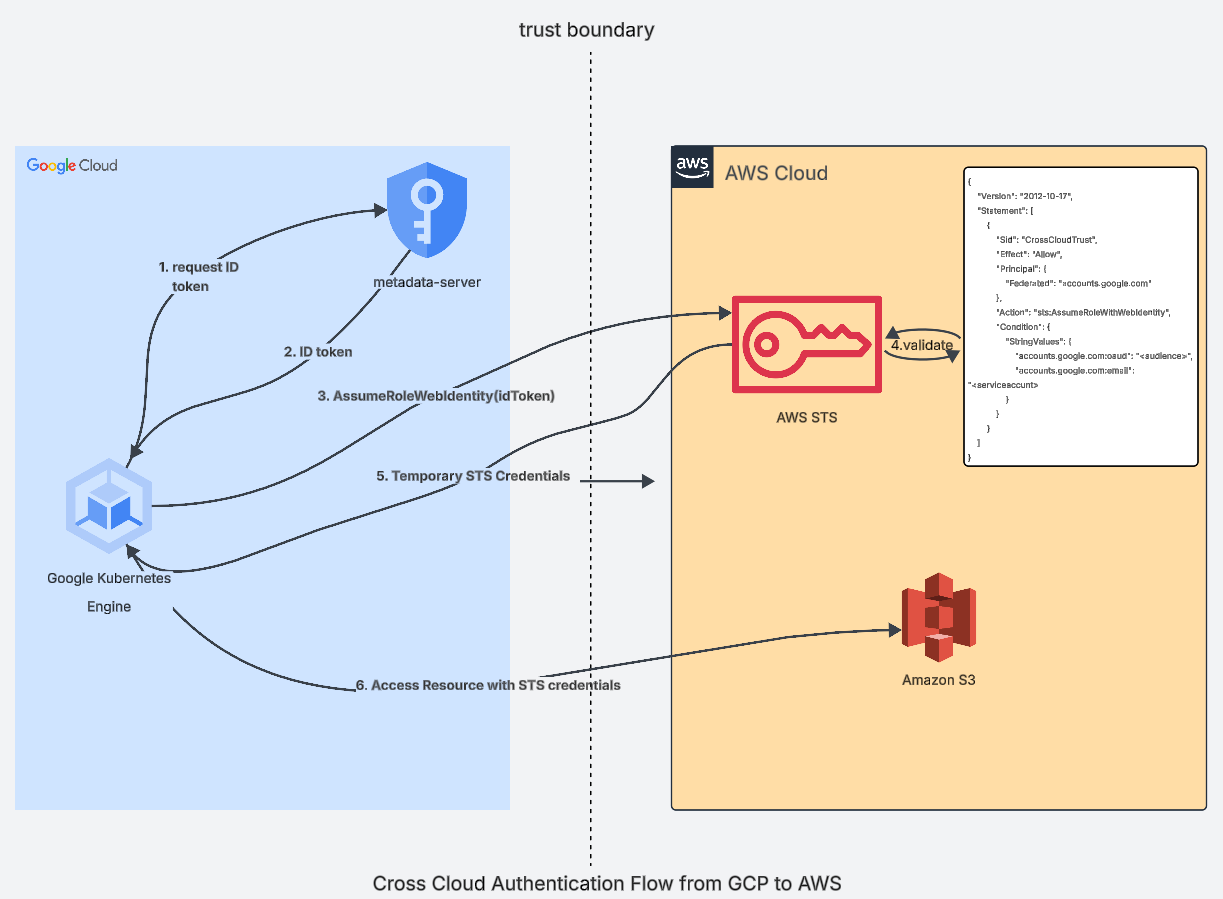
Identity Federation Authentication Flow
The flow, as explained in the diagram, is as follows:
- Workload in Google Cloud GKE gets its ID token from the metadata service
- Metadata Server responds with the ID token of the caller.
- Workload calls the AWS STS assume role api with the ID token.
- AWS STS validates the tokens using Google Cloud JKWS and verifies the trust policy set up for the role.
- AWS STS generates and sends the temporary STS credentials to the Google Cloud workload
- Google Cloud workload can now access AWS S3 using those STS credentials.
Implementation Details With MultiCloudJ
MultiCloudJ makes the above flow natural and developer-friendly by abstracting away provider-specific details. Overall, the flow looks like this:
- Use the StsClient of MultiCloud for "gcp" and get the ID token using GetCallerIdentity, and create a token supplier from it.
- Create the CredentialsOverrider of MultiCloudJ and provide the role and the ID token supplier.
- Use the BucketClient for "aws" and inject the credentials overrider into it.
- Access Blobstore APIs using BucketClient.
This abstracts away all provider-specific complexity and appears natural and developer-friendly for cross-cloud communication.
Code snippet of the above flow is as follows (full example):
Supplier<String> tokenSupplier = () -> {
  // Use the StsClient from MultiCloudJ to get the ID token
  StsClient clientGcp = StsClient.builder("gcp").build();
  CallerIdentity identity = clientGcp.getCallerIdentity(GetCallerIdentityRequest.builder().aud("multicloudj").build());
  return identity.getCloudResourceName();
};

// Create the CredentialsOverrider for web identity token and supply the ID token creator
CredentialsOverrider overrider = new CredentialsOverrider.Builder(CredentialsType.ASSUME_ROLE_WEB_IDENTITY)
  .withRole("arn:aws:iam::<accountId>:role/<role-name>")
  .withWebIdentityTokenSupplier(tokenSupplier)
  .build();

// Initialize the portable BucketClient for "aws" and supply the credentials overrider
BucketClient bucketClient = BucketClient.builder("aws")
  .withRegion("us-west-2").withBucket("<bucketName>")
  .withCredentialsOverrider(overrider)
  .build();

// Access the S3
ListBlobsPageResponse r = bucketClient.listPage(ListBlobsPageRequest.builder().withMaxResults(1).build());
Conclusion
Multi-cloud setups are common today, and many teams run services on AWS, GCP, and other clouds at the same time. When these systems need to talk to each other, the main challenge is secure authentication.
Using long-lived AWS access keys is unsafe. The better method is identity federation, where the Google Cloud workload uses its own identity to get short-lived AWS credentials. This keeps the setup secure and easy to manage.
MultiCloudJ simplifies the process by handling token flow and credentials for you. It lets developers build cross-cloud features without worrying about provider-specific details. This approach helps teams build safe, reliable, and clean cross-cloud communication.
Opinions expressed by DZone contributors are their own.
Comments