Modern code review works best as a layered workflow, with each layer doing the work it’s suited for: Automation handles mechanical checks, AI assistance supports understanding, and human reviewers apply judgment.
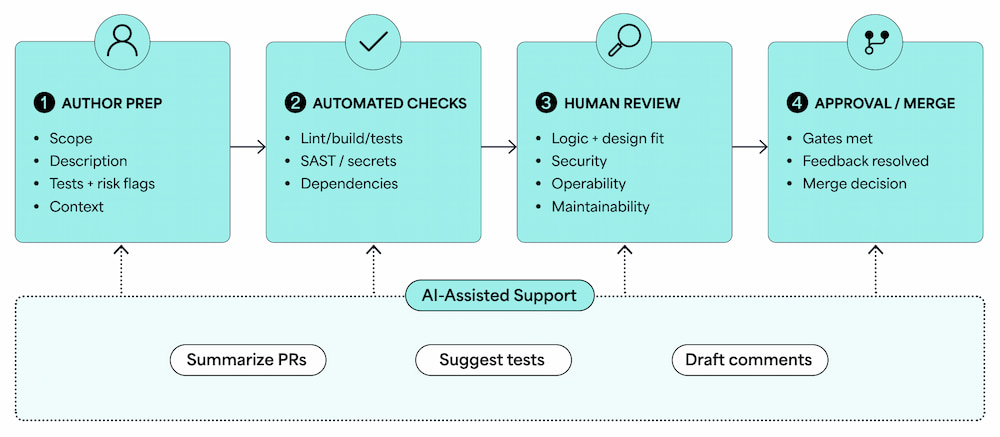
Code review process overview
Prepare Code for Review
A change is reviewable when a reviewer can understand its purpose, scope, and risk without a meeting or a long Slack thread. Authors should aim for that bar before requesting review. When preparing for a code review, check for the following:
- Focused scope – One logical change per PR is the right target. A PR that fixes a bug, refactors the surrounding code, and adds a new feature combines three separate reviews. Reviewers will either rush through it or request a split. Splitting the PR upfront saves everyone time and usually produces faster, more thoughtful feedback.
- Useful context – The PR description should explain both why the change exists and what it does. For example,
Refactors user auth flow leaves reviewers guessing, whereas Refactors user auth flow to remove the session token from the query string, which was appearing in server logs gives them something to evaluate.
- Visible validation – Tell reviewers how you tested the change. If there is a new test, say what it covers. If you tested manually, explain how. If a change has no tests, say why. Reviewers will ask, and the answer belongs in the description.
- Clear risk flags – If a change touches something sensitive — including migrations, CI configuration, dependencies, security-adjacent code, prompts for AI systems, or generated artifacts — flag it explicitly. Don’t make reviewers discover the risk themselves.
- Non-code changes – Config files, dependency updates, CI/CD changes, database migrations, and IaC all have a real blast radius if they go wrong. These types of changes need review too. Treat them with the same care as logic changes, and loop in a specialist if the team doesn’t have deep expertise in that area.
Use Automation Before Human Review
Human review time is expensive, and spending it on things a tool can check is a waste. Automation should clear a baseline before any human reviewer opens a file so that by the time a reviewer looks at a PR, the mechanical questions are already answered. When they aren’t, reviewers end up doing work that belongs to the author or the CI pipeline.
Below are quality gates to run before review opens:
| Quality Gate |
Requirements |
| Formatting and style checks |
If a linter or formatter is configured, it should run in CI and block merge rather than surface as review comments. |
| Build verification |
The change should compile and build cleanly before any reviewer looks at it. |
| Test suite |
All existing tests should pass, and new tests should run. |
| Static analysis |
Tools that flag common defects, type errors, or complexity hotspots should be in the pre-review pipeline. |
| Dependency and license checks |
New or updated dependencies should be scanned for known vulnerabilities and license compatibility before they merge. |
| Secrets detection |
Tools such as truffleHog or git-secrets should run on every commit to catch credentials before they reach a shared branch. |
One thing worth enforcing: If automation gates aren’t green, the PR shouldn’t be open for review. Reviewers who open a PR to find 20 linting errors will either fix the style issues themselves (not their job) or ignore them, which teaches authors that the gates don’t matter. Both outcomes are bad.
Automation answers mechanical questions; however, it’s unable to accurately evaluate whether logic is correct, whether an approach is sound, or whether a change introduces subtle risk at the edges. Those require human judgement, and automation saves human reviewers to focus on making those calls.
Give Actionable Human Feedback
Good review feedback is specific enough to act on, and that is the whole standard. A comment that leaves the author unsure about what to change will slow the cycle or start a debate. Both reviewers and authors benefit from knowing which comments are blockers and which are preferences.
Label your comments by type:
- Blocker – The code has a bug, a security issue, or a logic error that needs fixing before merge.
- Suggestion – A change that would improve the code but isn’t a requirement for approval.
- Question – Something the reviewer doesn’t understand and needs clarified, either in a reply or in the code itself.
- Nit – A minor style preference the reviewer is noting but won’t hold up the review.
Example of a weak comment and what context makes it stronger:
// Weak:
// This doesn’t look right.

// Strong:
// This will throw a NullPointerException if user.profile is null, which can happen for new accounts. We need a null check here or handle it for the caller.
Comment labels shouldn’t require a long back-and-forth dialogue to interpret their meaning. For example, a comment labeled nit takes pressure off the author — they know they can use their own judgment — and a comment labeled blocker removes ambiguity.
Avoid these common sources of review bottlenecks:
- Style debates – If a team repeatedly argues the same formatting or naming conventions in review comments, those conversations belong in a style guide or linter config, not in individual PRs.
- Vague comments –
Consider refactoring this could mean anything. Authors often respond by asking for clarification, which delays merges and frustrates everyone.
- Large PRs – Reviews of 500-plus line changes tend to miss things and take longer to approve. Authors who split their work into smaller, focused PRs get faster feedback and fewer missed issues.
Review for Quality, Security, and Maintainability
With automation answering mechanical questions, human reviewers answer the harder ones: Does the code do what it’s supposed to do, could it break in ways the tests don’t cover, and will the next person who reads this be able to work with it? Assess a change for its quality, security, and maintainability by addressing the following questions.
Behavior and Correctness
Read the logic, not just the diff. A change can look clean in isolation while introducing a bug at the boundary.
- What happens when the input is empty?
- What happens under load?
- What happens when a downstream service is slow or unavailable?
If you can’t answer those questions from the PR, the tests or the description aren’t doing their job.
Tests
Tests should be considered a required part of the change.
- Does the PR add or change logic without tests?
- Do the tests verify the actual behavior of the change?
- Do the tests check what the function returns, or only that it runs?
- Are any tests brittle enough to break on unrelated changes?
Architecture Fit
Checking whether a change fits into an existing architecture is key even before implementing the change.
- Does the change fit the existing structure?
- Does it introduce a pattern that will confuse the next person?
- Does it create an abstraction that duplicates an existing one?
- Does it pull a dependency into a module where it doesn’t belong?
Operability
Operability without observability makes it hard to find where the actual issue is.
- Will this change be observable once it’s in production?
- Does it log enough to debug?
- Does it add metrics where needed?
- Does it fail gracefully, or does it take down the process?
These questions matter more for backend changes and are often skipped in review.
Maintainability
Code that only the author understands is a liability.
- Can someone unfamiliar with the codebase read this function and understand what it does?
- Are the variable names clear?
- Is the function short enough to reason about?
- Is the logic simple enough to follow?
- Are inline comments used where they would help future readers?
- Is this function doing too much for the next person to safely understand or change?
Right-Sizing Review Depth
Not every change needs the same level of scrutiny. Use the risk of the change to decide how deep the review should go.
- Is this a one-line config fix that only needs a light review?
- Does this change touch auth, payments, data persistence, or system configuration?
- How large is the blast radius if something goes wrong?
- Does the size of that blast radius mean the review should go deeper?
Security in Everyday Review
Security review doesn’t require a dedicated security engineer on every PR. Reviewers can build useful habits.
- How is user input handled? Is it sanitized, validated, or passed to a query or shell command?
- Could sensitive data appear in logs, error messages, or API responses?
- Do new dependencies have a reasonable security posture and maintenance status?
- Does this change affect access control, authentication, or authorization behavior?
Bigger changes with real security surface area should involve someone with security expertise. Don’t rely on general reviewers to catch everything.
Apply AI Assistance Responsibly
AI tools have changed what code review can do, but not what it should achieve. Reviewers who use AI assistance well can handle more context faster. Reviewers who hand off judgment to AI tools introduce a different kind of risk than the one they are trying to reduce.
| Review Layer |
Best Used For |
Limitations |
Example Checks |
| Formatting/style automation |
Consistent code style across a large team |
Can’t evaluate logic, intent, or correctness |
Linters, formatters, style enforcement in CI |
| Build and test automation |
Verifying the code runs and existing tests pass |
Doesn’t tell you whether tests are meaningful |
CI pipelines, test runners, coverage reports |
| Static analysis / SAST |
Common defects, type errors, known vulnerability patterns, complexity hotspots |
High false-positive rates without tuning; limited context |
Static analyzers, dependency scanners, secrets detection |
| AI-assisted review |
PR summaries, code explanation, test suggestions, defect flags, draft comments |
Can be confidently wrong; lacks codebase context; needs human verification |
AI review tools integrated with code host or CI |
| Human review |
Logic correctness, design fit, security judgment, operability, team context |
Slower; can miss things on large PRs; subject to reviewer load |
Full code review by an engineer familiar with the codebase |
AI can contribute at several points in a review. For large PRs, it can read the full diff and produce a readable summary of what changed and why, saving reviewers the effort of reconstructing purpose from code alone. When a reviewer encounters unfamiliar code or an unusual pattern, an AI tool can explain it faster than searching documentation. AI can also propose test cases for edge conditions that a reviewer spots but hasn’t yet turned into suggestions for evaluation. These cases are often a useful starting point.
On the defect side, some tools surface potential bugs, type mismatches, or patterns associated with security issues; these work best as a prompt for human review rather than a final verdict. AI-drafted review comments can help reviewers articulate feedback more quickly, though they should always be read and edited before posting since both tone and accuracy matter.
Guardrails for AI-assisted review:
- Treat AI output as a first draft and check suggestions before acting on them.
- Don’t paste sensitive code into external AI tools. This includes code with credentials, personal data, internal business logic, or proprietary algorithms. Use tools integrated with your own systems, where data handling and retention are clearly defined.
- AI tools can be confidently wrong. A flag that looks authoritative can still be based on incomplete context. Reviewers who trust AI output without verifying it are not reviewing; they are delegating.
- If your team uses AI assistance in review, make the expectation explicit: AI helps reviewers but doesn’t replace them.
Checklist for Reviewing AI-Generated Code
Not every item applies to every PR, but each one is worth a deliberate check.
Getting oriented
- Verify the AI-generated PR summary against the actual diff
- Use AI explanation tools for unfamiliar patterns, then review the code yourself before you sign off
Correctness
- Check edge cases: empty inputs, nulls, unexpected types, and concurrent access
- Review edge case test coverage
- Read AI-generated test assertions and confirm what they verify
Security
- Review generated code with the same scrutiny as external code
- Inspect SQL queries, file handling, auth logic, and input processing
- Use defect flags as prompts for deeper review, not as findings
Author understanding
- Confirm that the author can explain how the code works and why it’s structured that way
- Check that the author evaluated AI-suggested tests before accepting them
Compliance
- Confirm your team’s licensing requirements and AI tooling policy before generated code merges
- Document required AI-use disclosures, approvals, or provenance details in the PR
Feedback
- Read and edit AI-drafted review comments before sending them
- Confirm the tone and recommendation reflect your own judgment
Measure Review Quality Responsibly
Metrics can help a team see where their review process is healthy and where it’s not. However, metrics can also be misused to measure things that create pressure without improving quality. The point of review metrics is to find patterns in the quality, not to rank people.
| Metric |
What It Reveals |
Possible Misuse |
| Time to first review |
Review bottlenecks and load imbalance across the team |
Pressure on reviewers to engage too quickly before reading carefully |
| Review cycle time |
Process friction, PR size problems, slow feedback loops |
Penalizing thorough reviewers who catch real issues |
| Comment-to-approval ratio |
Feedback depth, standard clarity, scope creep patterns |
Rewarding nitpicking or penalizing reviewers who look closely |
| Post-merge defect rate |
Review effectiveness, calibrated by PR type or risk level |
Blaming individual reviewers for what are often systemic gaps |
What metrics won’t tell you is whether the review was good. A PR with two comments and a quick approval might have been reviewed carefully or rubber-stamped. Use metrics to find process problems and calibrate workflow decisions. Don’t use them to evaluate individuals.
Conclusion
Code review quality comes down to three things working together: authors who prepare their work before requesting review, automation that handles mechanical checks before humans get involved, and human reviewers who apply real judgment to the things that matter. AI assistance can make parts of that workflow faster but doesn’t change who is accountable for the code that ships. That accountability stays with the team, and it should.
Additional resources: