

Remote Testing Mobile Devices and Embedded Platforms Using Squish
Squish provides a range of specialized drivers and APIs, which make it easy to automate the testing of GUI applications running on mobile and electronic devices.
Join the DZone community and get the full member experience.
Join For FreeAutomation testing tools rely on object identification based on object models or object properties such as name, type, and position. We have many automation tools for web and desktop applications. While testing mobile devices, hardware, and electronic equipment poses unique challenges, which can be sorted out with remote system access. Where the local and remote system is not geographically co-located, interactive script recording and debugging can become cumbersome and time-consuming. Existing remote desktop solutions bring problems of their own: interoperability of the controlled and controlling platform, compatibility of the test framework and remote control application, setup and configuration issues, and others. Accessing specific embedded or mobile devices may not be possible.
Squish is a cross-platform testing tool that supports many desktop, mobile, and embedded platforms. In addition, Squish allows automation of the testing of graphical user interfaces (GUI) for applications written in various programming languages, including Java, .NET, and Qt.
First, to perform remote testing using Squish, set up a remote connection between the device or computer running the Squish test suite and the target device or computer using various remote access tools like SSH, VNC, or RDP.
When working with a remote Application Under Test (AUT), Squish allows you to stream the display of the remote device locally on the test machine in real time.
AUT information will be added in IDE at Edit > Server Settings > Manage AUTs > Attachable AUTs Or command line with squishserver --config addAttachableAUT <Identifier> [host:]port
The remote control is designed to streamline the test development of virtually any target. In addition, Squish provides a powerful and flexible API that allows the creation of automated test scripts in various programming languages, including Perl, Ruby, Python, JavaScript, and Tcl. Squish also provides a range of built-in test automation features, such as record and playback, object identification, and verification of GUI elements, which make it easy to create reliable and robust automated tests for applications.
When interactively recording tests, the tool can pick UI objects for inspection from the remote viewer, from within the remote viewer, use the Squish Spy tool to set up a verification point, preview the current AUT state during a debug session, and more.
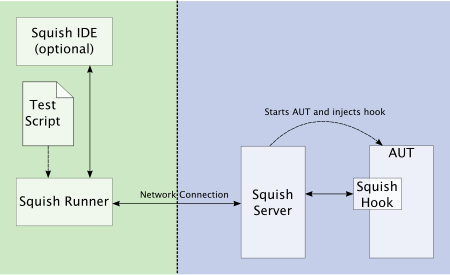
Squish runs a small server, squishserver, that handles the communication between the AUT and the test script. First, Squishserver starts the instrumented AUT on the device, which creates the Squish hook. The hook is a small library that makes the AUT's live running objects accessible and allows communication with squishserver. With the hook in place, squishserver can query AUT objects regarding their state and execute commands on behalf of squishrunner. Then, Squishrunner directs the AUT to perform whatever actions the test script specifies. All the communication takes place using network sockets which means that everything can be done on a single machine, or the test script can be executed on one device, and AUT can be tested over the network on another device.
Conclusion
In addition to desktop computers and mobile devices, Squish also supports testing embedded platforms, such as embedded Linux and QNX-based systems. Squish provides a range of specialized drivers and APIs for these platforms, which make it easy to automate the testing of GUI applications running on mobile and electronic devices. Remote testing offers several benefits for software development teams, particularly those working on projects involving multiple devices, platforms, or geographically dispersed teams. In addition, it is an ideal choice for organizations looking to streamline their testing processes by automating complex hardware-dependent tests and improving the quality of their applications.
Opinions expressed by DZone contributors are their own.
Comments