

A Comprehensive Exploration of Automated vs. Manual Accessibility Testing
Explore the nuances of automated and manual accessibility testing in our latest blog. Learn how CX Score combines the strengths of both approaches.
 ·
·
Join the DZone community and get the full member experience.
Join For FreeIn our previous post, Understanding the Importance of Digital Accessibility, we explored the factors driving the dramatic increase in focus and attention on web accessibility over the last few years by both users and companies. Today, web accessibility is no longer a choice but a necessity for companies.
As such, accessibility testing is crucial in identifying and eliminating barriers that hinder users with disabilities from accessing and interacting with websites. While manual testing has been the traditional approach, automated testing has emerged as a valuable tool in recent years. This post delves into the strengths, weaknesses, and potential applications of automatic and manual accessibility testing.
What Is Manual Accessibility Testing?
Manual accessibility testing uses human testers to check and evaluate websites and applications for accessibility issues that may cause problems for users with disabilities. This type of testing is typically performed by individuals with expertise in accessibility guidelines, such as the Web Content Accessibility Guidelines (WCAG).
Critical Capabilities of Manual Accessibility Testing
- Thorough inspection: Human testers meticulously examine the website or application, navigating through all pages, elements, and functionalities.
- User-centered approach: These testers simulate the experience of disabled users using assistive technologies like screen readers and keyboard navigation.
- Context-aware evaluation: Human testers also consider the overall context of the website or application, ensuring accessibility is consistent throughout.
- Edge case detection: Human testers also identify and address accessibility issues from unusual or edge-case scenarios.
Limitations of Manual Accessibility Testing
- Time-consuming and resource-intensive: Manual testing requires significant time and effort, making scaling for large or frequently updated websites potentially costly and challenging.
- Consistency and interpretation: Manual testing results may vary depending on the individual testers’ expertise and interpretation of the accessibility guidelines.
- Susceptibility to human error: Manual testers are susceptible to human error, which may lead to inaccurate results such as false positives and negatives.
Automated Accessibility Testing: A Powerful Complement
Automated accessibility testing is a software-based approach to identifying and evaluating accessibility issues in websites and applications. These tools analyze a digital product's code, structure, and content against established accessibility standards, such as the Web Content Accessibility Guidelines (WCAG). Automated testing can significantly reduce the time and resources required for accessibility testing, particularly for large and complex websites.
Critical Capabilities of Automated Accessibility Testing
- Technical scans: Automated tools can scan the website's code, structure, and content to identify technical accessibility issues, such as missing alt text for images, missing form labels, and incorrect color contrast ratios.
- Rule-based compliance checks: Automated tools can check against predefined rules and algorithms based on accessibility guidelines, testing and validating for compliance with WCAG and other standards.
- Scalability and efficiency: Automated testing can handle large volumes of data and websites, making it more cost-effective and highly scalable when compared to manual testing.
- Consistency and repeatability: Automated tests provide consistent scanning and repeatable results, eliminating discrepancies between testers and providing a reliable record of accessibility issues.
- Early detection and prevention: Automated testing can identify accessibility issues early in development, reducing the need for costly fixes and rework later.
Limitations of Automated Accessibility Testing:
- Context insensitivity: Automated tools may need to fully understand the context of the website or application, leading to false positives or missed issues.
- Ability to handle complexity: Automated tools may struggle to identify complex accessibility issues that require human judgment and expertise.
- Edge case detection: Automated tools may not adequately handle unusual edge-case scenarios requiring human understanding.
The Right Approach: A Strategic Combination
The choice between automated and manual accessibility testing is not an either-or proposition. Both approaches have strengths and weaknesses, and a strategic combination of the two is usually the most effective, as automated testing can provide a quick and comprehensive initial scan, while manual testing can delve deeper into complex issues and provide context-aware feedback.
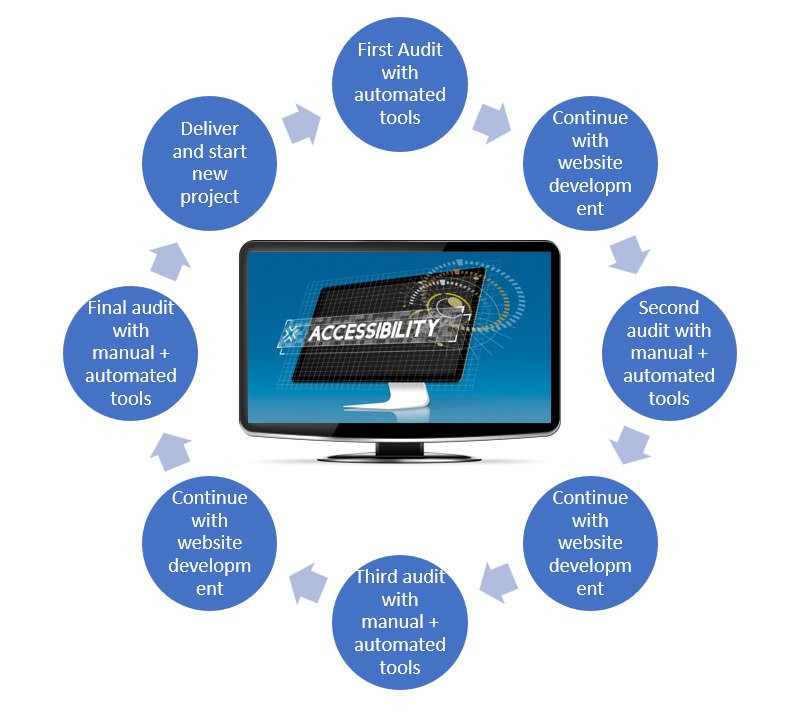
An ideal approach typically involves:
- Automated pre-testing: Running automated tests early in the development process to identify and address significant accessibility issues quickly.
- Manual in-depth testing: Employing manual testers to conduct thorough testing, focusing on complex issues, user experience, and edge cases.
- Continuous monitoring: Integrating automated testing into the development cycle to ensure accessibility compliance throughout the development process.
Together, let's navigate the path to a digital world that prioritizes accessibility for all.
Published at DZone with permission of Rahul Pandey. See the original article here.
Opinions expressed by DZone contributors are their own.
Comments