

Implement Redux-like Global Store With React Hooks and React Context
Introducing a new way to implement a global store step by step by using React Hooks and React Context. The example code is available in GitHub.
Join the DZone community and get the full member experience.
Join For FreeIn this article, I'm going to introduce a new way to implement a global store step by step by using React Hooks and React Context. The example code is available in GitHub.
1. Initialize the Project
Let's create the project and install the dependencies.
npx create-react-app react-context-hooksyarn installyarn start
2. Local Store(state)
Let's illustrate React local store in a simple counter-example. There is a local state to manage the count variable, and a method — setCount to update it. It's quite straight forward, however it's restricted within the component to update count. What if we need to update from other components? React provides Context to achieve that.
x
import React, { useState } from 'react';
function Counter() {
// Declare a new state variable, which we'll call "count"
const [count, setCount] = useState(0);
return (
<div>
<p>You clicked {count} times</p>
<button onClick={() => setCount(count + 1)}>
Click me
</button>
</div>
);
}
3. Global Store(state)
First of all, you need to walk through a basic tutorial for React Context. In a nutshell, React Context provides a way to pass data through the component tree without having to pass props down manually at every level.
3.1 ContextProvider
We define a count state and pass the value to the global context so that its descendants can access count and setCount. As you can see, we use React hooks API: useContext. If you’re familiar with the context API before Hooks, useContext(CounterContext) is equivalent to static contextType = CounterContext in a class, or to <CounterContext.Consumer>. We also create a provider for its descendants to consume and subscribe to changes.
x
import React, {useState, createContext, useContext} from "react";
export const CounterContext = createContext();
export const CounterProvider = props => {
const [count, setCount] = useState(0);
return <CounterContext.Provider value={[count, setCount]} {props} ></CounterContext>;
};
export const useCounterStore = () => useContext(CounterContext);
3.2 Consume Context
We'll create two components called counterview and countercontroller to display and update the count variable in the global store, which will leverage useCounterStore function.
CounterView:
xxxxxxxxxx
import React from "react";
import {useCounterStore} from "../../store";
export default function CounterView() {
const [count] = useCounterStore();
return (
<p>You clicked {count} times</p>
);
}
CounterController:
xxxxxxxxxx
import React from "react";
import {useCounterStore} from "../../store";
export default function CounterController() {
const [count, setCount] = useCounterStore();
return (
<button onClick={() => setCount(count + 1)}>
Click me
</button>
);
}
Main app:
We just need render CounterView and CounterController as the children of CounterProvider so that they can consume the Context.
x
import React from 'react';
import logo from './logo.svg';
import './App.css';
import {CounterProvider} from "./store";
import CounterView from "./components/counterview";
import CounterController from "./components/countercontroller";
function App() {
return (
<div className="App">
<header className="App-header">
<img src={logo} className="App-logo" alt="logo" />
<CounterProvider>
<CounterView />
<CounterController />
</CounterProvider>
</header>
</div>
);
}
export default App;
4. Further Example: userReducer
In this chapter, we will move forward to a more complicated example in which React Context works together with useReducer API to achieve Redux-like global store. If you are not familiar with Redux, please check my article - https://dzone.com/articles/how-to-build-a-single-page-ui-application-by-using.
4.1 Actions
We define two actions to manipulate the global store: increase and decrease
xxxxxxxxxx
export const increase = value => ({type: "increment", value: value});
export const decrease = value => ({type: "decrement", value: value});
4.2 Reducers
I prefer to use the generic way to define reducers, but you also can see the commented code below which is more direct.
x
const initialState = {count: 0};
// function counterReducer(state, action) {
// switch (action.type) {
// case 'increment':
// return {count: state.count + action.value};
// case 'decrement':
// return {count: state.count - action.value};
// default:
// throw new Error();
// }
// }
const increment = (state, { value }) => ({
count: state.count + value
});
const decrement = (state, { value }) => ({
count: state.count - value
});
const createReducer = (handlers) => (state, action) => {
if (!handlers.hasOwnProperty(action.type)) {
return state;
}
return handlers[action.type](state, action);
};
const counterReducerHandler = {
increment, decrement
}
export const CounterReducer = [createReducer(counterReducerHandler), initialState];
4.3 Global Store: useReducer Together With React Context
As you can see from the code, the only difference to chapter 3 is to bind useReducer to the context provider. So it would be straight forward to understand the code.
x
import React, {createContext, useContext, useReducer} from "react";
import {CounterReducer} from "../reducers";
export const CounterContext = createContext();
export const CounterProvider = props => {
const [state, dispatch] = useReducer(CounterReducer);
return <CounterContext.Provider value={[state, dispatch]} {props} />;
};
export const useCounterStore = () => useContext(CounterContext);
4.4 Access to Global Store and Dispatch Actions
There is a slight difference to chapter 3. We can access the state and dispatch by using useCounterStore,
CounterView:
xxxxxxxxxx
import React from "react";
import {useCounterStore} from "../../store";
export default function CounterView() {
const [state] = useCounterStore();
return (
<p>You clicked {state.count} times</p>
);
}
CounterController:
xxxxxxxxxx
import React from "react";
import {useCounterStore} from "../../store";
import {increase, decrease} from "../../actions";
export default function CounterController() {
const [, dispatch] = useCounterStore();
return (
<div>
<button onClick={() => dispatch(increase(1))}>
Increase me
</button>
<button onClick={() => dispatch(decrease(1))}>
Decrease me
</button>
</div>
);
}
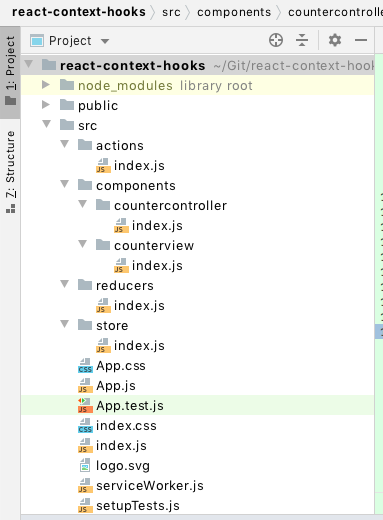
Published at DZone with permission of Kunkka Li. See the original article here.
Opinions expressed by DZone contributors are their own.
Comments