

A SonarQube Plugin for Kotlin
Interested in Kotlin but worried about leaving your favorite Java tools behind? Time to make a plugin! Here, we start the process of making a SonarQube plugin for Kotlin.
Since I started my journey into Kotlin, I wanted to use the same libraries and tools I use in Java. For libraries — Spring Boot, Mockito, etc. — it’s straightforward, as Kotlin is 100% interoperable with Java. For tools, well, it depends. For example, Jenkins works flawlessly, while SonarQube lacks a dedicated plugin. The SonarSource team has limited resources: Kotlin, though on the rise — and even more so since Google I/O 17, is not in their pipe. This post series is about creating such a plugin, and this first post is about parsing Kotlin code.
ANTLR
In the realm of code parsing, ANTLR is a clear leader in the JVM world.
ANTLR (ANother Tool for Language Recognition) is a powerful parser generator for reading, processing, executing, or translating structured text or binary files. It’s widely used to build languages, tools, and frameworks. From a grammar, ANTLR generates a parser that can build and walk parse trees.
Designing the Grammar
ANTLR is able to generate parsing code for any language thanks to a dedicated grammar file. However, creating such a grammar from scratch for regular languages is not trivial. Fortunately, thanks to the power of the community, a grammar for Kotlin already exists on GitHub.
With this existing grammar, ANTLR is able to generate Java parsing code to be used by the SonarQube plugin. The steps are the following:
- Clone the GitHub repository
git clone [email protected]:antlr/grammars-v4.git - By default, classes will be generated under the root package, which is discouraged. To change that default:
- Create a
src/main/antlr4/<fully>/<qualified>/<package>folder such assrc/main/antlr4/ch/frankel/sonarqube/kotlin/api - Move the g4 files there
- In the POM, remove the
sourceDirectoryandincludesbits from theantlr4-maven-pluginconfiguration to use the default
- Create a
- Build and install the JAR in the local Maven repo
cd grammars-v4/kotlin
mvn install
This should generate a KotlinLexer and a KotlinParser class, as well as several related classes in target/classes. As Maven goes, it also packages them in a JAR named kotlin-1.0-SNAPSHOT.jar in the target folder — and in the local Maven repo as well.
Testing the Parsing Code
To test the parsing code, one can use the grun command. It’s an alias for the following:
java -Xmx500M -cp "<path/to/antlr/complete/>.jar:$CLASSPATH" org.antlr.v4.Tool
Create the alias manually or install the antlr package via Homebrew on OSX.
With grun, Kotlin code can be parsed then displayed in different ways, textual and graphical. The following expects an input in the console:
cd target/classes
grun Kotlin kotlinFile -tree
After having typed valid Kotlin code, it yields its parse tree in text. By replacing the -tree option with the -gui option, it displays the tree graphically instead. For example, the following tree comes from this snippet:
fun main(args : Array<String>) {
    val firstName : String = "Adam"
    val name : String? = firstName
    print("$name")
}
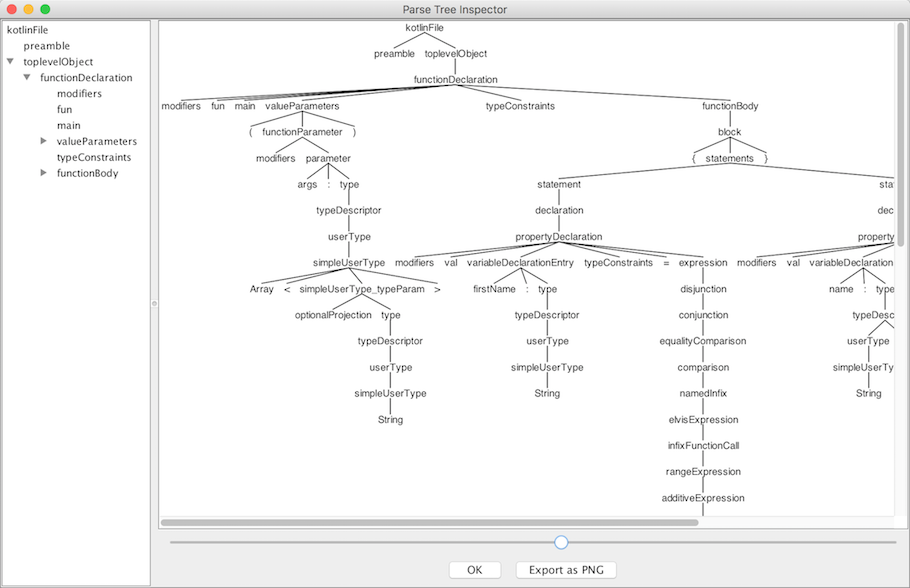
In order for the JAR to be used later in the SonarQube plugin, it has been deployed on Bintray. In the next post, we will be doing proper code analysis to check for violations.
Published at DZone with permission of Nicolas Fränkel. See the original article here.
Opinions expressed by DZone contributors are their own.