

A Look at ScheduledService [Code Snippets]
ScheduledService lets you execute the same task a regular intervals and can even restart itself in the event of a failure, making it a good tool to have in the box.
 CORE
·
CORE
·
Join the DZone community and get the full member experience.
Join For FreeScheduledService is a very nice feature of Java 8 present under the javafx.concurrent package.
In general, a service is a program that encapsulates all the essential information to execute tasks. The same way, the ScheduledService API works for us, but a difference is that it executes the same task at regular intervals, and it has the capability of restarting itself after a successful execution. There could be possible conditions when it could restart itself in the event of a failure as well.
The only way to work with JavaFX is to subclass Application in stand-alone applications because it needs to prepare the environment and toolkit — otherwise, it will throw the exception 'Exception in thread "main" java.lang.IllegalStateException: Toolkit not initialized.'
Let us look at an example:
Counter.java
package scheduledservice.test;

/**
 * @author arun.pandey
 */
public class Counter{
  private int count = 0;

  public int getCount() {
    return count;
  }
  public void setCount(int count) {
    this.count = count;
  }
}
CounterService.java
package scheduledservice.test;

import javafx.concurrent.ScheduledService;
import javafx.concurrent.Task;

/**
 * @author arun.pandey
 */
public class CounterService extends ScheduledService<Object> {
  private Counter obj;

  public final void setObject(Counter obj) {
    this.obj = obj;
  }

  @Override
  protected Task<Object> createTask() {
    return new Task<Object>() {
      protected Integer call() {
        obj.setCount(obj.getCount()+1);
        return obj.getCount();
      }
    };
  }
}
Now let us look at the client code.
CounterServiceApplication.java
package scheduledservice.test;

import org.apache.commons.logging.Log;
import org.apache.commons.logging.LogFactory;
import javafx.application.Application;
import javafx.concurrent.WorkerStateEvent;
import javafx.event.EventHandler;
import javafx.stage.Stage;
import javafx.util.Duration;

/**
 * @author arun.pandey
 */
public class CounterServiceApplication extends Application {
  public static final Log LOG = LogFactory.getLog(CounterServiceApplication.class);

  @Override
  public void start(Stage stage) throws Exception {
    CounterService counterServc = new CounterService();
    Counter oc = new Counter();
    counterServc.setObject(oc);
    counterServc.setPeriod(Duration.seconds(1));

    counterServc.setOnSucceeded(new EventHandler<WorkerStateEvent>() {

      @Override
      public void handle(WorkerStateEvent event) {
        LOG.info("Getting called : " + event.getSource().getValue() + " times");
        oc.setCount((int) event.getSource().getValue());
      }
    });
    counterServc.start();
  }

  public static void main(String[] args) {
    launch();
  }
}
The output can be seen as below:
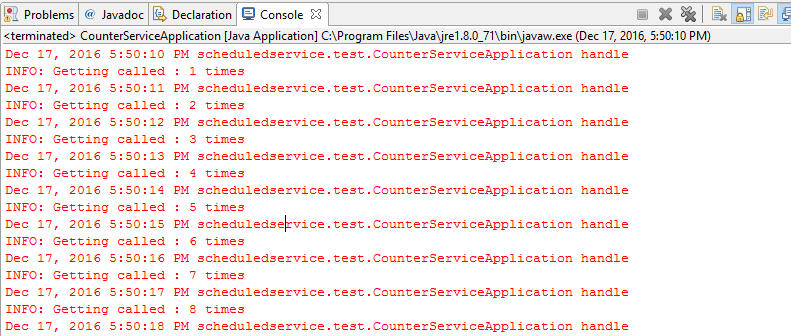
I hope this gives you an understanding of the ScheduledService API. Happy learning!
Opinions expressed by DZone contributors are their own.
Comments