

Your AD Password Policies Are Security Theater
Active Directory password-complexity policies can be bypassed via certain password-set paths, rendering many common controls mere “security theater.”
 ·
·
Join the DZone community and get the full member experience.
Join For FreeLast week, Microsoft published a three-phase plan to kill the NTLM authentication protocol. My LinkedIn feed filled up with celebrations. And I get it, the protocol has been a source of pain for decades.
But almost nobody in those threads seems to understand a critical distinction, and it's been bugging me enough to write this up with working proof-of-concept scripts so you can test it in your own lab.
First: NTLM Hash and NTLM Protocol Are Two Different Things
This confusion is everywhere, even in posts from people who should know better. Let me clear it up.
The NTLM protocol is a challenge-response authentication mechanism. That's what Microsoft is deprecating. When you hear about pass-the-hash relay attacks, CVE-2025-24054, and all those headlines from last year, that's the protocol side. Fair enough, it deserves to die.
The NTLM hash is just how Windows calculates and stores your password. You type your password, Windows computes an MD4 hash over its UTF-16LE encoding, and stores the resulting 16-byte value in Active Directory. This hash is commonly called the "NTLM hash" or "NT hash" because it's used in the NTLM protocol. But here's what most people miss: Kerberos uses the same hash. When your organization migrates from NTLM protocol to Kerberos (which is the whole point of Microsoft's deprecation roadmap), that same NT hash will still be sitting in AD, doing the same job, just serving a different protocol.
Why does this matter? Because the attack I'm about to show you doesn't touch the NTLM protocol at all. It targets how the hash gets written to Active Directory. Killing the protocol changes nothing about this vulnerability.
The Attack: Bypassing Every Password Policy in Your Domain
Windows provides a SamrSetInformationUser function through its remote procedure call (RPC) interface. This function lets you set a user's password hash directly in Active Directory, without submitting the actual password.
Think about what that means. Windows never sees the password itself. It only receives the 16-byte hash. So every layer of password validation you've configured simply never gets called:
- GPO password complexity rules? Skipped.
- Custom password filter DLLs checking against breached dictionaries? Never invoked.
- Third-party password policy tools with character substitution logic? They don't even know anything happened.
The only requirement is Password Reset permissions on the target account. If you've administered any sizeable AD environment, you know how generously those tend to be handed out.
Try It Yourself
I've put together a PowerShell script that demonstrates this. It calls SamrSetInformationUser and sets a user's password hash directly, bypassing all password complexity checks.
Download SetNtlmPassword.zip.
Here's how to run it:
- Create a folder (e.g.,
C:\SetPassword). - Copy the script into that folder.
- Run:
powershell .\SetNtlmPassword.ps1. - Enter the username and a new password.
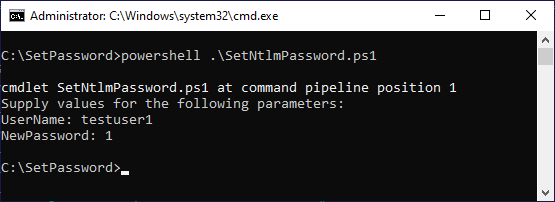
Running the attack script. Password for testuser1 is now literally "1". Every GPO complexity rule was active. None of them fired.
That's it. The user "testuser1" now has a password that is the single digit "1." Every password policy in the domain was configured and active. None of them fired.
The Defense: Hooking SamrSetInformationUser Inside LSASS
All Active Directory operations on a Domain Controller happen inside the LSASS.EXE process. That means we can find the SamrSetInformationUser function inside that process and block its call when someone tries to write a hash directly.
This requires two conditions: you need to be on the Domain Controller itself, and the LSASS process must not be locked down by Credential Guard, LSA Protection (PPL), or an endpoint security product that prevents injection.
I wrote a second PowerShell script that demonstrates this defense. It injects into the LSASS process address space, hooks the SamrSetInformationUser function, and, inside the hook, prevents the original function from executing when it detects a direct password hash write. For injection and hooking, it uses EasyHook.
Download Protect.zip.
Try the Defense Yourself
- Copy the script into the same
C:\SetPasswordfolder. - Download and unpack EasyHook 2.7.6789.0 into the same folder.
- If needed, adjust the EasyHook path in the script:
$easyHookPath = ".\EasyHook-2.7.6789.0-Binaries\projects\easyhook\Deploy\NetFX4.0\EasyHook.dll". - Run:
powershell .\Protect.ps1.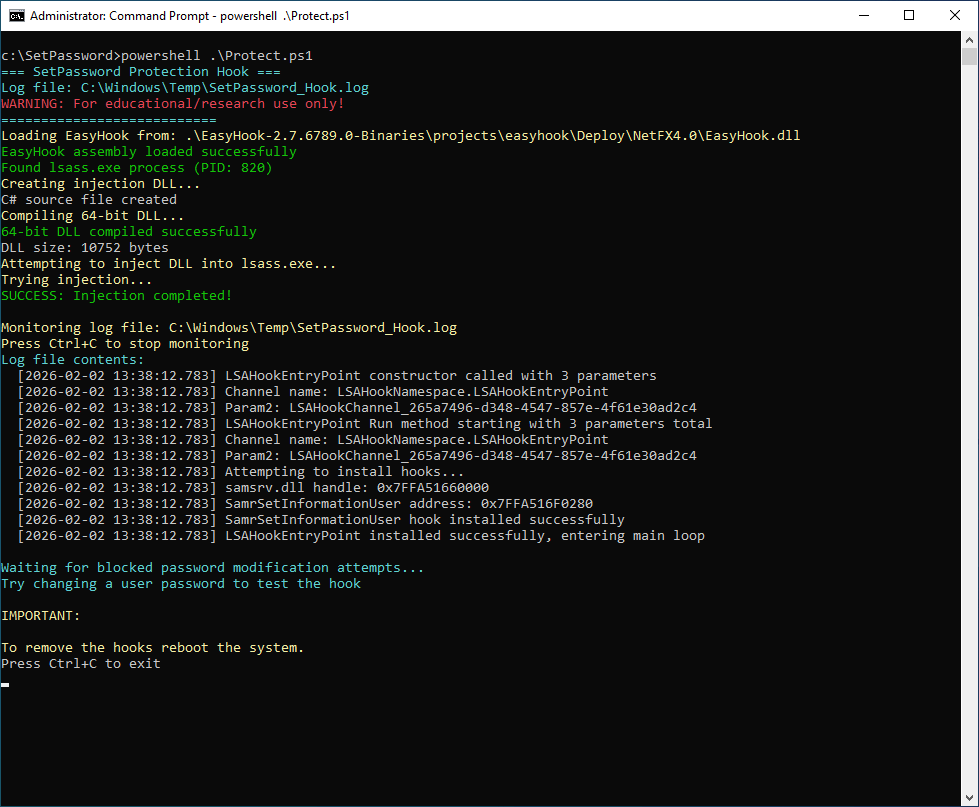
The protection script injecting into LSASS. It locates samsrv.dll, finds SamrSetInformationUser at 0x7FFA516F0280, and installs the hook successfully.
Read the output carefully. The script finds samsrv.dll inside LSASS, locates the SamrSetInformationUser function address, installs the hook, and starts monitoring.
Now try running the attack script again. This time you'll see it fail:
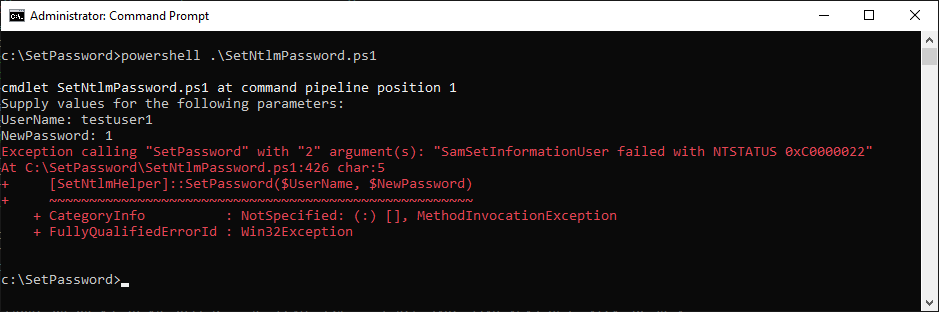
Same attack, same script, same target user. This time: NTSTATUS 0xC0000022 — access denied. The hook intercepted the call before the hash reached AD.
The hook intercepts the call and returns an access denied error before the hash ever reaches AD.
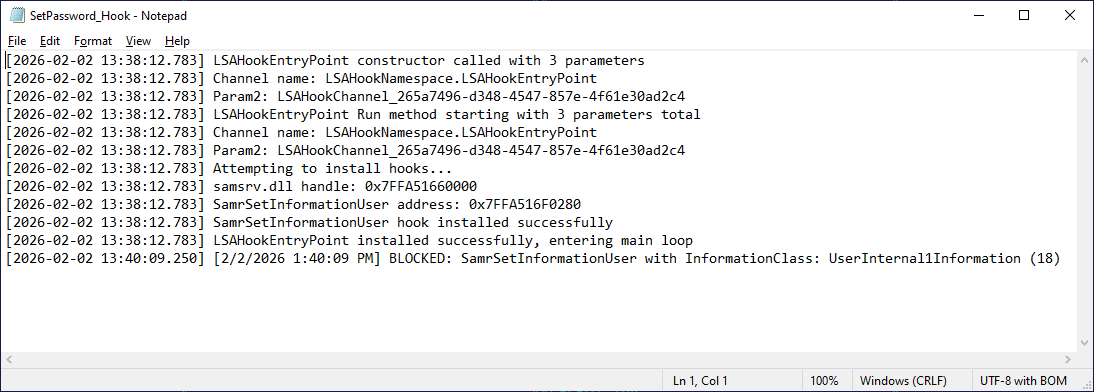
You can also check the log file at C:\Windows\Temp\SetPassword_Hook.log to see every blocked attempt, along with cases where the function was allowed to proceed normally:
Why This Matters Right Now
Everyone is celebrating the NTLM protocol deprecation. And yes, killing the protocol is the right move. But the hash that gets stored in AD is the same hash that Kerberos uses. SamrSetInformationUser is an RPC function, not an NTLM protocol feature. The ability to bypass every password policy in your domain survives the migration to Kerberos completely intact.
Important: The scripts shared here are for educational and testing purposes. They are not production-ready. There are more reliable methods for process injection and function hooking, and you'd likely need to configure exceptions for legacy applications that legitimately use this API.
But the underlying problem is real, and GPOs and password filters can't solve it because they operate at the wrong level. You need to intercept where the hash meets the directory, and that means you need to be inside LSASS.
After more than 17 years working with Windows kernel and LSASS internals, one lesson is clear: controls that operate above the authentication layer can often be bypassed. Designing defenses at the right layer is what ultimately matters.
Opinions expressed by DZone contributors are their own.
Comments