

Adding to an Existing Azure Blob
Want to add to your blob storage while keeping your overhead low? Here are multiple ways you can append your blobs in Microsoft Azure.

Join the DZone community and get the full member experience.
Join For Freein this post , i briefly cover the concept of storage accounts and blob storage; however, there are more to blobs than this simple use case. in this post, i’ll explore creating a blob file from a text stream, and then add to that file.
as is stated in the post referenced above, azure provides a facility for storing files in, what are known as, azure blobs.
in order to upload a file to a blob, you need a storage account and a container. setting these up is a relatively straightforward process and, again, is covered in the post above.account, and a container. setting these up is a relatively straightforward process and, again, is covered in the post above.
our application here will take the form of a simple console app that will prompt the user for some text, and then add it to the file in azure.
setup
once you’ve set-up your console app, you’ll need the azure nuget storage package .
also, add the connection string to your storage account into the app.config:
<connectionstrings>
    <add name="storage" connectionstring="defaultendpointsprotocol=https;accountname=testblob;accountkey=wibble/dslkdsjdljdsoicj/rkdl7ocs+abuq3hpunuq==;endpointsuffix=core.windows.net"/>
</connectionstrings>
here’s the basic code for the console app:
static void main(string[] args)
{
    console.write("please enter text to add to the blob: ");
    string text = console.readline();

    uploadnewtext(text);

    console.writeline("done");
    console.readline();
}
i’ll bet you’re glad i posted that — otherwise, you’d have been totally lost. the following snippets are possible implementations of the method uploadnewtext().
uploading to blockblob
the following code will upload a file to a blob container:
string connection = configurationmanager.connectionstrings["storage"].connectionstring;
string filename = "test.txt";
string containerstring = "mycontainer";

using (memorystream stream = new memorystream())
using (streamwriter sw = new streamwriter(stream))
{
    sw.write(text);
    sw.flush();
    stream.position = 0;

    cloudstorageaccount storage = cloudstorageaccount.parse(connection);
    cloudblobclient client = storage.createcloudblobclient();
    cloudblobcontainer container = client.getcontainerreference(containerstring);
    cloudblockblob blob = container.getblockblobreference(filename);
    blob.uploadfromstream(stream);
}
(note that the name of the container in this code is case sensitive).
if we have a look at the storage account, a text file has, indeed, been created:
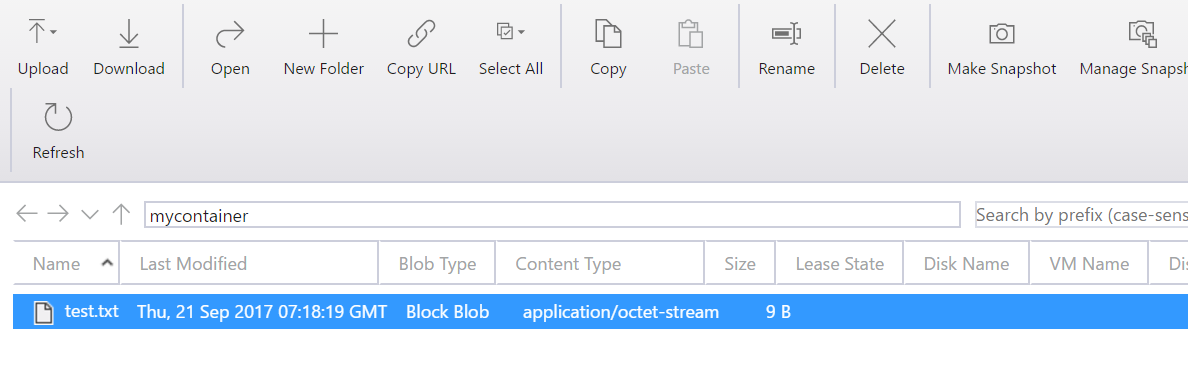
but, what if we want to add to that? well, running the same code again will work, but it will replace the existing file. to prove that, i’ve changed the text to “test data 2” and run it again:
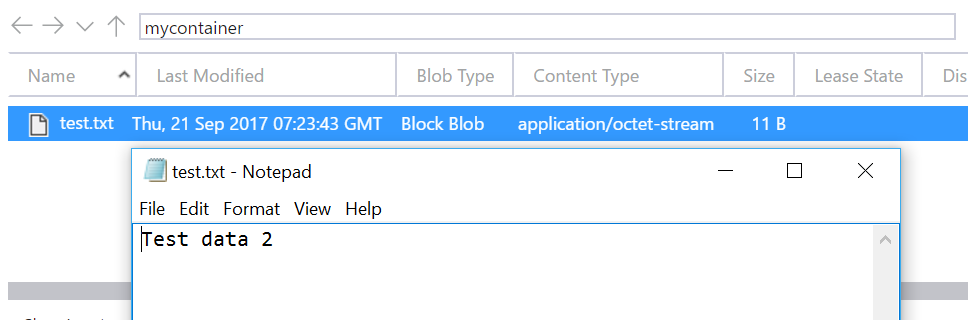
so, how do we update the file? given that we can update it, one possibility is to download the existing file, add to it and upload it again; that would look something like this:
string connection = configurationmanager.connectionstrings["storage"].connectionstring;
string filename = "test.txt";
string containerstring = "mycontainer";

cloudstorageaccount storage = cloudstorageaccount.parse(connection);
cloudblobclient client = storage.createcloudblobclient();
cloudblobcontainer container = client.getcontainerreference(containerstring);
cloudblockblob blob = container.getblockblobreference(filename);

using (memorystream stream = new memorystream())
{
    blob.downloadtostream(stream);

    using (streamwriter sw = new streamwriter(stream))
    {
        sw.write(text);
        sw.flush();
        stream.position = 0;

        blob.uploadfromstream(stream);
    }
}
this obviously means two round trips to the server, which isn’t the best thing in the world. another possible option is to use the append blob…
azure append blob storage
there is a blob type that allows you to add to it without actually touching it; for example:
string connection = configurationmanager.connectionstrings["storage"].connectionstring;
string filename = "testappend.txt";
string containerstring = "mycontainer";

cloudstorageaccount storage = cloudstorageaccount.parse(connection);
cloudblobclient client = storage.createcloudblobclient();
cloudblobcontainer container = client.getcontainerreference(containerstring);
cloudappendblob blob = container.getappendblobreference(filename);
if (!blob.exists()) blob.createorreplace();

using (memorystream stream = new memorystream())
using (streamwriter sw = new streamwriter(stream))
{
    sw.write("test data 4");
    sw.flush();
    stream.position = 0;

    blob.appendfromstream(stream);
}
there are a few things to note here:
- the reason that i changed the name of the blob is that you can’t append to a blockblob (at least not using an appendblob); so it has to have been created for the purpose of appending.
- while uploadfromstream will just create the file if it doesn’t exist, with the appendblob, you need to do it explicitly.
putblock
the final alternative here is to use putblock. this can bridge the gap, by allowing the addition of blocks into an existing block blob. however, you either need to maintain the block id list manually, or download the existing block list; here’s an example of creating, or adding to a file using the putblock method:
string connection = configurationmanager.connectionstrings["storage"].connectionstring;
string filename = "test4.txt";
string containerstring = "mycontainer";

cloudstorageaccount storage = cloudstorageaccount.parse(connection);
cloudblobclient client = storage.createcloudblobclient();
cloudblobcontainer container = client.getcontainerreference(containerstring);
cloudblockblob blob = container.getblockblobreference(filename);

showblobblocklist(blob);

using (memorystream stream = new memorystream())
using (streamwriter sw = new streamwriter(stream))
{
    sw.write(text);
    sw.flush();
    stream.position = 0;

    double seconds = (datetime.now - new datetime(2000, 1, 1)).totalseconds;
    string blockid = convert.tobase64string(
        asciiencoding.ascii.getbytes(seconds.tostring()));

    console.writeline(blockid);
    //string blockhash = getmd5hashfromstream(bytes);

    list<string> newlist = new list<string>();
    if (blob.exists())
    {
        ienumerable<listblockitem> blocklist = blob.downloadblocklist();

        newlist.addrange(blocklist.select(a => a.name));
    }

    newlist.add(blockid);

    blob.putblock(blockid, stream, null);
    blob.putblocklist(newlist.toarray());
}
the code above owes a lot to the advice given on this stack overflow question.
in order to avoid conflicts in the block ids, i’ve used a count of seconds since an arbitrary date. obviously, this won’t work in all cases. further, it’s worth noting that the code above still makes two trips to the server (it has to download the block list).
the commented md5 hash allows you to provide some form of check on the data being valid, should you choose to use it.
what is showblobblocklist(blob)?
the following function will give some details relating to the existing blocks (it is shamelessly plagiarized from here ):
public static void showblobblocklist(cloudblockblob blockblob)
{
    if (!blockblob.exists()) return;

    ienumerable<listblockitem> blocklist = blockblob.downloadblocklist(blocklistingfilter.all);
    int index = 0;
    foreach (listblockitem blocklistitem in blocklist)
    {
        index++;
        console.writeline("block# {0}, blockid: {1}, size: {2}, committed: {3}",
            index, blocklistitem.name, blocklistitem.length, blocklistitem.committed);
    }
}
summary
despite being an established technology, these methods and techniques are sparsely documented on the web. obviously, there are microsoft docs, and they are helpful, but, unfortunately, not exhaustive.
references
Published at DZone with permission of Paul Michaels. See the original article here.
Opinions expressed by DZone contributors are their own.
Comments