

How Agent Frameworks Solve Human-in-the-Loop
Six frameworks, three HITL patterns — the right choice depends on tool-call granularity, editable args, and whether the run survives a process.
 ·
·
Join the DZone community and get the full member experience.
Join For FreeWhen we are demoing an agentic product, it always looks clean and clear: the agent pauses, the human approves or rejects, and execution continues. But what happens when the human actually says no?
Human-in-the-loop (HITL) sounds like a single feature. In practice, it covers a wide design space:
- Do you pause mid-execution or notify asynchronously?
- Is the human a peer agent or an external approver?
- Can the human edit the action, or only approve or reject it?
- Does the framework resume execution exactly where it paused, or is there anything else?
These questions yield different answers across all major agent frameworks, and those answers have very real production consequences. I assumed that all frameworks would converge on a single pattern for HITL design, but I found them to be very different. This article compares the six frameworks and their implementations of HITL.
What You Will Learn
By the end of this article, you will be able to:
- Distinguish the three fundamental HITL patterns - durable graph interrupt, message-loop injection, and blocking gate, and know which framework implements each.
- Read working code for all six frameworks and understand the exact execution pause and how it resumes for the frameworks.
- Pick the right framework for your use case.
The Fundamental Divide
The three distinct HITL patterns can be described as
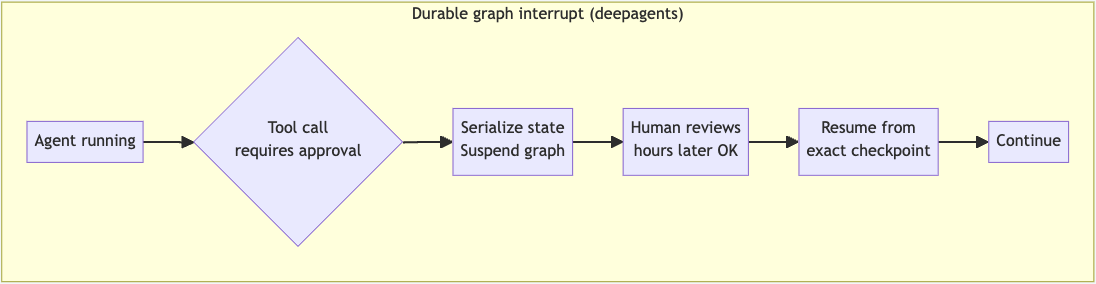
- Durable graph interrupt: In this pattern, the execution graph serializes the entire graph state and suspends at the exact node where approval was needed. Nothing happens until a decision is made. If the process exits, then it's saved in an external checkpointer, and the run resumes from the point of suspension.
![Durable graph interrupt pattern]()
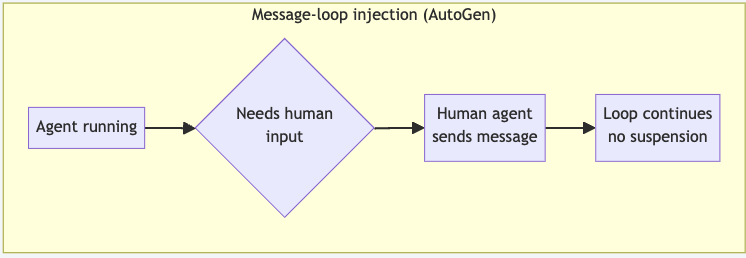
- Message loop injection: In this pattern, there is no suspension as such. Humans act as a first-class participant in a multi-agent conversation, steering a reply like any other agent. The loop runs continuously, and the human response is just another round.
![Message-loop injection pattern]()
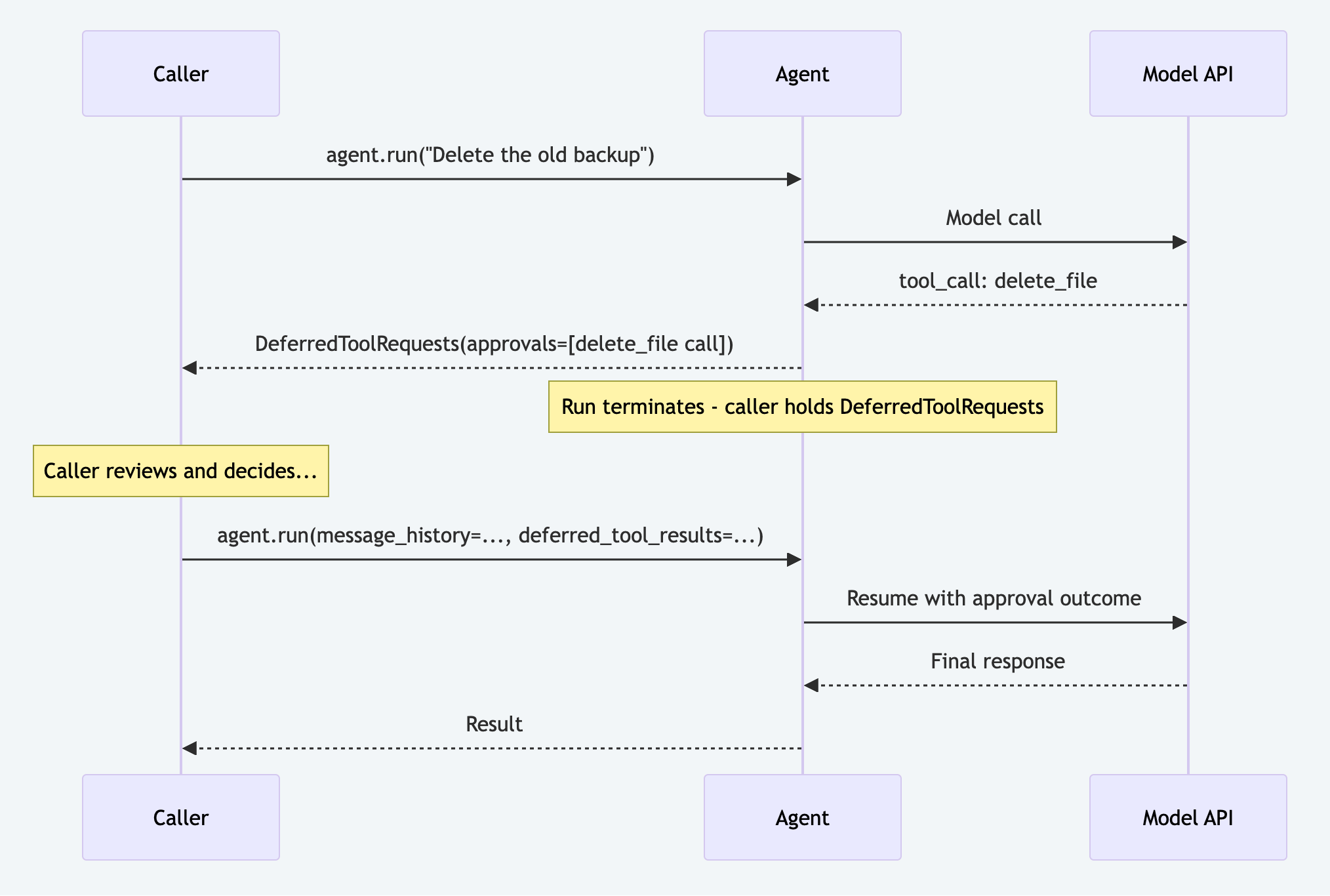
- Blocking gate/run-termination: In this pattern, the framework runs or ends the run cleanly at a designated point, either blocking in process until the caller responds or terminating and returning an approval pending object that the human needs to resolve before resuming. Resuming the run is the human's responsibility.
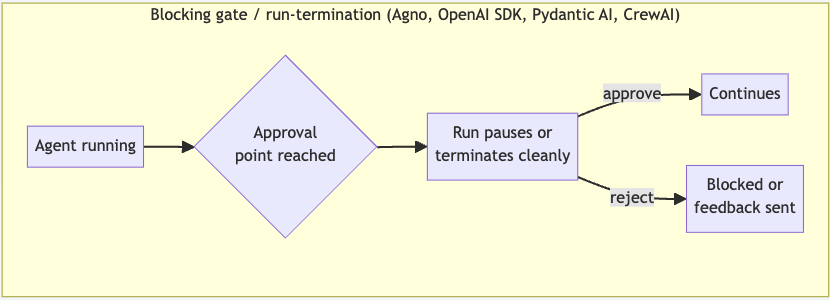
| framework | pattern | true suspension | human can edit action | resumable after process restart |
|---|---|---|---|---|
| deepagents | Graph interrupt (LangGraph) | ✓ | ✓ approve / edit / reject | ✓ |
| Agno | HumanReview on Step/Loop |
✓ | Partial | ✗ |
| AutoGen | UserProxy agent (message loop) | ✗ | ✓ via messages | ✗ |
| OpenAI Agents SDK | needs_approval interrupt |
Partial | ✗ | Partial |
| CrewAI | step_callback + human_input on Task |
✗ | ✗ | ✗ |
| Pydantic AI | Deferred tools (requires_approval) |
Partial | ✗ | ✗ |
deepagents + LangGraph: graph-level interrupt
Installation:
pip install deepagents langgraph
# Python >=3.10 required
# Docs: https://docs.langchain.com/oss/python/deepagents/human-in-the-loop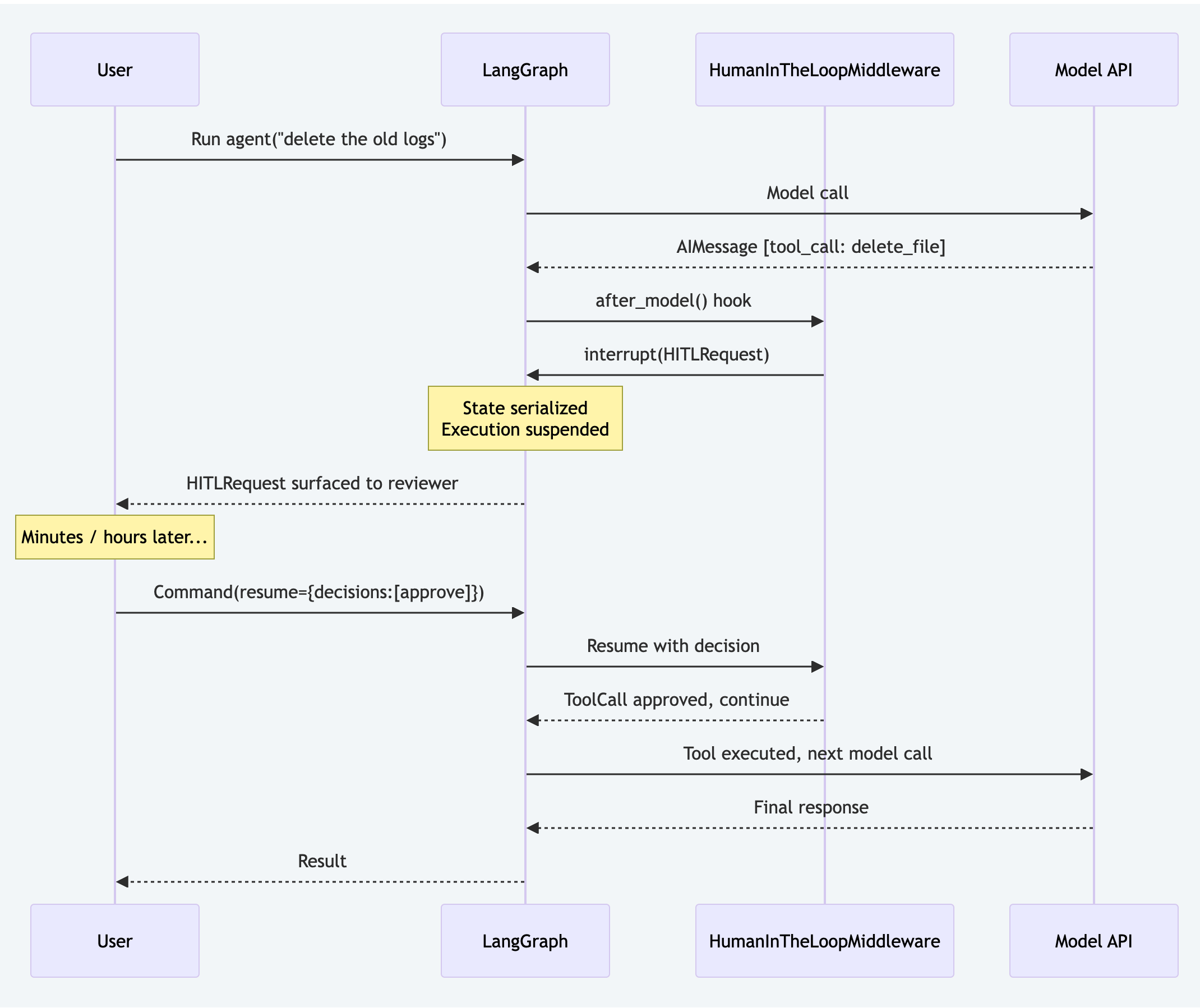
interrupt()primitive. When the model produces a tool call that requires approval, execution suspends at that exact graph node. The serialized state is stored via a LangGraph checkpointer; the process can exit entirely and resume hours later.
Wiring Up the Middleware
from deepagents import create_deep_agent
from langchain.agents.middleware import HumanInTheLoopMiddleware, InterruptOnConfig

hitl = HumanInTheLoopMiddleware(
    interrupt_on={
        # True = approve / edit / reject all allowed
        "delete_file": True,

        # Restrict to approve/reject only, with static description
        "run_bash": InterruptOnConfig(
            allowed_decisions=["approve", "reject"],
            description="Review this shell command before execution",
        ),

        # Dynamic description generated from the tool call at runtime
        "send_email": InterruptOnConfig(
            allowed_decisions=["approve", "edit", "reject"],
            description=lambda tool_call, state, runtime: (
                f"Approve sending email to: {tool_call['args'].get('to')}"
            ),
        ),
    }
)

agent = create_deep_agent(
    model="anthropic:claude-sonnet-4-6",
    middleware=[hitl],
)
What the Reviewer Sees (HITLRequest Structure)
# Surfaced to the reviewer when delete_file is triggered
{
    "action_requests": [
        {
            "name": "delete_file",
            "args": {"path": "/workspace/output.log"},
            "description": "Tool execution requires approval\n\nTool: delete_file\nArgs: ..."
        }
    ],
    "review_configs": [
        {
            "action_name": "delete_file",
            "allowed_decisions": ["approve", "edit", "reject"]
        }
    ]
}
The Three Decision Types
from langgraph.types import Command

# Approve — run as-is
graph.invoke(
    Command(resume={"decisions": [{"type": "approve"}]}),
    config={"configurable": {"thread_id": "session-123"}},
)

# Edit — change args before running
graph.invoke(
    Command(resume={
        "decisions": [{
            "type": "edit",
            "edited_action": {
                "name": "delete_file",
                "args": {"path": "/workspace/old-backup.log"}
            }
        }]
    }),
    config={"configurable": {"thread_id": "session-123"}},
)

# Reject — agent receives explanation and stops retrying
graph.invoke(
    Command(resume={
        "decisions": [{
            "type": "reject",
            "message": "Do not delete production logs. Archive instead."
        }]
    }),
    config={"configurable": {"thread_id": "session-123"}},
)
Multi-Tool Batching
If the model calls two tools in the same response, deepagents batches them into a single HITLRequest. One round-trip will handle both:
# Single interrupt — two pending actions simultaneously
graph.invoke(Command(resume={
    "decisions": [
        {"type": "approve"},
        {"type": "reject", "message": "rm -rf is too broad — use a specific path"}
    ]
}))
AutoGen v0.4: the UserProxy pattern
Installation:
pip install autogen-agentchat autogen-ext
# Docs: https://microsoft.github.io/autogen/stable/
AutoGen models the human as a UserProxyAgent which is a peer participant in multi-agent conversation. There is no suspension. The loop runs continuously, and the human turn is when the proxy injects a message.
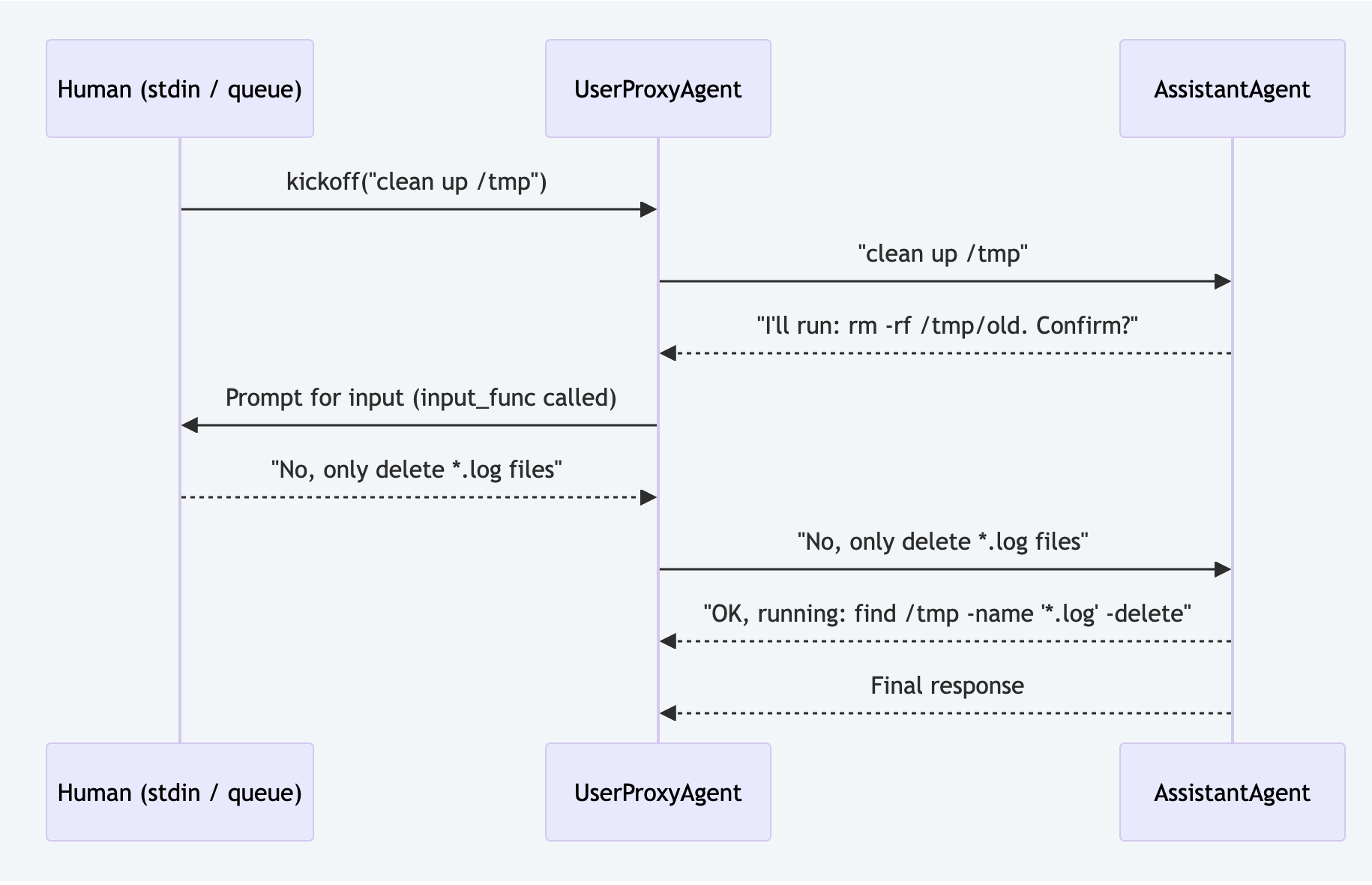
from autogen_agentchat.agents import AssistantAgent, UserProxyAgent
from autogen_agentchat.teams import RoundRobinGroupChat
from autogen_agentchat.conditions import TextMentionTermination
from autogen_ext.models.openai import OpenAIChatCompletionClient

assistant = AssistantAgent(
    "assistant",
    model_client=OpenAIChatCompletionClient(model="gpt-4o"),
    system_message=(
        "You are a helpful agent. Always describe what you are about to do "
        "and ask for confirmation before executing file operations."
    ),
)

# input_func is called when the proxy needs human input
# Replace `input` with an async queue for web applications
user_proxy = UserProxyAgent("human", input_func=input)

team = RoundRobinGroupChat(
    participants=[assistant, user_proxy],
    termination_condition=TextMentionTermination("DONE"),
)

await team.run(task="Clean up old log files in /tmp")Limitation: The conversation loop never truly suspends. If the process exits mid-conversation, the state is lost. For async web UIs, you'd need a background thread and an asyncio queue to bridge human input. There's no built-in checkpointing.
Agno: HumanReview on Steps
Installation:
pip install agno
# Docs: https://docs.agno.com/reference/workflows/step
Agno's HITL uses a HumanReview config object attached to workflow steps. It supports confirmation gates before execution, user input collection, and post-execution output review:
from agno.workflow import Workflow, Step
from agno.workflow.types import HumanReview
from agno.agent import Agent
from agno.models.anthropic import Claude

extract_agent = Agent(name="Extractor", model=Claude(id="claude-haiku-4-5"), ...)
transform_agent = Agent(name="Transformer", model=Claude(id="claude-haiku-4-5"), ...)
load_agent = Agent(name="Loader", model=Claude(id="claude-sonnet-4-6"), ...)

workflow = Workflow(
    name="DataPipeline",
    steps=[
        Step(name="extract", agent=extract_agent),
        Step(name="transform", agent=transform_agent),
        Step(
            name="load",
            agent=load_agent,
            # Pause and require human confirmation before this step runs
            human_review=HumanReview(requires_confirmation=True),
        ),
        Step(
            name="verify",
            agent=load_agent,
            # Pause after execution for a human to review the output
            human_review=HumanReview(requires_output_review=True),
        ),
    ],
)
HumanReview fields:
| field | scope | what it does |
|---|---|---|
requires_confirmation |
Step, Loop, Router, Condition | Pause before the step executes |
confirmation_message |
Step, Loop, Router, Condition | Custom prompt shown to the reviewer |
requires_user_input |
Step, Router | Collect freeform user input before continuing |
requires_output_review |
Step, Router | Pause after execution; accepts bool or Callable[[StepOutput], bool] for conditional review |
requires_iteration_review |
Loop only | Review after each loop iteration |
on_reject |
All | OnReject.skip (default), cancel, or retry (re-run the step with human feedback) |
on_error |
All | OnError.pause triggers HITL on step failure - human decides retry or skip |
timeout / on_timeout |
All | Timeout in seconds; on_timeout is cancel (default), skip, or approve |
Resumability: Agno has no workflow-level checkpoint equivalent to LangGraph's checkpointer. If the process exits while a step is awaiting human input, the workflow state is lost. Resumability requires external session storage wired by the caller.
OpenAI Agents SDK: needs_approval interrupt
Installation:
pip install openai-agents
# Docs: https://openai.github.io/openai-agents-python/
The OpenAI Agents SDK uses a needs_approval parameter on function_tool. When set, the run loop pauses and surfaces a ToolApprovalItem that the caller approves or rejects via RunState:
from agents import Agent, function_tool, Runner

@function_tool(needs_approval=True)
def delete_file(path: str) -> str:
    """Delete a file at the given path."""
    import os
    os.remove(path)
    return f"Deleted {path}"

# needs_approval can also be a callable for conditional approval
@function_tool(
    needs_approval=lambda ctx, args, call_id: args.get("path", "").startswith("/prod")
)
def write_file(path: str, content: str) -> str:
    """Write content to a file."""
    with open(path, "w") as f:
        f.write(content)
    return f"Wrote {path}"

agent = Agent(
    name="FileAgent",
    instructions="Help the user manage files.",
    tools=[delete_file, write_file],
)

async def run_with_approval():
    result = await Runner.run(agent, "Delete the old backup file")

    if result.interruptions:
        # Convert result to a resumable state, then resolve each pending approval
        state = result.to_state()
        for item in result.interruptions:
            print(f"Approve {item.raw_item.name}({item.raw_item.arguments})? [y/N]: ", end="")
            if input().strip().lower() == "y":
                state.approve(item)
            else:
                state.reject(item, rejection_message="User rejected this action")
        # Resume: pass the mutated state back to Runner
        result = await Runner.run(agent, state=state)

print(result.final_output)Limitation: The approval flow is approve-or-reject only. There's no structured "edit" decision type. Humans cannot modify tool arguments through the SDK's approval mechanism. Partial cross-restart resumability is available via state.to_string() / RunState.from_string() and the human is responsible for persisting and restoring the serialized state externally.
CrewAI: step_callback + human_input
Installation:
pip install crewai
# Docs: https://docs.crewai.com/en/concepts/crews
CrewAI has two distinct mechanisms with very different semantics.
step_callback — Observational Only
step_callback fires after each agent step and receives an AgentAction | AgentFinish object. It cannot block or modify the next step:
from crewai import Agent, Crew, Task
from crewai.agents.crew_agent_executor import AgentAction, AgentFinish

def review_step(step: AgentAction | AgentFinish) -> None:
    if isinstance(step, AgentAction):
        print(f"Tool used: {step.tool}, input: {step.tool_input}")
    elif isinstance(step, AgentFinish):
        print(f"Agent finished: {step.return_values}")

researcher = Agent(
    role="Researcher",
    goal="Research the topic",
    backstory="An expert researcher.",
    verbose=True,
)
task = Task(description="Research quantum computing trends", agent=researcher)

crew = Crew(
    agents=[researcher],
    tasks=[task],
    step_callback=review_step,
)
crew.kickoff()
human_input — Blocking Task-Output Review
Setting human_input=True on a Task does produce a real synchronous pause. After the agent finishes its work for that task, execution blocks on input() , and the human can provide free-form feedback before the output is finalized:
from crewai import Agent, Crew, Task

researcher = Agent(
    role="Researcher",
    goal="Research the topic",
    backstory="An expert researcher.",
    verbose=True,
)

task = Task(
    description="Research quantum computing trends and summarize findings.",
    expected_output="A summary of the latest quantum computing developments.",
    agent=researcher,
    human_input=True,  # blocks after agent finishes, before output is accepted
)

crew = Crew(agents=[researcher], tasks=[task])
crew.kickoff()
# Agent completes its work, then execution pauses:
# > Please provide feedback on the agent's output (or press Enter to accept):
Key distinction from tool-call-level gates: human_input fires after the agent has already finished the task and all tool calls have already executed. You are reviewing the output, not approving individual actions before they run. The human provides free-form text feedback. There is no structured approve/edit/reject schema, no async queue support, and no state serialization. Because it calls input() directly, it blocks the calling thread, and it is incompatible with async web servers (FastAPI, Starlette) without bridging to a separate thread and queue.
Pydantic AI: Deferred Tools
Installation:
pip install pydantic-ai
# Docs: https://pydantic.dev/docs/ai/tools-toolsets/deferred-tools/
Pydantic AI has a first-class HITL primitive called Deferred Tools. Mark a tool with requires_approval=True (or raise ApprovalRequired conditionally) and the agent run terminates with a DeferredToolRequests object instead of a final answer. The caller resolves approvals and resumes with the original message history.
Declaring Tools That Require Approval
from pydantic_ai import Agent
from pydantic_ai.exceptions import ApprovalRequired

agent = Agent("anthropic:claude-sonnet-4-6")

# Always requires approval
@agent.tool(requires_approval=True)
async def delete_file(ctx, path: str) -> str:
    import os
    os.remove(path)
    return f"Deleted {path}"

# Conditional: only requires approval for destructive commands
@agent.tool
async def run_bash(ctx, command: str) -> str:
    import subprocess
    risky = ["rm", "drop", "truncate"]
    if any(r in command for r in risky):
        raise ApprovalRequired(metadata={"reason": "destructive command detected"})
    return subprocess.check_output(command, shell=True).decode()
Handling DeferredToolRequests and Resuming
from pydantic_ai.tools import DeferredToolRequests, DeferredToolResults, ToolDenied

async def run_with_approval():
    result = await agent.run("Delete the old backup file")

    if isinstance(result.output, DeferredToolRequests):
        approvals = {}
        for tool_call in result.output.approvals:
            print(f"Approve {tool_call.tool_name}({tool_call.args})? [y/N]: ", end="")
            if input().strip().lower() == "y":
                approvals[tool_call.tool_call_id] = True
            else:
                # ToolDenied lets you pass a custom message back to the model
                approvals[tool_call.tool_call_id] = ToolDenied(
                    message="User rejected this action - do not retry."
                )

        # Resume: pass original message history + approval decisions
        result = await agent.run(
            message_history=result.all_messages(),
            deferred_tool_results=DeferredToolResults(approvals=approvals),
        )

    print(result.output)
Inline resolution with HandleDeferredToolCalls
For cases where you want to resolve approvals within the same run (e.g., a CLI prompt that doesn't need to persist state), use the HandleDeferredToolCalls capability:
from pydantic_ai.capabilities import HandleDeferredToolCalls
from pydantic_ai.tools import DeferredToolRequests, DeferredToolResults, ToolDenied

async def interactive_approver(ctx, requests: DeferredToolRequests) -> DeferredToolResults:
    approvals = {}
    for tool_call in requests.approvals:
        print(f"Approve {tool_call.tool_name}({tool_call.args})? [y/N]: ", end="")
        if input().strip().lower() == "y":
            approvals[tool_call.tool_call_id] = True
        else:
            approvals[tool_call.tool_call_id] = ToolDenied(message="Rejected by user.")
    return DeferredToolResults(approvals=approvals)

agent = Agent(
    "anthropic:claude-sonnet-4-6",
    tools=[delete_file, run_bash],
    capabilities=[HandleDeferredToolCalls(interactive_approver)],
)Limitation: There is no durable state serialization. If the process exits between the first run (which returns DeferredToolRequests) and the resume, the run cannot be recovered. The caller(human) must persist result.all_messages() and the pending tool call IDs externally. There is also no structured "edit" decision type; the human can approve or deny, but cannot modify tool arguments through the SDK.
Choosing the Right Pattern
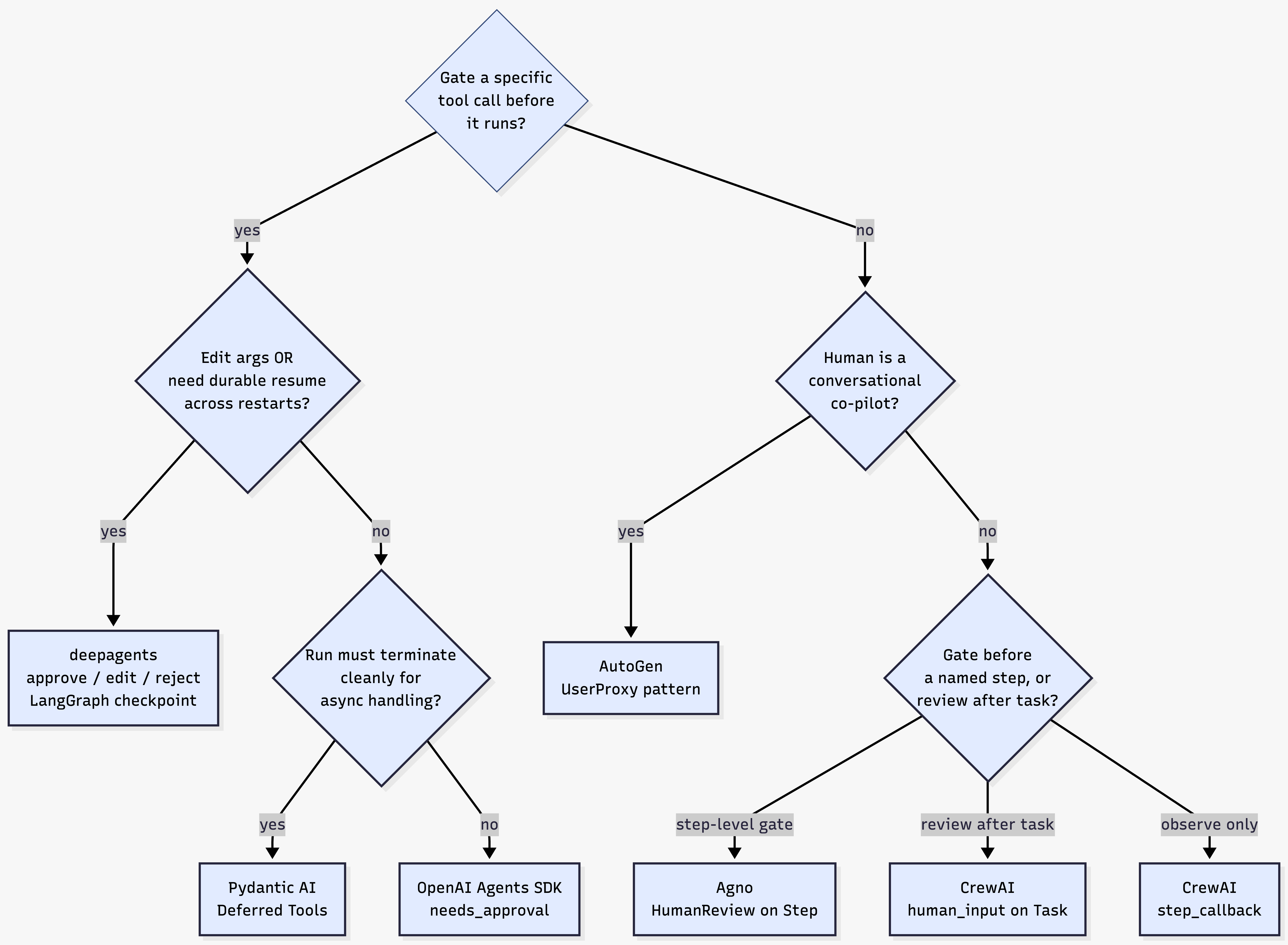
| use case | best fit |
|---|---|
|
Long-running agent, async human reviewer with durable resume
|
deepagents only
|
|
Human needs to edit tool args before execution
|
deepagents only
|
|
Step-level gates with on_reject retry loops, no durable resume
|
Agno HumanReview
|
|
Conversational co-pilot, real-time back-and-forth
|
AutoGen
|
|
Approve/reject specific tools, run stays in-process
|
OpenAI Agents SDK
|
|
Approve/reject specific tools, run terminates for async handling
|
Pydantic AI Deferred Tools
|
|
Audit logging, no blocking needed
|
CrewAI step_callback
|
|
Review task output after agent finishes (not tool-call level)
|
CrewAI human_input=True
|
Conclusion
There is no universal answer to HITL in agent frameworks. The right choice depends on three questions before choosing your framework: at what granularity does a human need to intervene (tool call, step, or task output), whether the reviewer responds in real time or hours later, and whether you need the process to survive a restart between the interrupt and the resume.
If the answer to any of the last two is "yes," deepagents with a LangGraph checkpointer is the only framework that handles both today. For everything else, the landscape is richer than it first appears: Pydantic AI's Deferred Tools give you structured tool-call-level approval without a graph runtime; Agno gives you powerful step-level gates with retry semantics; and OpenAI Agents SDK gives you the simplest possible approve/reject path when you control the process lifecycle.
The mistake most teams make is treating HITL as an afterthought. The primitives each framework exposes are not interchangeable, and switching from an observational callback to a durable interrupt requires rearchitecting the execution model, not just swapping a parameter. The decision tree above is meant to surface that choice before it becomes expensive to undo.
Opinions expressed by DZone contributors are their own.
Comments