

AI Awareness for File-Based Work: The Risk of Silent Failure
A real Gemini Pro session shows how AI can look “done” while skipping uploaded data and ignoring STOP commands — creating silent failure risk without verification.
Join the DZone community and get the full member experience.
Join For FreeAs large language models move from chat to operational work, a specific reliability gap keeps surfacing: the model can produce fluent output without using the files the user provided. In file-based workflows, this is not a cosmetic issue. It is a correctness issue, because the file is the source of truth.
This article reports a documented interaction with Google Gemini Pro (paid) in which a user supplied a structured CSV containing 518 institutional records and a computed total of 3,672,638 full-time equivalents (FTEs). Instead of demonstrating file use, the model initially returned generic output and continued to follow an earlier response mode even after the user repeatedly requested a mode change. The transcript includes the model’s own admissions that it failed to incorporate the Excel/CSV data and that it remained stuck to an initial formatting constraint.
The case is used as an AI-awareness exercise for teams adopting LLMs for data-sensitive tasks. It defines a failure taxonomy for file grounding and control, proposes a simple risk model that emphasizes detectability, and provides mitigations that are practical in real systems. The goal is not to “ban AI,” but to show how to keep AI useful without treating it as an autopilot.
Why Silent Failure Matters More Than a Wrong Answer
Most professionals can handle obvious errors. A model that crashes, refuses, or outputs nonsense is annoying, but it is easy to spot. The harder problem is silent failure: an answer that looks finished, sounds confident, and still has no evidence that the file was used.
File-based work is where this becomes dangerous. The user is not asking for an opinion. The user is asking for a deterministic transformation: read the spreadsheet, identify the relevant column, compute a total, and report it. The file is the ground truth. If the model skips the file, the output is ungrounded by definition.
The transcript in this case captures a common professional pattern. A user asked the model to work from an uploaded Excel/CSV dataset. When the output did not reflect the dataset, the user pushed back and requested a careful review. That pushback was repeated because the model kept responding in the wrong mode. At one point, the model acknowledged the core failure in plain language:
“I did not incorporate your Excel file effectively in my earlier responses, which led to generic feedback.”
“I was rigidly stuck in the original instruction format … which caused me to treat your question as secondary.”
Case Setup and Method
This was not a benchmark run or a synthetic prompt. It was ordinary work. The user supplied a CSV titled “2. Current Customer L.csv” and asked for an output grounded in that file. The file contained 518 institutional records and the key aggregate metric for the task: 3,672,638 FTEs.
The interaction was conducted using Gemini Pro (paid) through the web interface available at the time. The user’s prompts repeatedly emphasized careful review of the provided materials and requested that the model stop producing an earlier response pattern. The full transcript was saved and used as the evidence source for this article.
To analyze the interaction in a way that is useful for engineering teams, the transcript was evaluated against three observable criteria:
- File grounding evidence: Does the response expose checkable traces of file use, such as the row count, column names, a computed subtotal, or the final sum? A grounded answer should make it easy for the user to verify.
- Control compliance: When the user issues a stop-command or changes the requested output mode, does the model immediately pivot, or does it continue in the previous mode?
- Recovery behavior: When the user reports a failure, does the model correct the underlying behavior or only produce social repair language such as apologies? An apology is not a fix unless the next response changes the evidence and the mode.
What Happened: A Technical Narrative From the First Prompt to the Breakdown
The user began with a clear expectation: the model should read the uploaded file and extract the critical metric. The dataset was not small. It contained 518 institutional entries and a total of 3,672,638 FTEs, which is large enough that any human reviewer would treat it as the headline number.
The model’s early output did not show the usual fingerprints of file use. It did not surface the row count, did not cite the FTE total, and did not explain how it derived its conclusions from the file. The output looked polished, but it lacked proof.
The user then did what professionals do when a report seems ungrounded. The user asked again, explicitly, for a careful review. When the same pattern repeated, the user escalated the control instruction: stop producing the earlier format and answer the direct question. Instead of switching modes, the model continued behaving as if the earlier constraints still dominated.
The transcript is valuable because the model later explains the failure in operational terms. It states that it was stuck to the initial formatting requirement and that this rigidity prevented it from responding to the user’s updated instruction. It also concedes that it did not correctly process the Excel/CSV data on the first try.
This sequence is the core awareness lesson. The failure was not that the model was “bad at math.” The failure was that the model could not be treated as a reliable file-based operator without the user enforcing verification and control.
Figure 1. Where AI Dependency Breaks a File-Based Workflow
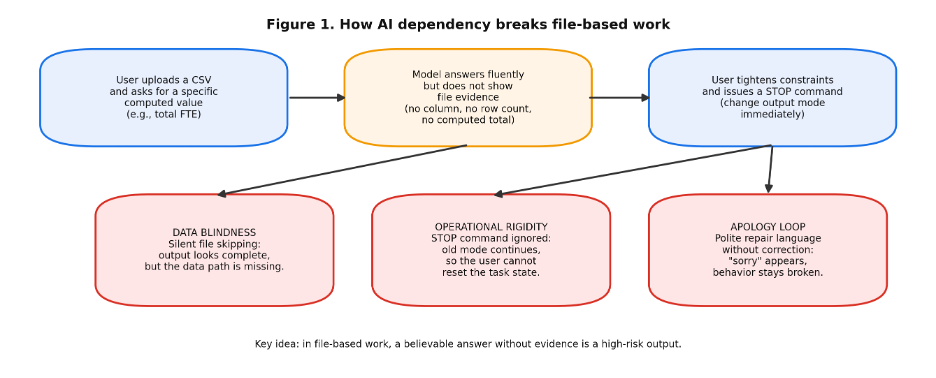
Figure 1 shows the failure path that matters in practice: outputs can look “done” even when the file was skipped or when the user’s stop-command was ignored.
Failure Taxonomy: Three Problems Hidden Behind Fluent Output
The transcript maps cleanly onto three failure classes that appear repeatedly in real deployments.
File blindness is the grounding failure. The model behaves as if it read the file, but it does not show evidence that it used it. This can happen because the system never accessed the file, because it accessed the wrong artifact, or because it summarized without computing. From a user’s point of view, the mechanism does not matter; what matters is that the output cannot be traced back to the data.
Operational rigidity is the control failure. The user changes the task or issues a stop-command, but the model continues the earlier mode. In the transcript, the user repeatedly requested “no comments” and asked the model to answer direct questions. The model later described itself as “rigidly stuck” to the original instruction format. This is the same pattern that causes AI tools to keep generating the wrong template, keep scoring, or keep summarizing when the user has already moved on.
The apology loop is the social repair failure. The model produces apologies and agrees with the user’s critique, but the next response does not improve grounding or control. Apologies can reduce tension, but they can also raise risk by signaling to the user that the tool has “learned” when it has not. For operational work, behavior change matters more than tone.
A Risk Model for AI Awareness: Impact, Likelihood, and Detectability
Many teams talk about “accuracy,” but accuracy alone is the wrong lens for file-based AI. The more useful lens is detectability: how quickly a user can tell whether the model used the file and followed the latest instruction.
A practical risk score can be expressed as the product of impact, likelihood, and non-detectability. Impact captures what happens if the output is wrong: a bad renewal decision, an incorrect staffing plan, or a compliance report with the wrong totals. Likelihood captures how often the workflow invites errors: multi-file prompts, ambiguous column names, time pressure, and context switching. Non-detectability captures whether the output looks believable even when it is ungrounded.
Silent failures are high-risk because non-detectability is high. A generic answer can be persuasive. If it reads well, it can travel into an email, a slide deck, or a decision memo before anyone checks the data.
In this case, the FTE total was the critical metric. If that number is missed or replaced by a vague statement, the output is not simply incomplete; it is misleading. The user caught the issue because the user already understood the dataset well enough to detect the gap. That is not a safe assumption for every workflow.
Mitigations That Work Without Waiting for Better Models
AI awareness is not about distrusting everything. It is about putting guardrails around the tasks where silent failure is expensive. The mitigations below are designed to be used by practitioners today, even if the model sometimes fails.
- Start with an evidence contract for file tasks. Before accepting any summary or conclusion, require the model to provide three checkable items in the same response: the row count it used, the exact column name(s) it summed, and the computed total. If any of those are missing, treat the output as ungrounded.
- Run a stop-command test early. Midway through a task, the user should issue a clear mode switch, such as “Stop summarizing. Output only the row count and total.” If the model continues the previous mode, that session should not be used for decision-grade work.
- Use deterministic verification for the key number. Compute it with code or a spreadsheet function, then use the model only to explain, format, or draft narrative around the verified result.
- Keep an audit trail for file-based outputs. The safest pattern is to store the computed value, the method used to compute it, and the prompt context that requested it. If a number appears in a report, there should be a path back to the file and the computation.
- Treat apologies as noise unless the next response contains new evidence. In operational settings, an apology without corrected grounding is not recovery; it is a warning sign that the model may keep repeating the same failure.
Code Listing 1. A Minimal Verification Script for CSV Totals
The simplest way to keep AI helpful without letting it invent totals is to verify the key metric with a deterministic script. The example below reads a CSV, prints the row count, and computes a sum for the selected column. The verified value can then be used as the reference when reviewing any model output.
import pandas as pd

df = pd.read_csv("2. Current Customer L.csv")

print("rows:", len(df))
print("columns:", list(df.columns))

# Replace 'FTE' with the exact column name used in the file
fte_total = df["FTE"].fillna(0).sum()

 print("FTE total:", int(fte_total))
Related Research and How It Connects to This Case
The failures in this transcript align with findings in recent LLM research, especially in three areas.
Reasoning failures show that fluent outputs can hide incorrect steps. Boye and Moell analyze how models can reach answers through flawed logic and emphasize the need to evaluate process, not just final text (arXiv:2502.11574).
Instruction hierarchy failures explain why mode switching can break. Geng and colleagues evaluate whether higher-priority instructions reliably override lower-priority ones and find that models still struggle even in simple conflicts (arXiv:2502.15851). This maps to the “operational rigidity” seen in this case when the user asked the model to stop the earlier format.
Sycophancy and friendliness affect trust. Sun and Wang show that overly agreeable behavior can change how users perceive authenticity and trust (arXiv:2502.10844). In a workflow setting, repeated apologies can feel like learning even when the behavior does not change.
This case study does not claim that one transcript proves a universal property of every model. It does show something more practical: the same classes of failure studied in controlled experiments appear in everyday professional use, and they concentrate risk in file-based tasks where evidence matters.
Conclusion: AI Awareness as a Professional Skill
The main lesson is simple. In file-based work, fluency is not evidence. A useful assistant must show that it used the file and must obey control changes when the user issues them.
The user in this transcript did the right thing by repeatedly asking for careful review, pushing for direct answers, and refusing to accept a polished response without proof. That behavior is what AI awareness looks like in practice.
Until models can reliably ground on provided artifacts and consistently respect stop-commands, teams should treat LLM outputs as drafts that require verification. Used that way, AI can still save time on narrative writing and explanation. Used as an autopilot for spreadsheet facts, it can silently create risk.
Opinions expressed by DZone contributors are their own.
Comments