

Best Practices for Migrating Data From Legacy Systems With AI
In this article, I will share my experience with AI-powered data migration, including what worked well and key lessons learned along the way.
Join the DZone community and get the full member experience.
Join For FreeData migration is one of the most challenging and high-risk parts of legacy system modernization. No wonder engineers and business leaders are experimenting with modern tools to speed up this process. AI is among the most promising.
In this article, I will share my experience with AI-powered data migration, including what worked well and key lessons learned along the way.
How AI Accelerates Data Migration
With AI tools, you can automate key steps of data migration that used to take weeks of manual work. But don't forget that you first need to make the appropriate settings and analyze each case for the possibility of automating a particular task.
So what tasks can be automated:
- Schema discovery: You can use ML models to scan legacy databases and detect tables, columns, and relationships that were never properly documented. This saves extensive manual investigation and documentation time, and provides a faster view of how legacy systems are structured.
- Mapping generation: AI helps create intelligent mapping between old and new systems by analyzing data profiles and schema metadata. From my experience, it can reduce manual mapping work by more than half. Plus, models learn from previous projects and improve future mappings automatically.
- Data transformation: NLP and pattern recognition can identify formats, units, and naming inconsistencies and transform them to match target schemas. This is especially useful in cases like merging data from multiple legacy sources where formats vary widely. For example, in healthcare analytics, patient records and lab results are represented using different codes, units, and naming conventions.
- Data validation: AI-driven validation checks can flag anomalies, duplicates, and missing values before they cause production issues. You can integrate these checks into CI/CD for automated data quality testing.
Connecting these steps into a single AI-augmented pipeline helps ensure 30–50% faster migration timelines, depending on the project size and complexity.
Limitations of Using AI for Data Migration
Despite all its potential, AI is not a one-size-fits-all solution. I’ve seen projects fail when teams relied too heavily on AI tools without addressing underlying data issues.
One of the key pitfalls is that AI can’t fix poor source data. If your legacy systems contain duplicates, missing values, or unstructured content, these problems must be addressed first. Otherwise, AI will only replicate the same errors faster and on a larger scale.
Another thing to remember is that AI models recognize patterns, not business rules. They can misinterpret similar-looking fields that actually have different meanings. Or some data relationships may be hidden in legacy application logic that AI can’t easily interpret. That’s why human involvement is still so important.
Finally, AI migration tools often need to fit into existing ETL or data pipeline setups, which requires engineering work and careful testing.
In other words, AI helps reduce repetitive effort, but it doesn’t mean you don’t need careful planning, validation, and domain expertise.
Best Practices for Using AI in Data Migration
As you can see, AI is far from automating the whole data migration pipeline, but that’s not what we are looking for, right? Letting AI handle part of the workload can free up your time and significantly speed up the process, if implemented right. Here’s what that looks like in practice.
Profile and Audit Your Data
You should always start with a clear picture of your data landscape. Run data profiling jobs across all legacy sources to detect duplicates, missing values, and schema inconsistencies. Tools like Talend Data Quality, Pandas Profiling, or Databricks Data Profiler can automatically generate statistics such as column-level null ratios, unique value counts, correlation matrices, and pattern distributions.
Clean and Standardize Data Before Migration
Standardizing formats such as timestamps, currency symbols, and identifier patterns is crucial for data accuracy. You can use Python scripts with Pandas or PySpark for distributed data.
Also, don’t forget to apply normalization logic. For example, converting all timestamps to UTC, ensuring consistent decimal separators, and enforcing schema-level data types.
By cleaning data at this stage, you reduce noise in downstream AI models, improve schema mapping accuracy, and prevent costly errors.
Build a Hybrid Architecture
From my experience, combining AI-driven components with traditional ETL or ELT frameworks creates the best balance between automation and control.
A common setup looks like this:
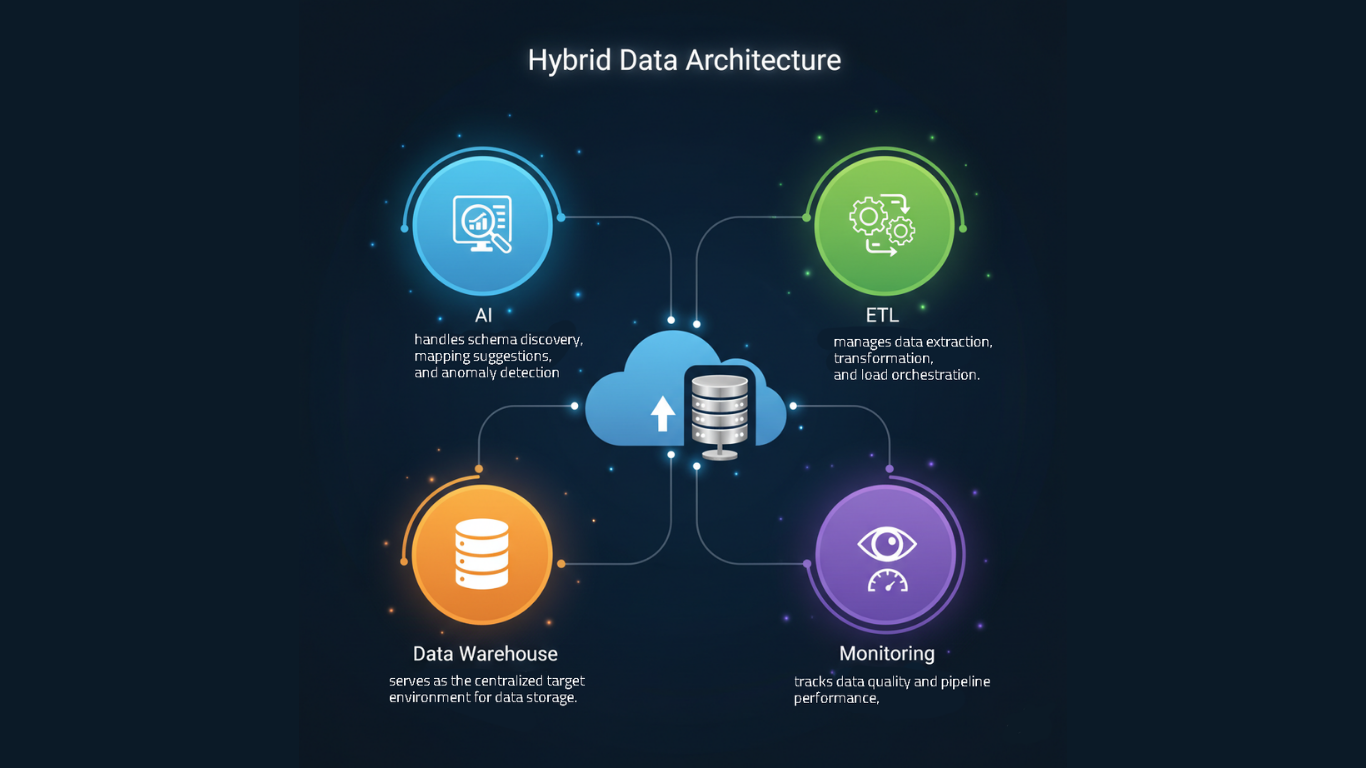
- AI layer: handles schema discovery, mapping suggestions, and anomaly detection.
- ETL layer: manages data extraction, transformation, and load orchestration.
- Data warehouse layer: serves as the centralized target environment for data storage.
- Monitoring layer: tracks data quality and pipeline performance, alerting teams to inconsistencies or failures in real time.
This hybrid setup keeps migrations efficient without turning them into a black box, so developers can still inspect, test, and fine-tune every step.
Migrate Incrementally
Nothing groundbreaking here, but it’s a common mistake. Teams often try to speed things up by migrating large chunks of data at once, which usually leads to more errors and rework later.
Migrate one dataset or domain at a time, validate thoroughly, and adjust mappings as needed. Use feature flags or versioned data pipelines to test changes safely.
Also, integrating automated validation frameworks into the CI/CD pipeline helps a lot. You can set up regression tests comparing legacy and migrated data to catch mismatches early.
Document and Version Everything
A lack of version control is a common mistake when teams rely too much on AI. Even when AI generates mappings automatically, export and store them in source control (Git) and carefully document the transformation logic. This helps future developers trace how data evolved. Keeping historical snapshots or versioned copies of migrated data gives you the safety net you’ll eventually need.
Set Up Monitoring and Rollback
I’ve learned that continuous monitoring can make a real difference in data migration. I highly recommend setting up automated alerts that track job status, data volume changes, and validation metrics so any failure or anomaly is detected immediately.
Detailed logs and audit trails make every data movement traceable. This is invaluable when you’re troubleshooting. With the right monitoring mindset, you catch issues early, recover fast, and maintain full confidence in the integrity of your migration pipeline.
Wrapping Up
My final advice is to use AI in repetitive tasks like schema mapping, data validation, and transformation. These are areas where automation can save hours and improve accuracy without sacrificing control. But when it comes to strategic design, data architecture, or defining business logic, keep humans in the lead.
Think of AI as a powerful assistant that helps you move faster and catch things you might otherwise miss, but the decisions that shape how systems work and data flows still need human judgment and accountability. This is especially true for legacy systems, where data structures are often so outdated or poorly documented that it takes more than one expert to make sense of how everything fits together.
Opinions expressed by DZone contributors are their own.
Comments