

Running AI/ML on Kubernetes: From Prototype to Production — Use MLflow, KServe, and vLLM on Kubernetes to Ship Models With Confidence
Run scalable, reliable AI/ML inference on Kubernetes with MLflow, KServe, and AutoML, and explore deployment, orchestration, and performance at scale.
 CORE
·
CORE
·
Editor's Note: The following is an article written for and published in DZone's 2025 Trend Report, Kubernetes in the Enterprise: Optimizing the Scale, Speed, and Intelligence of Cloud Operations.
After training a machine learning model, the inference phase must be fast, reliable, and cost efficient in production. Serving inference at scale, however, brings difficult problems: GPU/resource management, latency and batching, model/version rollout, observability, and orchestration of ancillary services (preprocessors, feature stores, and vector databases). Running artificial intelligence and machine learning (AI/ML) on Kubernetes gives us a scalable, portable platform for training and serving models. Kubernetes schedules GPUs and other resources so that we can pack workloads efficiently and autoscale to match traffic for both batch jobs and real-time inference. It also coordinates multi-component stacks — like model servers, preprocessors, vector DBs, and feature stores — so that complex pipelines and low-latency endpoints run reliably.
Containerization enforces reproducible environments and makes CI/CD for models practical. Built-in capabilities like rolling updates, traffic splitting, and metrics/tracing help us run safe production rollouts and meet SLOs for real-time endpoints. For teams that want fewer operations, managed endpoints exist, but Kubernetes is the go-to option when control, portability, advanced orchestration, and real-time serving matter.
Let's look into a typical ML inferencing setup using KServer on Kubernetes below:
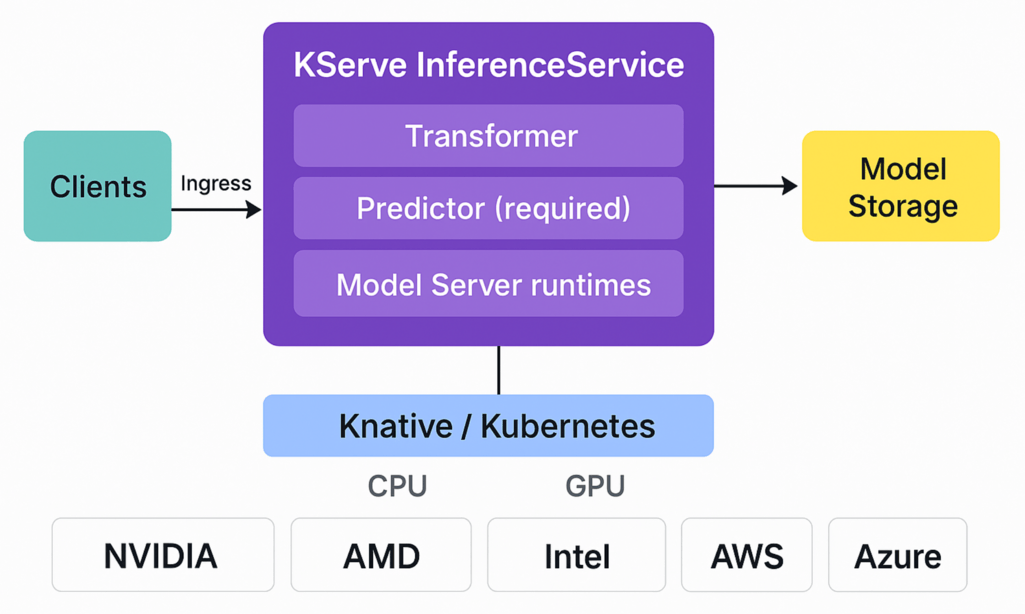
Figure 1. ML inference setup with KServe on Kubernetes
Clients (e.g., data scientists, apps, batch jobs) send requests through ingress to a KServe InferenceService. Inside, an optional Transformer pre-processes inputs, the Predictor (required) loads the model and serves predictions, and an optional explainer returns insights. Model artifacts are pulled from model storage (as seen in the diagram) and served via the chosen runtime (e.g., TensorFlow, PyTorch, scikit-learn, ONNX, Triton). Everything runs on Knative/Kubernetes with autoscaling and routing, using the CPU/GPU compute layer from providers such as NVIDIA/AMD/Intel on AWS, Azure, Google Cloud, or on-prem.
Part 1: MLFlow and KServe With Kubernetes
Let's dive into the practical implementation of an AI/ML scenario. We will use a combination of MLFlow to orchestrate ML processes, scikit-learn to train ML models, and KServe to inference our model in Kubernetes clusters.
Introduction to MLFlow
MLflow is an open-source ML framework, and we use it to bring order to the chaos that happens when models move from experiments to production. It helps us track runs (parameters, metrics, and files), save the exact environment and code that produced a result, and manage model versions so that we know which one is ready for production.
In plain terms, MLflow fixes three common problems:
- Lost experiment data
- Missing environment or code needed to reproduce results
- Confusion about which model is "the" production model; its main pieces — Tracking, Projects, Models, and the Model Registry — map directly to those needs
We can also use MLflow to package and serve models (locally as a Docker image or via a registry), which makes it easy to hand off models to a serving platform like Kubernetes.
Using MLflow and KServe on Kubernetes
MLflow offers a straightforward way to serve models via a FastAPI-based inference server, and mlflow models build-docker lets you containerize that server for Kubernetes deployment. However, this approach can be unsuitable for production at scale; FastAPI is lightweight and not built for extreme concurrency or complex autoscaling patterns, and manual management of numerous inference replicas creates significant operational overhead.
KServe (formerly KFServing) delivers a production-grade, Kubernetes-native inference platform with high-performance, scalable, and framework-agnostic serving abstractions for popular ML libraries such as TensorFlow, XGBoost, scikit-learn, and PyTorch.
We've created a short step-by-step guide on how to train an ML model with MLflow and scikit-learn, and how to deploy to Kubernetes using KServe. This guide walks you through a complete MLflow workflow to train a linear-regression model with MLflow tracking and perform hyperparameter tuning to determine the best model:
- Prerequisites – Install Docker, kubectl, and a local cluster (Kind or Minikube) or use a cloud Kubernetes cluster. See Kind/Minikube quickstarts.
- Install MLflow + MLServer support – Install MLflow with the MLServer extras (
pip install mlflow[mlserver]) and review MLServer examples for MLflow. - Train and log a model – Train and save the model with
mlflow.log_model()(ormlflow.sklearn.autolog()), following the MLflow tutorial. - Smoke-test locally – Serve with MLflow/MLServer to validate invocations before Kubernetes:
mlflow models serve -m models:/<name> -p 1234 --enable-mlserver. See MLflow models/MLServer examples. - Package or publish
- Option A – Build a Docker image:
mlflow models build-docker -m runs:/<run_id>/model -n <your/image> --enable-mlserver→ push to a registry. - Option B – Push artifacts to remote storage (S3/GCS) and use the
storageUriin KServe. Documents and examples can be found here.
- Option A – Build a Docker image:
- Deploy to KServe – Create a namespace and apply an
InferenceServicepointing to your image orstorageUri. See KServe's InferenceService quickstartand repo examples. Below is an example (Docker image method + Kubernetes) InferenceService snippet:YAMLapiVersion: "serving.kserve.io/v1beta1" kind: InferenceService metadata: name: mlflow-wine-classifier namespace: mlflow-kserve-test spec: predictor: containers: - name: mlflow-wine-classifier image: "<your_docker_user>/mlflow-wine-classifier" ports: - containerPort: 8080 protocol: TCP env: - name: PROTOCOL value: "v2" - Verify and productionize – Check Pods (
kubectl get pods -n <ns>), call the endpoint, then add autoscaling, metrics, canary rollouts, and explainability as needed (KServe supports these features).
The official MLflow documentation also has a good step-by-step guide that covers how to package the model artifacts and dependency environment as an MLflow model, validate local serving with mlserver using mlflow models serve, and deploy the packaged model to a Kubernetes cluster with KServe.
Part 2: Managed AutoML: Azure ML to AKS
For this example, we selected Azure. However, Azure is just one of many tool providers that can work in this scenario. Azure Machine Learning is a managed platform for the full ML lifecycle — experiment tracking, model registry, training, deployment, and MLOps — that helps teams productionize models quickly. Defining a reliable ML process can be difficult, and Automated ML (AutoML) can simplify that work by automating algorithm selection, feature engineering, and hyperparameter tuning. For low-latency, real-time inference at scale, you can run containers on Kubernetes, the de facto orchestration layer for production workloads.
We pick Azure Kubernetes Service (AKS) when we need custom runtimes, strict performance tuning (GPU clusters, custom drivers), integration with existing Kubernetes infrastructure (service mesh, VNETs), or advanced autoscaling rules. If we prefer a managed, low-ops path and don't need deep cluster control, Azure ML's managed online endpoints are usually faster to adopt.
We run AutoML in Azure ML to find the best model, register it, and publish it as a low-latency real-time endpoint on AKS so that we keep full control over runtime, scaling, and networking:
- Prerequisites – Acquire an Azure subscription, an Azure ML workspace, the Azure CLI/ML CLI or SDK, and an AKS Cluster (create one or attach an existing cluster).
- Run AutoML and pick the winner – Submit an AutoML job (classification/regression/forecast) from the Azure ML studio or SDK and register the top model in the Model Registry.
- Prepare scoring + environment – Add a minimal
score.py(load model, handle request) and an environment spec (Conda/requirements); you can reuse examples from the azureml-examples repo. - Attach AKS and deploy – Attach your AKS compute to the workspace (or create AKS), then deploy the registered model as an online/real-time endpoint using the Azure ML CLI or Python SDK.
- Test and monitor – Call the endpoint, add logging/metrics and autoscaling rules, and use rolling/canary swaps for safe updates.
As an example of how AutoML works, I will provide a typical AI/ML pipeline below:
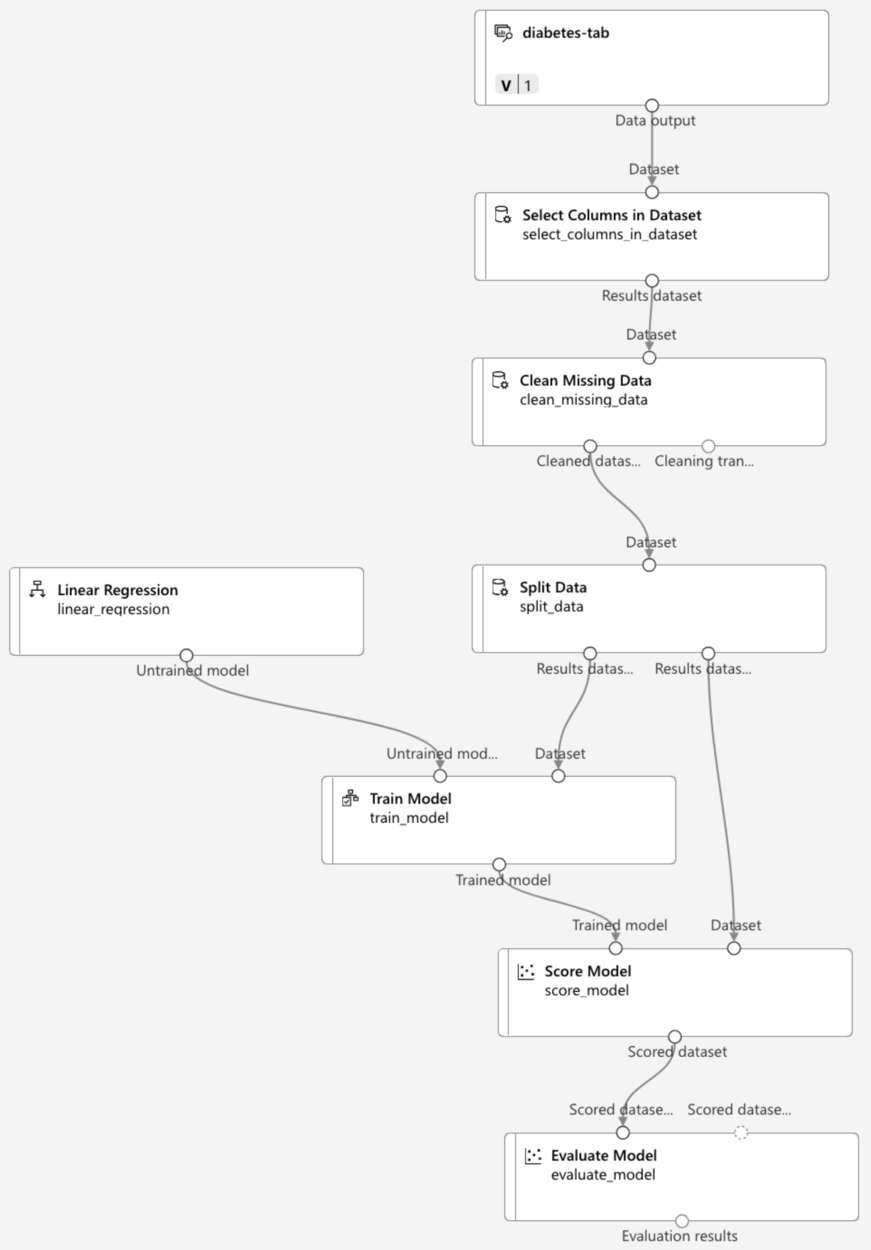
This ML pipeline contains steps to select, clean up, and transform data from datasets; to split data for training, selecting the ML algorithm, and testing the model; and finally, to score and evaluate the model. All those steps can be automated with AutoML, including several options to deploy models to the AKS/Kubernetes Real-Time API endpoint.
Part 3: Serving LLMs on Kubernetes
Let's have a look into the combination of LLMs and Kubernetes. We run LLMs on Kubernetes to get reliable, scalable, and reproducible inference: Kubernetes gives us GPU scheduling, autoscaling, and the orchestration primitives to manage large models, batching, and multi-instance serving. By combining optimized runtimes, request batching, and observability (metrics, logging, and health checks), we can deliver low-latency APIs while keeping costs and operational risks under control. To do so, we can use the open-source framework vLLM, which is used when we need high-throughput, memory-efficient LLM inference.
On Kubernetes, we run vLLM inside containers and couple it with a serving control plane (like KServe) so that we get autoscaling, routing, canary rollouts, and the standard InferenceService CRD without re-implementing ops logic. This combination gives us both the low-level performance of vLLM and the operational features of a Kubernetes-native inference platform.
Let's see how we can deploy LLM to Kubernetes using vLLM and KServe:
- Prepare cluster and KServe – Provision a Kubernetes cluster (AKS/GKE/EKS or on-prem) and install KServe, following the quickstart.
- Get vLLM – Clone the vLLM repo or follow the docs to install vLLM and test
vllm servelocally to confirm that your model loads and the API works. - Create a vLLM ServingRuntime/container – Build a container image or use the vLLM ServingRuntime configuration that KServe supports (the runtime wraps
vllm servewith the correct arguments and environment variables). - Deploy an InferenceService – Apply a KServe InferenceService that references the vLLM serving runtime (or your image) and model storage (S3/HF cache). KServe will create pods, handle routing, and expose the endpoint.
- Validate and tune – Hit the endpoint (through ingress/port-forward), measure latency/throughput, and tune vLLM batching/token-cache settings and KServe autoscaling to balance latency and GPU utilization.
Last but not least, we can run vLLM, KServe, and BentoML together to get high-performance LLM inference and production-grade ops. Here is a short breakdown:
- vLLM – the high-throughput, GPU-efficient inference engine (token generation, KV-cache, and batching) — the runtime that actually executes the LLM
- BentoML – the developer packaging layer that wraps model loading, custom pre-/post-processing, and a stable REST/gRPC API, then builds a reproducible Docker image or artifact
- KServe – the Kubernetes control plane that deploys the container (Bento image or a vLLM serving image) and handles autoscaling, routing/ingress, canaries, health checks, and lifecycle management
How do they fit together? We package our model and request logic with BentoML (image or Bento bundle), which runs the vLLM server for inference. KServe then runs that container on Kubernetes as an InferenceService (or ServingRuntime), giving autoscale, traffic controls, and observability.
Pros and Cons of Kubernetes Inference Frameworks for ML
We already had a look at the KServe library. However, there are other powerful alternatives. Let's look at the table below:
Table 1. KServe alternative tools and libraries
| Library | Overview | Pros | Cons |
|---|---|---|---|
|
Kubernetes-native ML serving and orchestration framework offering CRDs for deployments, routing, and advanced traffic control |
Kubernetes-first (CRDs, Istio/Envoy integrations); rich routing (canary, A/B); built-in telemetry and explainer integrations; supports multiple runtimes |
Steeper learning curve; more operational surface to manage; heavier cluster footprint |
|
|
BentoML (with Yatai) |
Python-centric model packaging and serving; Yatai/Helm lets you run Bento services on Kubernetes as deployments/CRDs |
Excellent developer ergonomics and reproducible images; fast local dev loop; simple CI/CD image artifacts |
Less cluster-native controls out of the box (needs Yatai/Helm); autoscaling and advanced Kubernetes ops require extra setup |
|
NVIDIA Triton Inference Server |
High-performance GPU-optimized inference engine supporting TensorRT, TensorFlow, PyTorch, ONNX, and custom back ends |
Exceptional GPU throughput and mixed-framework support; batch and model ensemble optimizations; production-grade performance tuning |
Less cluster-native controls out of the box (needs Yatai/Helm); autoscaling and advanced Kubernetes ops require extra setup |
Conclusion
Our goal is to run reliable, low-latency AI/ML in production while keeping control of cost, performance, and repeatability. Kubernetes gives us the orchestration primitives we need — GPU scheduling, autoscaling, traffic control, and multi-service coordination — so that models and their supporting services can run predictably at scale. Paired with optimized runtimes, serving layers, and inference engines, we get both high-inference performance and production-grade operational controls. The result is portable, reproducible deployments with built-in observability, safe rollout patterns, and better resource efficiency.
Start small, validate with a single model and clear SLOs, pick the serving stack that matches your performance and ops needs, then iterate. Kubernetes lets you grow from prototype to resilient, scalable serving.
This is an excerpt from DZone's 2025 Trend Report, Kubernetes in the Enterprise: Optimizing the Scale, Speed, and Intelligence of Cloud Operations.
Read the Free Report
Opinions expressed by DZone contributors are their own.