

AI-Powered AWS CloudTrail Analysis: Using Strands Agent and Amazon Bedrock for Intelligent AWS Access Pattern Detection
In this post, I came up with a solution that addresses the critical challenge of efficiently analyzing AWS CloudTrail logs to identify security threats.
Join the DZone community and get the full member experience.
Join For FreeBackground/Challenge
AWS CloudTrail logs capture a comprehensive history of API calls made within an AWS account, providing valuable information about who accessed what resources and when. However, these logs can be overwhelming to analyze manually due to their volume and complexity. Security teams need an efficient way to:
- Identify unusual access patterns
- Detect potential security threats
- Understand resource usage patterns
- Generate human-readable reports from technical log data
My approach combines AWS native services with generative AI to transform raw log data into actionable security insights. By leveraging the power of Amazon Bedrock and the Strands Agent framework, I have created a scalable, automated system that significantly reduces the manual effort required for CloudTrail analysis while providing more comprehensive results than traditional methods.
Solution Overview
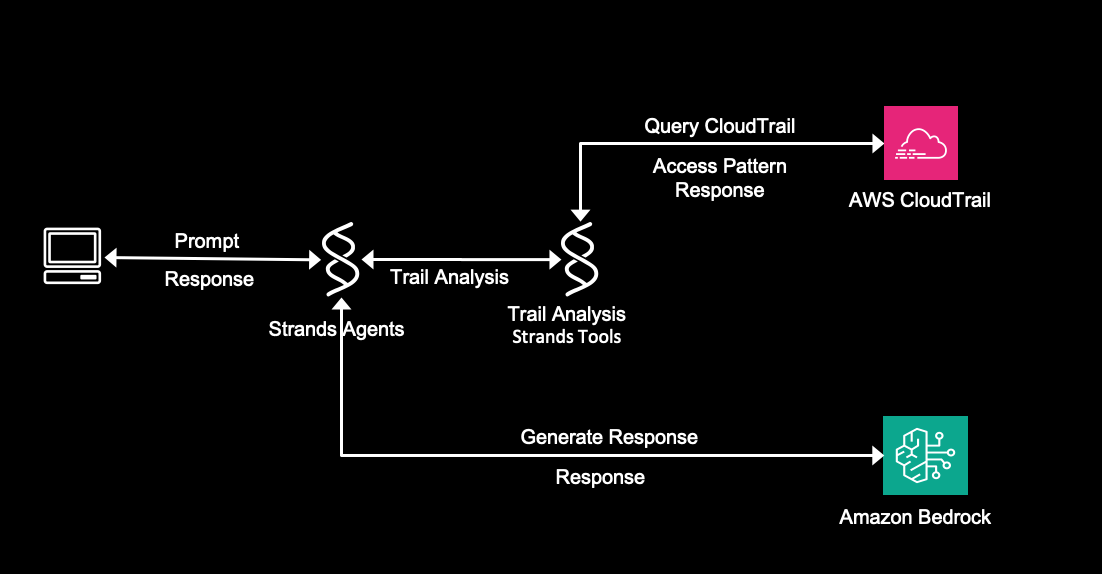
This solution leverages AWS CloudTrail logs, Strands Agents, and Amazon Bedrock's generative AI capabilities to automatically analyze access patterns and generate insightful reports. The system queries CloudTrail logs, performs pattern analysis, and uses Anthropic Claude (via Amazon Bedrock) to transform raw data into actionable security insights.
Prerequisites
- AWS Resources
- AWS account with CloudTrail enabled
- IAM permissions (Add more as needed):
- CloudTrail:LookupEvents
- Bedrock:InvokeModel
- Python Environment
- Python 3.12+
- Required packages:
- boto3
- Strands Agents SDK (for agent framework)
- Configuration
- AWS credentials configured locally (via AWS CLI or environment variables)
- Amazon Bedrock access to Claude model (us.anthropic.claude-3-5-sonnet-20241022-v2:0)
Solution Architecture Overview
Set Up the Environment
Follow the quickstart guide to create a Strands agent project. Once your environment is ready, replace the agent.py with trailInsightAgent.py and add files as shown in the image below.
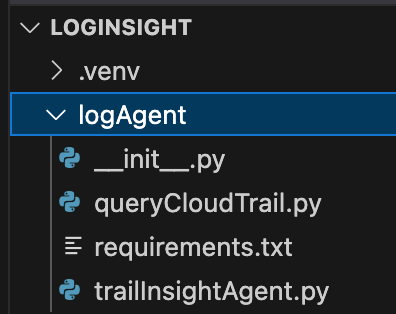
The solution consists of two main components:
1. Orchestration Layer (trailInsightAgent.py)
- Uses the Strands Agent framework to manage the workflow
- Registers the `trail_analysis` tool (decorated with '@tool' in queryCloudTrail.py)
- AI-Powered Insight Generation executes the analysis and displays results
- Connects to Amazon Bedrock
- Sends the analysis data to Claude with a specialized prompt
- Processes the AI-generated response
- Returns formatted insights
# trailInsightAgent.py
from strands import Agent, tool
from queryCloudTrail import trail_analysis

def main():
    # Initialize the agent with the trail_analysis tool
    agent = Agent(tools=[trail_analysis])
    # Define the prompt for CloudTrail analysis
    prompt = """Review the cloudtrail logs for the last 3 days and provide a report in a tabular format. \
    Focus on identifying unusual access patterns and security concerns, and give remediation to address any findings."""

    # Execute the agent with the message
    response = agent(prompt)
    # Print the response
    print(response)

if __name__ == "__main__":
    main()
2. CloudTrail Log Retrieval (queryCloudTrail.py)
This component has three functions as follows. The first function, query_cloudtrail_logs, retrieves CloudTrail events using the AWS SDK (boto3).
#queryCloudTrail.py
import boto3
from datetime import datetime, timedelta
from strands import tool
region="us-west-2"  #read the region from environment variable

def query_cloudtrail_logs(
    days=7,
    max_results=10
):
    # Create CloudTrail client
    client = boto3.client('cloudtrail', region_name=region)
    # Calculate start and end time
    end_time = datetime.now()
    start_time = end_time - timedelta(days=days)
    # Query parameters
    params = {
        'StartTime': start_time,
        'EndTime': end_time,
        'MaxResults': max_results
    }
    # Execute the query
    response = client.lookup_events(**params)
    return response['Events']
The second function, analyze_access_patterns, processes CloudTrail events to identify patterns.
- Most frequent API calls
- Most active users
- Most accessed AWS services
- Most accessed resources
#Access Pattern Analysis (queryCloudTrail.py)
def analyze_access_patterns(events):
    # Initialize counters
    event_counts = {}
    user_counts = {}
    resource_counts = {}
    service_counts = {}

    for event in events:
        # Count events by name
        event_name = event.get('EventName', 'Unknown')
        event_counts[event_name] = event_counts.get(event_name, 0) + 1

        # Count events by user
        username = event.get('Username', 'Unknown')
        user_counts[username] = user_counts.get(username, 0) + 1

        # Extract service name from event source
        event_source = event.get('EventSource', '')
        service = event_source.split('.')[0] if '.' in event_source else event_source

        service_counts[service] = service_counts.get(service, 0) + 1

        # Count resources accessed
        if 'Resources' in event:
            for resource in event['Resources']:
                resource_name = resource.get('ResourceName', 'Unknown')
                resource_counts[resource_name] = resource_counts.get(resource_name, 0) + 1

    return {
        'event_counts': event_counts,
        'user_counts': user_counts,
        'service_counts': service_counts,
        'resource_counts': resource_counts
    }
The third function, trail_analysis, ties everything together:
- Retrieves CloudTrail logs for the last 3 days
- Analyzes the access patterns
- Returns the formatted insights
- Add error logic to extend this function
# Trail_analysis Tool (queryCloudTrail.py)
@tool
def trail_analysis() -> str:
    # Query CloudTrail logs (customize parameters as needed)
    events = query_cloudtrail_logs(
        days=3,           # Look back 3 days
        max_results=10   # Get up to 100 results
    )

    # Analyze access patterns
    analysis = analyze_access_patterns(events)
    return analysis
Verify It
To test this solution, run the following command in a terminal window. Make sure you are inside the logAgent directory.
- python3 trailInsightAgent.py
Summary
In this post, I showed you how this architecture automates the AWS CloudTrail log analysis process, reducing manual effort and improving security insights. The solution combines CloudTrail data retrieval, pattern analysis, and generative AI to transform complex log data into actionable security recommendations. By leveraging Amazon Bedrock and the Strands Agent framework, I have created a system that addresses concerns regarding the complexity and volume of CloudTrail logs while providing meaningful security insights.
Try out this approach for your own AWS environments and share your feedback and questions in the comments. You can extend this solution by hosting it in AWS Lambda and exposing it using API Gateway, adding scheduled execution, integrating with security information and event management (SIEM) systems, or customizing the analysis for your specific security requirements.
Cost Consideration
While this solution offers automated analysis capabilities, costs can be managed effectively through several strategies:
- Adjust query frequency: Schedule analyses at appropriate intervals rather than running on-demand
- Optimize query size: Limit the ‘max_results’ parameter to retrieve only necessary data
- Fine-tune bedrock usage: Adjust token limits based on required detail level
- Use targeted filters: Apply specific filters (username, event type) to focus on relevant data
The primary cost drivers are:
- CloudTrail storage
- Amazon Bedrock API calls
Remember to delete all resources after implementing this architecture if you are only validating the solution, to prevent incurring unnecessary costs.
Opinions expressed by DZone contributors are their own.
Comments