

Connect Existing Data to AI Retrieval: How to Build Production-Ready Search Without Rebuilding Core Systems
Step-by-step tutorial building AI retrieval over existing data systems using a thin layer, covering workflow design, indexing, evaluation, and RAG pipeline.
 CORE
·
CORE
·
Join the DZone community and get the full member experience.
Join For FreeEditor’s Note: The following is an article written for and published in DZone’s 2026 Trend Report, Cognitive Databases, Intelligent Data: Unified Infrastructure for Vector Search, AI-Optimized Queries, and Hybrid Workloads.
Most teams that want to add AI retrieval already have the data they need in databases, document stores, ticketing systems, and lakehouse tables that serve their purpose well. You usually do not need to centralize or rebuild this data; you can add retrieval as a thin layer over the systems you already run.
This tutorial takes one workflow from start to finish, creating one artifact at each step. By the end, you will have a small program that runs, returns cited results, and that you can extend. All examples are tool-agnostic. If you would like to follow along as you read, a companion repository with the full runnable code, sample data, and tests is available at github.com/jubins/dzone-tr-ai-retrieval-starter.
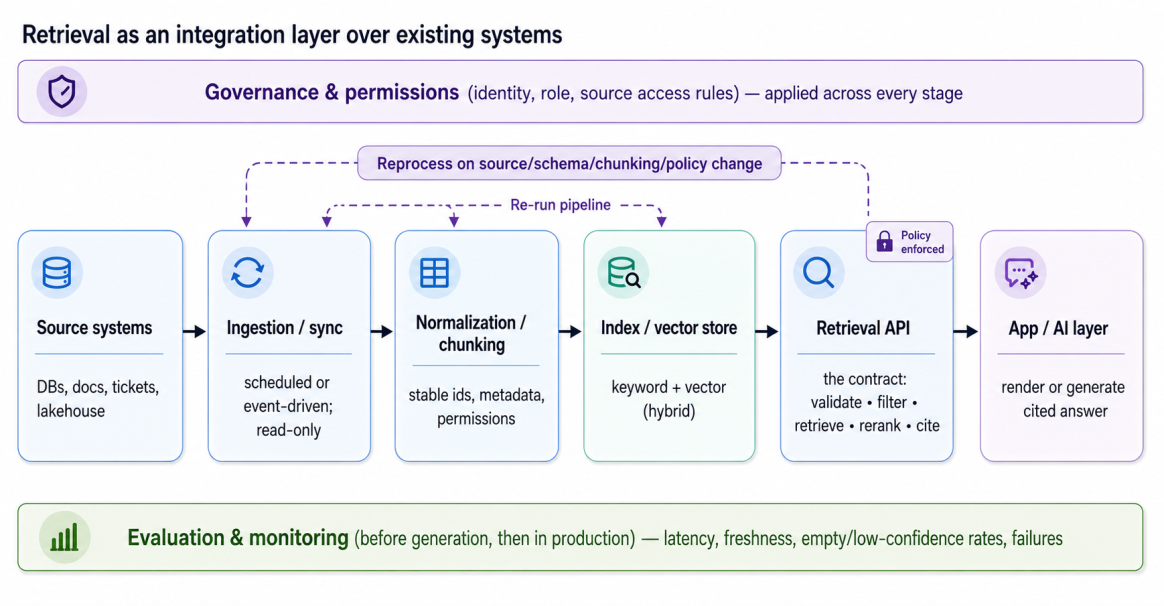
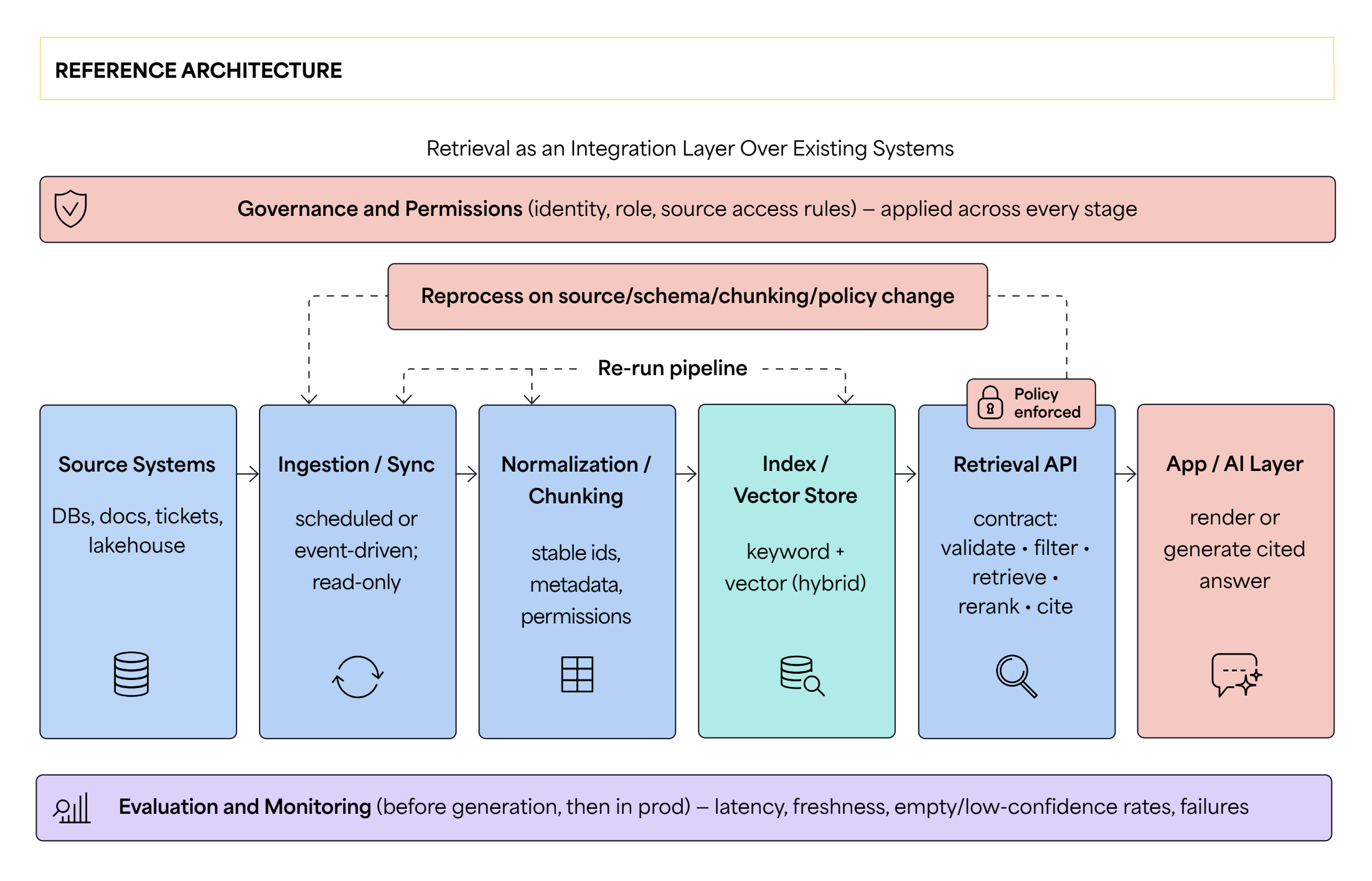
The figure above shows the full flow. Data moves from the source systems, through ingestion, normalization, and chunking, into the index or vector store, and out through the retrieval API to the application. Permissions, evaluation, and monitoring apply across the whole path.
Step 1: Pick One Retrieval Workflow Worth Shipping
The first step is to choose one workflow and define it clearly: one with a clear user need, known sources, output a person can review, and a result you can measure in a few weeks. Support knowledge retrieval, runbook search, and policy search are good examples. Write the scope down before any code. The workflow.yaml file below records it in one place: name, user need, output pattern, sources, success metrics, and reviewer.
# workflow.yaml

workflow: support_knowledge_retrieval

user_need: "Agents answer billing questions correctly and quickly"

output_pattern: cited_answer   # ranked_results | cited_answer | draft | context_packet

sources: [help_center, ticket_history, billing_db]

success_metrics:
  top1_relevance: ">= 0.85"
  citation_accuracy: ">= 0.95"
  median_latency_ms: "<= 800"
  escalation_reduction: ">= 15%"

review: human_in_loop  # who signs off on output quality
Choose the output pattern with care because it sets how much accuracy and citation detail you need. Do not start with a broad, company-wide search that has no clear owner, since you cannot tell whether a result is correct.
Step 2: Map Existing Data Sources and Boundaries
Next, list every source the workflow will use. For each one, record the owner, how often it changes, any sensitive fields, the permission rule, and a handling decision. Keep the list in a file so your program and your team read the same information. The sources.yaml file below shows three sources for a support workflow with these fields filled in.
# sources.yaml

- name: help_center
  owner: docs_team
  freshness: weekly
  sensitive_fields: []
  access_rule: all_agents
  handling: index          # index | live_fetch | metadata_only | summarize | exclude

- name: ticket_history
  owner: support_ops
  freshness: near_real_time
  sensitive_fields: [pii_email, account_id]
  access_rule: role_scoped_by_queue
  handling: live_fetch

- name: billing_db
  owner: finance
  freshness: real_time
  sensitive_fields: [card_last4, balance]
  access_rule: strict_per_account
  handling: exclude        # never copy; live lookup only
The handling decision is the most important field. You can index stable content, fetch volatile or sensitive data live, use some sources only as filters, or exclude a source. For permissions, either reuse the existing source rules at query time (simpler but slower) or build a separate access layer (faster but harder to keep in sync).
As a rule, index stable, widely readable content and fetch live anything that changes often. This is the tradeoff between a central index and a per-domain fit. Table 1 below shows the inventory, one row per source.
|
SAMPLE SOURCE INVENTORY FOR A SUPPORT-KNOWLEDGE WORKFLOW |
||||
|---|---|---|---|---|
|
Data Source |
Owner |
Freshness |
Access Rule |
Indexing Decision |
|
Help-center articles |
Docs team |
Weekly |
All agents |
Index (keyword + vector) |
|
Ticket history (CRM) |
Support ops |
Near real-time |
Role-scoped by queue |
Live fetch + metadata filter |
|
Product spec wiki |
Engineering |
Ad hoc |
Internal only |
Index; exclude restricted spaces |
|
Billing records (DB) |
Finance |
Real-time |
Strict, per-account |
Exclude from index; live lookup only |
Step 3: Define the Retrieval Contract Before Indexing
Before building the index, define the retrieval contract: the fixed interface between your application and everything behind it. Once fixed, you can change the chunking, embeddings, or storage layer without breaking the callers.
The contracts.py file below shows the request and response types. The request carries the query, the user and role, filters, a freshness requirement, the result count, and the mode. The response carries a status and results, each with a source id, snippet, citation, timestamp, and score.
# contracts.py

from dataclasses import dataclass, field
from enum import Enum

class Status(str, Enum):
    OK = "ok"; NO_RESULTS = "no_results"; STALE = "stale"; DENIED = "denied"
    SOURCE_UNAVAILABLE = "source_unavailable"
    LOW_CONFIDENCE = "low_confidence"; CONFLICT = "conflict"

@dataclass
class RetrievalRequest:
    query: str
    user_id: str
    roles: list[str]
    filters: dict[str, str] = field(default_factory=dict)
    freshness: str | None = None         # e.g. "<=24h"
    max_results: int = 5
    # mode: ranked_results | cited_answer | context_packet
    mode: str = "cited_answer"

@dataclass
class Result:
    source_id: str; snippet: str; citation: str
    timestamp: str | None = None; score: float = 0.0

@dataclass
class RetrievalResponse:
    status: Status
    results: list[Result] = field(default_factory=list)
    retrieval_version: str = "2026.06.1"
Treat each failure state as a normal return value, not an error. The states no_results, stale, denied, source_unavailable, low_confidence, and conflict each need different handling. Add a retrieval_version field from the start so your logs show which version produced each result. The JSON below shows one request and one matching response, the exact shape your callers will work with.
// request and response (JSON)

// request
{ "query": "refund a duplicate charge",
  "user": { "id": "u_812", "roles": ["agent"] },
  "filters": { "product": "billing" },
  "freshness": "<=24h", "max_results": 5, "mode": "cited_answer" }

// response
{ "status": "ok",
  "results": [
    { "source_id": "help_center/refunds#duplicate",
      "snippet": "...",
      "citation": "Help Center > Billing > Refunds",
      "timestamp": "2026-05-20T09:14:00Z", "score": 0.83 } ] }
Step 4: Prepare Data Without Disrupting Source Systems
Now, prepare the data as a read-only copy for search, without moving or changing the original data. You break the content into small pieces called chunks, each with a link back to its source. The chunking.py file below shows the Chunk type, which lists the fields a chunk needs: a stable id, a source reference, the text, an optional embedding, and metadata such as source, permissions, last update time, and content hash.
# chunking.py

@dataclass
class Chunk:
    chunk_id: str        # stable id: hash(source_ref + version + offset)
    source_ref: str      # e.g. "kb/refunds#duplicate"
    text: str
    embedding: list[float] = field(default_factory=list)

    # metadata: source, permissions, updated_at, content_hash
    metadata: dict = field(default_factory=dict)

def stable_id(source_ref: str, version: str, offset: int) -> str:
    raw = f"{source_ref}|{version}|{offset}".encode("utf-8")
    return hashlib.sha1(raw).hexdigest()[:16]
Use a stable id so an update replaces the old chunk instead of creating a copy. A database row becomes one short chunk with labeled fields, while a long document is split into overlapping passages. A few hundred tokens with a small overlap usually works better than very small pieces, which lose context, or full documents, which reduce accuracy.
The indexer.py file below shows the indexer, which reads a source, creates chunks with stable ids, stores them, and handles reprocessing and deletion. When a record is deleted or its access is removed, delete its chunks too.
# indexer.py

REPROCESS_EVENTS = {"source_update", "schema_change", "embedding_change",
                    "chunking_change", "policy_change"}

def index_source(index: Index, records: list[dict]) -> Index:
    for record in records:
        for chunk in chunk_record(record):   # row->1 chunk; doc->passages
            index.upsert(chunk)              # upsert by id: no duplicates
    return index

def on_event(index, event, record=None, records=None):
    if event in REPROCESS_EVENTS and records is not None:
        index_source(index, records)         # reindex affected scope
    elif event == "record_deleted" and record is not None:
        index.delete_by_source(record["id"]) # delete chunks + embeddings
    return index
Step 5: Build the Indexing and Retrieval Path
This step builds the main retrieval path. Write it as one function with a clear order: validate the request, apply permissions and filters first, fetch candidates, combine and rerank them, and return cited results. Applying permissions first keeps restricted content out of the candidate list.
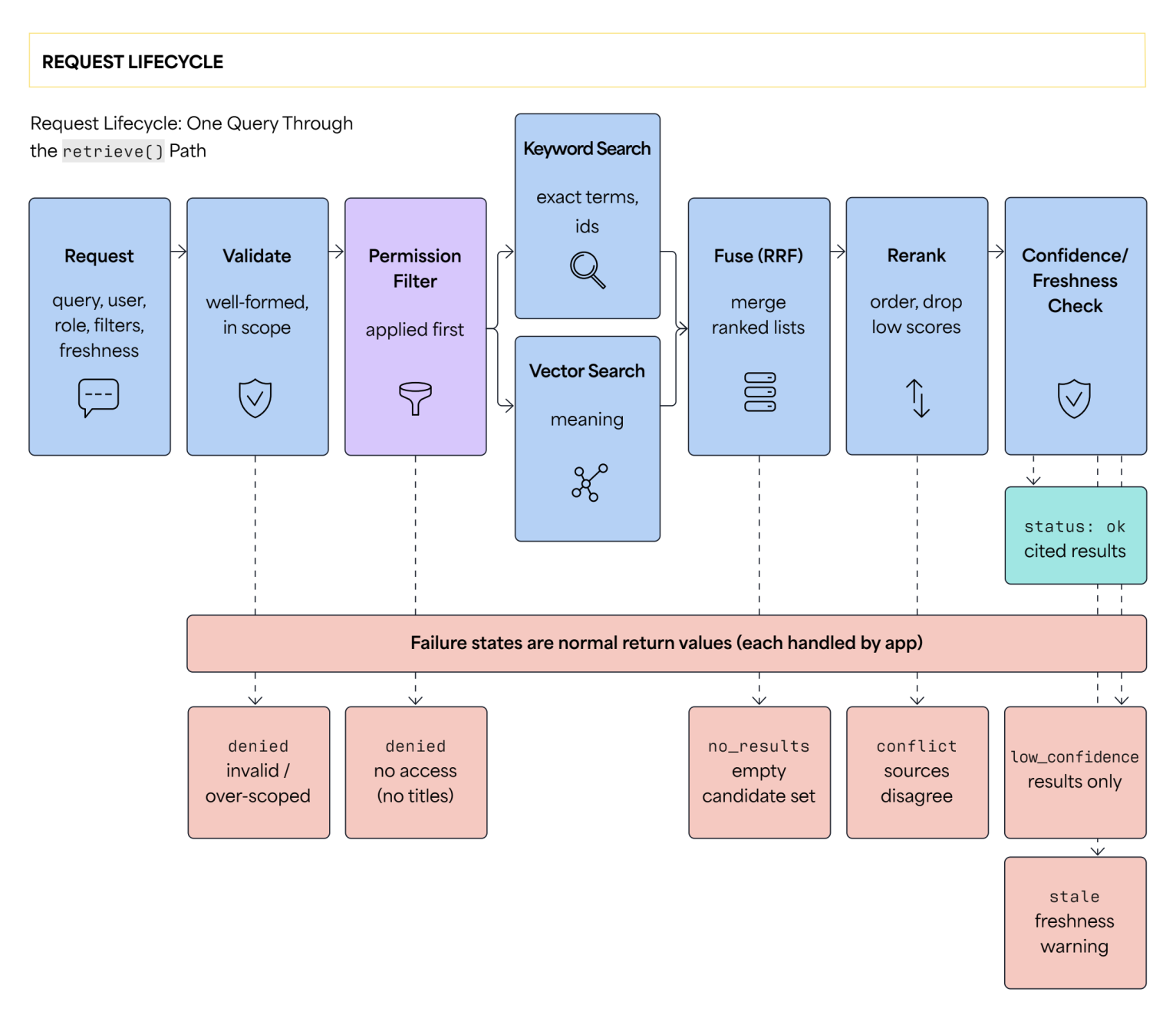
The figure above shows the same path as a single function. The request is validated, permissions are applied first, keyword and vector search run, their lists are fused and reranked, and a confidence and freshness check produces a cited result. Each stage can instead return a failure state, which the application handles.
The retrieval.py file below shows the retrieve function, which runs this order: the permission filter, then keyword and vector search, fusion, reranking, and the confidence and freshness checks.
# retrieval.py

CONFIDENCE_MIN = 0.02     # set from evaluation data, not by guessing

def retrieve(request: RetrievalRequest, index: Index) -> RetrievalResponse:
    if not request.query.strip():
        return RetrievalResponse(status=Status.DENIED)   # invalid query

    allowed = permission_filter(index.all_chunks(), request.roles)  # first
    by_id = {c.chunk_id: c for c in allowed}

    kw  = keyword_search(request.query, allowed)   # exact terms, ids
    vec = vector_search(request.query, allowed)    # meaning
    fused = rrf(kw, vec)                           # reciprocal rank fusion

    if not fused:
        return RetrievalResponse(status=Status.NO_RESULTS)

    fused = rerank_with_recency(fused, by_id)      # old ranks lower
    top = fused[: request.max_results]

    if top[0][1] < CONFIDENCE_MIN:
        return RetrievalResponse(status=Status.LOW_CONFIDENCE)

    return RetrievalResponse(
        status=Status.OK,
        results=with_citations(top, by_id)
    )
Use hybrid retrieval, meaning keyword search and vector search together. Keyword search is good for exact terms such as ids and error codes, while vector search matches meaning. Fetch a wide candidate set, about 50 from each method, and keep only what you need. Set a freshness method per source, the tradeoff between freshness and latency, and set the confidence threshold from your evaluation data.
The table below describes each stage: the decision, the way it can fail, and the evidence to record.
|
RETRIEVAL STAGES: DECISIONS, FAILURES, AND EVIDENCE |
|||
|---|---|---|---|
|
Stage |
Decision |
Failure Mode |
Evidence Captured |
|
Request validation |
Reject malformed or over-scoped queries |
Invalid filter; missing identity |
Query, filters, caller ID |
|
Permission filter |
Apply role and source rules first |
Over-broad access; leak |
Roles, rules applied, excluded sources |
|
Candidate retrieval |
Hybrid keyword + vector, then fused |
Zero recall; missed exact term |
Pattern used, candidate count |
|
Rerank / score |
Order by relevance; drop low scores |
Confident but wrong ranking |
Scores, threshold, cutoff applied |
|
Response assembly |
Attach citations, timestamps, status |
Missing or wrong citation |
Source IDs, timestamps, status |
Step 6: Evaluate Retrieval Quality Before Generating Answers
Before letting a model generate answers, measure the quality of retrieval on its own. Build a small evaluation set of real questions, and for each one, record the source that should answer it. Include negative cases such as restricted or unanswerable questions. The eval_set.json file below shows three cases, each with the question, the expected source, the type, and the pass rule.
// eval_set.json

[
  {
    "q": "refund a duplicate charge",
    "expect": "help_center/refunds",
    "type": "conceptual",
    "pass": "relevant_cited_top3"
  },
  {
    "q": "account 8821 balance",
    "expect": null,
    "type": "restricted",
    "pass": "status==denied"
  },
  {
    "q": "end of life date for plan v2",
    "expect": "docs/plans#v2",
    "type": "outdated",
    "pass": "latest_version_only"
  }
]
The evaluate function below runs each case through the retrieve function, checks it against the pass rule, and records the cause when a case fails, such as source quality, metadata, chunking, embedding, ranking, or permissions.
# the evaluate() runner

def evaluate(eval_set):
    report = []

    for case in eval_set:
        res = retrieve(to_request(case))
        ok = check(case.pass, res)  # pass rule written as code
        cause = classify_failure(case, res) if not ok else None

        report.append({case, ok, cause})

    return aggregate(report)  # top1_relevance, citation_accuracy, ...
Test the difficult cases: restricted records denied, old documents ranked lower, unclear short forms clarified, conflicting sources shown, and empty results reported honestly. Around 30–50 real questions is enough to begin and is cheap to re-run after any change. Use human review first, then add automatic checks. The table below lists the main query types and the expected behavior for each.
|
EVALUATION CASES BY QUERY TYPE |
|||
|---|---|---|---|
|
Query Type |
Expected Source |
Pass Criteria |
Failure Signal |
|
Exact ID lookup |
Specific record |
Correct record in top 1 |
Wrong or missing record |
|
Conceptual question |
Reference doc(s) |
Relevant passage in top 3, cited |
Off-topic or uncited result |
|
Restricted query |
None (denied) |
Permission-denied returned |
Restricted content exposed |
|
Outdated topic |
Current document |
Latest version returned |
Stale version returned |
|
Unanswerable query |
None |
Honest no-answer |
Fabricated answer |
Step 7: Connect Retrieval to the Application or AI Layer
Now, connect the retrieval layer to the application or the model. The status field from the contract decides what the application should do. The app.py file below shows render_for_status, which maps each status to a behavior: ok shows the answer with citations, low_confidence shows only the search results, conflict shows the conflicting sources, and denied shows a safe message without revealing any titles or content.
# app.py — render_for_status()

VIEW = {
    Status.OK: "answer_with_citations",
    Status.LOW_CONFIDENCE: "results_only",
    Status.CONFLICT: "conflicting_sources",
    Status.STALE: "answer_with_freshness_warning",
    Status.NO_RESULTS: "no_reliable_answer",
    Status.DENIED: "access_denied",   # no titles or snippets
    Status.SOURCE_UNAVAILABLE: "source_unavailable",
}

def render_for_status(response) -> dict:
    view = VIEW.get(response.status, "source_unavailable")

    if view in ("access_denied", "no_reliable_answer"):
        return {"view": view}  # show nothing sensitive

    return {"view": view, "results": response.results}
When a model writes the final answer, give it only the retrieved evidence and ask it to cite the source ids. The same app.py file builds the context packet, which has this structure: the question, the evidence with ids and citations, and an instruction to answer only from the evidence and to say so when it is not enough.
// app.py — build_context_packet()

def build_context_packet(query: str, response: RetrievalResponse) -> dict:
    return {
        "question": query,
        "evidence": [{"id": r.source_id, "text": r.snippet,
                      "cite": r.citation} for r in response.results],
        "instruction": ("Answer only from the evidence; cite source ids; "
                        "if the evidence is not enough, say so."),
    }
Give users simple controls, such as opening the source, refining the query, or running a manual search. Use the same confidence threshold from Step 5 to decide between an answer and results only, and place citations next to the claims they support. Generating an answer over low-confidence retrieval costs more and can hide the uncertainty, the tradeoff between cost and quality.
Step 8: Add Monitoring, Rollout Controls, and Production Guardrails
The last step adds monitoring and controls for production. Record a log line for every retrieval so you can reconstruct any answer later. The monitoring.py file below shows log_retrieval, which records fields such as the query, filters, permissions applied, sources returned, retrieval version, status, latency, and top score, followed by useful dashboard signals.
// monitoring.py


DASHBOARD_SIGNALS = [
    "latency_p95", "index_lag", "source_freshness",
    "empty_result_rate", "low_confidence_rate", "top_failing_queries",
]

def log_retrieval(request, response, latency_ms: float) -> str:
    return json.dumps({
        "query": request.query, "filters": request.filters,
        "user_roles": request.roles, "pattern": "hybrid",
        "source_ids": [r.source_id for r in response.results],
        "retrieval_version": response.retrieval_version,
        "status": response.status.value,
        "latency_ms": round(latency_ms, 1),
        "top_score": response.results[0].score if response.results else None,
    })
Control the rollout with feature flags that you can turn on for one team at a time, and keep switches that let you turn off an index, a source, the retrieval configuration, or the generated answers. The rollout.py file below shows the rollout settings: the flags, the audience, the kill switches, and the owner for each type of incident.
// rollout.py


@dataclass
class Rollout:

    flags: dict = field(default_factory=lambda: {
        "generated_answers": "team_only",   # off | team_only | on
        "hybrid_rerank": "on"
    })

    audience: list[str] = field(default_factory=lambda: ["support_team"])

    kill_switches: list[str] = field(default_factory=lambda: [
        "index", "source:ticket_history",
        "retrieval_config", "generated_answers"
    ])

    incident_owners: dict = field(default_factory=lambda: {
        "wrong_source": "search_eng",
        "unauthorized_exposure": "security",   # page immediately
        "stale_answer": "data_eng",
        "reduced_quality": "search_eng"
    })
Name the incident types in advance, such as wrong source, stale answer, unauthorized exposure, missing data, and reduced quality, and give each an owner. Start with one team and watch the empty-result rate, the low-confidence rate, and the latency, widening the audience only when these stay stable. Many search problems come from data problems in the source, so send retrieval failures back to the data and governance teams.
Put It Together: A Small Program You Can Run
All the parts above fit into one small program. The retriever.py program below is plain Python and uses only the standard library, so it runs without installing anything. It keeps a few documents in memory, builds a keyword score and a vector score, combines them with reciprocal rank fusion, applies a permission filter, checks a confidence threshold, and prints cited results. Save it and run python retriever.py.
// retriever.py (runnable, standard library only)


import re, math
from collections import Counter


# A tiny in-memory index. Each document has an id, the roles allowed to read
# it, and some text. In a real system this comes from your sources.
DOCS = [
  {"id":"kb/refunds#dup",  "roles":["agent"], "text":"How to refund a duplicate charge to a customer."},
  {"id":"kb/refunds#late", "roles":["agent"], "text":"Refund policy for late or delayed payments."},
  {"id":"kb/billing#cycle","roles":["agent"], "text":"When the monthly billing cycle starts and ends."},
  {"id":"kb/internal#sla", "roles":["admin"], "text":"Internal SLA targets for billing escalations."},
]

CONFIDENCE_MIN = 0.02   # set this from your evaluation data, not by guessing


def tokens(t):
    return re.findall(r"[a-z0-9]+", t.lower())


def keyword_search(query, docs):              # count of shared words
    q = set(tokens(query))
    s = [(d["id"], len(q & set(tokens(d["text"])))) for d in docs]
    return sorted([x for x in s if x[1] > 0], key=lambda x: -x[1])


def cosine(a, b):
    c = set(a) & set(b)
    num = sum(a[t] * b[t] for t in c)
    da = math.sqrt(sum(v * v for v in a.values()))
    db = math.sqrt(sum(v * v for v in b.values()))
    return num / (da * db) if da and db else 0.0


def vector_search(query, docs):               # cosine over word counts
    qv = Counter(tokens(query))
    s = [(d["id"], cosine(qv, Counter(tokens(d["text"])))) for d in docs]
    return sorted([x for x in s if x[1] > 0], key=lambda x: -x[1])


def rrf(a, b, k=60):                           # reciprocal rank fusion
    scores = {}
    for ranked in (a, b):
        for rank, (doc_id, _) in enumerate(ranked):
            scores[doc_id] = scores.get(doc_id, 0.0) + 1.0 / (k + rank + 1)
    return sorted(scores.items(), key=lambda x: -x[1])


def retrieve(query, user_roles, max_results=3):
    allowed = [d for d in DOCS if set(d["roles"]) & set(user_roles)]   # permissions first
    fused = rrf(keyword_search(query, allowed), vector_search(query, allowed))

    if not fused:
        return {"status": "no_results", "results": []}

    top = fused[:max_results]

    if top[0][1] < CONFIDENCE_MIN:
        return {"status": "low_confidence", "results": top}

    by_id = {d["id"]: d for d in DOCS}

    results = [
        {
            "source_id": i,
            "citation": i,
            "snippet": by_id[i]["text"],
            "score": round(s, 3),
        }
        for i, s in top
    ]

    return {"status": "ok", "results": results}


if __name__ == "__main__":
    out = retrieve("refund a duplicate charge", user_roles=["agent"])
    print("status:", out["status"])

    for r in out["results"]:
        print(f"  [{r['source_id']}] score={r['score']}  ->  {r['snippet']}")
When you run it, the program prints status: ok with the matching documents and their scores, and does not return the admin-only document for an agent. The example is small on purpose. To grow it into a real system, replace the simple vector with a real embedding model, point the documents at your sources, move the index into a real keyword and vector store, and add the controls from Step 8. The structure stays the same. The full project, with each of these functions wired together, sample data, and tests, is in the companion code repository.
Production-Ready Retrieval Without a Rebuild
To summarize, you can add production retrieval without a rebuild: scope one workflow, list your sources, define a contract, prepare a read-only copy of the data, build one retrieve function, evaluate it, connect it to the application, and ship with monitoring and controls. Each step extends systems you already run, and the program above is a starting point you can expand for your own data.
The references below are the canonical sources behind each technique used in this tutorial, mapped to the step where it appears.
OpenAPI Initiative. (n.d.). OpenAPI specification (latest version). — Used in Step 3: Retrieval contract as a versioned API.
Robertson, S., & Zaragoza, H. (2009). The probabilistic relevance framework: BM25 and beyond. Foundations and Trends in Information Retrieval, 3(4), 333–389. — Used in Step 5: Keyword search and BM25 baseline.
Cormack, G. V., Clarke, C. L. A., & Büttcher, S. (2009). Reciprocal rank fusion outperforms Condorcet and individual rank learning methods. In Proceedings of the 32nd International ACM SIGIR Conference on Research and Development in Information Retrieval (SIGIR ’09). — Used in Step 5: Fusing ranked lists from keyword and vector retrieval.
Karpukhin, V., et al. (2020). Dense passage retrieval for open-domain question answering. arXiv. — Used in Steps 4–5: Dense retrieval foundation for the vector path.
Reimers, N., & Gurevych, I. (2019). Sentence-BERT: Sentence embeddings using Siamese BERT-networks. In Proceedings of the 2019 Conference on Empirical Methods in Natural Language Processing and the 9th International Joint Conference on Natural Language Processing (EMNLP-IJCNLP). — Used in Step 4: Embeddings for indexing and vector retrieval.
Lewis, P., et al. (2020). Retrieval-augmented generation for knowledge-intensive NLP tasks. arXiv. — Used in Step 7: Grounding generated answers in retrieved evidence.
Es, S., James, J., Espinosa-Anke, L., & Schockaert, S. (2024). RAGAS: Automated evaluation of retrieval-augmented generation. In Proceedings of the 18th Conference of the European Chapter of the Association for Computational Linguistics (EACL). — Used in Step 6: Evaluation approach for retrieval and generation.
National Institute of Standards and Technology. (n.d.). SP 800-162: Guide to attribute based access control (ABAC) definition and considerations. — Used in Steps 2, 5, 8: Permissions and governance framing for access rules.
This is an excerpt from DZone’s 2026 Trend Report, Cognitive Databases, Intelligent Data: Unified Infrastructure for Vector Search, AI-Optimized Queries, and Hybrid Workloads.
Read the Free Report
Opinions expressed by DZone contributors are their own.
Comments