

Using Arrow Flight SQL to Improve Data Transfer Performance in Apache Doris
Learn how Arrow Flight SQL boosts Apache Doris data transfer up to 100x, enabling faster, efficient analysis and improved workflow in Python and Java.
Data analyst Xiao Hua rubs his sore eyes, staring blankly at the computer screen. He can't help but complain, "This data export is so slow!"
Indeed, waiting for MySQL protocol to transfer large volumes of data feels like trying to drink a barrel of water through a straw — when will it ever end?
While waiting for the data transfer, Xiao Hua flips through the Doris official documentation and stumbles upon a game-changing tool that can boost data transfer efficiency by 100 times — Arrow Flight SQL!
Traditional data transfer is like playing a "water pouring" game, involving several steps; Arrow Flight SQL, on the other hand, builds a highway for data to run smoothly without obstacles. Follow Xiao Hua's journey to understand Arrow Flight SQL in just three minutes!
Speed Up Data Transfer by 100 Times
Xiao Hua recently encountered a tricky problem. He needed to read massive amounts of data from Apache Doris for real-time analysis, but the traditional MySQL protocol's cumbersome serialization and deserialization processes made each query painfully slow.
"Is there a faster data transfer solution?" he wondered, scratching his head in frustration.
After scouring the Doris official documentation, he finally found a revolutionary breakthrough in Apache Doris 2.1 — Arrow Flight SQL, the high-speed data link.
This solution, based on Apache Arrow, boasts a staggering 100x improvement in data transfer performance compared to MySQL protocol.

How Does It Achieve a 100x Improvement?
Xiao Hua muttered to himself, "Do you know how slow traditional MySQL protocol data transfer is?"
It's like pouring a barrel of water into another through a funnel. Data from Doris's columnar storage format has to be converted to MySQL's row storage format and then back to columnar format on the client side, wasting a lot of time.
Arrow Flight SQL is completely different. It sets up a direct pipeline, allowing data to be transmitted from Doris to the client in Arrow columnar format without any conversion. This zero-copy transmission method boosts data transfer efficiency by nearly 100 times.
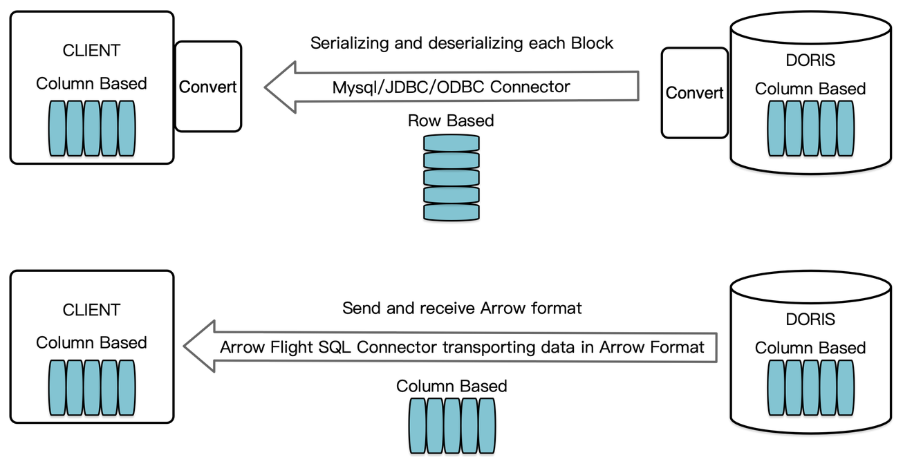
As shown in the figure above, query results in Doris are organized in columnar format blocks. In versions before 2.1, data had to be deserialized from row storage format bytes back to columnar format when transmitted via MySQL Client or JDBC/ODBC drivers.
By building a high-speed data transfer link with Arrow Flight SQL, if the target client also supports Arrow columnar format, the entire transfer process will completely avoid serialization/deserialization operations, eliminating the time and performance losses associated with them
What's even more amazing is that Arrow Flight SQL supports parallel transmission across multiple nodes, fully leveraging the multi-core advantages of modern hardware. For data scientists and analysts, this means they can obtain massive amounts of data for analysis in just a few seconds, significantly improving work efficiency!
Let Your Data Transfer Take Off
After understanding the basic principles, Xiao Hua couldn't wait to try out this "magic tool." In fact, using Arrow Flight SQL in Python and Java is very straightforward.
In Python, you can quickly set up a high-speed data channel in just a few steps:
# Doris Arrow Flight SQL Test

# Step 1: Install the library from PyPI.
# pip install adbc_driver_manager
# pip install adbc_driver_flightsql
import adbc_driver_manager
import adbc_driver_flightsql.dbapi as flight_sql

# Step 2: Create a client to interact with the Doris Arrow Flight SQL service.
# Modify arrow_flight_sql_port in fe/conf/fe.conf to an available port, such as 9090.
# Modify arrow_flight_sql_port in be/conf/be.conf to an available port, such as 9091.
conn = flight_sql.connect(uri="grpc://{FE_HOST}:{fe.conf:arrow_flight_sql_port}", db_kwargs={
            adbc_driver_manager.DatabaseOptions.USERNAME.value: "root",
            adbc_driver_manager.DatabaseOptions.PASSWORD.value: "",
        })
cursor = conn.cursor()

# Interacting with Doris via SQL using Cursor
def execute(sql):
    print("\n### execute query: ###\n " + sql)
    cursor.execute(sql)
    print("### result: ###")
    print(cursor.fetchallarrow().to_pandas())

# Step 3: Execute DDL statements, create database/table, show stmt.
execute("DROP DATABASE IF EXISTS arrow_flight_sql FORCE;")
execute("show databases;")
execute("create database arrow_flight_sql;")
execute("show databases;")
execute("use arrow_flight_sql;")
execute("""CREATE TABLE arrow_flight_sql_test
    (
         k0 INT,
         k1 DOUBLE,
         K2 varchar(32) NULL DEFAULT "" COMMENT "",
         k3 DECIMAL(27,9) DEFAULT "0",
         k4 BIGINT NULL DEFAULT '10',
         k5 DATE,
    )
    DISTRIBUTED BY HASH(k5) BUCKETS 5
    PROPERTIES("replication_num" = "1");""")
execute("show create table arrow_flight_sql_test;")

# Step 4: Insert data
execute("""INSERT INTO arrow_flight_sql_test VALUES
        ('0', 0.1, "ID", 0.0001, 9999999999, '2023-10-21'),
        ('1', 0.20, "ID_1", 1.00000001, 0, '2023-10-21'),
        ('2', 3.4, "ID_1", 3.1, 123456, '2023-10-22'),
        ('3', 4, "ID", 4, 4, '2023-10-22'),
        ('4', 122345.54321, "ID", 122345.54321, 5, '2023-10-22');""")

# Step 5: Execute queries, aggregation, sort, set session variable
execute("select * from arrow_flight_sql_test order by k0;")
execute("set exec_mem_limit=2000;")
execute("show variables like \"%exec_mem_limit%\";")
execute("select k5, sum(k1), count(1), avg(k3) from arrow_flight_sql_test group by k5;")

# Step 6: Close cursor
cursor.close()
For Java developers, Arrow Flight SQL also offers an elegant solution with JDBC-style APIs:
import java.sql.Connection;
import java.sql.DriverManager;
import java.sql.ResultSet;
import java.sql.Statement;

Class.forName("org.apache.arrow.driver.jdbc.ArrowFlightJdbcDriver");
String DB_URL = "jdbc:arrow-flight-sql://{FE_HOST}:{fe.conf:arrow_flight_sql_port}?useServerPrepStmts=false"
        + "&cachePrepStmts=true&useSSL=false&useEncryption=false";
String USER = "root";
String PASS = "";

Connection conn = DriverManager.getConnection(DB_URL, USER, PASS);
Statement stmt = conn.createStatement();
ResultSet resultSet = stmt.executeQuery("select * from information_schema.tables;");
while (resultSet.next()) {
    System.out.println(resultSet.toString());
}

resultSet.close();
stmt.close();
conn.close();
After testing and experimenting, Xiao Hua summarized several key performance optimization tips:
1. Smart Batch Processing
The default batch size is 1024 rows, which can be adjusted according to the actual scenario using setTargetBatchSize. For environments with ample memory, increasing the batch size can significantly boost throughput.
2. Parallel Acceleration
Java developers can use FlightClient to achieve parallel reading across multiple endpoints, more flexibly leveraging cluster resources.
A typical optimization is:
FlightClient client = FlightClient.builder()

            .setHost("localhost")

            .setPort(8080)

            .build();
3. Columnar Computing
Keep data in Arrow format for computations to avoid unnecessary format conversions. Python users can directly use pandas for efficient columnar computing:
cursor.fetchallarrow().to_pandas()

...
Summary
Back to the beginning of the story, Xiao Hua reconstructed his data analysis workflow using Arrow Flight SQL, achieving nearly 100x faster query speeds and significantly reduced memory usage. His boss was very satisfied with the improvement and even gave him a raise and promotion!
From this experience, Xiao Hua realized that technological innovation not only solves practical problems but also brings career development opportunities. Arrow Flight SQL is like giving data wings, truly "lifting" data analysis to new heights.
In the next issue, we will explore other interesting, useful, and valuable content. Stay tuned!
Opinions expressed by DZone contributors are their own.