

From Aspects to Advisors: Design Modular Cross-Cutting Features with Spring AI
Understand how Spring AI Advisors work and see how Aspect Oriented Programming concepts can be applied when interacting with LLMs.
 CORE
·
CORE
·
Join the DZone community and get the full member experience.
Join For FreeIn a nutshell, aspect-oriented programming (AOP) is a way of adding extra behavior to existing code without needing to change it. At its core, AOP is a programming paradigm that helps separate cross-cutting concerns (security checks, caching, transaction management, error handling, monitoring, logging, etc.) from the core logic of an application. By leveraging it, behavior that is needed in various layers or modules of an application is modularized and defined in a single place—an aspect—instead of being scattered across various components, which leads to duplicated and hard-to-maintain code or to a mix of business and infrastructure logic. With AOP, such concerns are written once and applied automatically whenever needed.
Similarly to AOP, when it comes to Spring AI applications, interaction requests and responses can be intercepted, modified, or augmented on the fly by using the Advisors API. Specifically, when sending or receiving data to or from a large language model (LLM) via a ChatClient instance, existing or custom advisors may be plugged in, and well-defined actions can be performed either before or after passing the request or response further down the execution chain.
The paradigm is similar — rather than defining a pointcut for weaving a before, after, or around advice at a certain join point, chains of advisors encapsulating specific logic can be injected into the components conducting the LLM interaction. As a result, the corresponding calls are advised in a specified order, based on the initial configuration.
This article aims to provide a better understanding of how such AI advisors work, how the ready-to-use ones can be plugged in and used directly, and ultimately how a custom advisor can be implemented and put to work as part of the request/response execution chain during communication with an LLM. Personally, I see this as a way of applying AOP concepts to Spring AI.
Proof of Concept
The experimental project built in this article is named ai-aop-advisors and uses the following:
- Java 21
- Maven 3.9.9
- Spring Boot v3.5.8
- Spring AI v1.1.0
In order to keep the Spring dependencies in sync, the following spring-ai-bom is configured in the pom.xml file.
<dependencyManagement>
    <dependencies>
        <dependency>
            <groupId>org.springframework.ai</groupId>
            <artifactId>spring-ai-bom</artifactId>
            <version>${spring-ai.version}</version>
            <type>pom</type>
            <scope>import</scope>
        </dependency>
    </dependencies>
</dependencyManagement>
The chosen LLM for interaction is gpt-5 from OpenAI, and the communication is carried over HTTP. Therefore, the following dependencies are added.
<dependency>
    <groupId>org.springframework.boot</groupId>
    <artifactId>spring-boot-starter-web</artifactId>
</dependency>
<dependency>
    <groupId>org.springframework.ai</groupId>
    <artifactId>spring-ai-starter-model-openai</artifactId>
</dependency>
Further, in order to connect to the LLM, the spring.ai.openai.api-key property is set up in the application.properties file, pointing to the actual key exported as an environment variable.
spring.ai.openai.chat.options.model = gpt-5
spring.ai.openai.chat.options.temperature = 1

spring.ai.openai.api-key = ${OPEN_AI_J_API_KEY}
To complete the initial implementation, a ChatClient is constructed using the automatically autowired ChatClient.Builder and injected into a @RestController so that questions can be asked directly using cURL, HTTPie, or a browser.
@RestController
@RequestMapping("/assistant")
public class AssistantController {

    private final ChatClient chatClient;

    public AssistantController(ChatClient.Builder builder) {
        chatClient = builder
                .defaultSystem("You are a helpful AI assistant, provide short, focused answers.")
                .build();
    }

    @RequestMapping("/ask")
    public String ask(@RequestParam String question) {
        return chatClient.prompt()
                .user(question)
                .call()
                .content();
    }
}
With these in place and the application running, one may issue the following request:
GET http://localhost:8080/assistant/ask?question=what is the capital of Romania?The model will obviously provide the correct response, which is Bucharest.
In just a few lines of code, with the help of the Spring Framework in general and Spring AI in particular, a simple AI assistant is sketched and developed as part of a web application running over HTTP. Nevertheless, the interaction with the LLM is stateless: the conversation has no context or message window, and therefore every time the user has a new inquiry, they must provide sufficient details for the model to understand the expectations and respond accordingly.
For instance, if the next user request comes immediately after the previous one:
GET http://localhost:8080/assistant/ask?question=How many citizens does it have?the LLM will most probably respond in the following manner:
What place or entity are you asking about? Please specify the country/city (and if you mean citizens vs total population), and I’ll give you the latest estimate.This behavior confirms what was stated earlier: with the current configuration, all questions are treated independently. The answer generated for one request is not used by the LLM when generating responses to subsequent ones.
Next, the experimental application is enhanced to use Spring AI advisors so that “memory” is transparently injected without requiring changes to the core logic.
AI Advisors
In general, Spring AI advisors are useful because they act as interception and enhancement layers around LLM interactions. They allow developers to add logic to every request or response during a conversation without polluting the core business code.
This makes them powerful, at least because they:
- control the LLM pipeline without changing application logic — request pre-processing or response post-processing
- enable memory and context injection — stateful conversations, personalized responses, long-term memory across sessions
- enable retrieval-augmented generation — answering with private data, staying up to date, and reducing hallucinations
- enforce guardrails and safety — blocking harmful prompts before they reach the model and sanitizing responses before users see them
- enable tool calling and agent behavior — calling databases, triggering services, and executing workflows
- enable observability and debugging — cost control, prompt-tuning optimizations, and compliance audits
The experiment in this article focuses on points 2 and 6. It first demonstrates how ready-to-use advisors can be used to add memory to the current prompt and to observe requests and responses by logging them — via MessageChatMemoryAdvisor and SimpleLoggerAdvisor, respectively. Afterwards, a custom advisor—called TokenUsageAdvisor — is implemented. On the one hand, it estimates the token count for every request sent; on the other, it extracts the total token usage from the metadata of every response received and logs it as well.
The core API components are designed for both synchronous scenarios — CallAdvisor and CallAdvisorChain — and reactive ones — StreamAdvisor and StreamAdvisorChain. The proof of concept in this article focuses on the former, non-streaming scenarios.
The central interface to implement in such cases is CallAdvisor.
public interface CallAdvisor extends Advisor {
    ChatClientResponse adviseCall(ChatClientRequest chatClientRequest, CallAdvisorChain callAdvisorChain);
}
In addition to the inherited getName() and getOrder() methods, the adviseCall() method may do the following:
- define logic that is executed before the rest of the advisor chain is called, using the
chatClientRequest - call the rest of the advisor chain
(ChatClientResponse chatClientResponse = callAdvisorChain.nextCall(chatClientRequest)), passing the request and obtaining the response - define logic that is executed after the rest of the advisor chain is called
Depending on the advisor type, the before, the after, or both parts are implemented. Nevertheless, the advisor chain is always invoked and the response returned.
Using the built-in advisors is straightforward. The two instances of MessageChatMemoryAdvisor and SimpleLoggerAdvisor are passed when the ChatClient is constructed.
chatClient = builder
        .defaultSystem("You are a helpful AI assistant, provide short, focused answers.")
        .defaultAdvisors(
                MessageChatMemoryAdvisor.builder(chatMemory).build(),
                SimpleLoggerAdvisor.builder().build()
        ).build();
With the application running, the two previously asked questions are issued again. While the former question regarding the capital of Romania is answered in the same way—Bucharest—the response to the latter question (How many citizens does it have?) is now different.
About 1.7 million residents in the city proper (2021 census), roughly 2.3 million in the metropolitan area.The context is now richer, the conversation is stateful, and the model is able to infer meaning based on the previous questions and answers.
Regarding SimpleLoggerAdvisor, if its logging level is configured accordingly in the application.properties file:
logging.level.org.springframework.ai.chat.client.advisor.SimpleLoggerAdvisor = DEBUGthe payload of every request and response can be seen in the console.
Below is the request logged after the second question. What is interesting to observe is that, thanks to MessageChatMemoryAdvisor, both user messages are sent, giving the LLM more context.
DEBUG 35512 --- [ai-aop-advisors] [nio-8080-exec-5] o.s.a.c.c.advisor.SimpleLoggerAdvisor    : request:
ChatClientRequest[
    prompt=Prompt{
        messages=[
            UserMessage{content='What is the capital of Romania?', metadata={messageType=USER}, messageType=USER},
            AssistantMessage [messageType=ASSISTANT, toolCalls=[], textContent=Bucharest., metadata={role=ASSISTANT, messageType=ASSISTANT, refusal=, finishReason=STOP, annotations=[], index=0, id=chatcmpl-CkX702H22Z9iBefp5QLyQz6ebQ8oI}],
            SystemMessage{textContent='You are a helpful AI assistant, provide short, focused answers.', messageType=SYSTEM, metadata={messageType=SYSTEM}},
            UserMessage{content='How many citizens does it have?', metadata={messageType=USER}, messageType=USER}],
        modelOptions=OpenAiChatOptions: {"streamUsage":false,"model":"gpt-5","temperature":1.0}
    },
    context={}
]
Regarding the response received, it contains quite a lot of information.
DEBUG 35512 --- [ai-aop-advisors] [nio-8080-exec-5] o.s.a.c.c.advisor.SimpleLoggerAdvisor    : response: {
  "result" : {
    "output" : {
      "messageType" : "ASSISTANT",
      "metadata" : {
        "role" : "ASSISTANT",
        "messageType" : "ASSISTANT",
        "refusal" : "",
        "finishReason" : "STOP",
        "annotations" : [ ],
        "index" : 0,
        "id" : "chatcmpl-CkX8C9VpplTNXOxAIuqTB9BsywHfC"
      },
      "toolCalls" : [ ],
      "media" : [ ],
      "text" : "About 1.7 million residents in the city proper (2021 census); roughly 2.3 million in the metro area."
    },
    "metadata" : {
      "finishReason" : "STOP",
      "contentFilters" : [ ],
      "empty" : true
    }
  },
  "metadata" : {
    "id" : "chatcmpl-CkX8C9VpplTNXOxAIuqTB9BsywHfC",
    "model" : "gpt-5-2025-08-07",
    "rateLimit" : {
      "requestsLimit" : 500,
      "requestsRemaining" : 499,
      "requestsReset" : 0.120000000,
      "tokensLimit" : 500000,
      "tokensRemaining" : 499961,
      "tokensReset" : 0.004000000
    },
    "usage" : {
      "promptTokens" : 51,
      "completionTokens" : 868,
      "totalTokens" : 919,
      "nativeUsage" : {
        "completion_tokens" : 868,
        "prompt_tokens" : 51,
        "total_tokens" : 919,
        "prompt_tokens_details" : {
          "audio_tokens" : 0,
          "cached_tokens" : 0
        },
        "completion_tokens_details" : {
          "reasoning_tokens" : 832,
          "accepted_prediction_tokens" : 0,
          "audio_tokens" : 0,
          "rejected_prediction_tokens" : 0
        }
      }
    },
    "promptMetadata" : [ ],
    "empty" : false
  },
  ...
}
In the last part of this article, a custom advisor is developed and plugged into the ChatClient. The goal of this experimental advisor is to behave as an “around” advisor, meaning that actions are taken both before and after the execution of the rest of the advisor chain.
For the request, before sending it to the LLM, a total estimation of the tokens present in the text of all contained messages — UserMessage, AssistantMessage, and SystemMessage — is calculated.
For the response, after it is received from the LLM, the message metadata is read and the actual token usage — promptTokens, completionTokens, and totalTokens — is extracted.
Both values are logged to the console.
To achieve this, the existing BaseAdvisor interface is used, with the focus, as mentioned earlier, on the non-streaming part.
public interface BaseAdvisor extends CallAdvisor, StreamAdvisor {

    @Override
    default ChatClientResponse adviseCall(ChatClientRequest chatClientRequest, CallAdvisorChain callAdvisorChain) {
        Assert.notNull(chatClientRequest, "chatClientRequest cannot be null");
        Assert.notNull(callAdvisorChain, "callAdvisorChain cannot be null");

        ChatClientRequest processedChatClientRequest = before(chatClientRequest, callAdvisorChain);
        ChatClientResponse chatClientResponse = callAdvisorChain.nextCall(processedChatClientRequest);
        return after(chatClientResponse, callAdvisorChain);
    }

    @Override
    default String getName() {
        return this.getClass().getSimpleName();
    }

    ChatClientRequest before(ChatClientRequest chatClientRequest, AdvisorChain advisorChain);

    ChatClientResponse after(ChatClientResponse chatClientResponse, AdvisorChain advisorChain);
}
A class implementing this interface and defining both the before() and after() methods clearly acts as an “around” advisor. Let’s examine them one by one.
To implement the action performed before the execution of the rest of the advisor chain, a JTokkitTokenCountEstimator instance is injected. With its help, for every message that is part of the ChatClientRequest prompt, the token count of its text is estimated. All estimations are then summed to compute the total for the entire request.
@Override
public ChatClientRequest before(ChatClientRequest chatClientRequest,
                                AdvisorChain advisorChain) {
    List<Message> messages = chatClientRequest.prompt().getInstructions();
    int tokenCount = messages.stream()
            .mapToInt(msg -> {
                var text = switch (msg) {
                    case UserMessage userMsg -> userMsg.getText();
                    case AssistantMessage assistantMsg -> assistantMsg.getText();
                    case SystemMessage systemMsg -> systemMsg.getText();
                    default -> "";
                };
                return tokenCountEstimator.estimate(text);
            })
            .sum();
    log.debug("Request: {} messages ~ {} tokens.", messages.size(), tokenCount);

    return chatClientRequest;
}
For the action performed after the execution of the rest of the advisor chain, the response shown above is read as JSON, and the pieces of information of interest are extracted from the metadata section using JsonPath. These include promptTokens, completionTokens, and totalTokens.
Since the JSON is read directly, the required dependency must be added to the pom.xml file.
<dependency>
    <groupId>com.jayway.jsonpath</groupId>
    <artifactId>json-path</artifactId>
</dependency>
Additionally, an ObjectMapper instance is constructed inside the TokenUsageAdvisor.
private static final ObjectMapper MAPPER = new ObjectMapper()
        .disable(DeserializationFeature.FAIL_ON_UNKNOWN_PROPERTIES)
        .disable(SerializationFeature.FAIL_ON_EMPTY_BEANS)
        .registerModule(new JavaTimeModule());
With these in place, the method in question looks as follows.
@Override
public ChatClientResponse after(ChatClientResponse chatClientResponse,
                                AdvisorChain advisorChain) {
    try {
        var json = MAPPER.writeValueAsString(chatClientResponse.chatResponse());
        var promptTokens = JsonPath.read(json, "$.metadata.usage.promptTokens");
        var completionTokens = JsonPath.read(json, "$.metadata.usage.completionTokens");
        var totalTokens = JsonPath.read(json, "$.metadata.usage.totalTokens");
        log.debug("Response: promptTokens = {}, completionTokens = {}, totalTokens = {}.",
                promptTokens, completionTokens, totalTokens);
    } catch (JsonProcessingException e) {
        throw new RuntimeException(e);
    }

    return chatClientResponse;
}
The complete implementation of TokenUsageAdvisor can be explored separately if desired.
The previously configured ChatClient is now extended with the custom advisor as well:
chatClient = builder
    .defaultSystem("You are a helpful AI assistant, provide short, focused answers.")
    .defaultAdvisors(
            MessageChatMemoryAdvisor.builder(chatMemory).order(0).build(),
            TokenUsageAdvisor.builder().order(1).build(),
            SimpleLoggerAdvisor.builder().order(2).build()
    ).build();
If the application is restarted and the two incipient questions are asked again, in addition to the pieces of information previously displayed in the logs, the token utilization for both the request and the response appears as well.
DEBUG 35512 --- [ai-aop-advisors] [nio-8080-exec-5] c.h.a.advisor.TokenUsageAdvisor : Request: 4 messages ~ 31 tokens.

DEBUG 35512 --- [ai-aop-advisors] [nio-8080-exec-5] c.h.a.advisor.TokenUsageAdvisor : Response: promptTokens = 51, completionTokens = 868, totalTokens = 919.
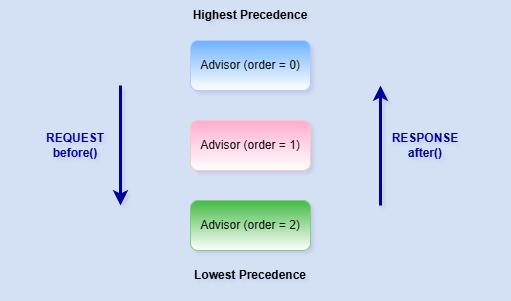
There are three advisors, and their priority is explicitly defined. In this particular case, the order of invocation is as follows:
- Requests:
MessageChatMemoryAdvisor,TokenUsageAdvisor,SimpleLoggerAdvisor - Responses:
SimpleLoggerAdvisor,TokenUsageAdvisor,MessageChatMemoryAdvisor
Regarding ordering, this is an important aspect, so a few additional details are worth mentioning.
The CallAdvisor interface extends Advisor, which in turn extends the core framework interface Ordered.
The execution order of advisors is determined by the Ordered#getOrder() method. Advisors with higher precedence (lower order values) are executed first during the before() phase and last during the after() phase. Conversely, advisors with lower precedence (higher order values) are executed later during request processing and earlier during response processing. The diagram below visually summarizes this behavior.
Takeaways
When it comes to Spring AI advisors, in addition to their elegant and powerful way of modularizing cross-cutting concerns during interactions with LLMs, a few best practices are worth taking into account.
When building such components, follow the Single Responsibility Principle and have each advisor handle a single, specific task in order to enhance modularity.
If state needs to be shared between advisors, use the advisor context.
When multiple advisors are involved, carefully configure their order of execution — or at least be aware of it if the ordering is irrelevant for a particular use case.
Additionally, in cases where the execution order for requests differs from that for responses, use separate advisors for each side and configure them with different order values.
Published at DZone with permission of Horatiu Dan. See the original article here.
Opinions expressed by DZone contributors are their own.
Comments