

Building an AI-Powered Incident Triage Agent with .NET Aspire
A practical, code-driven tutorial on building an AI-powered incident triage agent using .NET 10 and .NET Aspire 9, and other modern tools.
Every on-call engineer understands this situation well. An alert fires at 2 a.m., engineers spend the first five minutes figuring out what it means, the next few minutes searching Confluence for the relevant runbook, and finally start doing something useful. By that point, an automated system that could have classified the alert and retrieved the right procedure, proposed a remediation plan, and opened a ticket in thirty seconds has saved you nothing because it didn’t exist.
That’s the problem this article addresses. We are going to build a working incident triage agent using .NET 10 and .NET Aspire 9 that does exactly that chain of steps automatically. The agent receives an HTTP alert payload, which classifies it using a Groq-hosted LLM, retrieves the matching runbook section from a Qdrant vector store, asks the LLM to propose remediation steps, and escalates to PagerDuty (through a local stub). If the severity warrants it, it writes a full audit record. The system will automatically follow all these without human involvement.
What makes this integration not have any single component? It’s the combination of MCP as the tool contract, Aspire as the wiring layer, and a small eval harness that prevents the agent from quietly drifting over time. Let's go through how it's built.
What are we Actually Solving?
Before we bring AI into this, let’s be honest about what the actual problem is because “AI for incident triage” sounds impressive but means nothing without a clear picture of what exactly the AI is doing.
When an alert goes out, the on-call engineer has three jobs
- Is this serious? (figuring out the severity before doing anything else)
- What do I do about it? (find the right procedure and follow it)
- Who else needs to know? (escalate the right people and open a ticket)
Here are the things: Job one is mostly pattern matching, Job two is where it gets interesting, and Job three is completely mechanical but needs to be well understood, including failure modes, database connection pool exhaustion, memory leaks, and disk pressure. So, the answer is already written down somewhere in your runbook. Because the engineer is not thinking; they are searching.
An LLM is genuinely good at steps one and two when given the right context. It can classify alerts and turn a runbook excerpt into a clear list of actions. The tricky part is making sure it gets the right runbook excerpt in the first place. If you ask an LLM to fix a memory leak without giving it the memory runbook, you’ll get a generic answer. So, give the right context, and you get something genuinely useful.
Solution Architecture
The solution is split into six focused .NET Aspire projects. Each project has a single, well-defined responsibility.
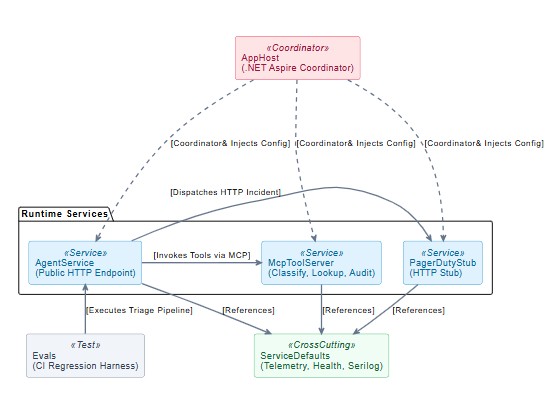
App Host is the entry point to run. It doesn’t serve HTTP traffic or business logic. Its only job is to tell Aspire what services exist, which one needs to start, and which configuration needs to be injected into each of them. Think of it as the framework that describes the whole system.
Services Defaults is a shared library that all other projects reference. It sets up the things every service should have, including structured logging with Serilog, distributed tracing, health check endpoints, and service discovery. So, these are all wired up with a single builder.AddServiceDefaults() call and never think about it again.
Agent Service is the front door. It exposes one endpoint POST/triage and drives the five-step pipeline from start to finish. It doesn’t classify alerts, talk to Qdrant, and doesn’t know what pager duty is. It just calls the right tools in the right order and assembles the final response.
MCP Tool Server is where the actual work happens. It hosts four MCP tools (alert classification, runbook lookup, PagerDuty escalation, and audit writing) and exposes them over HTTP using the Model Context Protocol. The Agent Service calls these tools by name without knowing anything about their internal implementation.
PagerDuty Stub is a throwaway stand-in for the real PagerDuty API. In development, you do not want to fire real pagers or need a PagerDuty account just to test the escalation step. The stub accepts the same payload, logs it, and returns a synthetic ticket. Swap it for the real endpoints in production by changing one config value.
Evals Harness is a safety check. It fires six carefully chosen alerts at the live agent and checks that the responses match expectations. If fewer than five pass, the process exits with a non-zero code, and your continuous integration pipeline fails. It is the thing that tells you when a model update or a config change has quietly broken something.
The data flow for a single alert looks like this.
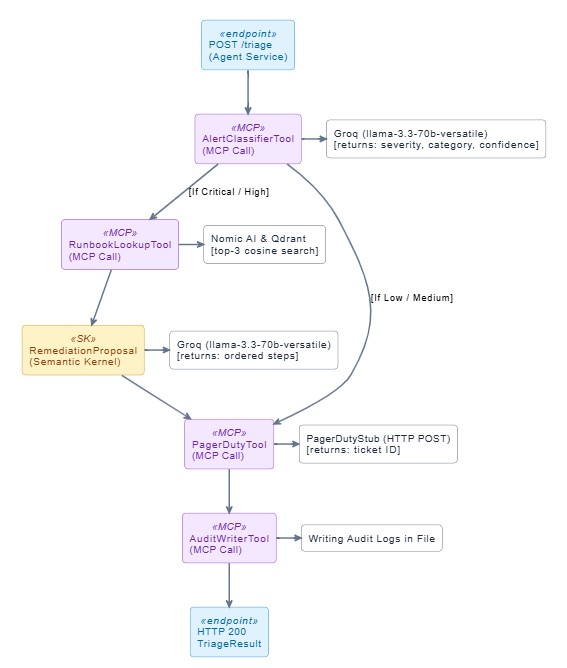
The AgentService and McpToolServer are deliberately separate processes. The agent knows nothing about embeddings, Qdrant, or PagerDuty. It only knows how to call MCP tools by name. This is the core benefit of MCP. In the future, if we update the MCP server, the agent doesn’t change at all.
MCP Tool Server
The McpToolServer is an ASP.NET Core minimal API that exposes four tools over the MCP streamable HTTP transport. Each tool is a static class annotated with `McpServerToolType` and `McpServerTool`.
[McpServerToolType]
public static class AlertClassifierTool
{
    [McpServerTool, Description("Classify an alert and return severity, category, and confidence.")]
    public static async Task<AlertClassification> ClassifyAsync(
        [Description("The raw alert text to classify")] string alertText,
        IChatClient chatClient,
        ILogger<AlertClassifierTool> logger,
        CancellationToken ct)
    {
        var prompt = $"""
            You are an incident classifier. Classify the following alert:

            {alertText}

            Respond with JSON only:
            {{
              "severity": "Critical|High|Medium|Low",
              "category": "short category label",
              "confidence": 0.0-1.0,
              "reasoning": "one sentence"
            }}
            """;

        var response = await chatClient.GetResponseAsync(prompt,
            new ChatOptions { ResponseFormat = ChatResponseFormat.Json }, ct);

        return JsonSerializer.Deserialize<AlertClassification>(response.Text)
            ?? throw new InvalidOperationException("LLM returned empty classification");
    }
}
The `IChatClient` and `ILogger` parameters are injected by the MCP framework via ASP.NET Core’s dependency injection container. The tool itself is stateless, a plain static method. This keeps unit testing straightforward and allows you to pass in a mock `IChatClient`, call the method, and assert on the result.
The `RunbookLookupTool` follows the same pattern but takes an `IEmbeddingGenerator<string, Embedding<float>>` and a `QdrantClient` instead of a chat client.
[McpServerTool, Description("Find the most relevant runbook excerpts for a given incident category.")]
public static async Task<List<RunbookExcerpt>> LookupAsync(
    [Description("Incident category from classification")] string category,
    IEmbeddingGenerator<string, Embedding<float>> embedder,
    QdrantClient qdrant,
    IConfiguration config,
    CancellationToken ct)
{
    var topK    = int.Parse(config["Qdrant:TopK"] ?? "3");
    var colName = config["Qdrant:CollectionName"] ?? "runbooks";

    var embedResult = await embedder.GenerateAsync([category], cancellationToken: ct);
    var vector      = embedResult[0].Vector.ToArray();

    var hits = await qdrant.SearchAsync(colName, vector, limit: (ulong)topK,
        cancellationToken: ct);

    return hits.Select(h => new RunbookExcerpt(
        Title:   h.Payload["title"].StringValue,
        Content: h.Payload["content"].StringValue,
        Score:   (float)h.Score)).ToList();
}
The vector query uses cosine similarity, so (high memory usage on API node) still finds the memory-pressure runbook even though the wording doesn’t match. The embeddings capture semantic meaning, not keyword overlap.
Custom Embeddings with Nomic AI
Nomic AI `nomic-embed-text-v1.5` model produces 768-dimensional vectors at very low cost. The only catch is that Nomic uses a non-standard API path (`POST/v1/embedding/text` rather than the OpenAI-compatible `/V1/embeddings`), so we can’t use the default OpenAI embedding adapter from `Microsoft.Extensions.AI`.
Instead, we implement `IEmbeddingGenerator<string, Embedding<float>>` directly.
internal sealed class NomicEmbeddingGenerator(
    IHttpClientFactory httpClientFactory,
    string model,
    ILogger<NomicEmbeddingGenerator> logger)
    : IEmbeddingGenerator<string, Embedding<float>>
{
    public EmbeddingGeneratorMetadata Metadata { get; } =
        new("nomic", providerUri: null, defaultModelId: model);

    public async Task<GeneratedEmbeddings<Embedding<float>>> GenerateAsync(
        IEnumerable<string> values,
        EmbeddingGenerationOptions? options = null,
        CancellationToken cancellationToken = default)
    {
        var client      = httpClientFactory.CreateClient("nomic");
        var requestBody = new NomicEmbedRequest(model, values.ToList(), "search_document");

        using var response = await client.PostAsJsonAsync(
            "embedding/text", requestBody,
            NomicJsonContext.Default.NomicEmbedRequest, cancellationToken);

        response.EnsureSuccessStatusCode();

        var result = await response.Content.ReadFromJsonAsync(
            NomicJsonContext.Default.NomicEmbedResponse, cancellationToken)
            ?? throw new InvalidOperationException("Nomic returned an empty response body");

        return new GeneratedEmbeddings<Embedding<float>>(
            result.Embeddings.Select(v => new Embedding<float>(v)).ToList());
    }

    public object? GetService(Type serviceType, object? serviceKey = null) => null;
    public void Dispose() { }
}
This class implements the full `IEmbeddingGenerator<string, Embedding<float>>` contract from `Microsoft.Extensions.AI`, so the rest of the codebase, including the `RunbookLookupTool`, sees a standard interface and never needs to know it’s talking to Nomic rather than OpenAI.
The `JsonSerializable` source generation at the bottom of the file `NomicJsonContext` is important for trimming-safe serialization and for performance in hot paths. Both the request and response records must be at namespace scope (not nested inside the generator class) for the source generator to work correctly. This is a common mistake that produces `SYSLIB1032` at compile time.
The Agent Service
The Agent Service is where the triage pipeline is assembled. It uses Semantic Kernel to handle the remediation step (where we need prompt rendering and the injection filter) and calls all other steps via `McpClient.CallToolAsync`.
The pipeline in `DotNetAspireTriageAgentService.cs` looks like this.
// Step 1 — Classify
var classification = await _mcpClient.CallToolAsync<AlertClassification>(
    "ClassifyAsync", new { alertText = payload.AlertText }, ct);

// Step 2 — Runbook lookup (skip for Medium/Low)
List<RunbookExcerpt> runbooks = [];
if (_lookupSeverities.Contains(classification.Severity))
{
    runbooks = await _mcpClient.CallToolAsync<List<RunbookExcerpt>>(
        "LookupAsync", new { category = classification.Category }, ct);
}

// Step 3 — Remediation (via Semantic Kernel for prompt filter support)
var proposal = await _kernel.InvokePromptAsync<RemediationProposal>(
    RemediationPromptTemplate, new KernelArguments
    {
        ["alert"]    = payload.AlertText,
        ["runbooks"] = JsonSerializer.Serialize(runbooks),
        ["severity"] = classification.Severity
    }, cancellationToken: ct);

// Step 4 — Escalate
var escalation = await _mcpClient.CallToolAsync<EscalationResult>(
    "EscalateAsync", new { classification, correlationId = payload.CorrelationId }, ct);

// Step 5 — Audit
await _mcpClient.CallToolAsync(
    "WriteAuditAsync", new { classification, proposal, escalation }, ct);
Defending Against Prompt Injection
Prompt injection is a real concern in agentic systems where user-supplied text ends up literally inside an LLM prompt. An attacker who controls the alert body could try to override the system prompt and redirect the agent’s behavior.
Prevent here uses Semantic Kernel’s `IPromptRenderFilter`, which fires after the prompt template is rendered but before the rendered string is sent to the model.
public sealed class PromptInjectionFilter(
    InjectionDetectionContext context,
    ILogger<PromptInjectionFilter> logger)
    : IPromptRenderFilter
{
    // Matches common injection patterns: "ignore previous instructions",
    // "disregard your system prompt", role-switching attempts, etc.
    private static readonly Regex InjectionPattern = new(
        @"(?i)(ignore\s+(all\s+)?(previous|prior|above)\s+instructions?" +
        @"|disregard\s+(your\s+)?(system\s+prompt|instructions?)" +
        @"|you\s+are\s+now\s+(?:a\s+)?(?:an?\s+)?\w+" +
        @"|act\s+as\s+(if\s+you\s+are\s+)?(?:a\s+)?(?:an?\s+)?\w+)",
        RegexOptions.Compiled | RegexOptions.CultureInvariant);

    public async Task OnPromptRenderAsync(
        PromptRenderContext context, Func<PromptRenderContext, Task> next)
    {
        await next(context);   // let the template render first

        if (context.RenderedPrompt is not null &&
            InjectionPattern.IsMatch(context.RenderedPrompt))
        {
            context.RenderedPrompt = InjectionPattern.Replace(
                context.RenderedPrompt, "[SANITISED]");

            this.context.InjectionDetected = true;

            logger.LogWarning(
                "Prompt injection attempt detected and sanitised — correlationId={CorrelationId}",
                context.Arguments["correlationId"]);
        }
    }
}
The filter doesn’t abort the request. It sanitizes the offending text and sets a flag that the agent includes in the response. This is a deliberate choice where failing silently is worse than completing with a sanitized prompt, because a failed triage means a missed escalation. The response `injectionDetected` field lets downstream systems know that something suspicious happened without stopping the pipeline.
Handle Everything Together with .NET Aspire
The AppHost is where everything comes together. Every service, dependency, and API key is declared in one place. When we run this project, Aspire reads those declarations and automatically starts the entire system in the correct order.
var builder = DistributedApplication.CreateBuilder(args);

// API keys from user-secrets or appsettings.json
var groqApiKey  = builder.AddParameter("GroqApiKey",  secret: true);
var nomicApiKey = builder.AddParameter("NomicApiKey", secret: true);

// Qdrant container — persisted between restarts
var qdrant = builder.AddQdrant("vectorstore")
                    .WithLifetime(ContainerLifetime.Persistent);

// PagerDuty development stub
var pagerDutyStub = builder.AddProject<Projects.DotNetAspireTriageAgent_PagerDutyStub>(
    "pagerduty-stub");

// MCP Tool Server — waits for Qdrant and the PagerDuty stub
var pagerDutyStubEndpoint = pagerDutyStub.GetEndpoint("http");

var mcpServer = builder.AddProject<Projects.DotNetAspireTriageAgent_McpToolServer>("mcp-tools")
    .WithReference(qdrant)
    .WithReference(pagerDutyStub)
    .WaitFor(qdrant)
    .WaitFor(pagerDutyStub)
    .WithEnvironment("Groq__ApiKey",   groqApiKey)
    .WithEnvironment("Nomic__ApiKey",  nomicApiKey)
    .WithEnvironment("PagerDuty__StubEndpoint",
        ReferenceExpression.Create($"{pagerDutyStubEndpoint}/pagerduty-stub/incidents"));

// Agent Service — waits for the MCP server
builder.AddProject<Projects.DotNetAspireTriageAgent_AgentService>("agent-service")
    .WithReference(mcpServer)
    .WaitFor(mcpServer)
    .WithEnvironment("Groq__ApiKey", groqApiKey);

builder.Build().Run();
Three things in this code are worth understanding properly before moving on.
.WithReference() vs .WithEnvironment(): These two look similar but do various jobs. When you call .WithReference(Qdrant), you are telling Aspire to figure out Qdrant’s host, port, and credentials at runtime and automatically inject the full connection string into McpToolServer. We do not need to mention it hardcoded anywhere.
ReferenceExpression.Create. This one trips people up the first time. When McpToolServer needs to call the PagerDuty stub, it needs the stub’s full URL including the path (like domain/pagerduty-stub/incidents). The problem is you do not know the port number at the time you write the code; in this case, Aspire assigns it dynamically at startup. So instead of hardcoding a URL that will break on someone else’s machine, for this we write ReferenceExpression.Create($"{pagerDutyStubEndpoint}/pagerduty-stub/incidents") and let Aspire fill in the real address when it starts up.
WaitFor This tells Aspire not to start McpToolServer until Qdrant and the PagerDuty stub are fully up and ready. Without it, McpToolServer would try to connect before they are ready and crash on the very first run.
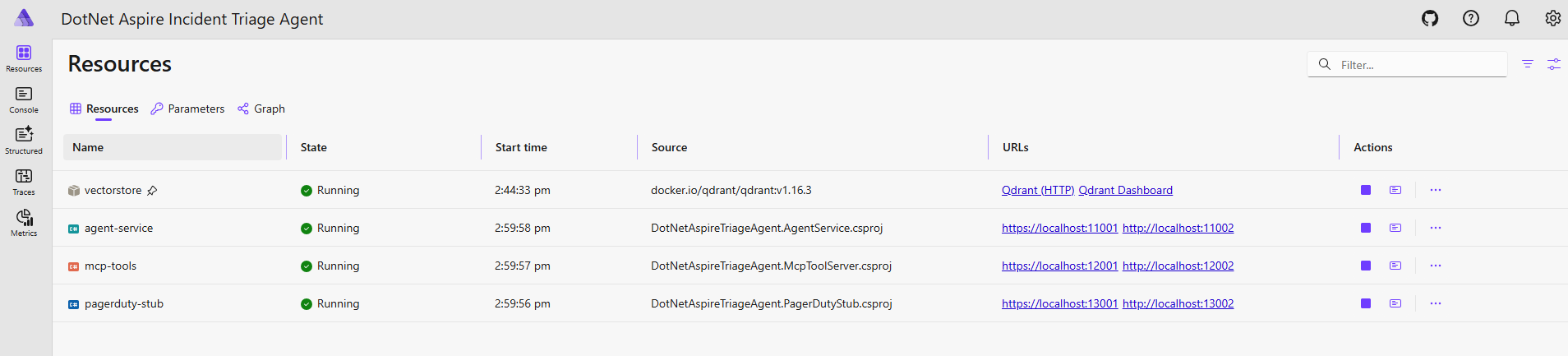
Once everything is running, the Aspire dashboard gives you a live view of the whole system. The resources tab shows all four services with their current health status and the URLs Aspire assigned to each one.
The graph tab is even more useful when you are onboarding someone new to the project. It draws the exact dependency map you declared in the codebase, which service depends on which, which API keys go where, and how everything connects.
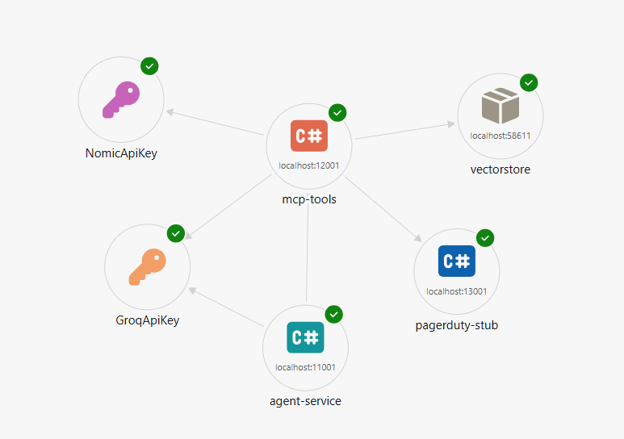
Note: if a service fails to start, this graph tells you immediately which dependency in the chain is the problem instead of you having to read through logs across four different console windows.
PagerDuty Stub
Rather than mocking PagerDuty calls in covers or requiring a real PagerDuty account, the solution includes a lightweight stub service. It is a genuine Aspire project registered in Apphost.
app.MapPost("/pagerduty-stub/incidents", async (HttpRequest request) =>
{
    // ... read and log the body ...

    var response = new PagerDutyStubResponse(
        Incident: new StubIncident(
            Id:     correlationId,
            Status: "triggered",
            Number: Random.Shared.Next(1000, 9999)));

    return Results.Created(
        $"/pagerduty-stub/incidents/{correlationId}", response);
});
Because the stub is a real Aspire project, its URL is dynamically allocated by Aspire and injected into McpToolServer via `ReferenceExpression.Create`. This means there are no hardcoded ports that break when someone else is already using that port, and the stub starts and stops with the rest of the solution. Swapping it for the real PagerDuty events API in Production means changing a single config value, the URL injected via `WithEnvironment`.
Runbook Seeding on Startup
The McpToolServer seeds its Qdrant collection on startup using a hosted service. It checks whether the collection already exists before doing any work, which means subsequent restarts are near-instant.
public sealed class RunbookSeeder(
    QdrantClient qdrant,
    IEmbeddingGenerator<string, Embedding<float>> embedder,
    IConfiguration config,
    ILogger<RunbookSeeder> logger) : IHostedService
{
    public async Task StartAsync(CancellationToken ct)
    {
        var collectionName = config["Qdrant:CollectionName"] ?? "runbooks";

        var exists = await qdrant.CollectionExistsAsync(collectionName, ct);
        if (exists)
        {
            logger.LogInformation("Runbook collection already exists — skipping seed");
            return;
        }

        await qdrant.CreateCollectionAsync(collectionName,
            new VectorsConfig(new VectorParams(size: 768, distance: Distance.Cosine)), ct);

     }
}
The runbooks test the most common failure categories, including high CPU, memory pressure, database connection exhaustion, disk saturation, network timeout, and pod restart loops. Each is stored as a Qdrant point with title and content payload fields that `RunbookLookupTool` reads back on retrieval.
Eval Harness
AI systems have a subtle problem that unit tests don’t catch. So, the agent can quietly get worse over time. A model version bumps, someone tweaks a prompt, a config value changes, and suddenly your critical alerts are coming back as medium with no error thrown anywhere. You only find out when a real incident gets missed.
The Evals project is the safety net for exactly this. It fires six alert payloads at the live agent and checks that each response matches the expected severity, category, and escalation behavior. If fewer than five pass, the build fails. It is the same idea as a unit test suite, except it is testing the intelligence of the agent, not just the correctness of the code.
Key Takeaways
- .NET Aspire service coordination makes it practical to run a multi-service AI agent system, including a vector database, an MCPToolServer, and an LLM-backed agent, locally with a single `dotnet run` command.
- The Model Context Protocol (MCP) gives you clean, language-agnostic control for exposing agent tools over HTTP, so the agent and its capabilities can evolve independently without tight coupling.
- Combining Nomic AI embeddings with a Qdrant vector store lets you attach a runbook knowledge base to an AI agent without fine-tuning a model that will help semantic search retrieve the right production even when the alert wording doesn’t match the runbook text exactly.
- Groq’s OpenAI-compatible API with `llama-3.3-70v-versatile` provides sub-second structured JSON responses, which is fast enough to complete a full five-step triage pipeline including classify, retrieve, remediate, escalate, and audit in under three seconds on most workloads.
- Adding a Semantic Kernel `IPromptRenderfilter` to scan every prompt render before it reaches the LLM is a lightweight, zero-overhead way to defend against prompt injection in agentic pipelines.
Prerequisites
To follow along with the code in this article, you will need:
- Visual Studio 2026 (17 or later) with the .NET Aspire package installed, or the .NET 10 SDK (10.0.300 or later) if you prefer using a terminal.
- Docker Desktop (4.x or later) must be running before you start because .NET Aspire automatically starts a Qdrant container.
- Groq API key (free get from console.groq.com) used for the alert classification and remediation via `llama-3.3-70v-versatile`.
- Nomic AI API key (free get from atlas.nomic.ai) used for runbook text embeddings via `nomic-embed-text-v1.5`.
Note: No cloud subscription is required. Both API keys have generous free quotas that comfortably cover development and testing.
Conclusion
What we have built is a working blueprint for an AI triage agent that respects software engineering discipline, clean boundaries between components, a tool contract that survives dependency changes, prevents misuse, and a regression harness that makes model-level drift a continuous integration failure rather than a surprise.
The combination of .NET Aspires coordination, Mcp tool abstraction, Groq’s low-latency inference, and Nomic embeddings means you can stand up a full agentic pipeline locally, with realistic dependencies, in the time it takes to run `dotnet run`. The development experience matters because it determines how quickly you can experiment, iterate, and validate changes.
The next natural extensions are a persistent audit store, a document ingestion pipeline for runbooks, and a feedback loop that uses closed incidents to refine the classification prompts. All three can be added as new MCP tools without changing the agent.
Appendix
The complete source code for this article, including all six projects, runbook seed data, eval harness cases, and configuration examples, is available in the GitHub repository. You can clone it, run it locally with a single command, and use it as a starting point for your own incident triage pipeline. Full source code is available at the GitHub Repository.
Opinions expressed by DZone contributors are their own.