

Automating RCA and Decision Support Using AI Agents
The article explores how AI agents can automate insight generation, assist teams in root cause analysis, and outline a scalable agentic AI architecture for enterprises.
 ·
·
Join the DZone community and get the full member experience.
Join For FreeWith the AI boom over the past couple of years, almost every business is trying to innovate and automate its internal business processes or front-end consumer experiences.
Traditional business intelligence tools require manual intervention for querying and interpreting data, leading to inefficiencies. AI agents are changing this paradigm by automating data analysis, delivering prescriptive insights, and even taking autonomous actions based on real-time data. Obviously, it is the humans who set the goals, but it is an AI agent that autonomously decides on the best action to perform these goals.
What makes an AI agent so special is that it can perceive both physical and software interfaces to make a rational decision. For instance, a robotic agent gathers information from the sensors, while a chatbot takes in customer prompts or queries as input. Then, the AI agent processes this data, evaluates it, and determines the most suitable course of action that aligns with its set objectives.
Why AI Agents for Decision Support?
AI agents can empower non-technical teams by uncovering insights instantly through NLP querying or prompt engineering, eliminating the need for manual data wrangling — hence enabling true no-code, self-serve data visualization.
For example:
- A user asks: "What are the top-selling products in Q2 2024?"
- AI agent converts it into:
SELECT product_name, SUM(sales) FROM sales_data WHERE quarter = 'Q2 2024' GROUP BY product_name ORDER BY SUM(sales) DESC;
Nonetheless, it can scrape through voluminous data files without limitations and provide real-time insights without delays. This allows business owners more time to think about innovative strategies rather than juggling between finding the correct data sources.
AI Agent Architecture for Decision Support
The architecture for an AI agent for decision automation consists of multiple layers.
1. Data Sources and Events
The events that teams add during feature development help to capture data and interactions. These act as data sources. The table below depicts the key data sources and event types captured during user and product interaction, which AI agents use to extract insights and inform decisions.
| source | examples | nature |
|---|---|---|
|
Customer Interactions |
App usage, page views, clicks |
Real-time events |
|
Transcations |
Orders, refunds, payment failures |
Batch + real-time events |
|
Marketing and Promotions |
Coupon redemptions, Campaign codes |
Batch |
|
Product |
Price changes, inventory |
Transactional (batch/real-time) |
|
Support Logs |
Tickets, call transcripts |
Unstructured |
|
User Prompts |
User input queries |
NLP/Conversational |
2. Data Ingestion Layer
This layer collects the data from different sources. As highlighted above, these data sources can be structured (SQL, NoSQL databases), semi-structured (APIs, logs), and unstructured (CSV, Parquet files).
Streaming pipelines or real-time data processing systems like Kafka, AWS Kinesis, and Google Pub/Sub handle continuous data flows from various sources.
3. Data Storage Layer
It has three main layers:
- Raw data layer: It stores the data in its original, unprocessed form.
- Cleaned layer: Data transformation occurs, where you parse the raw files to handle nulls/missing values, etc. The final data is stored in a partitioned, queryable format.
- Feature engineering layer: The raw, cleaned data is used to extract reusable features. All these reusable features are stored in a centralized repository like Databricks or BigQuery to be used for ML training.
- Modeled layer: Presents high-level business KPIs like engagement score, LTV, churn rate, etc.
4. AI-Agent Layers
- Prompt interface: For users to input prompts.
- LangChain orchestration engine: Central controller of AI-agent
- (RAG → Calls APIs → Apply reasoning rules)
- RAG: Retrieves data chunks from feature stores, SQL models, etc.
- Reasoning engine: Encodes business logic and heuristics.
- For example: “Trigger a churn alert if score> 0.8 and last login > 30 days” OR “Recommend the bundle if a user shows interest in A and B”.
- Explainable AI: Before automating key business decisions, it is important to review the explanation. For example, after model training, SHAP analyzes how each feature impacts predictions by creating a visual explanation.
- Execution layer: This is the last layer that provides users with insights. There are two ways in which the reporting can be done:
- Dashboards: AI-generated/automated visual reports via Power BI, Tableau, or Looker.
- Slack, email by text summarization: Auto-execute decisions like campaign pausing and CX alert notifications.
5. Feedback Loop
User actions and feedback are logged and fed back to retrain the models and agents. Alternatively, reinforcement learning can also be applied for rule tuning.
Industry Application
Let’s understand through a use case study how AI agents can significantly aid product teams in detecting any metric drop.
Problem Scenario
Conversion rates (payment success/ sessions) have dropped suddenly by 23% across the Android App in the last 6 hours.
Detection Flow
- Kafka detects a drop in event
payment_success. - Statistical deviation is confirmed by the anomaly agent.
- The root cause analysis (RCA) agent traces the issue to a recent feature release, which led to increased latency in loading card payment options.
- The insight agent converts the RCA findings into a human-readable explanation: “Conversion rate dropped 23% at the post-checkout screen on the V8.1 Android release, due to higher latency.”
- Action agents pull historical remediation data, analyze similar past events, and suggest a roll-back. (If AI confidence is high (say above 90%), then roll-back is recommended. If the actions are auto-configured, then the rollback can be autonomously triggered based on a confidence threshold.)
- Finally, the system keeps everyone in the loop by triggering Slack notifications to the respective Product Team, and the newly generated insights are reflected on daily dashboards, ensuring full visibility.
Architecture Diagram
The diagram illustrates the end-to-end basic architecture of an agentic AI-driven decision support system, tracing the flow from data producers to the final teams that actually utilize the extracted insights and visualizations.
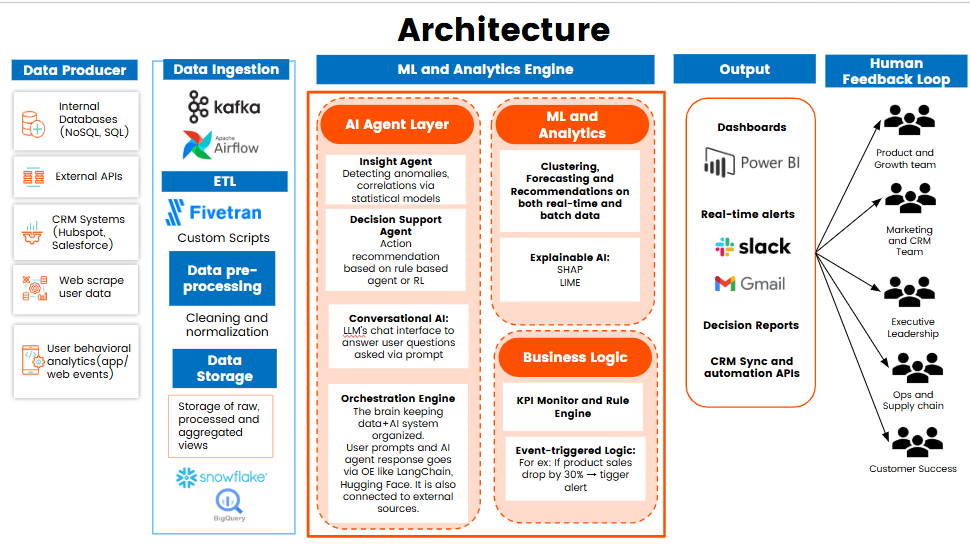
By weaving AI agents into a decision-making fabric, organizations can improve decision accuracy, reduce manual effort, and respond faster to ever-changing business conditions. However, implementing such systems demands thoughtful setup of data pipelines, careful model training, and a robust mechanism for safe decision execution.
To stay ahead, it’s crucial to regularly update the AI agents based on user feedback and to embed AutoML capabilities that allow rapid experimentation and improvement without long development cycles. Thus, in a world changing at lightning speed, these AI agents are not just assistants; they are the copilots driving faster, smarter, and more resilient business outcomes.
Opinions expressed by DZone contributors are their own.
Comments