

A Practical Pipeline for Identifying Sensitive Columns Before Test Data Masking
In this article, I will be introducing a pipeline designed to identify sensitive data columns before masking steps and improve the efficiency of the data masking process.
I work as a data analyst at a legal services company. Part of my work involves protecting sensitive data during the Test Data Management (TDM) process. Many other departments in the company need test data to develop an application. Copying the production data for test sounds like a good plan. But because the test environment usually has lower cybersecurity requirements, this will cause customer privacy data leaks. So, my job is to mask the sensitive data to protect customer privacy.
When it comes to my job, the first thing that comes to many people’s minds is that my work involves masking sensitive data. For example, changing the email address from [email protected] to [email protected]. Masking data is indeed important, but before we jump to the masking step, there's one basic question:
Which column contains sensitive data, and how can I find it?
In this article, I will introduce a pipeline designed to identify sensitive data columns before masking steps.
Structure of the Pipeline
Please find the identifying sensitive data pipeline structure workflow chart below:
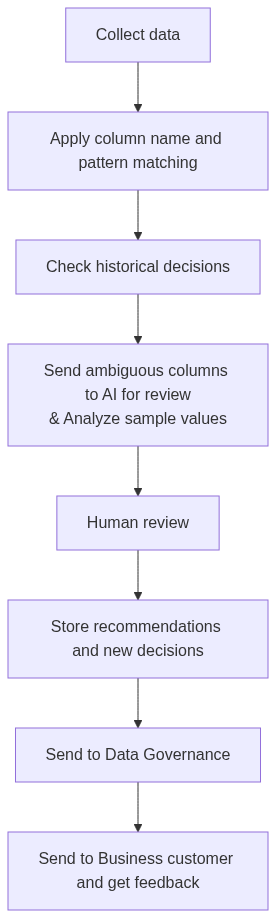
Before I start introducing each stage, I’d like to mention two points. The first point: The original intent behind this pipeline structure design was to save time spent locating sensitive data. Server usage is billed based on duration. In a perfect world, the system would balance efficiency and accuracy. However, in practice, efficiency takes precedence in order to cut costs.
The second point: The pipeline also had to preserve data usability for testing. In some cases, data privacy controls must be designed in a way that does not break core application workflows. For key columns such as primary keys and foreign keys, they need to preserve join functions and application workflows. So in practice, we usually leave them unchanged.
Apply Column Name and Pattern Matching
First, and quite intuitively, many columns' names are really straightforward and can be easily identified. For example, full name, phone number, and email. After the very first easy screening, some columns can be identified by hardcoded Python scripts, based on the specific column name pattern. However, there is an issue at this stage. I can identify columns containing sensitive data using customer email. But if there is another column named customer email address that hasn't been included in the hardcoded script, I won't be able to detect it.
Besides that, relying solely on column names isn't always reliable. Take the notes column, a free-text field, for instance. It often appears as an optional field after the main information has been entered. Most people will leave it blank or write some insignificant things. But sometimes customers do write something, such as Our CEO Everett would like you to prioritize processing the ABC document. Please email them to [email protected] as soon as you finish, and then call 123-456-7890 to notify him. If I don't mark this column as need masking, the customers' private information will be exposed.
Check Historical Decisions
After the initial filtering step, I will check the historical decisions database for specific columns, such as the notes column mentioned earlier. If the database indicates that the historical decision for column notes is to mask it, then that column will be masked during the current round. Even if the notes in this specific round contain no sensitive data. For example, no privacy-related information is mentioned. There is no guarantee that the data in the next refreshed cycle will remain free of sensitive information.
Send Ambiguous Columns to AI for Review and Analyze Sample Values
Here comes the highlight of the entire pipeline. Sometimes, column names are somewhat ambiguous. Or it's unclear whether certain rows contain sensitive data. Let's take the notes column mentioned earlier again. It might be empty. Or it could contain a message like When food is delivered, please ring the doorbell and call my wife Bobi, thereby the sensitive information gets leaked.
I started using the spaCy library from Python for Natural Language Processing (I will refer to this term as NLP later in this article). While spaCy isn’t a Large Language Model (I will call this term LLM), it certainly performs NLP analysis. However, the sampling process was time-consuming. I would sample the entire dataset if it had fewer than 50,000 rows, but randomly select 50,000 rows if it exceeded that limit. In a later version of the workflow, I switched to OpenAI: this time, I just need to select a sample of 100 rows and send them via API to the AI/LLM for analysis. The AI then generates a masking recommendations database, which will undergo manual review later.
Accuracy improved significantly after we began using LLMs. It rose from 80% with spaCy to approximately 93% after switching to OpenAI. This 93% figure was determined by having human analysts conduct a column-by-column analysis in parallel with my development of the pipeline and automation scripts. So the result is benchmarked against manual reviews. Furthermore, this figure represents an average obtained after two rounds of actual TDM data masking operations and several additional rounds of testing. Regarding the remaining 7% of errors, false positives accounted for about 90%, and false negatives for only 10%. This is important because missing sensitive data is much more serious than over-flagging a column for review.
Compared to manually analyzing a medium-sized schema containing 100 tables for 64 hours. An automated script can complete the analysis in just 2 hours. However, please note that this 2-hour timeframe does not include the time required for subsequent manual review.
Human Review and Store Recommendations and New Decisions
After the AI/LLM finishes analysis, human analysts will review the mask recommendations database generated by the AI. Each row in the database generates a report containing the user ID, database name, table name, column name, masking suggestion, masking rule, and analysis date. Then, humans will review the mask suggestions and corresponding masking methods.
For example, the AI-generated mask suggestion database is:

As a human analyst, at this stage, I can review the masking suggestion generated by the AI. I would agree with the suggestion to mask the data. However, regarding the masking rule, I would review it and change it to set it to a blank value. Manual review needs to randomly sample 500 rows and analyze them individually to reach a final mask decision. In this new process, human analysts only need to review a single row of AI-generated mask decisions and mask rules. The switch saves time significantly.
During a new round of the TDM data masking process, some new columns will be identified by AI and flagged as requiring masking. The new masking decision will be added to the existing historical decisions database after manual review.
Send to Data Governance and Send to Business Customer and Get Feedback
After our TDM team identifies and masks the sensitive data columns, we submit our results to the Data Governance department for a secondary manual review. Their review process differs slightly from ours. Our team focuses on using business knowledge to determine whether a column contains sensitive data. And we’re also responsible for developing more efficient identification & masking procedures. However, the Data Governance department needs to review and provide more accurate masking decisions. Because their team members have better knowledge of how to decide whether a column should be masked and of the appropriate masking method.
After our two departments conducted two rounds of manual review, we sent the masked data results to our business customers' departments. They will use this data for testing and provide us with feedback based on their specific needs. For example, we recommended masking customer_id with a generated synthetic number. But doing so will change primary and foreign keys, thereby breaking database linkages. So, our business customer departments advised us against masking those columns.
Conclusion and Future Improvement Plans
Successfully masking sensitive data begins with accurately identifying the columns containing such data. Many people skip this and jump straight to the more interesting masking process. In my view, however, getting this step wrong will fail the rest of the workflow as well.
The pipeline I designed isn't perfect. And I have a few ideas for improving the "Apply column name and pattern matching" component in the future. Since we’ve already used OpenAI, why not let the AI detect new patterns when analyzing ambiguous columns? We could have the AI generate a dynamic pattern database that updates automatically with every refresh cycle. It would also help us continuously update and refine our historical decisions database.
Opinions expressed by DZone contributors are their own.