

Automating Safety
This article explores preventing accidental production profile invocation in test automation with 12-factor and chaos engineering strategies.
 ·
·
Join the DZone community and get the full member experience.
Join For FreeIn today’s software development landscape, test automation plays a pivotal role in ensuring the reliability and stability of applications. However, automating tests, especially when dealing with complex environments, introduces a set of challenges, one of which is the accidental invocation of production profiles. In this blog post, we’ll explore the potential pitfalls of this scenario and discuss how adhering to the principles of the 12-factor app and embracing chaos engineering can help prevent these accidents.
The Perils of Accidental Production Profile Invocation
Accidentally invoking a production profile during the testing phase can have catastrophic consequences. Production profiles are configured to work with real, live data and systems, making them highly sensitive to any changes. Here are some common scenarios that highlight the risks:
1. Data Corruption
Automated tests may inadvertently modify or delete real data, causing irreversible damage to the production environment. This can lead to data loss, financial losses, and reputational damage.
2. Unintended Costs
Production environments often involve resources that are costly to operate, such as databases, cloud services, or third-party integrations. Running tests in production mode can result in unexpected usage charges.
3. Service Disruption
Production profiles may connect to external services or systems that should not be accessed during testing. Accidental calls to these services can disrupt critical operations and harm user experience.
Embracing the 12-Factor App Principles
The 12-Factor App methodology provides a set of best practices for building scalable, maintainable, and resilient applications. Let’s see how some of these principles can help prevent accidental production profile invocations in your test automation process:
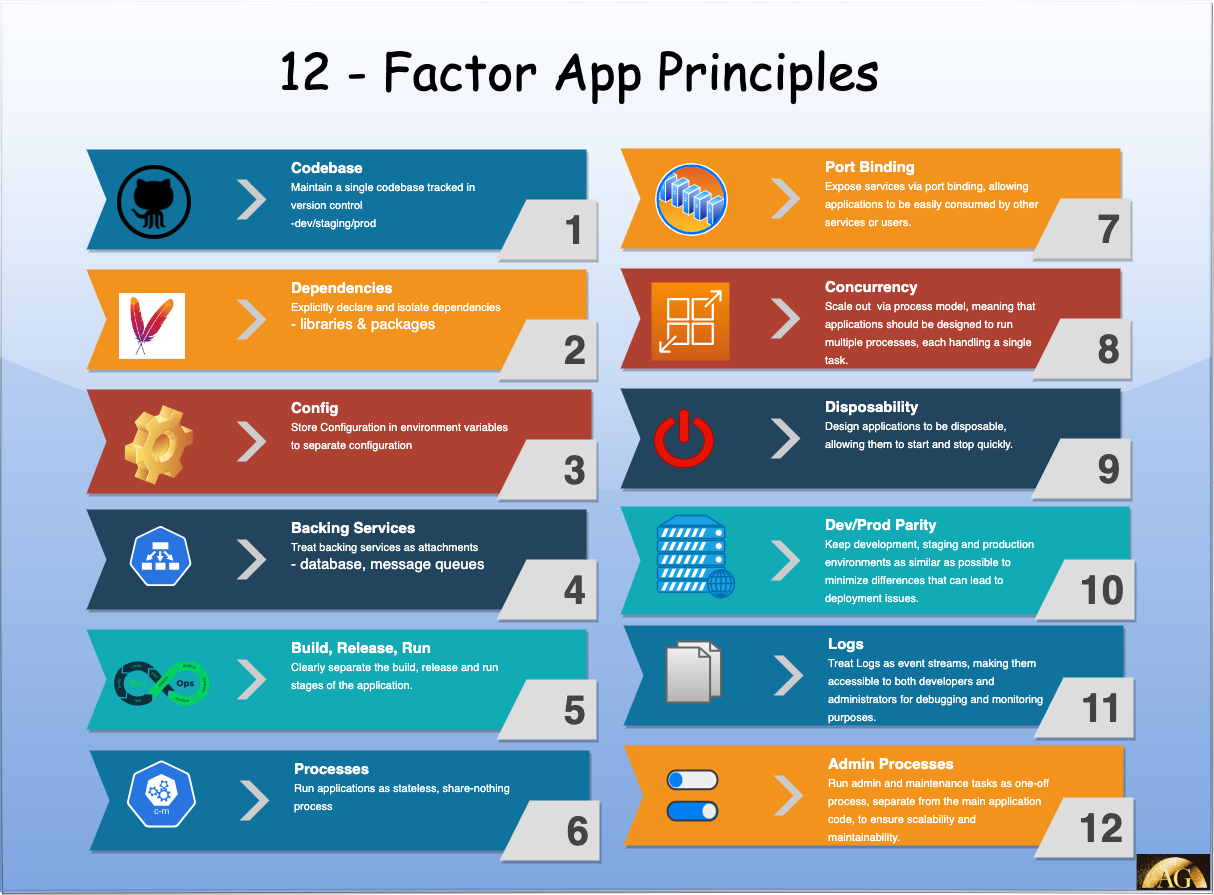
1. Isolate Configurations (Factor III)
- Use environment variables: Store configuration settings, including profile information, in environment variables. This makes it easy to switch between profiles without modifying code.
- Profile-aware code: Ensure that your application code is profile-aware. It should read the necessary configuration from environment variables and act accordingly.
2. Dependency Management (Factor VII)
- Scoped dependencies: Clearly define and isolate dependencies based on profiles. Test dependencies should not overlap with production dependencies. Use dependency injection and mock services for testing.
3. Build, Release, Run (Factor IX)
- Consistent build artifacts: Create distinct build artifacts for different profiles. Automate the build and release process to ensure consistency.
- Immutable builds: Build immutable artifacts that cannot be altered at runtime. This reduces the risk of runtime configuration changes.
Applying Chaos Engineering Principles
Chaos engineering focuses on proactively identifying system weaknesses and vulnerabilities through controlled experiments. Incorporating chaos engineering practices into your testing strategy can help uncover and mitigate risks associated with production profile accidents:
1. Experimentation (Principle I)
- Chaos testing: Design controlled chaos experiments that intentionally trigger scenarios where production profiles are invoked. Monitor and measure the impact and response of your system.
2. Automation (Principle II)
- Automated chaos tests: Implement automated chaos tests that can be included in your test automation suite. These tests should simulate various failure scenarios, including production profile invocations.
3. Failures as a First-Class Concept (Principle III)
- Failure-driven development: Embrace a mindset of anticipating and mitigating failures. Learn from incidents related to accidental production profile invocations and use this knowledge to improve your testing approach.
Demo
Numerous approaches can be tailored to suit your existing architecture. However, I’d like to present two potential solutions that are compatible with containerized environments and a wide range of cloud-based platforms such as EKS, AKS, GKE, and more.
- Restricting profile invocation with environment variables
- Restricting production access by IP range
Disclaimer
While the solutions presented in this blog post offer valuable strategies to mitigate the risks associated with accidental production profile invocation and enhance the robustness of your test automation processes, it is essential to recognize that no single solution is a universal remedy for all scenarios. Each software system is unique, with its own set of capabilities and limitations.
Before implementing any of the proposed solutions, it is imperative to thoroughly assess your current system’s architecture, requirements, and constraints. Consider the specific needs of your application, the complexity of your environment, and the potential impact of the proposed changes.
Furthermore, it is advisable to consult with relevant stakeholders, including your development and operations teams, to ensure that any modifications align with your organization’s broader goals and objectives.
Ultimately, the effectiveness of these solutions will depend on the context in which they are applied. Always exercise discretion and adapt these strategies to suit your specific circumstances, taking into account the intricacies of your software ecosystem.
Example 1: Restricting Profiles With Environment Variables
Suppose you’re developing a Spring Boot application that has multiple profiles, including a production profile. Here’s how you can restrict the production profile using environment variables:
Setting Environment Variables
Development and testing environments: set an environment variable that defines the active profile. For example, in a Unix-based system, you can do this in your terminal:
#In Production Environment
export PROD_ENV_VALIDATION=true
Profile-Aware Configuration
- In your Spring Boot application code, make it profile-aware by reading the
SPRING_PROFILES_ACTIVEenvironment variable. You can set the environment variable to"production". You can pass it via arguments (or in Docker run command), as shown below.
java jar -Dspring.profiles.active=production ./your-app.jar
2. Override onApplicationEvent from ApplicationListener<ApplicationEnvironmentPreparedEvent> and check the selected profile
class ProfileConfigEventListener :
    ApplicationListener<ApplicationEnvironmentPreparedEvent> {

    override fun onApplicationEvent(event: ApplicationEnvironmentPreparedEvent) {
        val environment = event.environment
        val activeProfiles = environment.activeProfiles

        println("Inside ProfileConfigEventListener -> onApplicationEvent")

        // Check conditional property which is available only in PROD servers
        val isProd = System.getProperty("PROD_ENV_VALIDATION")

        // Check if the production profile is active
        for (profile in activeProfiles) {

            if ("prod" == profile) {

                //If isProd is not available
                if (!StringUtils.hasText(isProd)) {

                    System.err.println("Production profile is active.
                                          Aborting application startup.")
                     // Terminate the application
                     System.exit(1)

                }
              }
                println("All Set to Run your App in Prod")
            }
        }
}
3. Register the above class as bean in your main class
@SpringBootApplication
class AccidentalProfileExecutionProtectionDemoApplication

fun main(args: Array<String>) {
    runApplication<AccidentalProfileExecutionProtectionDemoApplication>(*args)
}

//Register your Custom Event Listener here.
@Bean
fun profileConfigEventListener(): ProfileConfigEventListener? = ProfileConfigEventListener()
4. To include this bean in Spring’s factory classes, you can achieve it by generating a “spring.factories” file within the “src/main/resource/META-INF/” directory. Then add the below entry:
org.springframework.context.ApplicationListener
    =com.ashok.demos.accidentalprofileexecutionprotectiondemo.config.ProfileConfigEventListener
Let’s attempt to execute the “prod” profile locally without the need to specify the environment variable.
If you observe this, it has hindered the local execution of the application with the "prod” profile due to the absence of the expected environment variable on your local machine.
Example 2: Restricting Production Access by IP Range
Now, let’s take the above process to the next level by adding additional guardrails. Specifically, we’ll do this by specifying the IP Range for your production environment. In today’s cloud-based solutions, this often begins with separating your network into VPCs with public and private subnets and, additionally, by defining specified IP Ranges. It’s crucial to keep your production IP range accessible via environment variables while configuring your cloud infrastructure for this approach.
Let’s consider a scenario where you wish to limit access to a production environment based on specific IP address ranges. Here’s a practical example:
1. Define IP Range:
If you are using IntelliJ, you can add this by “Modify Options -> Add VM Options”
2. Implement IP Range Filter:
Create a custom filter, IPRangeFilter, which checks the incoming request's IP address and restricts access if it falls outside the allowed range. Here is how I did by changing the above onApplicationEvent function
Take note of the method named isIPInRange(hostIp, ipRange). This function is responsible for verifying whether your host’s IP falls within the specified range necessary for running this application.
 override fun onApplicationEvent(event: ApplicationEnvironmentPreparedEvent) {
        val environment = event.environment
        val activeProfiles = environment.activeProfiles

        val ipRange = System.getProperty("PROD_IP_RANGE")

        println("Inside ProfileConfigEventListener -> onApplicationEvent")

        // Check if the production profile is active
        for (profile in activeProfiles) {

            if ("prod" == profile) {

                val inetAddress = InetAddress.getLocalHost()
                val hostIp = inetAddress.hostAddress

                if (!StringUtils.hasText(ipRange)
                            or (StringUtils.hasText(ipRange)
                                    and !DemoUtil.isIPInRange(hostIp, ipRange))) {

                    if(!StringUtils.hasText(ipRange))
                        println("PROD_IP_RANGE is not set.")

                    System.err.println("IP Address is not in specified range or
                                        Value of PROD_IP_RANGE Given: $ipRange
                                                and Your IP Address is: $hostIp")

                    // Terminate the application
                    System.exit(1)

                    System.err.println("Production profile is active. Aborting application startup.")
                }

                println("All Set to Run your App in Prod")
            }
        }
    }
Now, let’s execute it by defining an IP Range that does not include your specific IP within its scope.
Next, modify the environment variable once more to ensure that your IP address falls within the specified range.
By using these two examples, you can enforce restrictions on your application’s profiles using environment variables and control access to production environments based on IP address ranges. These practices enhance the security and reliability of your test automation and development processes.
Conclusion
Preventing accidental invocation of production profiles during test automation is crucial to maintaining the integrity of your applications and protecting your organization from potential disasters. By following the principles of the 12-factor app, you can create a clear separation of configurations and dependencies for different profiles. Furthermore, adopting chaos engineering practices allows you to proactively identify and address vulnerabilities associated with profile accidents.
In today’s dynamic and fast-paced development environments, safeguarding your systems against accidental production profile invocations should be a top priority. By implementing these best practices, you can significantly reduce the risks and ensure the reliability and stability of your applications.
Remember, a robust testing and deployment strategy is a cornerstone of successful software development, and adhering to these principles will help you achieve just that.
If you found my blog posts enjoyable and gained new insights, I kindly ask you to think about sharing them and joining me here for future updates. You can find the source code on my GitHub. You can reach out to me on LinkedIn for any questions or suggestions.
That’s all for now, Happy Learning!
Published at DZone with permission of Ashok Gudise. See the original article here.
Opinions expressed by DZone contributors are their own.
Comments