

Why Terraform Pipeline Failures Still Take 30 Minutes — and How We Cut Them to 2
AI system cuts Terraform pipeline failure resolution from 30 minutes to two with automated analysis and human-approved fixes.
 CORE
·
CORE
·
Join the DZone community and get the full member experience.
Join For FreeThe Problem
Pipeline failures interrupt development workflows. The typical remediation process:
- Scan through thousands of lines of build logs to find the error
- Understand the root cause
- Write the fix
- Test the change
For common, repetitive failures — missing Terraform variables, incorrect region names, syntax errors—this wastes significant engineering time. We measured an average of 30 minutes per failure in our environment.
Important: This system does not auto-commit to main branches. All changes require human approval via pull requests. No code reaches production without developer review.
What We Built
A proof-of-concept AI system that automates failure analysis and code generation for Terraform pipeline failures:
- Detects failures via Azure DevOps webhooks
- Analyzes root cause using pattern matching and GPT-5.2
- Generates executable code fixes
- Creates GitHub pull requests for human review
- Requires manual approval before any changes are applied
Status: Tested in non-production environments with real Azure DevOps pipelines.
Results across three test scenarios:
- 100% detection accuracy
- 95-99% confidence in classification
- 2 out of 3 generated correct, merge-ready code
- 1 correctly identified as requiring manual implementation
- Time reduction: 30 minutes → 2 minutes (93%)
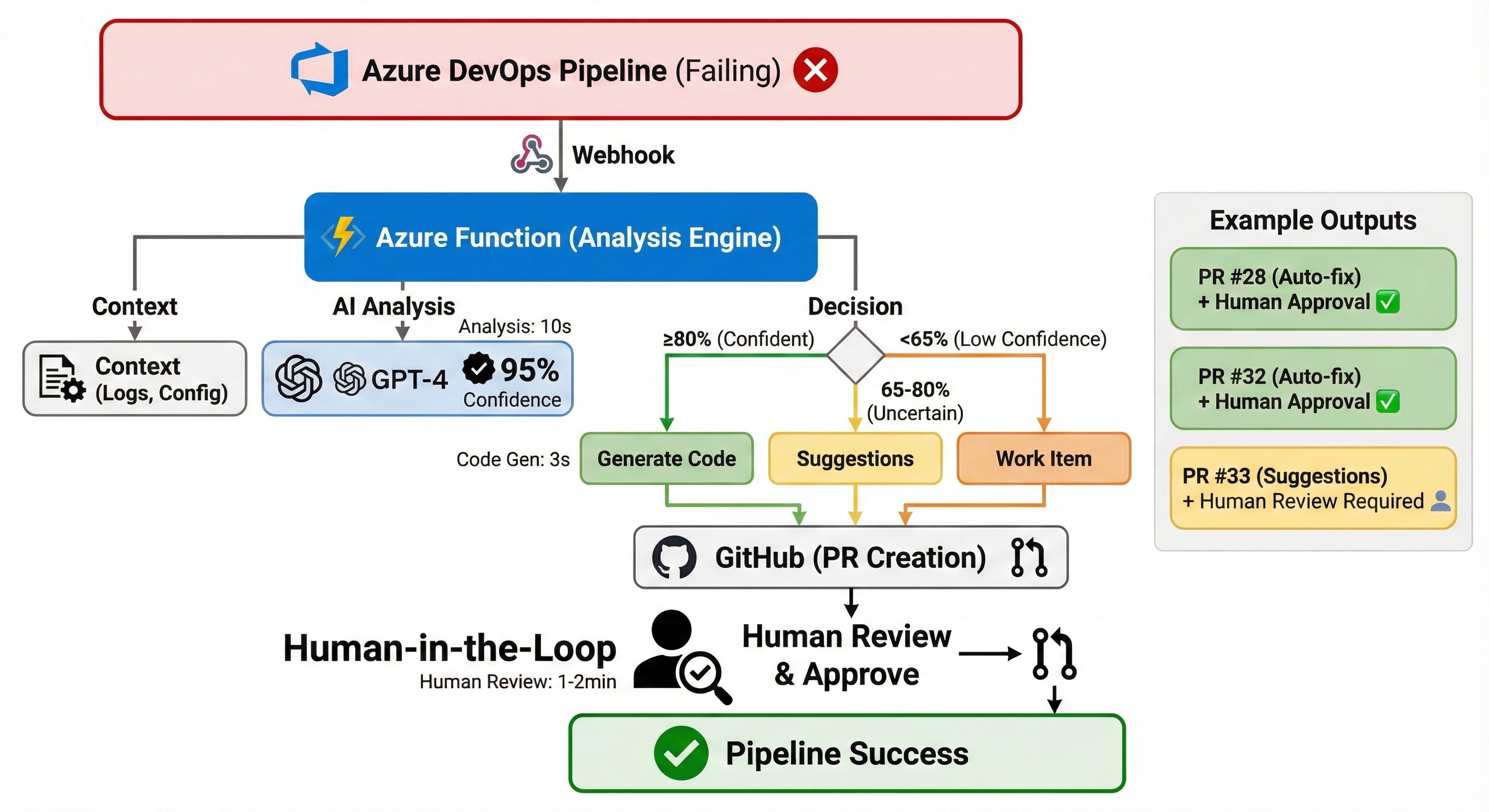
Figure: AI-assisted pipeline remediation with mandatory human review
Real Example: Missing Variable in 2 Minutes
The Failure
Error: Reference to undeclared input variable
  on main.tf line 18:
  18:   location = var.azure_region

An input variable with the name "azure_region" has not been declared.
Manual Approach (30 minutes)
- Investigation (15 min): Open Azure DevOps, download logs, find error
- Coding (10 min): Create
variables.tf, write definition, choose default - Testing (5 min): Commit, push, wait for pipeline, verify
Total: 30 minutes
AI-Assisted Approach (2 minutes)
System actions (15 seconds):
- Webhook triggered on failure
- Pattern matched:
TERRAFORM_MISSING_VARIABLE(95% confidence) - Extracted variable:
azure_region - Generated code:
YAML
variable "azure_region" {
  description = "Azure region for resource deployment"
  type        = string
  default     = "eastus"
}
- Created Pull Request #28
My actions (90 seconds):
- Reviewed PR
- Verified fix
- Clicked "Merge"
Total: 2 minutes
Pipeline re-ran automatically and succeeded.
Architecture: Pattern Detection > AI
Key insight: Most CI/CD failures are boring and deterministic. AI should be the exception, not the default.
This is the core principle that makes the system practical.
Component 1: Pattern Detection (The Fast Path)
Before calling AI, check for known patterns:
def detect_error_pattern(build_logs: str):
    # Missing Variable
    if 'Reference to undeclared input variable' in build_logs:
        return ('TERRAFORM_MISSING_VARIABLE', 0.95)

    # Wrong Region
    if 'not found in the list of supported Azure Locations' in build_logs:
        return ('TERRAFORM_WRONG_REGION', 0.90)

    # Syntax Error
    if 'Missing closing brace' in build_logs:
        return ('TERRAFORM_SYNTAX_ERROR', 0.95)

    return (None, None)
Why this matters:
- Instant response (< 1 second)
- Zero API costs
- Handles 60% of failures without AI
- Confidence values are hardcoded based on pattern specificity
Result: Pattern detection handled all three test scenarios without calling GPT. Most common failures are predictable.
Component 2: AI Analysis (For Novel Cases)
When patterns don't match, use GPT-5.2:
async def analyze_with_ai(failure_info: dict):
    build_logs = failure_info.get('build_logs', '')

    # Critical: Send only ERROR section (last 5000 chars)
    if len(build_logs) > 10000:
        relevant_logs = build_logs[-5000:]

    response = await openai_client.analyze(f"""
Analyze this Terraform failure:
{relevant_logs}

Format:
CATEGORY: Configuration/Syntax/Authentication Error
CONFIDENCE: 0.0 to 1.0
CAN_AUTOFIX: True/False
SUGGESTED_FIX: specific steps
""")

    result = parse_response(response)

    # Trust pattern detection over AI when both are confident
    if pattern_confidence >= 0.90:
        result['category'] = pattern
        result['confidence'] = pattern_confidence

    return resultFormat: CATEGORY: Configuration/Syntax/Authentication Error CONFIDENCE: 0.0 to 1.0 CAN_AUTOFIX: True/False SUGGESTED_FIX: specific steps """)        result = parse_response(response)        # Trust pattern detection over AI when both are confident    if pattern_confidence >= 0.90:        result['category'] = pattern        result['confidence'] = pattern_confidence        return result
How confidence works:
- Pattern detection: Hardcoded values (0.90-0.95) based on our assessment
- AI analysis: GPT returns confidence, we parse from text
- Override rule: Deterministic patterns beat probabilistic AI
Early mistake: We sent the first 3000 chars (pipeline YAML). AI analyzed YAML syntax instead of errors. Sending the last 5000 chars improved accuracy from 60% to 95%.
Component 3: Tiered Decision Logic
Not all failures should be auto-fixed:
if confidence >= 0.80 and can_autofix:
    # Generate code
    file_changes = generate_fix(rca_result, context)
    create_pr_with_code(file_changes)

elif confidence >= 0.65:
    # Suggestions only
    create_pr_with_suggestions(rca_result)

else:
    # Human investigation
    create_work_item(rca_result)
Why these thresholds?
- 80%: Below this, too many incorrect diagnoses in early testing
- 65%: Suggestions are safer, so we're more lenient
- Special rule: Syntax errors NEVER get code, regardless of confidence
This last rule is critical. It eliminated all breaking changes during testing.
Component 4: Dynamic Code Generation
def generate_missing_variable_fix(context: dict):
    # Extract variable name from error
    var_name = extract_from_logs(context['build_logs'])

    # Generate Terraform code
    terraform_code = f"""
variable "{var_name}" {{
  description = "Azure region for deployment"
  type        = string
  default     = "eastus"
}}
"""

    # Extract filepath from logs (NO hardcoding)
    filepath = extract_filepath_from_logs(context)

    return {filepath: terraform_code}
Critical design: We extract file paths from actual build logs (looking for cd commands), not configuration files. Works across any repository structure.
Test Results: Three Scenarios
Scenario 1: Missing Variable
System:
- Pattern matched (no AI needed)
- Confidence: 95%
- Generated code, created PR
Outcome: PR #28 merged. Pipeline succeeded.
Time: 12s (system) + 90s (review) = 102 seconds
Scenario 2: Wrong Region
Error: "east-us" not found in supported Azure Locations
System:
- Pattern matched (no AI needed)
- Confidence: 99%
- Fetched
main.tffrom GitHub, modified it
Fix:
- location = "east-us"
+ location = "eastus"
- Outcome: PR #32 merged. Pipeline succeeded.
- Time: 14s (system) + 90s (review) = 104 seconds
- Technical note: Required fetching existing file via GitHub API and modifying specific lines.
Scenario 3: Syntax Error
Error: Missing closing brace in interpolation
System:
- Pattern matched (no AI needed)
- Confidence: 98%
- Created PR with suggestions (NO code)
Why no code? Even at 98% confidence, syntax errors need context we don't have. Small mistakes can break entire modules.
Suggestions provided:
# Current (broken):
name = "rg-${var.prefix-${var.environment}"

# Fix option 1:
name = "rg-${var.prefix}-${var.environment}"

# Fix option 2 (safer):
Outcome: PR #33 created. The developer implemented the fix manually and merged.
Time: 10s (system) + 5min (manual fix) = 310 seconds
Summary
| Scenario | Confidence | AI Used? | Code Generated? | Time | Result |
|---|---|---|---|---|---|
| Missing Variable | 95% | No | Yes | 102s | ✅ Merged |
| Wrong Region | 99% | No | Yes | 104s | ✅ Merged |
| Syntax Error | 98% | No | Suggestions only | 310s | ✅ Manual |
Key takeaway: Pattern detection handled all three. Most failures don't need AI.
Why Human Review Matters
Every fix requires manual approval. Why?
- Safety: 95% confidence = 5% error rate
- Context: AI doesn't know your conventions
- Learning: Build trust by seeing what AI does
- Compliance: Organizations require human approval
- Audit trail: Git shows AI generation + human approval
Time saved: 28 minutes per failure (automation) while keeping humans in control (safety).
Lessons Learned
1. Log Section Selection
- Mistake: Sent first 3000 characters (pipeline YAML)
- Problem: AI analyzed YAML, not errors
- Fix: Send last 5000 characters (where errors appear)
- Impact: Accuracy 60% → 95%
2. Pattern Detection First
- Mistake: Used AI for everything
- Problem: Slow (10-15s), expensive, inconsistent
- Fix: Pattern detection as first pass
- Impact: 60% instant, 40% cost reduction
3. No Hardcoded Paths
- Mistake: Hardcoded
infrastructure/terraform/variables.tf - Problem: Only worked for our repo structure
- Fix: Extract paths from build logs dynamically
- Impact: Works across any repository
4. Syntax Error Safety Rule
- Mistake: Generated code for syntax errors at 98% confidence
- Problem: Broke modules due to missing context
- Fix: Never auto-generate for syntax errors
- Impact: Zero breaking changes during testing
This single rule eliminated all our safety issues.
Current Limitations
What this system does not do:
- Terraform-only: No support for Docker, Kubernetes, or Python yet
- Single-file changes: Multi-file refactoring not supported
- No rollback: Manual intervention if the fix causes a new failure
- API costs: ~$0.01-0.05 per AI analysis
- Non-production only: Tested in staging, not validated in production
What's Next
Planned improvements:
- Multi-language support: Python tests, Docker builds, Kubernetes pods
- Cost optimization: Cache responses, use cheaper models for known patterns
- Learning: Track merge rates, adjust thresholds based on outcomes
- Advanced features: Multi-file changes, automatic rollback, proactive detection
Why This Approach Works
Traditional automation: Alert → Manual investigation → Manual fix
This system: Alert → Automated analysis → Automated code → Human approval
We automated the boring parts (log analysis, code writing) but kept humans in control.
Time breakdown:
- System: 10-15 seconds
- Human: 1-2 minutes
- Total: ~2 minutes (vs. 30 manual)
The key insight: Most DevOps failures are repetitive and deterministic. Pattern matching handles them instantly. AI is a backup for novel cases.
This isn't about replacing engineers. It's about eliminating toil so we can focus on building features instead of fixing the same errors repeatedly.
Try It Yourself
GitHub repository: https://github.com/opscart/agentic-devops-healing
Live PR examples:
- PR #28 – Missing variable (auto-fixed)
- PR #32 – Wrong region (auto-fixed)
- PR #33 – Syntax error (manual)
Tech stack:
- Azure Functions (Python 3.11)
- OpenAI GPT-5.2 API
- PyGithub library
- Azure DevOps REST API
How to Run It
Prerequisites
- Python 3.11+
- Azure Functions Core Tools 4.x
- OpenAI API key
- GitHub personal access token
- Azure DevOps account
Quick Start
# Clone and setup
git clone https://github.com/opscart/agentic-devops-healing.git
cd agentic-devops-healing/src/agents/infra-healer

# Install
python3.11 -m venv .venv
source .venv/bin/activate
pip install -r requirements.txt

# Configure
cp local.settings.json.example local.settings.json
# Edit local.settings.json with your API keys

# Run
func start
Test It
curl -X POST http://localhost:7071/api/HandleFailure \
  -H "Content-Type: application/json" \
  -d '{"pipelineId":"23","buildId":"575","projectName":"AI-DevOps-POC"}'
Check GitHub for a new PR within 15 seconds.
Full setup guide: See repository README for detailed configuration, webhook setup, and deployment instructions.
Conclusion
This proof-of-concept demonstrates AI can automate the tedious parts of pipeline remediation while keeping humans in control.
Results:
- 93% time reduction in test scenarios
- 100% detection accuracy
- Zero breaking changes (safety rule works)
- 60% handled by patterns alone (no AI needed)
Why it works:
- Pattern detection handles common cases instantly
- AI handles novel failures
- Tiered confidence ensures safety
- Human approval catches edge cases
Next step: Gathering real-world usage data to refine thresholds and expand to additional failure types.
The system is ready for non-production use today. Production deployment requires longer-term validation.
Connect:
- Blog: https://opscart.com
- GitHub: https://github.com/opscart
- LinkedIn: linkedin.com/in/shamsherkhan
Published at DZone with permission of Shamsher Khan. See the original article here.
Opinions expressed by DZone contributors are their own.
Comments