

Automating Unix Security Across Hybrid Clouds
Here is an architectural pattern for building a fully automated, cross-cloud patching engine using GitLab CI, Docker, and Ansible.
Join the DZone community and get the full member experience.
Join For FreeIn modern DevOps, we automate deployments, testing, and infrastructure provisioning. Yet, in many organizations, server patching remains a manual, high-friction event. Admins log in late at night, run scripts, and hope services restart correctly.
This manual approach is a security liability. The longer the gap between a vulnerability disclosure and a patch application, the wider the attack window.
Based on a recent implementation for large-scale Unix environments (VMware, AWS, OCI), this article outlines a “Patching as Code” architecture. By containerizing the patching logic and orchestrating it via CI/CD, we can transform patching from a manual chore into an automated, auditable pipeline.
The Architecture: Patching as a Containerized Service
The core innovation here is decoupling the patching logic from the target infrastructure. Instead of maintaining jump hosts with various scripts, we package the entire toolchain — Ansible, Python, and SSH keys — into a Docker image.
The Components
- The orchestrator (GitLab CI): Triggers the workflow based on a schedule or commit.
- The execution environment (Docker): A lightweight container that holds the playbooks and scripts.
- The secret manager (Thycotic/Vault): Injects credentials at runtime so they never live in the code.
- The controller (Python Scheduler): Manages concurrency and the logic of which servers to patch and when.
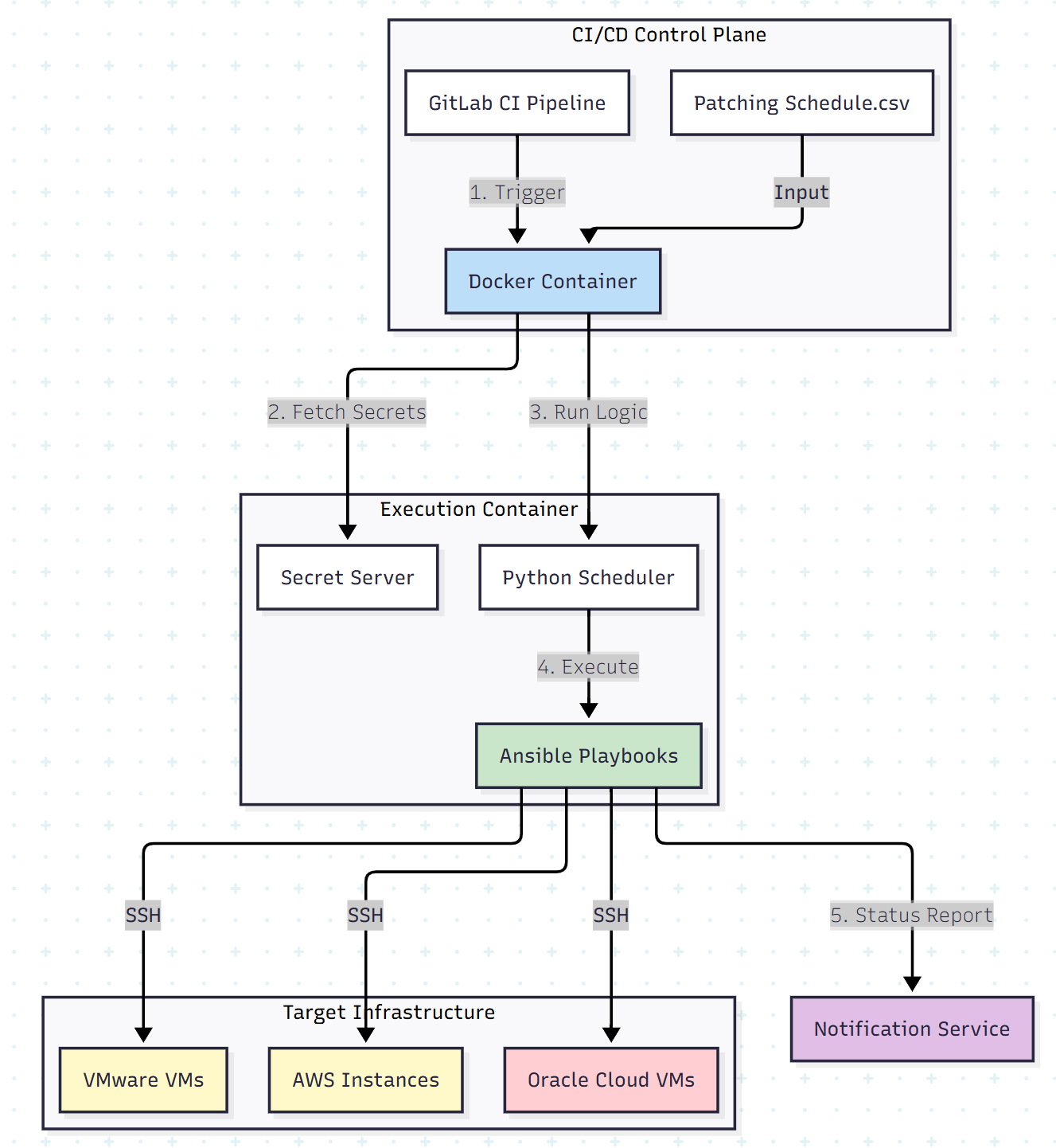
Step 1: The “Schedule as Code”
Instead of maintaining static lists of servers, we define the patching schedule in a simple CSV file committed to the Git repository. This allows the Patch Manager to update the schedule via a pull request, providing an audit trail of who authorized the changes.
patch_schedule.csv
Hostname, IP, OS, PatchGroup, MaintenanceWindow
db-prod-01, 10.0.1.50, RHEL8, Group A, 22:00
web-prod-01, 10.0.1.51, Ubuntu20, Group B, 02:00
Step 2: The Python Controller
Inside the Docker container, a Python script acts as the traffic cop. It reads the CSV, checks the current time against the maintenance window, and spawns Ansible processes.
Conceptual Python Logic:
import pandas as pd
import subprocess
from datetime import datetime

def run_patching():
    # 1. Read the Schedule
    df = pd.read_csv('patch_schedule.csv')
    current_hour = datetime.now().hour

    # 2. Filter targets for the current window
    targets = df[df['MaintenanceWindow'].astype(str).str.startswith(str(current_hour))]

    for index, row in targets.iterrows():
        print(f"Starting patch for {row['Hostname']}")

        # 3. Trigger Ansible Playbook for this specific host
        # We pass the target IP dynamically to the playbook
        cmd = [
            "ansible-playbook",
            "-i", f"{row['IP']},",
            "patch_server.yml",
            "--extra-vars", f"target_os={row['OS']}"
        ]

        subprocess.run(cmd)

if __name__ == "__main__":
    run_patching()
Step 3: Secure Execution
A critical security requirement is handling root credentials. Hardcoding SSH keys or passwords in the container is a non-starter.
We integrate with a secret server (such as Thycotic or HashiCorp Vault).
- The Docker container starts.
- The pipeline injects a temporary API token.
- The Python script queries the secret server API to retrieve the root password or key for the specific target server just in time.
- The credential is passed to Ansible in memory and discarded immediately after execution.
Step 4: Verification and Reporting
Automation is blind without verification. The pipeline doesn’t just run yum update; it validates the system state.
Pre-checks:
- Is there sufficient disk space?
- Are critical services running?
- Is the backup recent?
Post-checks:
- Did the kernel version change?
- Did the server reboot successfully?
- Are the application ports listening?
If a post-check fails, the system automatically triggers a notification (email or Slack) to the on-call engineer, significantly reducing the mean time to detect a failed patch.
Results: The “Zero-Touch” Reality
Implementing this architecture transforms patching from a monthly headache into a background process.
- Consistency: Every server, whether on AWS or on-prem, receives the same standard of care.
- Security: Vulnerabilities are patched within hours of testing, not weeks.
- Scalability: Adding 100 new servers requires only 100 new lines in the CSV. The Docker architecture scales horizontally to handle the load.
Conclusion
The era of manual server management is over. By treating your patching process as a software application — versioned in Git, packaged in Docker, and executed via CI/CD — you gain the reliability and speed required to secure a modern hybrid infrastructure.
Key takeaway: Don’t patch servers. Build a robot that patches servers.
Opinions expressed by DZone contributors are their own.
Comments