

A Step-by-Step Guide to AWS Lambda Durable Functions
Build long-running workflows by separating orchestration from execution, persisting state, and using events or callbacks to pause and resume without holding compute.
Join the DZone community and get the full member experience.
Join For FreeAs developers, we often encounter scenarios where traditional serverless functions fall short — think workflows that require pausing for days or months, waiting for external events like user approvals or API callbacks. Enter AWS Lambda Durable Functions, a feature unveiled at re:Invent 2025, designed to bring durable execution patterns directly into Lambda. This allows you to craft stateful, resilient applications using familiar languages like Python or JavaScript, with the AWS SDK handling state management, retries, and orchestration. Perfect for e-commerce order processing, AI model training pipelines, or enterprise approval systems, Durable Functions eliminate the need for complex workarounds like external queues or databases.
In this detailed guide, this article will walk through learning and implementing AWS Lambda Durable Functions step by step, complete with code snippets, diagram explanations for visualization, and a comprehensive comparison with other durable execution engines like Azure Durable Functions, AWS Step Functions, and Temporal.
Let’s begin with the fundamentals. Lambda’s traditional 15-minute timeout and stateless nature have long limited its use for complex, long-running tasks. Durable Functions address this by embedding orchestration logic into your code, using checkpointing to save progress and resume execution as needed. This is a shift from managing state manually to a serverless-first approach, reducing operational overhead while maintaining scalability.
Architecture Overview
Imagine a workflow where an order is checked, paid for, and then waits for shipping confirmation before notifying the customer. The diagram below illustrates this flow: a Lambda function orchestrates tasks, suspends on external events, and resumes without losing context, all while integrating with AWS services like EventBridge or S3.
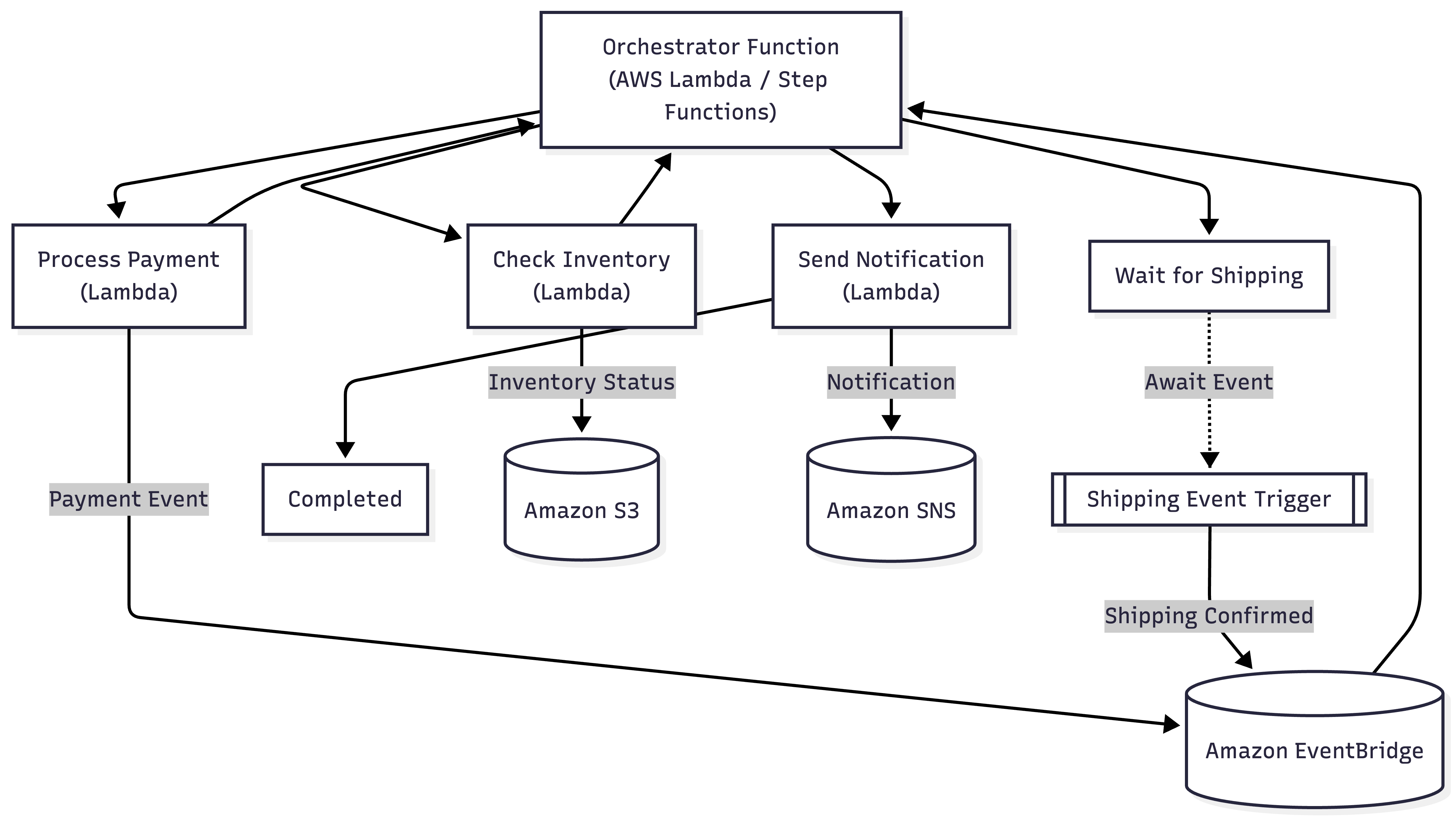
This setup not only simplifies development but also aligns with cost models where you pay only for active compute time, not idle suspensions.
Understanding Durable Functions
Durable Functions enhance Lambda with patterns like function chaining, fan-out/fan-in, and eternal orchestrations. They rely on "durable tasks" (individual steps that can pause and replay) and offer features like:
- Long suspension: Up to one year, ideal for delayed responses.
- Automatic retries: Configurable to handle failures.
- AWS ecosystem integration: Works with VPC, layers, and more.
- Version pinning: Ensures consistency during long runs.
Compared to vanilla Lambda, this reduces reliance on external orchestration tools, though it’s not a one-size-fits-all solution — we’ll explore alternatives later.
To get started, you’ll need an AWS account, the AWS CLI, and a runtime environment (Node.js or Python). The open-source SDK is available via npm or pip. Let’s use Node.js for this tutorial.
Step 1: Setting Up Your Environment
Configure AWS credentials with aws configure, setting your region (e.g., us-east-1). Create a project:
mkdir durable-demo

cd durable-demo

npm init -y

npm install @aws-sdk/durable-functions
In the AWS Console, create a Lambda function named "MyDurableWorkflow" with Node.js 20.x. Assign the AWSLambdaBasicExecutionRole and add policies for any services (e.g., SQS, DynamoDB).
Step 2: Coding Your First Durable Function
Let’s build that order processing workflow. In index.js:
JavaScript
const { DurableFunctions } = require('@aws-sdk/durable-functions');

exports.handler = DurableFunctions.orchestrator(function* (context) {
    const order = context.input;

    // Check inventory
    const inventoryResult = yield context.callActivity('CheckInventory', order.items);
    if (!inventoryResult.available) throw new Error('Out of stock');

    // Process payment
    yield context.callActivity('ProcessPayment', order.paymentInfo);

    // Wait for shipping (suspend)
    const shippingEvent = yield context.waitForExternalEvent('ShippingConfirmed', { timeout: 'P7D' });

    // Notify customer
    yield context.callActivity('SendNotification', { email: order.email, message: 'Order shipped!' });

    return { status: 'Completed', orderId: order.id };
});

// Activity functions
exports.CheckInventory = async (items) => ({ available: true });
exports.ProcessPayment = async (paymentInfo) => ({ success: true });
exports.SendNotification = async ({ email, message }) => console.log(`Email to ${email}: ${message}`);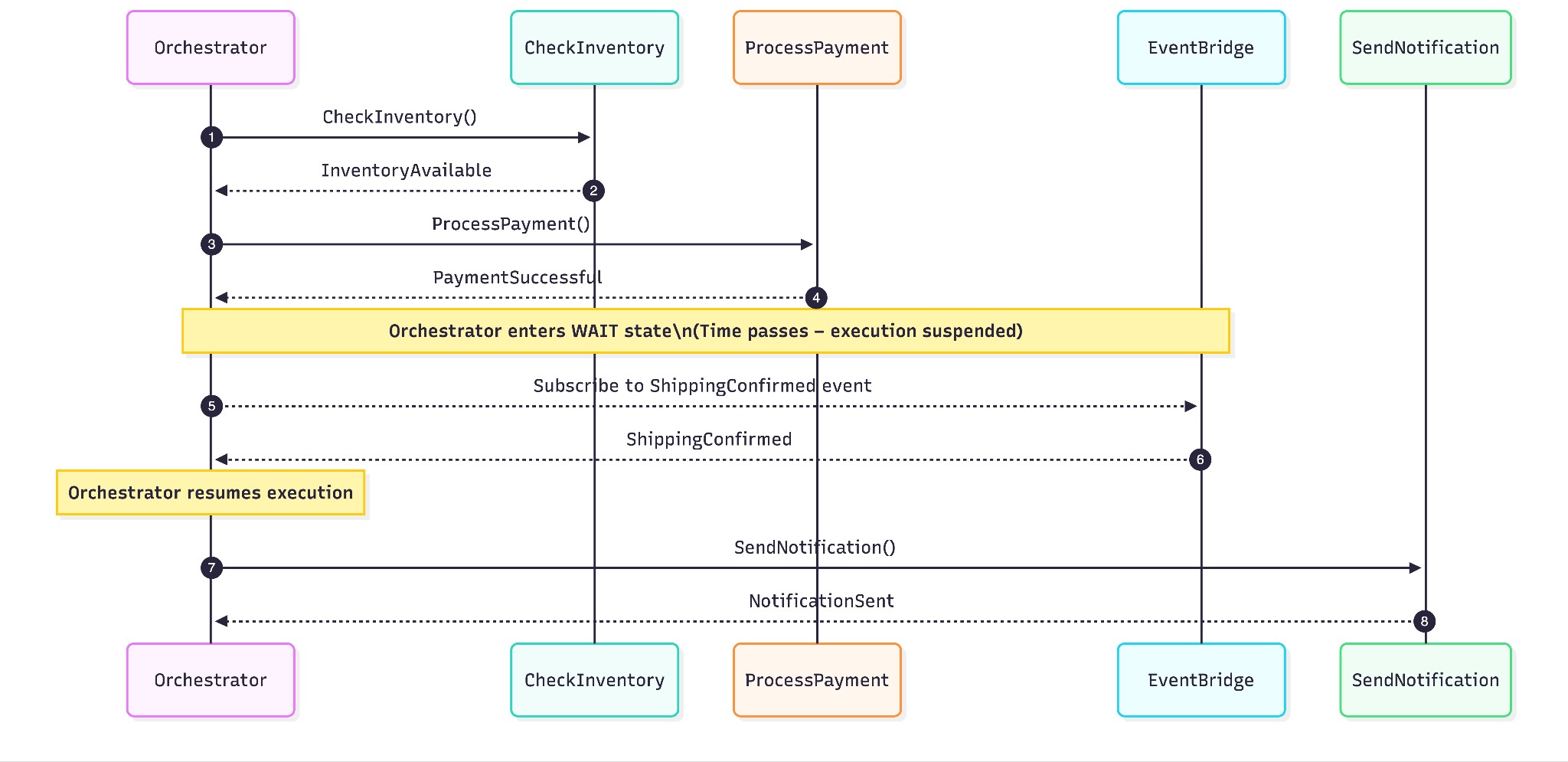
A sequence diagram showing the orchestrator calling "CheckInventory" and "ProcessPayment" activities, then waiting for a "ShippingConfirmed" event, followed by "SendNotification." Include time axes to highlight the suspension period.
Step 3: Deployment and Testing
Zip and deploy:
zip -r function.zip .

aws lambda update-function-code --function-name MyDurableWorkflow --zip-file fileb://function.zip
Trigger it:
aws lambda invoke --function-name MyDurableWorkflow --payload '{"orderId": "123", "items": [{"id": "1"}], "paymentInfo": {"amount": 100}, "email": "[email protected]"}' output.jsonSimulate the shipping event using the resumption API with the instance ID from CloudWatch logs. Monitor logs and metrics to verify each step.
Step 4: Advanced Features and Error Handling
Add retries:
yield context.callActivityWithRetry('ProcessPayment', { retryOptions: { maxAttempts: 3 } }, order.paymentInfo);
For parallel processing (fan-out/fan-in):

const tasks = orders.map(order => context.callActivity('ProcessOrder', order));
const results = yield context.whenAll(tasks);
Use timers:
yield context.createTimer(new Date(Date.now() + 24 * 60 * 60 * 1000)); // 24-hour delay
Integrate with VPC or layers for production readiness. Versioning ensures stability during long suspensions.
Comparing With Other Durable Execution Engines
Azure Durable Functions
Azure is a pioneer in this space and offers similar code-based orchestration with entity functions. It excels in debugging (local emulation) and language support (C#, Java, JS), but AWS wins on global reach and ecosystem integration. Azure’s state storage costs can exceed Lambda’s pay-per-use model.
AWS Step Functions
Step Functions use ASL for visual workflows, ideal for complex integrations and auditing. They’re YAML-based, less coder-friendly than Durable Functions, and incur state transition fees ($0.025/1,000). Durable Functions are cheaper for app-logic workflows, while Step Functions scale better for service orchestration.
Temporal
Temporal, an open-source option, requires self-hosting or Temporal Cloud, offering flexibility in versioning and retries. It’s heavier to set up but suits custom backends. AWS’s serverless ease trumps Temporal’s ops burden. Community benchmarks show Durable Functions are 3x faster to develop than Step Functions, with 20-30% lower costs for intermittent use.
Cloudflare Workflows
Tied to Cloudflare’s edge, it’s lightweight but lacks AWS’s enterprise depth. Best for web tasks, not complex integrations.
Conclusion
AWS Lambda Durable Functions empower developers to build enduring workflows with ease, reducing complexity and costs. This guide covers setup, coding, deployment, and comparisons, offering a foundation to explore further. Start with simple workflows and scale to enterprise needs — your next big project awaits!
Opinions expressed by DZone contributors are their own.
Comments