

Background Work, Push Topics, and Richer Notifications
Constraint-based background work, foreground services, push topic subscriptions, shared-content handling, and enhanced local notifications with full simulator support.
 CORE
·
CORE
·
Join the DZone community and get the full member experience.
Join For FreeThe work that happens while your app is not in the foreground has always been the fiddly part of mobile development, and Codename One's coverage of it had gaps. PR #5142 modernizes local notifications, push, background execution, and shared content across the core, JavaSE, Android, and iOS, and importantly, it makes all of it work in the simulator so you can iterate without a device.
Background Work With Constraints
The new com.codename1.background package schedules work that the OS runs when its conditions are met, mapping to Android JobScheduler and iOS BGTaskScheduler underneath. You describe what the work needs, not when to poll:
WorkRequest req = WorkRequest.builder("daily-sync", SyncWorker.class)
    .setRequiresNetwork(true)
    .setRequiresCharging(true)
    .setPeriodic(6 * 60 * 60 * 1000L)
    .build();
BackgroundWork.schedule(req);
The worker is a small class with a no-argument constructor that the platform instantiates when it runs your task:
public class SyncWorker implements BackgroundWorker {
    public void performWork(String workId, Map<String, String> inputData,
                            long deadline, Callback<Boolean> onComplete) {
        boolean ok = pullLatestData();
        onComplete.onSucess(ok);
    }
}
The builder covers the usual constraint set: network, unmetered network, charging, idle, battery-not-low, periodic intervals, an initial delay, and input data. For longer foreground operations, there is ForegroundService.start(...), which runs a JVM task behind a persistent notification on Android, and for heavier iOS background processing BackgroundTask.scheduleProcessing(...) maps to BGProcessingTaskRequest. The iOS background-processing identifiers are declared with the ios.backgroundProcessingIds build hint, which the builder turns into the matching Info.plist entries for you.
Notifications Got a Lot Richer
LocalNotification gained a long list of capabilities, all added backward-compatibly so every existing field, getter, and setter behaves exactly as before. New on top of that: an image attachment, multiple action buttons, inline quick reply, per-channel sound, grouping with a summary, full-screen intent, time-sensitive delivery, ongoing and progress notifications, a custom view, and a messaging-conversation style.
A download-progress notification, for example:
LocalNotification n = new LocalNotification();
n.setId("download");
n.setAlertTitle("Downloading");
n.setAlertBody("episode-12.mp4");
n.setOngoing(true);
n.setProgress(100, 40);
Display.getInstance().scheduleLocalNotification(
    n, System.currentTimeMillis(), LocalNotification.REPEAT_NONE);
Or a notification with an inline reply, the kind a messaging app uses:
n.addInputAction("reply", "Reply", "Type a message", "Send");On newer Android devices, notification channels are now first-class through a builder routed via Display:
Display.getInstance().registerNotificationChannel(
    new NotificationChannelBuilder("messages", "Messages")
        .importance(NotificationChannelBuilder.IMPORTANCE_HIGH)
        .enableVibration(true)
        .lockscreenVisibility(NotificationChannelBuilder.VISIBILITY_PRIVATE));
Permission requests are explicit too, with Display.requestNotificationPermission(...) taking a NotificationPermissionRequest (provisional, critical, time-sensitive, or the Android POST_NOTIFICATIONS permission) and returning a NotificationPermissionResult you can check with isGranted().
Push Topics
Push now supports topic subscriptions:
Push.subscribeToTopic("sports");
Push.unsubscribeFromTopic("sports");
On Android these map to FCM topics. On iOS they are a documented no-op, because raw APNs have no topic concept; the call is safe to make on both, so your code stays cross-platform.
Receiving Shared Content
If a user shares text, a URL, a file, or an image into your app from another app, it now arrives through a single lifecycle hook:
public void onReceivedSharedContent(SharedContent content) {
    // content carries text / url / file / image items
}
On Android this is backed by a share-receiver activity that handles SEND and SEND_MULTIPLE and hands files off through app storage. On iOS it reuses the share extension that landed two weeks ago and reads the App-Group payload when the app activates; the App Group is configured with the ios.shareAppGroup build hint. The build plugin wires the manifest entries, services, and intent filters automatically based on a classpath scan, so turning these features on does not mean hand-editing platform descriptors.
All of It Runs in the Simulator
The piece that makes this practical day-to-day is the JavaSE support. There is a new "Notifications and Background" entry in the Simulate menu with constraint toggles, a run-the-work-now button, a channel inspector, and shared-content injection, plus a rich notification panel that renders images, actions, inline quick reply, and progress and routes taps back to your LocalNotificationCallback and PushContent on the same code path the device uses. You can build and debug these flows entirely on your desktop before you ever make a build.
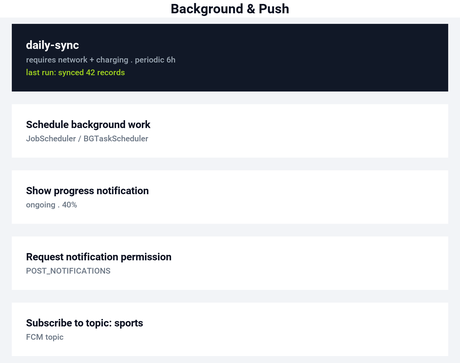
A control screen like this, with the scheduled job and the actions wired to the calls above, runs and renders in the simulator:
The previous deep dive was about the new advertising API, and the release post has the full index for the week, including the smaller fixes and the note about how we are handling contributions now. Keep an eye out for our next release this Friday.
Published at DZone with permission of Shai Almog. See the original article here.
Opinions expressed by DZone contributors are their own.
Comments