


How to Build Your Own AI SRE From Scratch
A hands-on walkthrough: 7 steps from a bare model behind an endpoint to an agent that reads your telemetry, reads your code, and files its findings as a GitHub issue.
If you are responsible for keeping a production system alive, you have probably been pitched an "AI SRE" in the last few months. Maybe more than one. Maybe more than one this week.
When we sat down at Bronto to map that space, we ended up with 64 tools across seven camps: pure-play investigation agents, observability platforms with AI built in, incident management tools with AI on top, AIOps and alert correlation, hyperscaler agents like AWS DevOps Agent and Azure SRE Agent, Kubernetes copilots and open source projects, and a long tail of adjacent tools. All of them use the same two words on their landing page, and they solve very different problems.
So the first question most teams ask is the classic one: do we buy, or do we build?
In our landscape article, we argue that the choice isn't binary. You can go full DIY, build on open source foundations like HolmesGPT or K8sGPT, buy a product and extend it, or buy it as-is. Most teams land somewhere in the middle.
In this article, I want to make a different argument for building one, at least once: build to understand what you buy. Even if you never run your own DIY agent in production, putting one together by hand shows you where its answers come from, what it can't see, and why it goes wrong when it does. After building one, you know which questions to ask a vendor, and you know how to get better results from whatever you end up running. That's the profit you should take away from this post. The fun is the building and seeing your agent try to investigate an incident: it might get it wrong, it might get it right, but you'll see how it interacts with your tools and your data.
This post is based on a hands-on lab we ran at an AWS and Bronto evening, and everything is available through bronto-community/ai-sre-lab. By the end, you will have a small agent with the following capabilities:
- reads logs, traces, and metrics through an MCP server,
- reads the application's source code and commit history through GitHub's MCP server,
- writes its hypothesis, evidence, and confidence into a GitHub issue.
Note that in the lab we use Bronto as the observability backend. I work there, so I am biased to think it is your best option, but you can of course use any other solution.
What an AI SRE Is
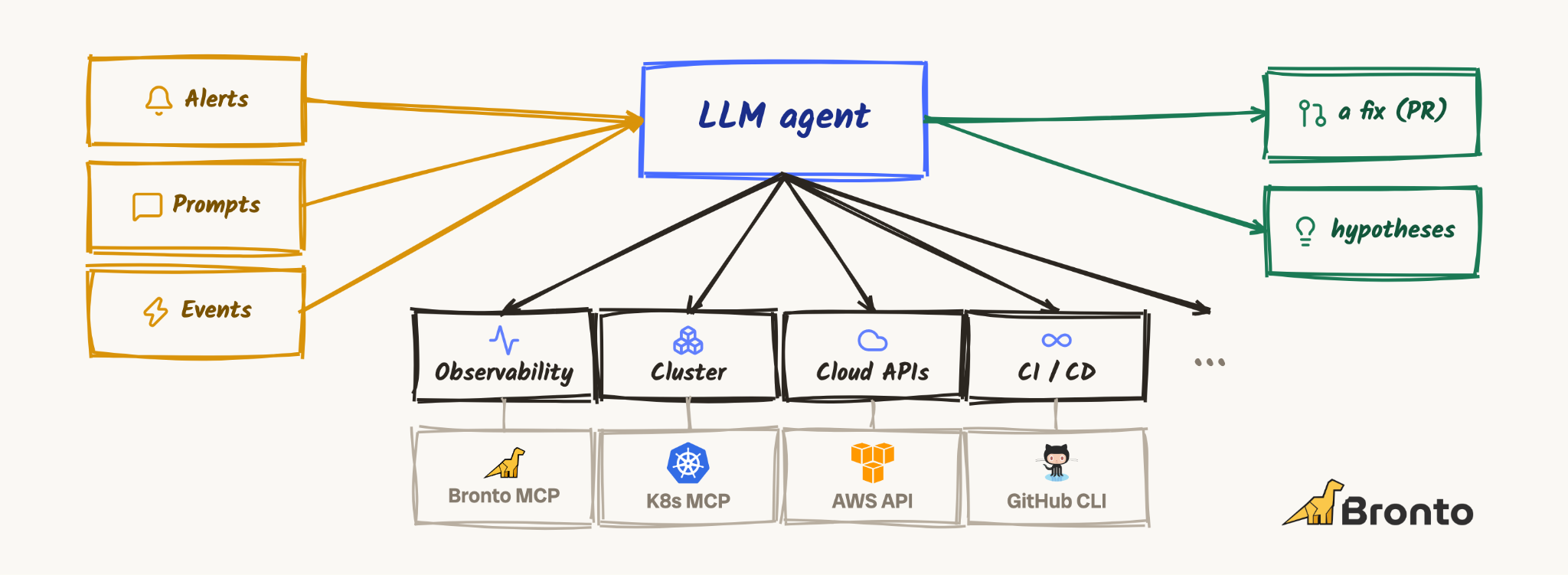
AI SRE is mostly a marketing term. In short, it's an agentic loop pointed at the production system that can answer questions about it and help you troubleshoot. Like any agentic loop, it has inputs on one side (an alert, a question from a human), a model in the middle, tools underneath (mostly MCP servers these days, for telemetry, code, cloud APIs, runbooks), and outputs on the other side (a Slack message, a ticket, a pull request).
So, it's an agent like any other. It's what you connect to it that makes it an agent for SRE.
The Patient: A Small Online Shop
Our AI SRE needs something to investigate. The lab comes with a tiny storefront: four Python services instrumented with OpenTelemetry, plus a payment processor mock standing in for a third party.
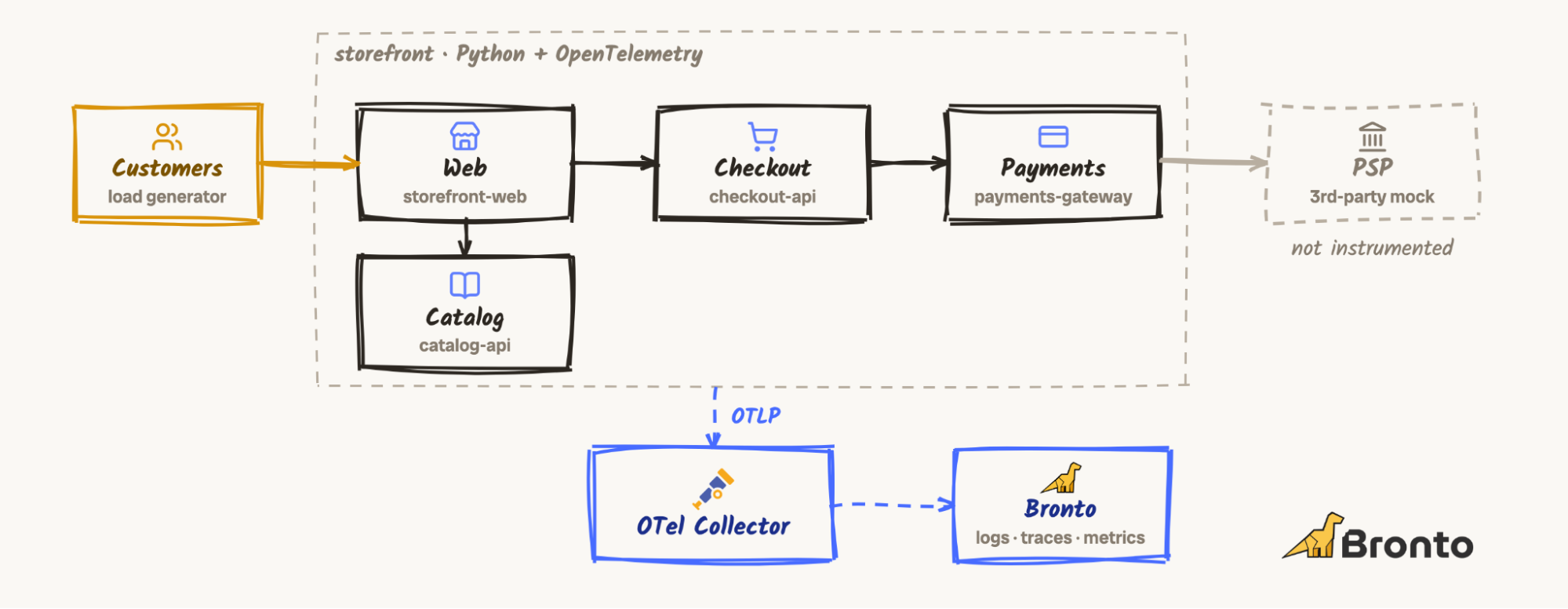
You can, of course, point the agent directly at your own data. It's read-only, so it is not able to harm your system.
What You Need
To run this lab, you need the following:
- A container engine, like Docker Desktop
- An AWS account with access to a model on Amazon Bedrock.
- A Bronto API key (there is a free trial), or another observability backend with an MCP server.
- A GitHub account and a fine-grained personal access token. It needs to read the contents of your copy of the storefront repo and write issues to it.
- Optional, for nicer output: jq and glow.
You can watch this video to follow along as we walk through each step:
Start the Shop
Clone the lab and generate the storefront repository. The script builds a small Git history with a handful of commits and tags two releases, v3.1.0 (healthy) and v3.2.0:
git clone https://github.com/bronto-community/ai-sre-lab
cd ai-sre-lab
./build-storefront.sh
Your agent will later read this code through GitHub, so push it to a repository of your own, tags included:
cd storefront
gh repo create storefront --public --source . --push
git push --tags
cd ..
Then point the Collector at your telemetry backend and bring everything up:
cd demo
echo "BRONTO_API_KEY=<your key>" > .env
make up
Note, that demo/collector.yaml ships to Bronto's EU ingestion endpoint. If your account lives in another region, or you want a different backend, that file is the only thing you need to change.
Next, run make up, which deploys v3.1.0 and starts the traffic. It prints a message that you should leave it about ten minutes before you do anything else. An investigator with no baseline has nothing to compare against. So, take your time going through the first few next steps so it can build up!
Step 1: The Loop
All agents start with a basic file that receives prompts, sends them to the model, and returns the results. It's a simple first agent, so here is more or less the code in full:
import os

from bedrock_agentcore import BedrockAgentCoreApp
from strands import Agent
from strands.models import BedrockModel

model = BedrockModel(
model_id=os.environ.get("BEDROCK_MODEL_ID", "us.anthropic.claude-haiku-4-5-20251001-v1:0"),
region_name=os.environ.get("AWS_REGION") or os.environ.get("AWS_DEFAULT_REGION", "us-west-2"),
)
app = BedrockAgentCoreApp()


@app.entrypoint
def invoke(payload: dict) -> dict:
agent = Agent(model=model)
return {"result": str(agent(payload.get("prompt", "Hello!")))}


if __name__ == "__main__":
app.run() # POST /invocations, GET /ping on :8080
Two libraries do the work. Strands Agents runs the agent loop: send the prompt to the model, run any tool the model asks for, feed the result back, repeat until the model has an answer. The Bedrock AgentCore SDK wraps that in an HTTP server with the /invocations and /ping contract AgentCore Runtime expects. Today that runs on your laptop. Later, the same container can run on AgentCore Runtime without changes.
Every step of the lab is a prebuilt image, so you don't need to build anything. Create a .env next to where you run the commands:
AWS_DEFAULT_REGION=us-west-2
AWS_ACCESS_KEY_ID=...
AWS_SECRET_ACCESS_KEY=...
AWS_SESSION_TOKEN=...
BEDROCK_MODEL_ID=us.anthropic.claude-haiku-4-5-20251001-v1:0
With this setup, you can start the agent for the first time:
docker run --rm -p 8080:8080 --env-file .env ghcr.io/bronto-community/ai-sre-agent:step-1Open a second terminal and ask it something:
curl -s localhost:8080/invocations -d '{"prompt": "Who are you?"}' | jq -r .resultIt will say, "Claude, an AI assistant made by Anthropic." Correct, and completely useless for incident response. Right now this is a model behind an endpoint, with no identity and no tools.
Step 2: Identity
The second step changes only one line of code. Every Markdown file in prompts/ becomes part of the system prompt:
SYSTEM_PROMPT = "\n\n".join(p.read_text() for p in sorted(Path("prompts").glob("*.md")))

@app.entrypoint
def invoke(payload: dict) -> dict:
agent = Agent(model=model, system_prompt=SYSTEM_PROMPT)
...
The image ships with two files. role.md:
You are the on-call SRE for Storefront, an online shop.
You investigate production incidents: what broke, where, and why.
And rules.md:
- Only state what you can back with evidence from your tools.
- If you have no tool that can answer, say so and name what you would need.
- Be brief.
You also get to add your own. Create a my.md:
- Answer in at most three bullet points.
- End every answer with your confidence: low, medium or high.
- Sign off as "your friendly on-call dino".
Start step 2 as follows. The command contains your custom instructions as an additional volume:
docker run --rm -p 8080:8080 --env-file .env \
-v "$PWD/my.md:/app/prompts/my.md" ghcr.io/bronto-community/ai-sre-agent:step-2curl -s localhost:8080/invocations -d '{"prompt": "Checkout is slow. What is wrong?"}' | jq -r .resultYou should get a short answer that says it has no access to telemetry, rates its own confidence as low, and signs off as a dino. That's a good result. The rule "say so and name what you would need" did its job: an agent that admits it can't see anything is far more useful than one that guesses.
Step 3: Eyes
Now the agent gets something to look at. Step 3 adds one tool source, Bronto's MCP server:
bronto = MCPClient(lambda: streamable_http_client(
os.environ.get("BRONTO_MCP_URL", "https://mcp.eu.bronto.io/mcp"),
http_client=httpx2.AsyncClient(
headers={"X-BRONTO-API-KEY": os.environ["BRONTO_API_KEY"]}, timeout=60,
),
))

@app.entrypoint
def invoke(payload: dict) -> dict:
agent = Agent(model=model, system_prompt=SYSTEM_PROMPT, tools=[bronto])
...
That's the whole change. The MCP server's tools (search logs, list datasets, and so on) become tools the agent can call, and Strands handles the plumbing. This is also the point where MCP pays off: if your telemetry lives somewhere else, you swap this client for that vendor's MCP server and keep everything else.
Add BRONTO_API_KEY to your .env (and BRONTO_MCP_URL if your account isn't in the EU region), then:
docker run --rm -p 8080:8080 --env-file .env \
-v "$PWD/my.md:/app/prompts/my.md" ghcr.io/bronto-community/ai-sre-agent:step-3
Start with a question that tells you what it can see:
curl -s localhost:8080/invocations -d '{"prompt": "What services do you know about?"}' | jq -r .resultIt should list the storefront services. Go ahead and ask it some more questions about the state of those services: what HTTP endpoints are available? What is the average error rate right now?
With this, you have a first working version. Next we want to investigate an incident. To do so, ship the next release of the storefront:
make releaseAccording to the Makefile, symptoms take about 60 seconds to show up in p95. So wait a minute or two and then ask it:
curl -s localhost:8080/invocations -d '{"prompt": "Anything wrong with checkout?"}' | jq -r .resultIt will come back with a hypothesis about what is wrong and what you might be able to do about it. Take a look at the telemetry yourself and check: is the analysis correct, or did the agent pick up some false information?
Step 4: Mouth
An answer in your terminal is nice for a demo, but in production you would want to have it sent to a Slack channel, a pager app, or an issue tracker. In our example, we send the answer as a GitHub issue. This would let you tag your coding agent to review the issue and open a pull request that fixes it.
You now have two options for how this gets filed. Either you give your agent another tool, and it can decide for itself where to send the hypothesis, or you make the code file the issue, so every analysis gets pushed into a dedicated issue:
def file_issue(question: str, hypothesis: str) -> str:
r = httpx2.post(
f"https://api.github.com/repos/{os.environ.get('GITHUB_REPO', 'ai-sre-lab/storefront')}/issues",
headers={"Authorization": f"Bearer {os.environ['GITHUB_TOKEN']}"},
json={"title": f"[investigation] {question}"[:120], "body": hypothesis},
timeout=30,
)
r.raise_for_status()
return r.json()["html_url"]


@app.entrypoint
def invoke(payload: dict) -> dict:
question = payload.get("prompt", "Hello!")
agent = Agent(model=model, system_prompt=SYSTEM_PROMPT, tools=[bronto])
hypothesis = agent(question)
return {"result": file_issue(question, hypothesis)}
To make sure that what the agent provides fits the output, an additional new prompt file tells the agent how to write it:
Your answer is filed as a GitHub issue for the on-call team. Write it as one:
a one-line hypothesis, the evidence for it, your confidence, and what you could not check.
Before running the next version of your agent, add your GitHub token and your repository to .env:
GITHUB_TOKEN=github_pat_...
GITHUB_REPO=<your-user>/storefront
Run step 4:
docker run --rm -p 8080:8080 --env-file .env \
  -v "$PWD/my.md:/app/prompts/my.md" ghcr.io/bronto-community/ai-sre-agent:step-4
Ask it again to investigate the issue:
curl -s localhost:8080/invocations -d '{"prompt": "Anything wrong with checkout?"}' | jq -r .resultThe response is now a link. Open it and read the hypothesis. Is it right? How confident is it?
There's a good chance it's confidently wrong. While testing the lab, one run concluded that checkout was down because a query returned nothing: an empty result is not proof of an outage, but nothing told the agent that.
Step 5: Better Instructions
What you do next doesn't involve code. You do what you'd do with a new human on the rotation: you tell them how you investigate.
Add these lines to your my.md:
- Slow is broken too: compare latency (p50, p95) before and after, not only errors.
- Compare against a quiet window earlier the same day.
- Look for `deploy` spans near the onset: they name the commit that went live.
Each line encodes a habit experienced SREs have, and models don't bring by default. Checkout can be very broken without throwing a single error. A number means little without a baseline. And the first question in most incidents is "what changed?"
The prompt files are read when the container starts, so restart step 4 with the same command and ask a more realistic question:
curl -s localhost:8080/invocations \
  -d '{"prompt": "Customers say checkout got slow in the last 30 minutes. What is going on?"}' | jq -r .result
Compare the new issue with the old one. Is it better? Worse? Did it fail outright?
Step 6: Better Model
As you might now, a different model can create a different output, so if you are not satisfied with the results yet, change one line in .env:
BEDROCK_MODEL_ID=us.amazon.nova-lite-v1:0Restart your agent, ask the question again, and compare the outputs again: better or worse?
Step 7: Code
So far the agent can see that something changed and maybe even when. If your instructions worked, it found the deploy. What it can't do is look at what was deployed. Step 7 adds the second MCP server, GitHub's, restricted to read-only repository tools:
github = MCPClient(lambda: streamable_http_client(
os.environ.get("GITHUB_MCP_URL", "https://api.githubcopilot.com/mcp/x/repos/readonly"),
http_client=httpx2.AsyncClient(
headers={"Authorization": f"Bearer {os.environ['GITHUB_TOKEN']}"}, timeout=60,
),
))

@app.entrypoint
def invoke(payload: dict) -> dict:
question = payload.get("prompt", "Hello!")
agent = Agent(model=model, system_prompt=SYSTEM_PROMPT, tools=[bronto, github])
    ...
To make it useful to the agent, add one more prompt file, code.md. It connects the telemetry to the code:
The shop's source code is in the GitHub repository `ai-sre-lab/storefront`.
Every service reports the commit it runs as `deployment.commit`.
Replace the repository path with your own, then mount it as an additional volume:
docker run --rm -p 8080:8080 --env-file .env \
-v "$PWD/my.md:/app/prompts/my.md" \
-v "$PWD/code.md:/app/prompts/code.md" \
  ghcr.io/bronto-community/ai-sre-agent:step-7
Ask the same question again:
curl -s localhost:8080/invocations \
  -d '{"prompt": "Customers say checkout got slow in the last 30 minutes. What is going on?"}' | jq -r .result
Does it find the deploy? Does it open the release and pick the right commit? In our testing, it found the deploy marker and the commit, and then stopped. The release contains several commits, and the last hop, reading every one of them and figuring out which change explains the symptom, didn't happen on its own.
If you experience the same, try to fix it yourself by refining your system prompts or by trying yet another model.
When you're done, make rollback puts the healthy version back, and make down cleans everything up. If you want to give your agent a harder case, make psp-slow degrades the third-party payment processor.
So, Buy or Build?
Now you know what an AI SRE is and how it works, from the inside. That's a much better position from which to answer the question this post started with.
If you buy, a lot of what hurt along the way becomes someone else's problem: confidently wrong answers that need endless prompt tuning, context windows overflowing with search results, wiring up every integration yourself. AWS DevOps Agent, for example, starts investigating when an alert fires and connects to the tools you likely already run, and you can still extend it with custom skills and your own tools. Take the four questions from the landscape article with you into every demo: Where does it get its data? Does it act, or only advise? Can you see its reasoning? What happens when it's wrong? After this lab, you'll know what good and bad answers to those look like.
If you build, what you have now is a skeleton, and you can build more features towards a complete picture on top of it:
- Let alerts trigger it instead of curl.
- Run it on AgentCore Runtime instead of your laptop (agentcore deploy).
- Give it more tools: your cluster, your cloud APIs, your past incidents and postmortems.
- Observe the agent itself. Its own traces tell you which tools it called, how many tokens it burned, and where it went wrong, and that's the input you need to improve it.
Either way, the data underneath matters more than the agent on top. Every improvement in this lab depended on the telemetry being there: a baseline from ten quiet minutes, latency and not just errors, a deployment.commit attribute that connects a span to a line of code. An agent can only reason about what your system tells it. That was true for humans long before agents showed up.
So: what would your agent get wrong?
The full lab, including the slides, the agent images for every step, and the storefront harness, is at github.com/bronto-community/ai-sre-lab. Content is CC BY 4.0; code is MIT. If you build something on top of it, I'd love to hear about it.
I've shown how easy it is to build a simple AI SRE agent for fun. If you want to see what a production-ready one looks like, read our post on the Bronto blog, Introducing Bronto's Open-Source Alert Investigation Agent. It's an open-source agent that replicates the Alert Investigation feature in Bronto, and it's essentially our production version of this lab: a Bronto monitor triggers it instead of curl, it sticks to a constrained set of tools and reasoning paths instead of improvising, and it hands you a report with likely root causes and suggested next steps. The code is at bronto-community/bronto-alert-investigation-agent.
Comments