

Building On-Call Agents That Learn Using LangChain Memory
On-call agents forget everything between incidents. Here's a three-layer memory architecture: episodic, semantic, and working, with real LangChain code.
Join the DZone community and get the full member experience.
Join For FreeEvery on-call AI agent has the same dirty secret: it starts each incident completely blank. It doesn't remember that the payments service crashed last Tuesday for the same reason. It doesn't know your team always checks the database connection pool first. It doesn't recall that rollbacks on this service take 20 minutes, not 5.
Humans build this knowledge over months of being paged at 2 a.m. Current agents throw it away at the end of every session.
That's the long-horizon memory problem. And it's the gap between an agent that's useful in a demo and one that actually gets better over time.
The Three Memory Types You Actually Need
Research on agentic memory converges on three distinct types, each doing a different job. Skip one and your agent has a specific failure mode.
Episodic memory: What happened in past incidents. The raw "we saw this before" recall.
Semantic memory: What the agent has learned from those episodes. Distilled patterns, not raw events.
Working memory: What the agent is actively tracking in the current incident. Scoped, temporary, cleared when the incident closes.
Most implementations conflate all three into one context window. That's why they degrade. Episodic recall bloats the context, semantic patterns get buried, and the agent loses track of the current incident in the noise.
The Architecture
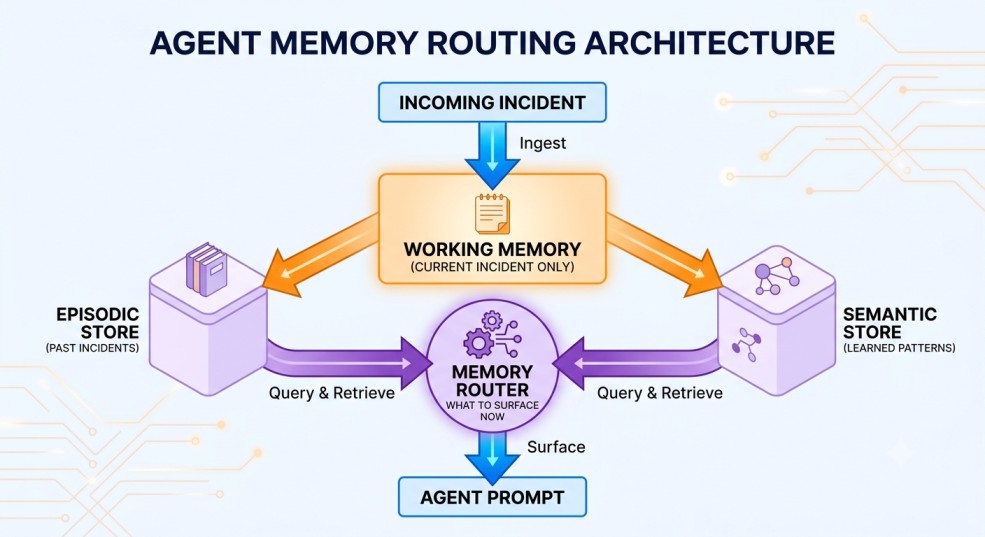
The memory router is the key piece most implementations miss. It decides what from episodic and semantic stores is actually relevant to the current incident, not everything, just what's useful right now.
Implementation
1. Working Memory, Current Incident Context
Working memory is the simplest piece. It tracks the active incident state and gets cleared when the incident resolves.
from langchain.memory import ConversationBufferWindowMemory
from dataclasses import dataclass, field
from datetime import datetime
from typing import Optional

@dataclass
class WorkingMemory:
    incident_id: str
    service: str
    started_at: datetime
    observations: list[str] = field(default_factory=list)
    actions_taken: list[str] = field(default_factory=list)
    current_hypothesis: Optional[str] = None

    def add_observation(self, obs: str):
        self.observations.append(f"[{datetime.utcnow().isoformat()}] {obs}")

    def add_action(self, action: str, result: str):
        self.actions_taken.append(f"{action} -> {result}")

    def to_prompt_context(self) -> str:
        return f"""
        Current Incident: {self.incident_id}
        Service: {self.service}
        Running for: {(datetime.utcnow() - self.started_at).seconds // 60} minutes
        Observations so far: {chr(10).join(self.observations[-5:])}
        Actions taken: {chr(10).join(self.actions_taken[-3:])}
        Current hypothesis: {self.current_hypothesis or "None yet"}
        """

    def close(self) -> dict:
        """Serialize for episodic storage when incident resolves."""
        return {
            "incident_id": self.incident_id,
            "service": self.service,
            "duration_minutes": (datetime.utcnow() - self.started_at).seconds // 60,
            "observations": self.observations,
            "actions_taken": self.actions_taken,
            "resolved_hypothesis": self.current_hypothesis
        }
The close() method is the handoff point. When the incident resolves, working memory gets serialized into episodic storage. That's how the agent accumulates experience over time.
2. Episodic Memory, Past Incident Store
Episodic memory stores resolved incidents as structured records. The agent can search them by service, error signature, or time window.
from langchain.memory import ConversationSummaryBufferMemory
from langchain_core.language_models import BaseChatModel
import json
from pathlib import Path

class EpisodicMemoryStore:
    def __init__(self, store_path: str, llm: BaseChatModel):
        self.store_path = Path(store_path)
        self.store_path.mkdir(exist_ok=True)
        self.llm = llm

    def save_incident(self, incident: dict):
        """Save a resolved incident to episodic store."""
        path = self.store_path / f"{incident['incident_id']}.json"
        path.write_text(json.dumps(incident, indent=2))

    def recall_similar(self, service: str, error_hint: str, limit: int = 3) -> list[dict]:
        """Retrieve past incidents for the same service."""
        incidents = []
        for f in self.store_path.glob("*.json"):
            data = json.loads(f.read_text())
            if data.get("service") == service:
                incidents.append(data)

        # Sort by recency and cap results
        incidents.sort(
            key=lambda x: x.get("duration_minutes", 999)
        )
        return incidents[:limit]

    def summarize_for_prompt(self, incidents: list[dict]) -> str:
        """Compress past incidents into a prompt-friendly summary."""
        if not incidents:
            return "No past incidents found for this service."

        raw = json.dumps(incidents, indent=2)
        summary = self.llm.invoke(f"""
        Summarize these past incidents for an on-call agent.
        Focus on: what triggered each incident, what actions resolved it,
        and how long it took. Be concise - 3-4 bullet points max.

        Incidents:
        {raw}
        """)
        return summary.content
The summarize_for_prompt method is doing real work here. Raw incident JSON dumped into a prompt bloats context fast. Summarizing it keeps the episodic recall tight and relevant.
3. Semantic Memory, Learned Patterns
Semantic memory is where the agent stores what it has learned from episodes - not raw events, but distilled patterns. Think of it as the runbook that writes itself.
from langchain.memory import ConversationSummaryMemory

class SemanticMemoryStore:
    def __init__(self, llm: BaseChatModel):
        self.llm = llm
        self.patterns: dict[str, list[str]] = {}  # service -> learned patterns

    def extract_and_store(self, incident: dict):
        """Extract a reusable pattern from a resolved incident."""
        service = incident["service"]

        pattern_prompt = f"""
        An on-call agent just resolved this incident:
        Service: {service}
        Actions that worked: {incident.get("actions_taken", [])}
        Root cause: {incident.get("resolved_hypothesis", "unknown")}
        Duration: {incident.get("duration_minutes")} minutes

        Extract ONE reusable pattern for future incidents on this service.
        Format: "When [symptom], check [thing] because [reason]. Fix: [action]."
        One sentence only.
        """
        pattern = self.llm.invoke(pattern_prompt).content.strip()

        if service not in self.patterns:
            self.patterns[service] = []
        self.patterns[service].append(pattern)

        # Cap patterns per service to avoid bloat
        self.patterns[service] = self.patterns[service][-10:]

    def get_patterns(self, service: str) -> str:
        patterns = self.patterns.get(service, [])
        if not patterns:
            return "No learned patterns yet for this service."
        return "Learned patterns for this service:\n" + "\n".join(
            f"- {p}" for p in patterns
        )
The cap at 10 patterns per service is intentional. Unlimited pattern accumulation is its own problem. Old patterns from a different version of the service become noise. Trim aggressively.
4. The Memory Router
This is the piece that ties everything together. Before the agent starts working on an incident, the router assembles what's actually relevant from all three stores.
from langchain_core.prompts import ChatPromptTemplate
from langchain_core.language_models import BaseChatModel

class MemoryRouter:
    def __init__(
        self,
        episodic: EpisodicMemoryStore,
        semantic: SemanticMemoryStore,
        llm: BaseChatModel
    ):
        self.episodic = episodic
        self.semantic = semantic
        self.llm = llm

    def assemble_context(
        self,
        working: WorkingMemory,
        error_hint: str
    ) -> str:
        # Pull relevant episodic memories
        past_incidents = self.episodic.recall_similar(
            service=working.service,
            error_hint=error_hint,
            limit=3
        )
        episodic_summary = self.episodic.summarize_for_prompt(past_incidents)

        # Pull learned patterns
        semantic_patterns = self.semantic.get_patterns(working.service)

        # Assemble the full memory context for the agent prompt
        return f"""
        === MEMORY CONTEXT ===

        {working.to_prompt_context()}

        Past incidents on {working.service}:
        {episodic_summary}

        {semantic_patterns}

        === END MEMORY CONTEXT ===
        Use the above context to inform your investigation.
        Prioritize patterns that match the current symptoms.
        Do not repeat actions that failed in past incidents unless you have new information.
        """

    def on_incident_close(self, working: WorkingMemory):
        """Called when incident resolves - persist to episodic and semantic stores."""
        record = working.close()
        self.episodic.save_incident(record)
        self.semantic.extract_and_store(record)
The last instruction in the assembled context - "do not repeat actions that failed in past incidents" - is subtle but important. Without it, the agent will try the same failed fix it tried last time, because that's what its training data says to try for this type of error.
5. Wiring It Into the Agent
from langchain.agents import AgentExecutor, create_react_agent
from langchain_anthropic import ChatAnthropic

llm = ChatAnthropic(model="claude-sonnet-4-6")

# Initialize stores
episodic_store = EpisodicMemoryStore(store_path="./incident_memory", llm=llm)
semantic_store = SemanticMemoryStore(llm=llm)
router = MemoryRouter(episodic_store, semantic_store, llm)

def handle_incident(incident_id: str, service: str, alert: str):
    # Open working memory for this incident
    working = WorkingMemory(
        incident_id=incident_id,
        service=service,
        started_at=datetime.utcnow()
    )

    # Assemble memory context
    memory_context = router.assemble_context(working, error_hint=alert)

    # Build the agent prompt with memory injected
    full_prompt = f"""
    You are an on-call SRE agent. Use your memory context to investigate and resolve this incident.

    {memory_context}

    Current alert: {alert}

    Investigate and resolve this incident. If you recognize a pattern from past incidents, try that resolution first.
    """

    agent = create_react_agent(llm, tools, prompt_template)
    executor = AgentExecutor(
        agent=agent,
        tools=tools,
        max_iterations=10,
        max_execution_time=120,
        handle_parsing_errors=True
    )

    try:
        result = executor.invoke({"input": full_prompt})
        working.current_hypothesis = result["output"]
    finally:
        # Always persist - even if agent errored, save what we observed
        router.on_incident_close(working)

    return result
The finally block matters. If the agent errors out mid-investigation, you still want to save whatever observations it made. The next incident benefits from partial information.
What This Looks Like After 30 Incidents
After the agent handles 30 incidents on the payments service, the semantic store might look like:
Learned patterns for payments-api:
- When connection timeout > 5s, check RDS connection pool because pool exhaustion
  causes cascade. Fix: increase max_connections in parameter group.
- When error rate spikes post-deploy, check feature flags because incomplete
  rollouts leave partial code paths active. Fix: disable new flag, redeploy.
- When latency p99 > 2s but p50 normal, check for slow queries in aurora logs
  because outlier queries drag tail latency. Fix: identify and kill long-running queries.
That's a runbook that wrote itself from real incidents. The agent surfaces these patterns before starting its investigation - not as hard rules, but as "try this first" signals.
What This Doesn't Solve
Episodic memory is only as good as the incidents that feed it. If the agent consistently misdiagnoses root causes, it stores bad patterns and compounds the error. You need a feedback loop - human confirmation of root cause before a pattern gets persisted.
The in-memory semantic store used here doesn't survive process restarts. For production, back it with a simple key-value store or SQLite. The pattern extraction logic stays the same.
And context windows are still finite. Even with summarization, a service with hundreds of incidents needs smarter retrieval than recency sorting. That's where vector search earns its place - but that's a separate article.
Research project context: This work was developed as a personal research project, not affiliated with any employer. If you're building incident memory for on-call agents and have hit the pattern-decay problem specifically, drop it in the comments.
Opinions expressed by DZone contributors are their own.
Comments