

Building an Investment Portfolio GPT Companion With OpenAI, Python LLaMA, and Flask
Step-by-step tutorial on how to build an AI web application, "Investment Portfolio GPT Companion," with OpenAI, Python LLaMA, and Flask frameworks.
Join the DZone community and get the full member experience.
Join For FreeIn this tutorial, I venture into the exciting world of OpenAI and LLM and share my experience of building an Investment Portfolio GPT Companion web application using OpenAI, Llama, and Python Flask. If you're curious to see a product demo and explore the code behind this app, I invite you to read the rest of this article, which includes step-by-step guidance on how I brought together these cutting-edge technologies to create an insightful tool for investment portfolio analysis.
The Investment Portfolio GPT Companion is a single-page application (SPA) that utilizes a proprietary investment portfolio LLM model to provide answers and insights related to the assets in the investment portfolio. I will explain how to construct the LLaMA model using OpenAI and contextual information obtained from a market data API. You can find the complete code for this application in this GitHub repository.
The idea for the Investment Portfolio LLM Companion came about from my own, only sometimes successful investment experience and my interest in algo trading strategies, market data APIs, and LLM models. As a fintech technologist, I saw the opportunity to combine these diverse domains into a practical use case and educational content.
I hope this product demo will give a better understanding of the application’s features.
Before we build the investment LLM model, also referred to as GPT, we need to define the investment knowledge base that includes information specific to my made-up investment portfolio. I used the Mboum Finance API, a market data provider freely available on the Rapid API Hub, to build the GPT model knowledgebase. The Mboum Finance API offers various market and instrument endpoints, and for this project, I used the market/news/{stock} endpoint.
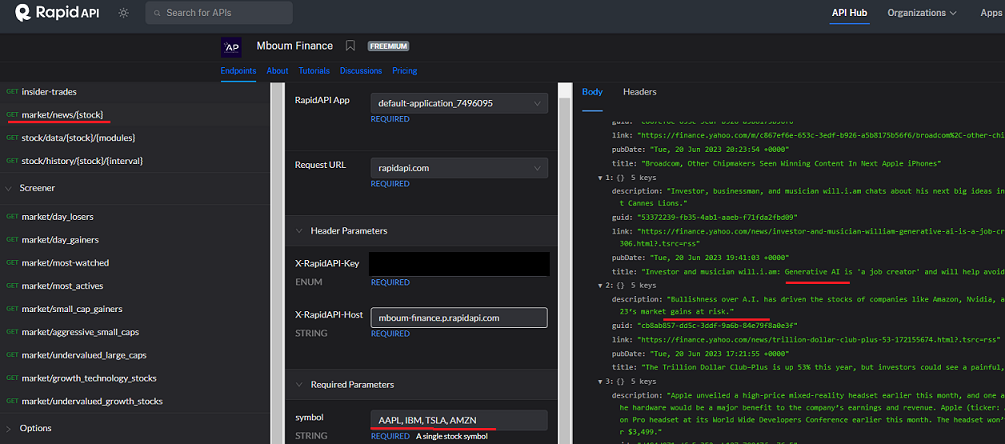
The Mboum Finance API accepts a list of instrument tickers from my investment portfolio and returns an array of data elements containing article information. For this tutorial, I hardcoded the list of stocks in the app code. In a real-world scenario, the logic responsible for building the LLaMA index would likely be triggered by messaging, APIs, or scheduler events such as AWS SQS or EventBridge. To build the GPT model, you’ll need an OpenAI account and API Key, which should be configured as environment variables.
FLASK_APP=app.py
FLASK_ENV=development
FLASK_DEBUG=True

OPENAI_API_KEY=***********************************
X-RapidAPI-Key=***********************************

X-RapidAPI-Host=mboum-finance.p.rapidapi.com
QUOTE_API_URL=https://mboum-finance.p.rapidapi.com/qu/quote
NEWS_API_URL=https://mboum-finance.p.rapidapi.com/ne/news/
We will use the VectorStoreIndex type index, created from an Article type array converted into a Document type array. Once the Llama SDK generates the VectorStoreIndex, it will be persisted to local storage for future use by the Flask application.
import os
from datetime import datetime, timedelta

import pytz
import requests
from dotenv import load_dotenv
from llama_index import Document, StorageContext, VectorStoreIndex
from llama_index.node_parser.simple import SimpleNodeParser

load_dotenv()

def create_index():

    tickers = "AAPL, IBM, TSLA, AMZN"
    articles = get_stock_news_feed(tickers)
    create_index_from_articles(articles=articles)

def create_index_from_articles(articles):

    path = "indexed_files/api_index"
    documents = []
    for article in articles:
        documents.append(Document(article))

    nodes = SimpleNodeParser().get_nodes_from_documents(documents)

    index = VectorStoreIndex(nodes)
    index.storage_context.persist(f'./{path}')
Now that we have the GPT index saved and available for use, we can start the Flask app. The Flask application will instantiate the VectorStoreIndex type global variable loaded from local storage during startup.
from dotenv import load_dotenv
from flask import Flask, jsonify, render_template, request
from llama_index import (SimpleDirectoryReader, StorageContext,
                         VectorStoreIndex, load_index_from_storage)

app = Flask(__name__)

index = None

def create_index():

    global index
    storage_context = StorageContext.from_defaults(persist_dir="./indexed_files/api_index")
    index = load_index_from_storage(storage_context)
We define a route that renders a single-page HTML template and an API endpoint to query the LLaMA index engine based on the user-submitted query. The LLaMA engine response is returned to UI in JSON format and displayed to the user.
@app.route('/')
def home():
    return render_template('index.html')


@app.route("/api/query")
def query():
    global index

    query_str = request.args.get('question', None)
    print(f"question: {query_str}")
    if not query_str:
        return jsonify({"error": "Please provide a question."})

    response = None
    try:

        query_engine = index.as_query_engine()
        response = query_engine.query(query_str).response

    except Exception as e:
        print(f"Exception: {e}")
        return jsonify({'response': e})

    return jsonify({'response': response})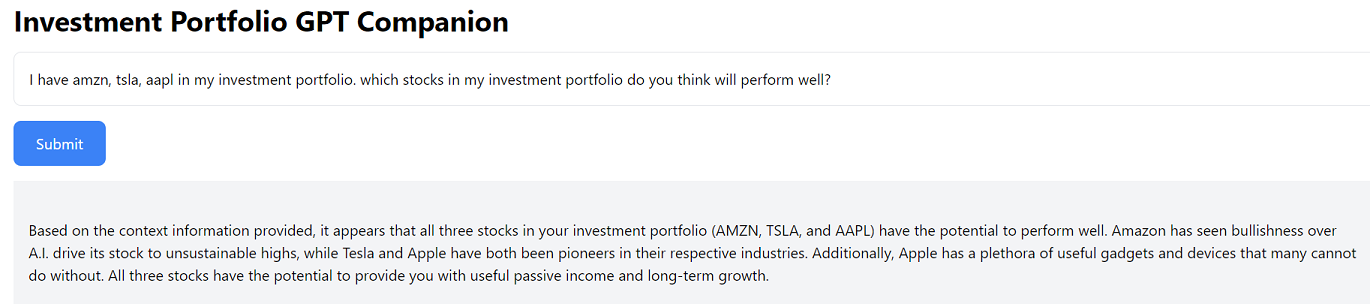
In this tutorial, I have demonstrated how you can utilize a market data API, along with Python Flask and LLaMA libraries, to build a use-case-specific ChatGPT application. By following these steps, you can create the Investment Portfolio GPT Companion web application and provide valuable insights about an investment portfolio. Feel free to explore the application code in this GitHub repository to enhance and customize the application according to your specific requirements.
I want to acknowledge the excellent article by Amir Tadrisi, “Building an Intelligent Education Platform with OpenAI, ChatGPT, and Django.” I am not a UI developer; therefore, I took the liberty to use some of his UI code for this project.
Published at DZone with permission of David Shilman. See the original article here.
Opinions expressed by DZone contributors are their own.
Comments