

Building Lambda Functions With Node.JS
Building Efficient Lambda Functions with Node.js: Unleashing the Power of Serverless Magic.
Join the DZone community and get the full member experience.
Join For FreeBuilding Efficient Lambda Functions with Node.js: Unleashing the Power of Serverless Magic
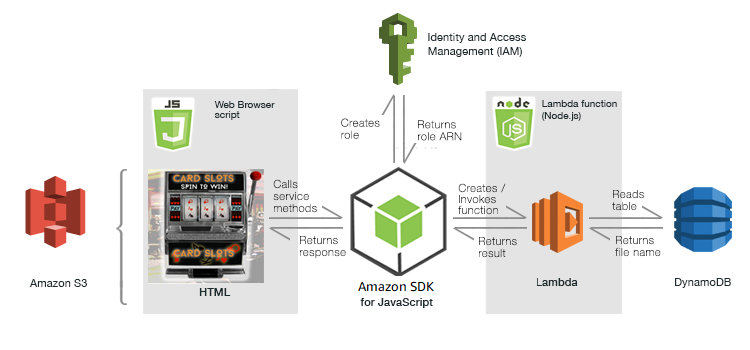
In the ever-evolving landscape of cloud computing, serverless architecture has emerged as a transformative paradigm, enabling developers to focus on code without the burden of managing infrastructure. At the heart of this revolution are AWS Lambda functions, lightweight, event-driven compute units that execute code in response to various triggers. In this article, we'll embark on a journey to master the art of building Lambda functions with the versatile programming language, Node.js.
Getting Started With Lambda Functions
What Are Lambda Functions?
Lambda functions are ephemeral units of code that run in the cloud, triggered by events such as HTTP requests, database changes, or messages from queues. As a Node.js developer, you can leverage this technology to create scalable, efficient, and cost-effective applications.
Setting Up Your Environment
AWS Account: If you don't have one already, create an AWS account to access Lambda services.
AWS CLI and Node.js: Install the AWS Command Line Interface (CLI) and Node.js to manage and deploy Lambda functions.
Create Your First Lambda Function: Using the AWS Management Console or CLI, you can create a Lambda function from scratch. Remember to select Node.js as the runtime.
Crafting Your Lambda Functions
Structure and Execution
A Lambda function typically follows this structure:
exports.handler = async (event) => { // Your code logic here return response; // This can be a JSON object or any other response };
Event Triggers
Lambda functions can be triggered by various events, such as:
- HTTP Requests: Using Amazon API Gateway.
- Database Events: Responding to changes in Amazon DynamoDB.
- File Uploads: Reacting to new files in Amazon S3 buckets.
- Messaging: Listening to messages from Amazon SNS or SQS.
Managing Dependencies
Leverage Node.js's rich ecosystem by including third-party libraries. Use npm (Node Package Manager) to manage dependencies efficiently. Remember to package your function along with its dependencies for deployment.
Optimizing Performance and Cost
Cold Starts
Lambda functions experience "cold starts" when they are initially invoked, causing a slight delay. Mitigate this by employing techniques such as:
- Provisioned Concurrency: Maintain a certain number of pre-initialized instances to reduce cold starts.
- Warm-up Scripts: Use scheduled CloudWatch events to invoke your function periodically, keeping it warm.
Memory Allocation
Configuring memory allocation affects CPU power and network performance. Adjust based on your function's requirements for optimal performance.
Timeouts
Set an appropriate timeout for your function. If it runs too long, it risks being terminated prematurely.
Debugging and Monitoring
Logging
Utilize the built-in console.log statements for debugging. Lambda function logs are available in CloudWatch.
Tracing
Enable AWS X-Ray to trace and analyze requests as they traverse through different services.
Deployment and Scaling
Deployment Packages
Package your Lambda function code and its dependencies in a deployment package (a .zip file) for easy deployment.
CI/CD Pipelines
Integrate your Lambda functions into a continuous integration and continuous deployment (CI/CD) pipeline for automated and efficient deployments.
Auto-scaling
Lambda functions scale automatically based on incoming requests, offering great flexibility and cost-efficiency.
Security and Best Practices
IAM Roles
Follow the principle of least privilege by assigning AWS Identity and Access Management (IAM) roles with only the necessary permissions.
Environment Variables
Safely store sensitive information using environment variables, accessed from within your Lambda function.
Conclusion
With AWS Lambda and Node.js, you can tap into the world of serverless computing, building applications that scale effortlessly and respond dynamically to real-time events. As you master the art of crafting Lambda functions, you unleash the power of serverless magic, freeing yourself to focus on creating innovative solutions without the overhead of infrastructure management. Embrace this powerful combination to usher in a new era of efficient, scalable, and cost-effective application development.
Published at DZone with permission of pooja kumari. See the original article here.
Opinions expressed by DZone contributors are their own.
Comments