

Building Resilient Industrial AI: A Developer’s Guide to Multi-ERP RAG
Move beyond prompt engineering. This guide outlines a hybrid RAG architecture for securely integrating legacy ERPs with cloud orchestration.
Join the DZone community and get the full member experience.
Join For FreeThe Integration Reality
When someone says "AI agent for supply chain," it’s tempting to think first about prompts and setting windows. But in real enterprises, the hard part isn’t generating text — it’s surviving the desegregation reality.
Engineers in manufacturing inherit many systems with multiple issues: ERP sprawl across regions, unstructured truth hidden in emails, text files, spreadsheets, and notes, and complex data lineage where SKUs vary by region.
Even when leadership wants “one version of the truth,” we inherit system boundaries that were never designed to reconcile cleanly. This playbook focuses on how to architect resilient industrial AI agents in that environment — hybrid by design, grounded in evidence via retrieval, and locked down with guardrails.
The Architecture: Hybrid and Local RAG
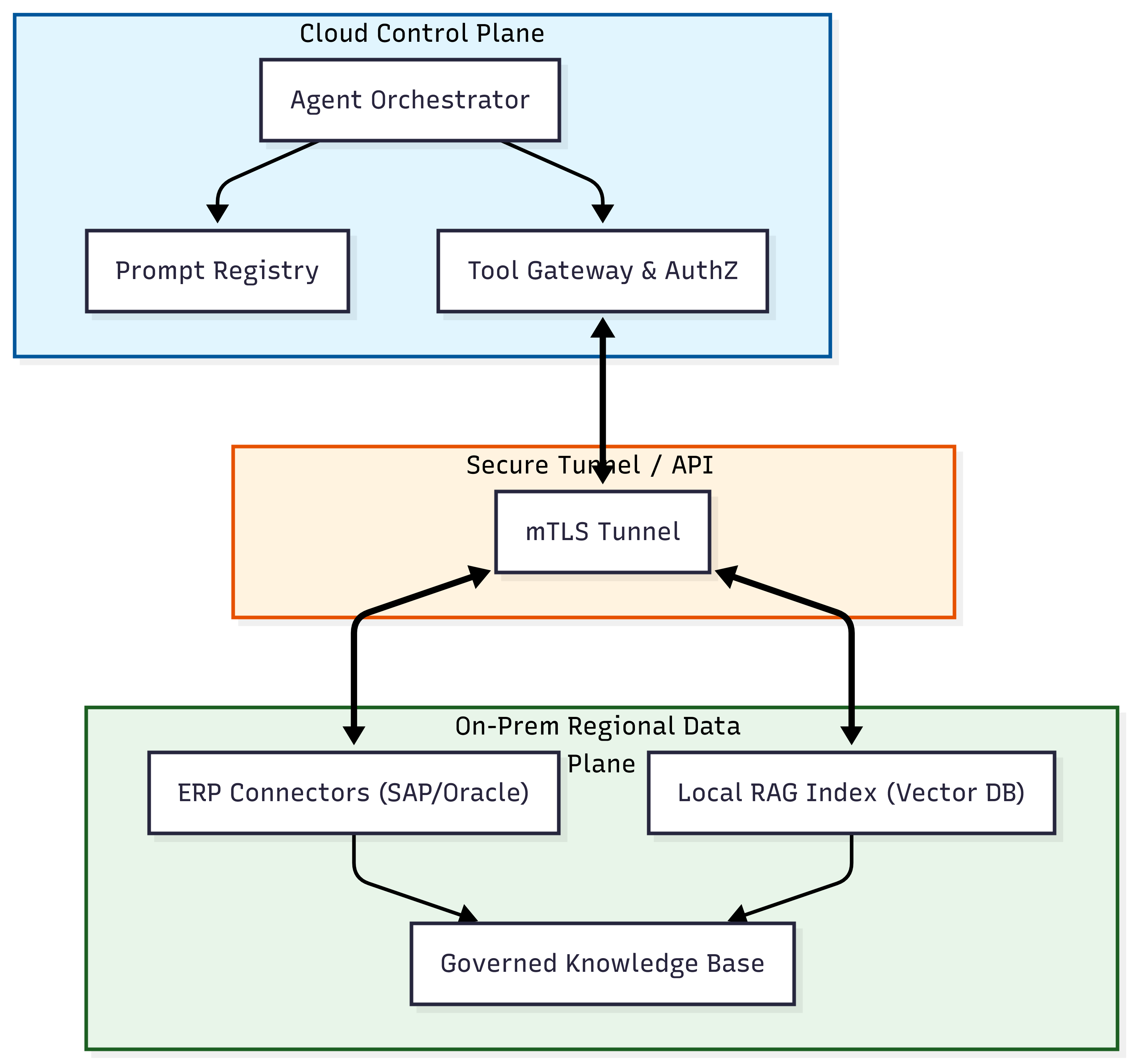
In consumer demos, an agent often implies a single model calling APIs. In industrial settings, an agent is closer to a controlled distributed system. We cannot just upload all ERP data to a vector database; latency, data sovereignty, and sheer volume make that impossible. Instead, we use a hybrid RAG pattern:
- Cloud control plane: Handles orchestration, user intent, and tool routing.
- On-prem regional data plane: Keeps the heavy and sensitive data local, exposing only specific retrieval endpoints and connectors to the cloud agent.
Step 1: Define a Canonical Model
Indexing raw ERP fields from multiple sources will fail due to semantic drift. The date field in one ERP system might mean 'ship date,' while in another it might mean 'Ship_Dt.' So, before indexing anything, define a 'canonical entity model.' This isn’t just documentation; it’s a data contract that acts as a reference layer between the ERPs and the logic of the LLM.
Here is a Python example using 'dataclasses' to enforce a contract that normalizes disparate ERP data:
from dataclasses import dataclass
from datetime import datetime
import pandas as pd

@dataclass(frozen=True)
class InventoryPosition:
"""
#The Canonical Model: The single source of truth for the Agent.
"""
sku: str
site: str
as_of_utc: datetime
on_hand_qty: float
source_system: str
lineage_event_id: str

def normalize_sap_inventory(sap_payload: dict) -> InventoryPosition:
"""
#Adapter: Converts raw SAP output into our Canonical Model.
#Prevents SAP-specific jargon (MATNR, WERKS) from leaking into the LLM context.
"""
return InventoryPosition(
                        sku=sap_payload.get("MATNR"), # Material Number
                        site=sap_payload.get("WERKS"), # Plant Code
                        # Crucial: Force UTC conversion to prevent 'time travel' bugs across timezones
                        as_of_utc=pd.to_datetime(sap_payload["TIMESTAMP"]).tz_convert("UTC"),
                        on_hand_qty=float(sap_payload.get("LABST", 0.0)),
                        source_system="SAP_EU_NORTH",
                        lineage_event_id=sap_payload.get("TRACE_ID")
                        )
This ensures that, regardless of whether the data came from SAP or Oracle, the agent always reasons about an 'InventoryPosition.'
Step 2: Build Safety Nets, Not Just Scripts
Connecting to an old ERP system isn't just about plugging in a wire; it’s about managing chaos. These systems get slow, they crash, and they get confused easily. Don’t just write a quick script and hope for the best. You need to build safeguards. Here is what that looks like in practice:
- The "click once" rule (idempotency): Agents often retry requests. Enforce unique IDs so that a failed API call doesn’t result in duplicate orders.
- Surge protection (circuit breakers): Agents can trigger dozens of parallel calls instantly. Use circuit breakers to pause during spikes, preventing the agent from unintentionally causing DDoS issues within legacy servers.
- The "fix it later" pile (dead-letter queues): Don’t let data sync fail silently. Route logic errors for human review to reconcile the gap between the agent’s intent and ERP’s reality.
class ResilientERPClient:
    def execute_safe_transaction(self, tx_id: str, payload: dict):
        """
        Wraps legacy ERP calls with modern distributed system safeguards.
        """

        # [cite_start]1. IDEMPOTENCY (The "Click Once" Rule) [cite: 62-64]
        # Check if we have already processed this specific transaction ID.
        # If yes, return the cached result to prevent duplicate orders.
        if self.cache.exists(tx_id):
            return self.cache.get(tx_id)

        try:
            # [cite_start]2. CIRCUIT BREAKER (Surge Protection) [cite: 65-67]
            # If the ERP is failing or slow, this context manager raises
            # a CircuitOpenError immediately, preventing a DDoS.
            with self.circuit_breaker.guard():
                result = self.erp_api.post(payload)

                # On success, cache the result for future idempotency checks
                self.cache.set(tx_id, result)
                return result

        except CircuitOpenError:
            # Fail fast so the Agent knows to back off/wait
            return {"status": "SKIPPED", "reason": "ERP_OVERLOAD_PROTECTION"}

        except DataValidationError as e:
            # [cite_start]3. DEAD-LETTER QUEUE (The "Fix It Later" Pile) [cite: 68-69]
            # Don't silently fail. Log the logic error for human review
            # to reconcile the Agent's intent with the ERP's constraints.
            self.dlq.send(
                tx_id=tx_id,
                error=str(e),
                payload=payload
            )
            return {"status": "FLAGGED_FOR_HUMAN_REVIEW"}
Step 3: Regional Policy Packs
A single global index sounds efficient until you hit regional constraints. A "stock" rule in Europe might be legally different from that in the US. Instead of hardcoding rules into prompts, use configuration files that inject region-specific constraints into the RAG context at runtime.
# policy_pack_na.yaml
policy_pack:
name: "NA-shortage-triage"
region: "NA"
retrieval:
allowed_indexes: ["na-sop", "na-incidents", "na-supplier-contracts"]
metadata_filters:
classification: ["internal"]
max_doc_age_days: 365
autonomy:
mode: "recommend_only" # Options: recommend_only | draft_actions | execute
approval_required_for:
- "expedite_spend"
- "promise_date_change"
This approach allows you to run "local RAG" (regionally scoped indexes) while keeping the policy control centralized.
Step 4: The Security Checkpoint
The difference between a helpful AI and a security nightmare is access. Security experts list "excessive control" (giving the AI too much freedom) as a top risk. Always force the agent through a gateway that checks every request.
Here are the two rules our "gateway" enforces before running any action:
- Role-based access: Just because the AI knows how to change a delivery date doesn't mean the user is allowed to do it. If a junior analyst asks the AI to delay a shipment, the gateway should check their job title and say, "Sorry, you don't have permission for that."
- The human-in-the-loop: For high-risk actions (like changing a confirmed Purchase Order), the AI should never act alone. It should draft the change, pause, and ping a human manager (via Slack or Teams). The action only executes once a human clicks "Approve."
Step 5: Managing the Human Boundary
Avoid over-reliance by designing for human engagement: force the agent to display evidence alongside recommendations and require user feedback to close the loop. The gathered feedback can be appended to the agent workflow instructions to provide better recommendations in the future.
Conclusion: From Clarity to Resilience
An agent is not a magic wand that automatically repairs data across fragmented ERPs. It is a distributed system that requires the same rigor as any other critical infrastructure.
By using the above methodology, we move beyond "chatting with data" to building systems that are evidence-based, failure-resistant, and trusted to keep the supply chain running.
Opinions expressed by DZone contributors are their own.
Comments