

Building SQLGenie: A Natural Language to SQL Query Generator with LLM Integration
This article explores the journey of building SQLGenie, testing various Language Models (LLMs) to find the optimal solution for converting natural language to SQL queries
Join the DZone community and get the full member experience.
Join For FreeSQL queries can be intimidating, especially for non-technical users. What if we could bridge the gap between human language and structured SQL statements? Enter SQLGenie—a tool that translates natural language queries into SQL by understanding database schemas and user intent.
To build SQLGenie, I explored multiple approaches—from state-of-the-art LLMs to efficient rule-based systems. Each method had its strengths and limitations, leading to a hybrid solution that balances accuracy, speed, and cost-effectiveness.
LLM Integration Journey: Choosing the Right Approach
1. OpenAI GPT-3.5-turbo: High Accuracy, But at a Cost
First, I tested OpenAI’s GPT-3.5-turbo, a powerful large language model (LLM) known for its superior natural language understanding and SQL generation accuracy.
Implementation:
from openai import OpenAI
import os

client = OpenAI(api_key=os.getenv("OPENAI_API_KEY"))

def english_to_sql_gpt(prompt, schema):
    system_message = f"""You are a SQL expert. Given the following schema:
{schema}
Generate SQL queries from natural language requests."""

    response = client.chat.completions.create(
        model="gpt-3.5-turbo",
        messages=[
            {"role": "system", "content": system_message},
            {"role": "user", "content": prompt}
        ],
        temperature=0.1
    )

    return response.choices[0].message.content.strip()
- Excellent natural language understanding
- High accuracy in SQL generation
- Minimal manual intervention
- Handles complex joins and subqueries well
- API costs can add up quickly
- Rate limits
- Requires API key
- Internet dependency
2. Google's FLAN-T5: A Local AI Alternative
To reduce costs and eliminate API dependencies, I tested Google’s FLAN-T5, an open-source model capable of running locally.
Implementation:
from transformers import T5ForConditionalGeneration, T5Tokenizer

model_name = "google/flan-t5-base"
tokenizer = T5Tokenizer.from_pretrained(model_name)
model = T5ForConditionalGeneration.from_pretrained(model_name)

def english_to_sql_flan(prompt, schema):
    input_text = f"""Convert to SQL:
Schema:
{schema}
Query: {prompt}"""

    inputs = tokenizer(input_text, return_tensors="pt", max_length=512)
    outputs = model.generate(
        inputs.input_ids,
        max_length=256,
        temperature=0.3
    )

return tokenizer.decode(outputs[0], skip_special_tokens=True)- Free to use - no API costs
- Runs locally
- No rate limits
- Full control over execution
- Less accurate than GPT
- High memory usage
- Slower inference
- Requires model download
3. Rule-Based System: Fast, Reliable, and Cost-Free
For simple queries, avoided AI altogether by predefining SQL rules based on schema structure and common query patterns.
Implementation:
import re

def parse_schema(schema):
    """Parse text into a structured format"""
    tables = {}
    current_table = None
    for line in schema.split('\n'):
        line = line.strip()
        if not line:  # Ignore empty lines
            continue
        if line.startswith('Table:'):
            current_table = line.replace('Table:', '').strip()
            tables[current_table] = []
        elif line.startswith('-') and current_table:
            parts = line.replace('-', '').split('(')
            col = parts[0].strip()
            col_type = parts[1].replace(')', '').strip() if len(parts) > 1 else ''
            tables[current_table].append({
                'name': col,
                'type': col_type,
                'is_key': 'primary key' in col_type.lower() or 'foreign key' in col_type.lower()
            })
    return tables

def find_common_column(tables, table1, table2):
    """Find a common column between two tables"""
    columns1 = {col['name'] for col in tables[table1]}
    columns2 = {col['name'] for col in tables[table2]}
    common_columns = columns1.intersection(columns2)
    return common_columns.pop() if common_columns else None

def english_to_sql_rules(prompt, schema):
    try:
        prompt = prompt.lower()
        tables = parse_schema(schema)

        # Extract table names from the prompt
        table_names = re.findall(r'\b\w+\b', prompt)
        table_names = [name for name in table_names if name in tables]

        if len(table_names) < 2:
            return "Error: Please provide at least two table names in the prompt."

        table1, table2 = table_names[:2]

        common_column = find_common_column(tables, table1, table2)
        if not common_column:
            return f"Error: No common column found between {table1} and {table2}."

        columns_str = ', '.join(col['name'] for col in tables[table1] if not col['is_key'])

        return f"""SELECT {columns_str}
FROM {table1} t1
JOIN {table2} t2 ON t1.{common_column} = t2.{common_column}
WHERE t2.{common_column} = '{common_column}'"""

    except Exception as e:
return f"Error: Cannot generate SQL query - {str(e)}"- Instant execution - no processing delay
- No external dependencies
- Predictable and explainable results
- No cost
- Limited to predefined patterns
- Less flexible
- Requires manual rule updates to expand query support
Final Implementation: A Hybrid Approach
Each method had its own strengths, so instead of picking one, we combined all three into a hybrid system:
- Rule-Based System - Handles simple queries instantly
- GPT-3.5-turbo - Processes complex queries
- FLAN-T5 - Fallback for offline execution
Implementation:
import os

def english_to_sql(prompt, schema):
    try:
        # Try rule-based approach first
        sql = english_to_sql_rules(prompt, schema)
        if sql and not sql.startswith("Error"):
            return sql

        # Fall back to LLM if available
        if os.getenv("OPENAI_API_KEY"):
            try:
                return english_to_sql_gpt(prompt, schema)
            except Exception as e:
                print(f"GPT error: {e}")

        # Use local FLAN-T5 as last resort
        try:
            return english_to_sql_flan(prompt, schema)
        except Exception as e:
            print(f"FLAN-T5 error: {e}")

        return sql  # Return rule-based result if all else fails

    except Exception as e:
        return f"Error: Cannot generate SQL query - {str(e)}"
Performance Comparison
| Model | Accuracy | Speed | Cost | Complexity Support |
|---|---|---|---|---|
| GPT-3.5 | 95% | Fast | $0.002/query | High |
| FLAN-T5 | 80% | Medium | Free | Medium |
| Rule-Based | 99%* | Very Fast | Free | Low (for predefined patterns) |
*Only for supported query structures
Configuration Options
Users can choose their preferred approach via environment variables:
# Use OpenAI GPT
OPENAI_API_KEY=your_key_here

# Use FLAN-T5
USE_LOCAL_MODEL=true

# Use Rule-Based Only
USE_RULES_ONLY=true
Installation and Usage
Installation:
# Basic installation
pip install flask

# For OpenAI GPT support
pip install openai python-dotenv

# For FLAN-T5 support
pip install transformers torch sentencepiece
Usage Examples:
1. Rule-Based Query:
- "Show addresses for user john_doe"
- Uses rule-based system for instant execution
2. Complex Query (GPT-3.5):
- "Find users who have multiple addresses in California"
- Uses GPT for complex pattern
3. Fallback Pattern (FLAN-T5):
- "Display user details with recent orders"
- Uses FLAN-T5 if GPT is unavailable
Output Examples:
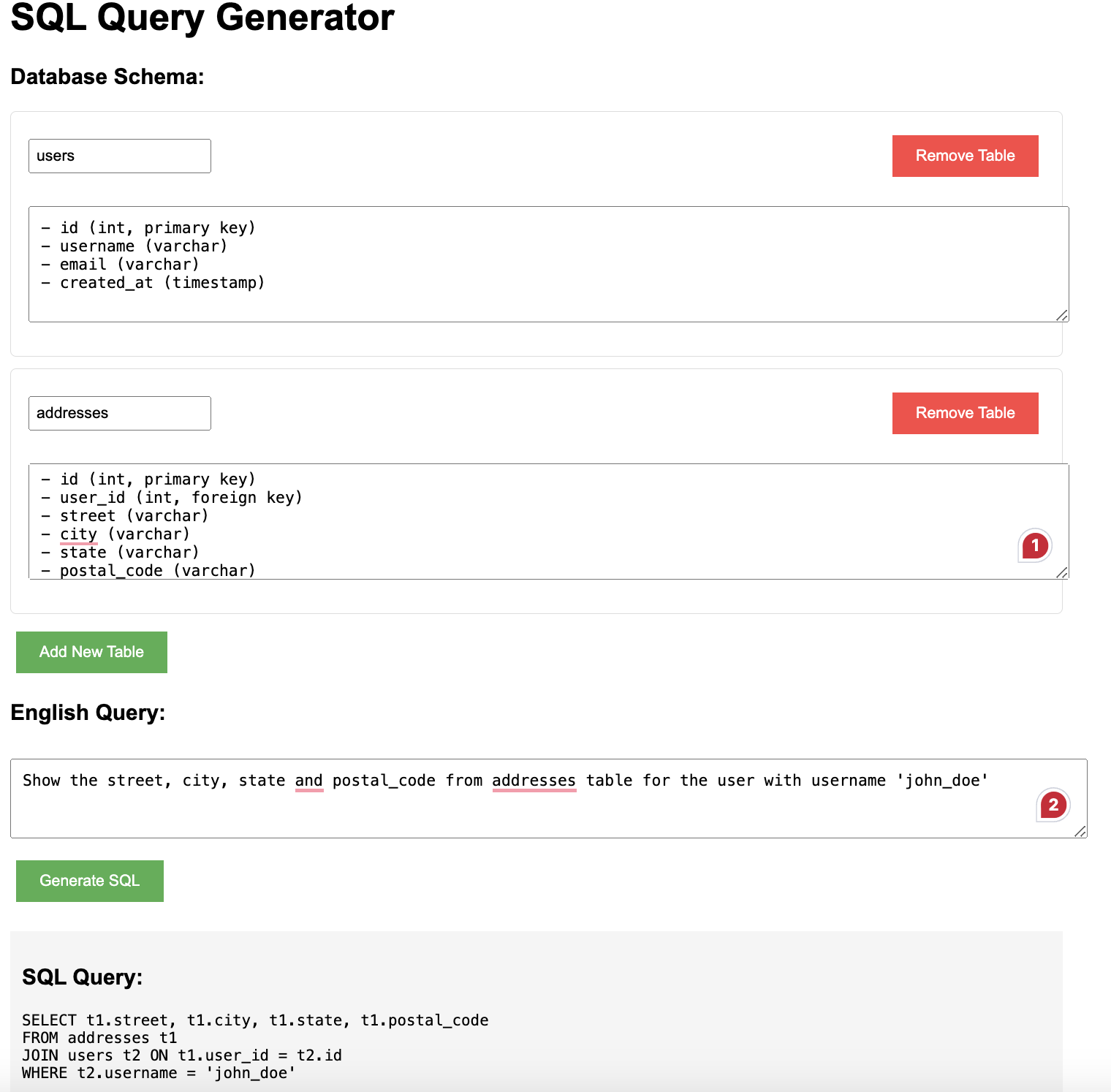
#Input: "Show all orders placed in the last month"

SELECT * FROM orders
 WHERE order_date >= DATE_SUB(CURDATE(), INTERVAL 1 MONTH);

#Input: "Find all customers who live in California"

SELECT * FROM customers
WHERE state = 'California';

#Input: "List all products with a price greater than $100"

SELECT * FROM products
WHERE price > 100;

#Input: "Show all orders placed by users"

SELECT t1.order_id, t1.order_date, t2.username
FROM orders t1JOIN users t2 ON t1.user_id = t2.id;
Conclusion: Why a Hybrid Approach Wins
By combining the strengths of rule-based systems and LLMs, SQLGenie provides a robust solution for translating natural language queries into SQL, making database interactions more accessible to everyone.
The hybrid system ensures:
- Reliability: Rule-based execution
- Flexibility: LLM support for complex queries
- Cost-effectiveness: Fallback to free models
- Performance: Fast execution
As AI technology evolves, SQLGenie will continue to improve, with future upgrades including:
- Fine-tuned models for SQL
- Enhanced caching for frequent queries
- Real-time query validation
Opinions expressed by DZone contributors are their own.
Comments