

Cartoonize Your Image With Java and OpenCV
We will learn using OpenCV and Java. OpenCV is a very popular framework developed using C++ and got bindings for Python, Java, R languages, etc.
Introduction
In this tutorial, we will learn some cool stuff using OpenCV and Java. OpenCV is a very popular framework developed using C++ and got bindings for Python, Java, R languages, etc.
So what we are going to do is to generate a 'cartoon' type image from an original image using Java OpenCV binding
Download and Install
Go to 'https://opencv.org/releases/' and select the proper version. I am using Windows 10 for development. After installing the framework, navigate to the folder and check for its binaries (.DLL). Add these binaries to your path. I have used IntelliJ IDEA for developing the code. You can choose any Java supported IDE.
Develop the Code
Create a file with a name called 'Cartoon.java' and add the following code to it:
xxxxxxxxxx
static {
System.loadLibrary(Core.NATIVE_LIBRARY_NAME);
}
We are loading the OpenCV system libraries by name NATIVE_LIBRARY_NAME using Core API.
Next, we need to load the image which you want to convert into the cartoon image.
Mat img = Imgcodecs.imread("E:\\unni\\rose.jpeg");
//you can change the location
We are loading an image using ImgCodecs API. This API has a similar method name called 'imread'.
In Python, we use
img = cv2.imread("rose.jpeg")
But in the Java version, it is returning a 'Matrix' not an image. Mat class is a matrix. Matrix is a 2D array that will store image details in this case.
The Process to Convert to Cartoon
xxxxxxxxxx
Mat dest = new Mat();
Imgproc.cvtColor(img, dest, Imgproc.COLOR_BGR2GRAY);
These are the following steps that are required to convert to cartoon:
1. Convert the image into Gray color
xxxxxxxxxx
Mat gray = new Mat();
Imgproc.cvtColor(img, gray, Imgproc.COLOR_BGR2GRAY);
2. Apply a Blur filter, in this case, a 'medianBlur'
This is a smoothing the image by taking the median value at the neighborhood of each pixel.
xxxxxxxxxx
Mat blur = new Mat();
Imgproc.medianBlur(gray, blur, 5);
3. Apply an algorithm called 'adaptiveThreshold' is the algorithm used to calculate the threshold value for smaller regions and therefore, there will be different threshold values for different regions.
xxxxxxxxxx
Mat edges = new Mat();
Imgproc.adaptiveThreshold(blur,edges, 255, Imgproc.ADAPTIVE_THRESH_MEAN_C,
Imgproc.THRESH_BINARY, 9, 9);
4. Apply a 'Bilateral filter' which is used to smoothing the image by preserving its edges.
xxxxxxxxxx
Mat colorImg = new Mat();
Imgproc.bilateralFilter(edges, colorImg, 9, 250, 250);
5. In this step, we combine the images generated in the previous step using a 'bitwise_and' operation.
xxxxxxxxxx
Mat cartoon = new Mat();
Core.bitwise_and(colorImg, edges, cartoon);
Finally, we save the new image into the disk
xxxxxxxxxx
Imgcodecs.imwrite("rose_cartoon.jpg", cartoon);
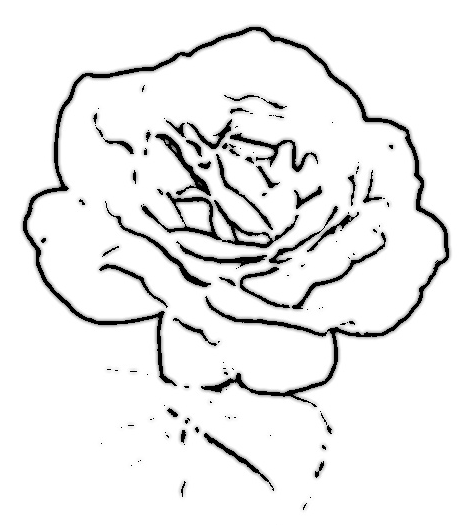
This is the below cartoon image generated after executing the previous step.
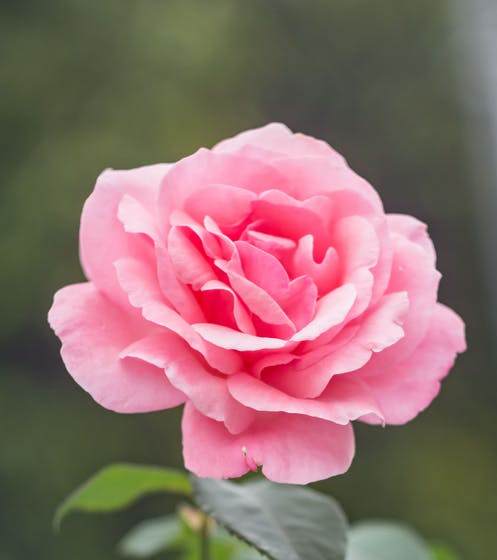
This is the original image
We have successfully generated a cartoon image from its original image.
Opinions expressed by DZone contributors are their own.