

Chaos Engineering: Thread Leak
‘java.lang.OutOfMemoryError: unable to create new native thread’ will be thrown when more threads are created than the memory capacity of the device.
 CORE
·
In the series of chaos engineering articles, we have been learning to simulate various performance problems. In this post, let’s discuss how to simulate thread leaks. ‘java.lang.OutOfMemoryError: unable to create new native thread’ will be thrown when more threads are created than the memory capacity of the device. When this error is thrown, it will disrupt the application’s availability.
Sample Program
Here is a sample program from the open source BuggyApp application, which keeps creating an infinite number of threads.
public class ThreadLeakDemo {public static void start() {while (true) {new ForeverThread().start();}}} public class ForeverThread extends Thread {@Overridepublic void run() {// Put the thread to sleep forever, so they don't die.while (true) {try {// Sleeping for 10 minutes repeatedlyThread.sleep(10 * 60 * 1000);} catch (Exception e) {}}}}
You can notice that the sample program contains the ‘ThreadLeakDemo’ class. This class has start() method. In this method, ‘ForeverThread’ is created an infinite number of times because of the ‘while (true)’ loop.
In the ‘ForeverThread’ class there is the run() method. In this method, the thread is put to continuous sleep, i.e., thread is repeatedly sleeping for 10 minutes again and again. This will keep the ‘ForeverThread’ alive always without doing any activity. A thread will die only if it exits the run() method. In this sample program, the run() method will never exit because of the never-ending sleep.
Since ‘ThreadLeakDemo’ class keeps creating ‘ForeverThread’ infinitely and they never exit. Thus very soon, several thousands of ‘ForeverThread’ will be created. It will saturate memory capacity, ultimately resulting in ‘java.lang.OutOfMemoryError: unable to create new native thread’ problem.
How to Diagnose ‘java.lang.OutOfMemoryError: unable to create new native thread’?
You can diagnose ‘OutOfMemoryError: unable to create new native thread’ problem either through a manual or automated approach.
Manual Approach
In the manual approach, you need to capture thread dumps as the first step. A thread dump shows all the threads that are in memory and their code execution path. You can capture thread dump using one of the 8 options mentioned here. But an important criterion is: You need to capture thread dump right when the problem is happening. As thread leaks cause production outage, your support/SRE team might restart the application before thread dumps are captured. If thread dumps are captured after the application is restarted, you won’t be able to identify the leaking threads. Even if thread dumps are captured at the right point in time, you need to import the thread dumps from production servers to your local machine. Then you need to use thread dump analysis tools like fastThread, Samurai to analyze the thread dumps to identify the problem.
Automated Approach
You can use root cause analysis tools like yCrash – which automatically captures application-level data (thread dump, heap dump, Garbage Collection log) and system-level data (netstat, vmstat, iostat, top, top -H, dmesg,…). Besides capturing the data automatically, it marries application-level data and system-level data generates an instant root cause analysis report. Below is the report generated by the yCrash tool when the above sample program is executed:
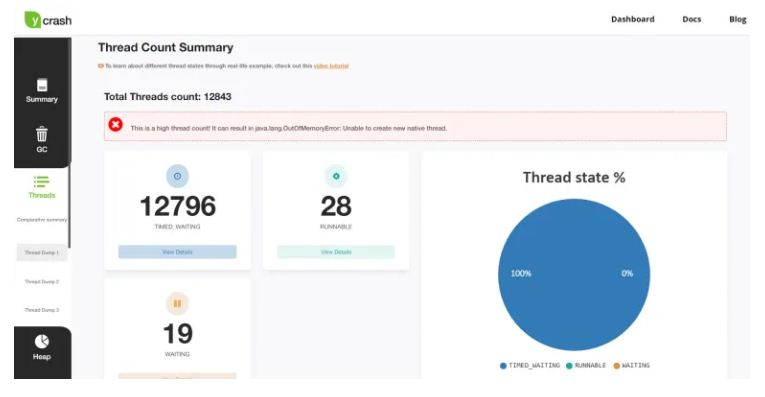
Fig: yCrash reporting 12,000+ are created and they can cause ‘OutOfMemoryError: unable to create new native thread’.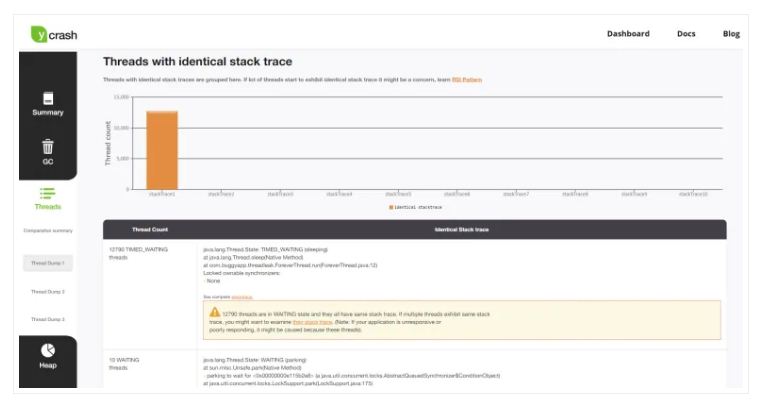
Fig: yCrash reporting the line of code in which 12,000+ threads are stuck.
From the report, you can notice that yCrash points out that 12,000+ threads are created, and they have the potential to cause ‘OutOfMemoryError: unable to create new native thread’ problem. Besides the thread count, the tool is also reporting the line of code, i.e., ‘com.buggyapp.threadleak.ForeverThread.run(ForeverThread.java:12)‘ in which all the 12,000+ threads are stuck. Equipped with this information, one can quickly go ahead and fix the problematic code.
Opinions expressed by DZone contributors are their own.