

Cloud to Local Copilots: A Hybrid Path to Privacy and Control
Cloud copilots deliver premium experience, while local copilots ensure privacy and control. Hybrid approach may be the future.
 CORE
·
CORE
·
Join the DZone community and get the full member experience.
Join For FreeSoftware usage patterns have always evolved alongside hardware capabilities. In recent years, with the rise of GPUs and cloud-based AI copilots such as GitHub Copilot, this evolution has accelerated — offering developers real-time code suggestions, documentation support, and automated testing at scale. However, concerns around personal data privacy, the cost of copilot usage, and the need for greater autonomy have given rise to local AI copilots. By hosting models on a local device, developers gain tighter control over sensitive data, reduce dependency on cloud providers, and unlock performance benefits tailored to their device’s capabilities.
Cloud Copilots vs. Local Copilots
Cloud-based copilots have become the default entry point for many developers, especially in workplace settings, offering seamless integration with cloud-hosted repositories and services. However, there are trade-offs — namely recurring subscription costs and potential exposure of sensitive code or data.
Local copilots, in contrast, shift the balance toward autonomy and privacy. Running models directly on developer machines or within on-premises infrastructure allows tighter control over proprietary codebases and independence from cloud providers. They can be integrated with the same tech stack (e.g., IDEs, CI/CD pipelines) to achieve secure and private developer workflows.
Hybrid copilots may combine both approaches, allowing developers to use cloud copilots for specialized use cases while reserving local copilots for privacy-sensitive or critical tasks. This hybrid model is set to redefine usage patterns, offering flexibility across diverse tech stacks.
|
|
Cloud Copilots |
Local Copilots |
|
Privacy |
Code and data sent to cloud provider for processing |
Code and data stay on local device or on premise |
|
Performance |
May host premium models that require more GPUs |
Optimized and may be limited in quality depending on local hardware (CPU, NPU, GPU etc.) |
|
Cost |
Some providers offer free access up to certain limits |
Can be free to run locally if open source solutions are chosen |
|
Usage Pattern |
Best for advanced use cases involving premium models |
Best for sensitive and private workflows |
Building Private Projects Securely with Local Copilot
Local copilots are especially valuable for hobby projects or private ideas because they run entirely on the developer’s machine, keeping sensitive code and personal experiments secure. Developers can confidently build applications, home automation scripts, or startup prototypes without worrying about data leaving their device.
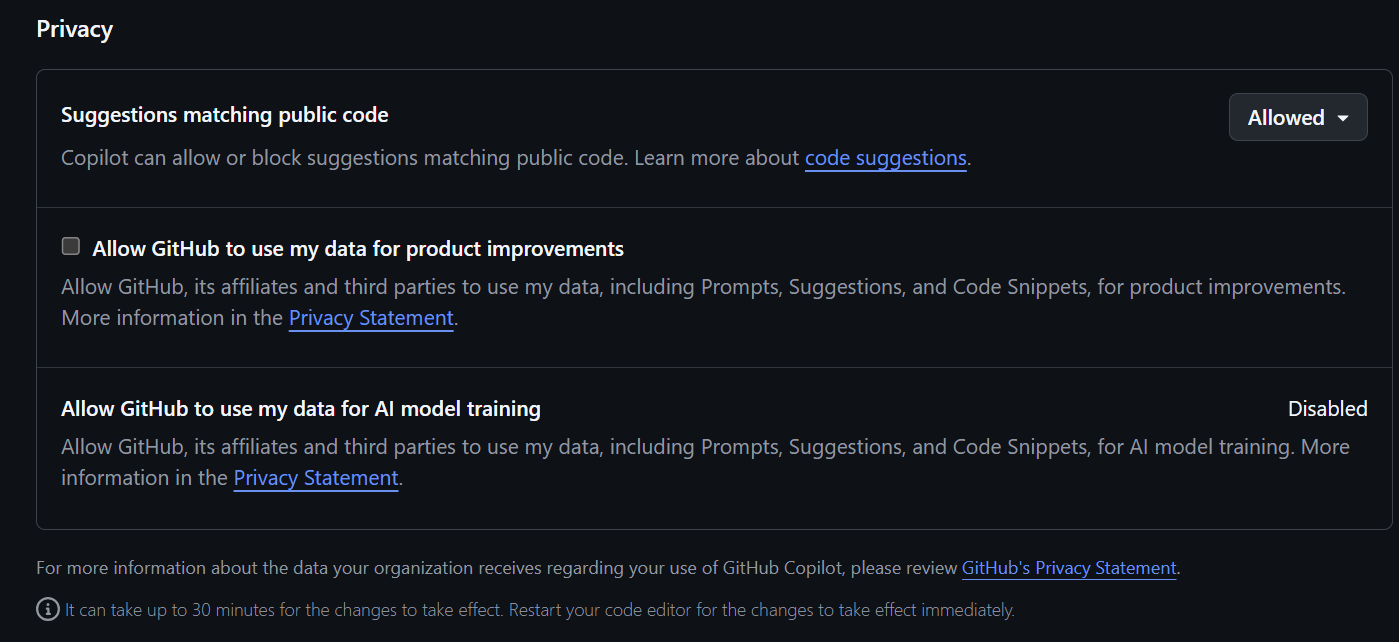
Local copilots help by generating boilerplate code, suggesting improvements, and refactoring projects to remain clean and maintainable — all while respecting privacy. By contrast, a cautionary example is that GitHub’s free Copilot service may use shared code snippets and interactions to improve its models unless explicitly disabled, meaning private or sensitive project data could potentially be included in training. This distinction highlights why local copilots are often the safer choice when privacy and sensitivity are priorities.
Open-Source Competitiveness Fueling Local Copilot Usage
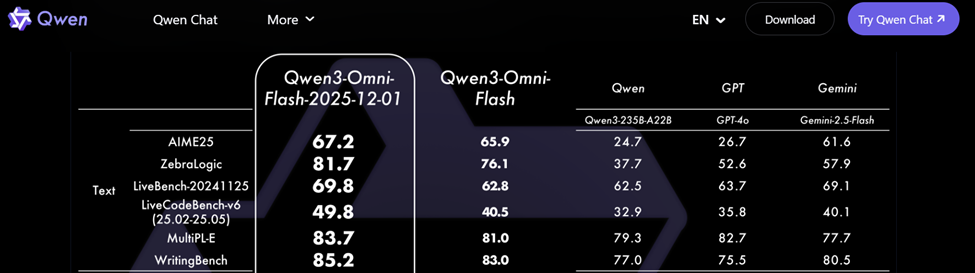
The latest release of Qwen3 Omni Flash demonstrates how far open-source AI has progressed. According to official documentation, the model achieved significant gains in logical reasoning, code generation, and writing quality, along with stronger visual reasoning capabilities.
These results show that open-source AI can now deliver state-of-the-art performance across text, code, speech, and vision. This is significant because it narrows the gap with proprietary closed-source systems such as GPT-4o or Gemini. Developers who once relied exclusively on cloud APIs for advanced reasoning and coding support can now run competitive open models locally. For hobby projects, private prototypes, or sensitive workflows, this enables near top-tier performance while keeping data entirely on local machines.
How to Set Up a Copilot Locally (Without a GPU)
Below is a simple example showing how to set up a local copilot and integrate it with Visual Studio Code. Several technology stacks support running local AI models, such as Ollama, llama.cpp, and LM Studio, each offering different ways to experiment with private local copilots.
Set Up Microsoft Foundry Local
1. Install Microsoft Foundry Local
PS C:\Windows\system32> winget install Microsoft.FoundryLocal

PS C:\Windows\system32> foundry model list
Service is Started on http://127.0.0.1:63036/, PID 3516!

Downloading complete!...

Successfully downloaded and registered the following EPs: OpenVINOExecutionProvider.

Valid EPs: CPUExecutionProvider, WebGpuExecutionProvider, OpenVINOExecutionProvider

Alias                          Device     Task           File Size    License       Model ID

-----------------------------------------------------------------------------------------------

phi-4                          GPU        chat           8.83 GB      MIT          phi-4-openvino-gpu:1

                               GPU        chat           8.37 GB      MIT           Phi-4-generic-gpu:1

                               CPU        chat           10.16 GB     MIT          Phi-4-generic-cpu:1

----------------------------------------------------------------------------------------------------------
2. Download qwen2.5-coder-0.5b
PS C:\Windows\system32> foundry model run qwen2.5-coder-0.5b

Downloading qwen2.5-coder-0.5b-instruct-openvino-npu:3...

[####################################] 100.00 % [Time remaining: about 0s]        58.5 MB/s

Loading model...

Model qwen2.5-coder-0.5b-instruct-openvino-npu:3 loaded successfully
3. Start the Foundry service
PS C:\Windows\system32> foundry service start

Service is Started on http://127.0.0.1:50983/, PID 11180!
Setup Open WebUI to Interact With the Model
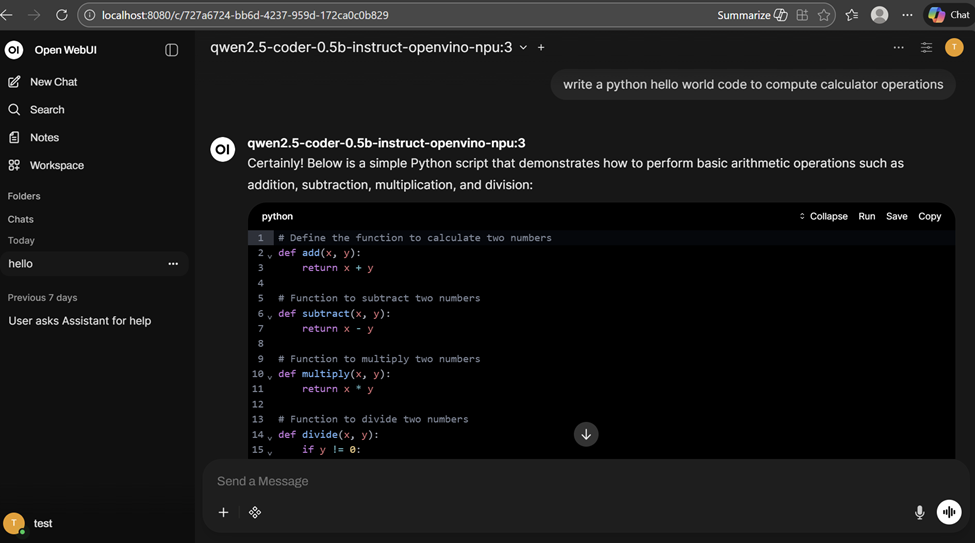
1. Follow instruction here to setup Open WebUI to connect with locally installed qwen2.5-coder-0.5b model.
pip install open-webui

open-webui serve
2. Open http://localhost:8080/ to open Open WebUI in browser and open a chat window by selecting the qwen2.5-coder-0.5b model running locally.
Set Up Visual Studio Code
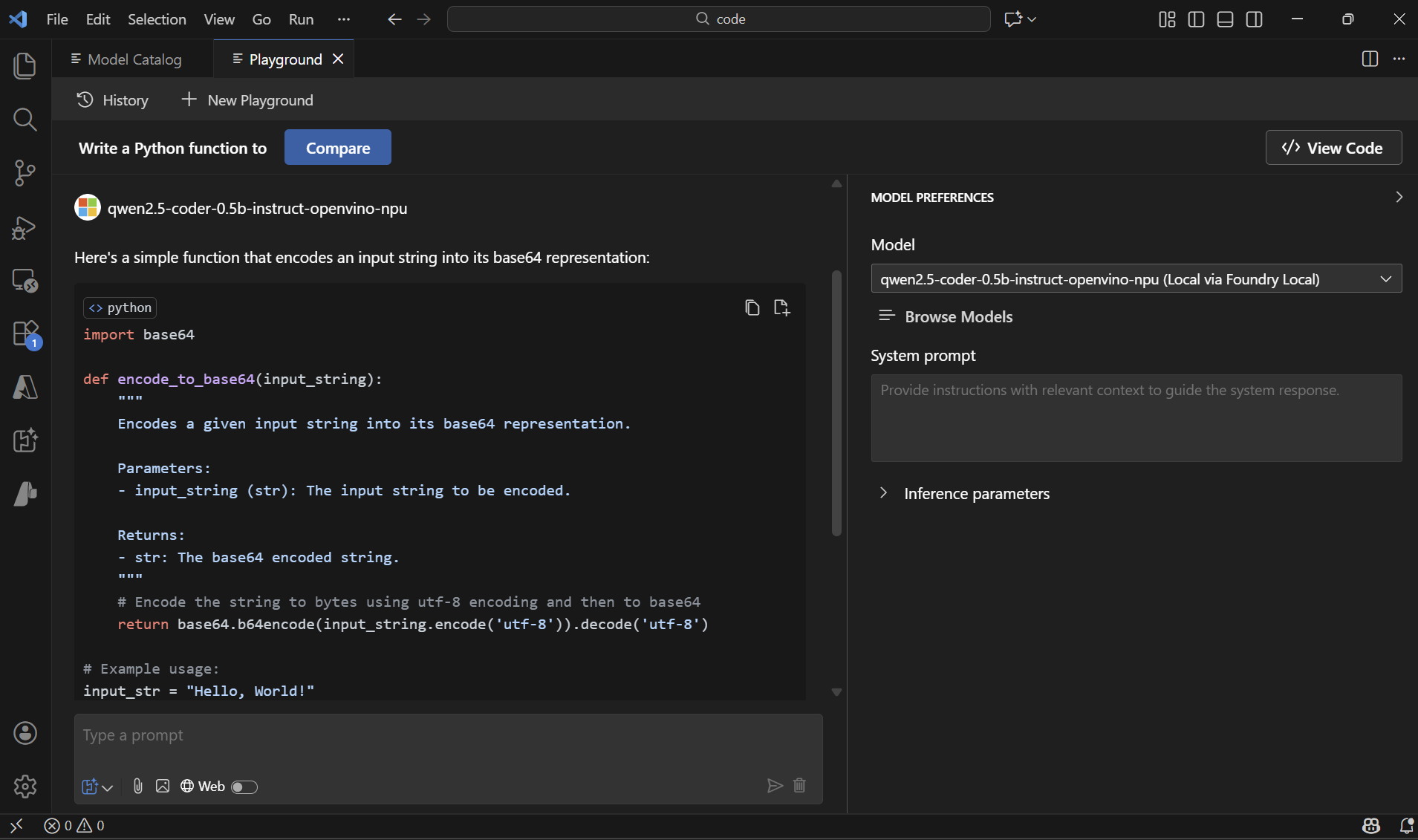
1. Install AI Toolkit for Visual Studio Code extension.
2. Click the extension icon in the left-hand menu and open Model Playground. Foundry Local models will appear automatically in the model selection dropdown and can be used for building agents.
Conclusion
The journey from cloud-based copilots to local and hybrid solutions represents a redefinition of how developers interact with AI. Cloud copilots have introduced accessibility and scale, while local hosting brings privacy and control. Hybrid architectures offer a balanced approach, enabling developers to choose the right environment for each task. For example, developers may rely on local copilots for sensitive work while using cloud copilots for collaboration and seamless integrations.
Opinions expressed by DZone contributors are their own.
Comments