

Code Rewriting With AI and TDD
Exploring the use of TDD and AI to rewrite projects with architectural debt, and how TDD in these cases can be a guardrail against hallucinations.
Join the DZone community and get the full member experience.
Join For FreeThis is a report on how we used an AI editor, CursorAI, to rewrite a project. We will describe the context and explain how we leveraged existing tests to develop a new version of the tool we were using.
This is not a simple success story. We'll try to explain our approach and the pitfalls we experienced, along with the different cases of hallucinations we encountered, and how our salvation is the attention we have and the reliance on our tests. We hope to give you an example of how rewriting code using AI can take place. It is also a reflection on how we can leverage old code and tests to ensure this success.
Context
We cover roughly 5–6 product lines, with about as many different test libraries. This amounts to a total of around 5000 tests.
To track tests and improve reporting and analysis of test results, we have created a test database. The test database is updated every time the tests are updated.
For a test, we would store what we call “TestInformation,” which consists of:
- Class
- Method
- ID (Class + Method)
- Description
- Test Groups
- JavaDoc
- Line number
In order to extract test data from the tests, we relied on the TestNG framework itself, which drove our original tests. TestNG did a great job of correctly parsing and qualifying the test and thus extracting the main information. We also used JavaParser to extract the JavaDoc and line numbers from the code.
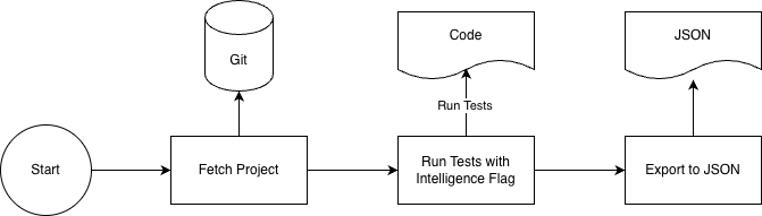
We would run the tests with a specific flag that would export all “TestInformation” in a JSON File. Below, you can see what one such entry for a test would look like:
{
  "javaDoc":"\n     * Test with multiple comments in groups array\n     ",
  "product":"CC",
  "framework":"TestNG-Campaign",
  "description":"Test with multiple comment types",
  "groups":["active","smoke","regression","api"],
  "id":"com.adobe.campaign.tests.integro.tests.Class1.testWithMixedComments,
  "lineNumber":56
}
This created a strong coupling to the TestNG Framework, and the TestNG version used.
Challenges, Evolutions, and Problems
The strong dependence we had on TestNG consequently had shortcomings when it came to non-Java-based test frameworks such as Cypress and Cucumber.
We started using the Gherkin Library to be able to perform analysis of Cucumber tests. This required parsing the Gherkin documents. The Gherkin TestInformation was created using the standard Gherkin library from Cucumber.io. Although we were using the same data and the same export mechanism, the approach was more straightforward, as we simply gave a root path, and the system started analyzing.
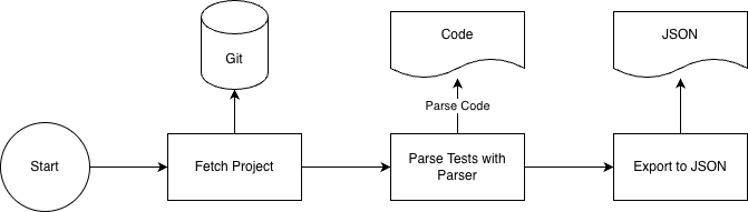
We now had a solution that, depending on the language, had to be executed quite differently. We also had an iterative design approach, where the data “TestInformation” was, by default, assumed to be Java, and if needed, we had “TestInformationGherkin.”
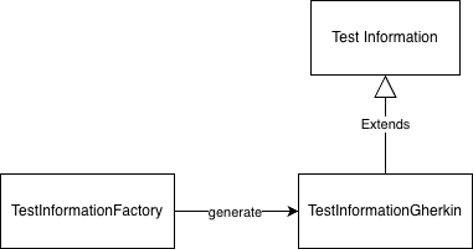
This was not an ideal solution and represented an iterative design that could not scale. The parsing approach seemed better. But, like many projects, when you are quite busy, you deprioritize problems and let the system be as it is. It was stable, it worked fine, so we felt that our time was better put elsewhere.
AI-Aided Refactoring Approach
We started using AI-aided development tools sometime last year and are becoming more accustomed to them.
We asked ourselves what refactoring using AI would look like. As mentioned before, we were eager to rewrite the code in order to:
- Have a more parser based appraoch
- Remove the tight coupling with TestNG
Our assumption was that if we could leverage our know-how, there were good chances that we could perform a rewrite without too much hassle. Our current solution was working with a few bugs and had a very high test coverage (90% line coverage, 87% branch coverage). So we said, why not give it a try and see if this can be done quickly.
We wanted to be able to make it simple for all frameworks to be mined, but also to make it simple to add new frameworks. Our experiences showed that JavaParser could very well replace TestNG to parse the tests, so we were eager to explore this possibility. With this approach, we would move to a different TestInformation layout:
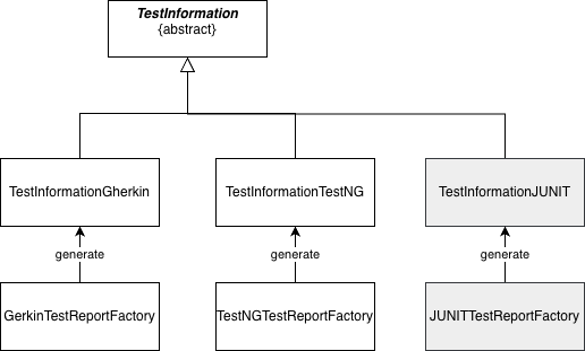
TestInformation would contain the specifics of each language (such as unique method id’s). For each language, we would develop a dedicated parser reflected in the “factory.”
Importing the Simple Parts
We started importing the sections of the code related to Gherkin, as it was subject to little change in code and is very similar to our new approach. This would not only represent the target approach in parsing, but it would also allow us to import the main data model for storage as well.
I want to import files from another java project in /original/path/to/integro-testngwrapper. I want you to start by importing a/b/c/MineGherkinTests.java to the package com.adobe.co.tests.miner.execs. I want to to import the depending classes, and the tests, and the test data.With this, we started getting the tests running. With a few iterations, it was able to import the necessary files for its needs.
Preparing the Terrain for Future Evolutions
Being truthful to our approach, we needed to allow for other test frameworks. Our previous approach was iterative, and we felt that we hadn’t taken the right decisions. So we started laying out the groundworks for easy expansion of our tool.
This project is not only for gherkin files. It is intended for all types of tests. Given a test project it will mine the relevant test information from the test project.We needed to make a skeleton TestInformation class upon which the other test frameworks are based. Also, as we were moving to a parser approach, we decided to use the API created for Gherkin tests and reuse it as an interface for other framework analysis.
Refactoring With TDD and AI
Once done, we needed to appraoch the carefully.
The project is supposed to perform test mining on different test projects. For now, we have had Gherkin tests. The next project is to analyze TestNG projects. For now, I want to remodel the project so I can construct TestIntelligence for different types of test projects, given a root path.
The project is supposed to perform test mining on different test projects. For now we have had gherkin tests. The next project is to analyze TestNG projects. For now I want to remodel the project so I can construct TestIntelligence for different types of test projects given a root path.We prepared an empty husk to allow for analysis:
Ok now lets integrate a miner for TestNG. Can you create the body without implementing the parsing methods? Use the Factory class for Gherkin as an API for the new TestNGFactory.Then we started by importing and getting the old-style tests to run:
Ok I want to start with a TDD approach. Good thing is, I already have tests. The bad news is that they used a different appraoch. The tests are here : /original/path/to/integro-testngwrapper/src/test/java/com/adobe/campaign/tests/integro/ti/TestListTest.java .

I want you to copy the tests in a new class called TestNGTestExtract. In that project I ran a specific TestNG plugin to parse the tests. When copying, I want you to adapt the test to use the new aproach. You will need to copy the test data of course, and deduce the paths from the testng file referenced in each test.

I see you did not copy all of the tests from the file. For starters this is ok, but I will need to do a gap analysis for keeping track of the tests.
As you see, there were some glitches, but we were able to push forward.
We then started getting the tests to pass and implemented the new TestNG analysis using JavaParser. JavaParser was already used for extracting JavaDoc, so we already had a parsing tool being used. We just needed to implement our new Factory for TestNGWrapper:
Ok let's implement the API by using a javaparser approach to parse the test codeIt was not as linear as expected, but to address my concerns, we built a GAP analysis doc. Dividing the problems into categories. Maybe because of my explanations, Cursor was not fully able to understand the notion of how TestNG was mined previously and how it could be re-adapted.
The Cost of New Approaches
As we mentioned before, using TestNG allowed us to take a lot of cases for granted, as they were inherent to the framework. With the parsing approach, many cases were not implicitly managed anymore.
For example, in the old approach, TestNG would manage cases such as class-level test annotations, i.e., tests that are declared at class level, and where the methods are automatically considered as tests. We needed to make sure that such issues are still working in the new system. We added a simple example of such a class (manually), and then directed the test creation:
I want to add a test targetting src/test/resources/testngTests/simple/ClassLevelTest1.java In testng the methods in this class are considered as tests even though they do not have the @test annotation.A major set of problems we encountered involved JavaDoc and TestGroups. Using the original approach of simulating a test execution had the added value of ensuring that all code was correctly identified. Test Groups, for example, could be expressed as:
- String Literals groups = {“Group3”}
- Constants
- Declared in the same Class
- Declared in a different Class
- Declared in a different Class, but imported statically
TestNG had no issues handling this because, to extract test information, we simply execute the code. In our new approach, we had to parse both the test class and, at times, the class that contains the Test Group definition. These were cases that we never needed to take into account, and that the new approach needed us to validate.
In our approach, we had not taken this into account. We first started looking at the class itself, and when some old and new unit tests failed, we had to cover the cases mentioned above. At first, Cursor started to have a smart approach to recursively expand the search area. This approach started showing big performance issues. To solve this, we decided to parse the whole project, instead of just the test classes. In other words, we chose the simple and stupid solution, and it was indeed much faster and more accurate than the smart one.
Conclusions
Architectural Mistakes and Remediations
As we mentioned earlier, the approach we took was quite inefficient at first. The delays were obviously very slow. By proposing a different approach, our result was 30x faster.
Cursor was not very good at suggesting the cause of this. Vibe coding leads to incremental changes. This approach has the drawback that it can narrow the scope and angle the AI has regarding the problem you are solving. It does not, and cannot, step back and consider that the approach needs to be at a higher level. That is your job.
The good thing is that it was quite simple to suggest a different approach, create benchmarks to measure the gap analysis, and compare the results.
One could argue that it is better to have a clear target architecture from the beginning. Although we fully agree with that, we also see the use of the incremental approach. AI Editors allow you to create an abstraction at a later time.
What helped us in this approach was that we had full control of the approach, and the mistakes, which were ultimately ours, were easy to grasp and correct.
Eagerness to Succeed
One of the causes for hallucinations is that LLMs are bent on giving an answer. In our experience, when approached with a big problem for our tool, it was a bit quick to consider the job done.
At some point, Cursor adapted the assertions to suit its needs.
When performing a GAP analysis with the original tool, we first experienced missing 30 tests in the export. For Cusor, this was quite ok.
Also, the gap analysis was quite shallow. When looking in more detail, it was not looking in detail at the differences. In its report, it considered them as insignificant.
Be Wary of High Coverage
We tried to get most of our unit tests imported into the new project. When you have around 90% coverage, it should be enough, right?
Ok, this was a leading question. I have often raised problems with over-reliance on coverage. This is especially true when your unit tests aim at filling gaps, rather than covering functional use cases.
One aspect of high coverage that people tend to leave out in discussions is that maintenance becomes hard, and it is hard to keep track of the location of the tests. This was the case here, as some unit tests were stored in unexpected locations, so we left out a few cases in our approach.
Another issue with coverage, which is relevant to AI, is that code coverage as a metric only relates to the code, not the functionality. At the same time, we definitely need to have a functional view of what we are testing.
In short, it is perfectly fine to ask AI/Cursor to add a unit test to cover functional cases, but make sure you have control over the functional cases before you try to raise the line coverage as a metric. Cursor will, in these cases, add unit tests to code that it may have hallucinated.
Big Comparisons Are Very Useful
With such rewriting of code, we felt that using big comparisons was a great help and gave us a lot of valuable input. Using the original outputs as a regression measure helped us greatly.
Cursor was very good at comparing big sets of data output, so we had better possibilities to compare our new results with the old. Another added value of this approach is that we identified errors in our original approach that we hadn’t noticed.
Surf the Hallucinations
We are all quite worried about hallucinations. In my experience, I take it for granted that the AI will hallucinate. I even count on it. As long as I have a clear view of what I want to do, it's ok. It is not as if we never gave a task to someone who completely misunderstood us? As long as you know what your end solution should look like, it's ok. My feeling is that once you have an overall code and system architecture, you can add guardrails to minimise the effects of hallucinations.
Hallucinations are presented in cases:
- Overfitting: In some cases, as mentioned before, Cursor could actually change the assertions in our unit tests. In our case, we were reusing much of the same code. So the Input and the assertions should never change. I avoid letting AI create my unit tests by just giving it the code. I may do this only after I am sure that I have covered the functional cases.
- Banging your head against the wall: Cursor would not stop until it succeeded with the tests. This was often due to wrong assumptions or misunderstandings. We had to interrupt it at times to lead it in the correct direction.
- Smoothing over/varnishing: In our gap analysis, at times, Cursor would consider some differences as unessential and basically smooth over the problem. Using a gap report was quite useful in this. Also, we probably need to be more precise in identifying the constraints of a GAP analysis.
Final Thoughts
Many projects work with legacy code due to the sunk-cost fallacy. The problem with such legacy projects is that, as they are no longer maintained or updated, people lose sight of their use and structure. Therefore, they tend to carry technical debt and unresolved security issues left in older code. Also, because no one dares to touch working code, people create a patchwork of smaller solutions instead of organizing features and functionality where they really belong.
We feel that AI can provide a great opportunity for rewriting code and maintaining architectural integrity.
The pitfall is that you need to take control at a high level. You need to have a clear understanding of both the code and the system architecture of your program. And foremost, do not lose sight of the functionality you are trying to solve. Even though tests can be automatically generated, you remain the person guaranteeing that your program does what it is supposed to do. So, even though aided by AI, you need to always make sure that the basic functionality is covered.
Opinions expressed by DZone contributors are their own.
Comments