

Common Mistakes While Implementing Self-Recursive Calls in MuleSoft [Video]
In this article, discover the common mistakes developers make while making self-recursive calls and suggest best practices around them.
What Are Self-Recursive Loops?
A self-recursive loop refers to a pattern where a flow or sub-flow calls itself recursively to process data iteratively. This is typically used to handle scenarios where data needs to be processed repetitively, such as iterating over nested data structures, managing pagination, or processing large payloads in chunks.
In short, it’s similar to the while/do-while loop in Java.
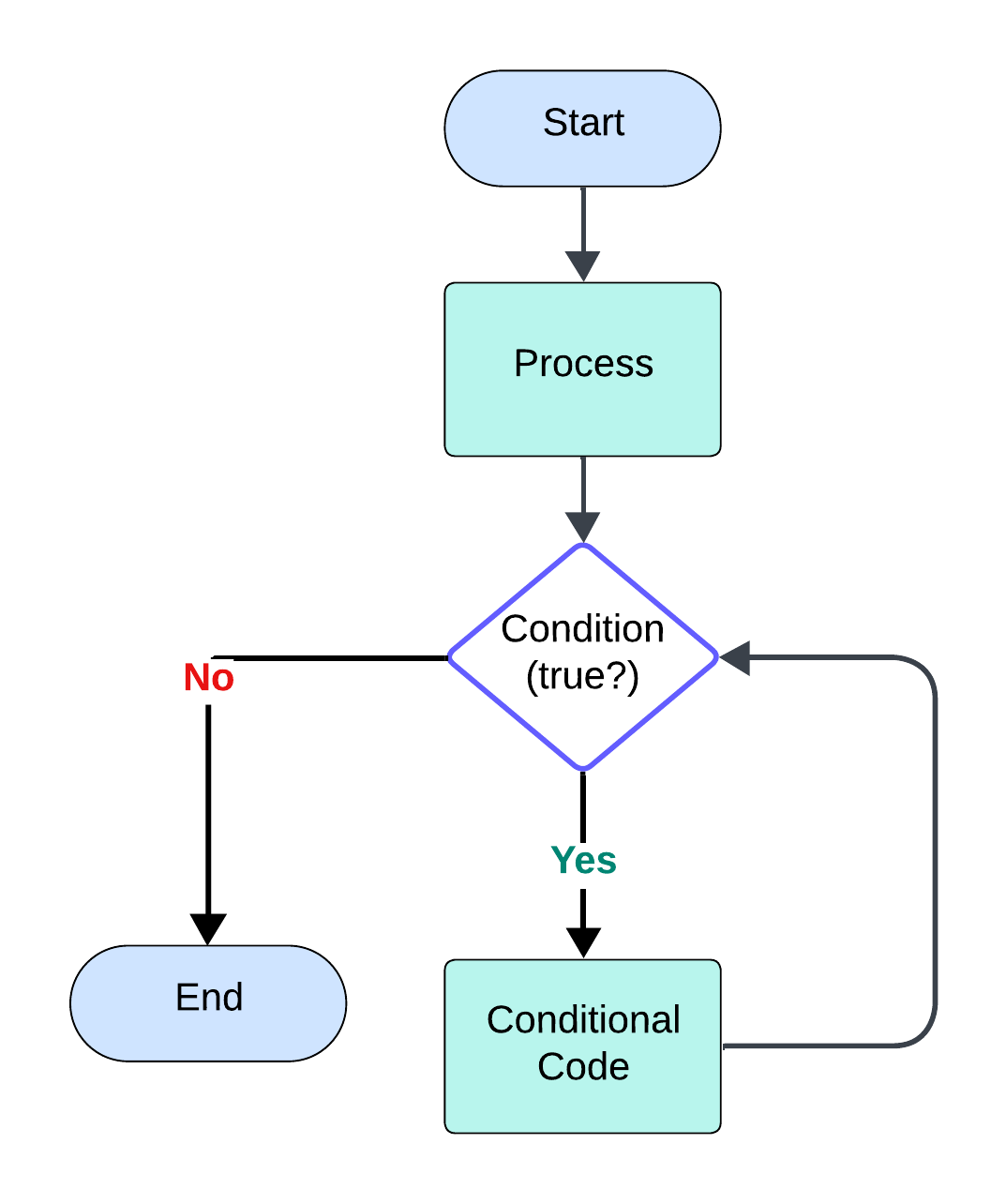
The above flowchart depicts the self-recursive call.
Some of the common use cases include:
- Processing nested data structures: When trying to process nested data structures, the self-recursive loop/function is used to traverse and process every level.
- Handling pagination: When calling an external API that returns paginated results, a self-recursive loop is used to fetch and process each page of data until all pages have been retrieved.
How To Implement This Pattern
Let’s try to answer it with the help of a formal conversation between a developer (John) and an architect/lead (Paul)
Paul:
Hey John, here’s the requirement:
We need to retrieve all the customer records from the third-party "ABC" system via a REST API. However, there’s a challenge — the system contains around 10,000 customer records, but you can’t fetch them all at once. The number of customers is also dynamic and can change over time.
Every API call will return only 100 records at a time. So, you’ll need to keep invoking the system until you’ve retrieved all the records.
How would you go about implementing this?
John:
Got it, Paul. That sounds straightforward. I’ll just use a Flow Reference to recursively call the same flow with the REST API call. I can use a Choice Router to check the condition and exit once all the records have been retrieved.
Paul:
Hmm, that approach could lead to an issue. Do you know what that might be?
John:
I don’t think so. What issue are you referring to?
Paul:
You might run into a MULE:CRITICAL — Too many nested child contexts error. It’s similar to a Stack Overflow issue. Recursively calling a flow too many times causes deep nesting, and Mule throws this critical error if the recursion exceeds 25 calls.
Since we’re dealing with 10,000 records, you’ll easily cross that limit, triggering the error.
John:
Oh, I see! I didn’t realize it would cause that. Could you suggest an alternative solution?
Paul:
Sure! Here’s a video explaining the recommended approach for handling this scenario more efficiently.
Sample Code Block
- recursive-pattern-demo.xml:
<?xml version="1.0" encoding="UTF-8"?>

<mule xmlns:jms="http://www.mulesoft.org/schema/mule/jms" xmlns:ee="http://www.mulesoft.org/schema/mule/ee/core"
 xmlns:vm="http://www.mulesoft.org/schema/mule/vm"
 xmlns:http="http://www.mulesoft.org/schema/mule/http" xmlns="http://www.mulesoft.org/schema/mule/core" xmlns:doc="http://www.mulesoft.org/schema/mule/documentation" xmlns:xsi="http://www.w3.org/2001/XMLSchema-instance" xsi:schemaLocation="http://www.mulesoft.org/schema/mule/core http://www.mulesoft.org/schema/mule/core/current/mule.xsd
http://www.mulesoft.org/schema/mule/http http://www.mulesoft.org/schema/mule/http/current/mule-http.xsd
http://www.mulesoft.org/schema/mule/vm http://www.mulesoft.org/schema/mule/vm/current/mule-vm.xsd
http://www.mulesoft.org/schema/mule/ee/core http://www.mulesoft.org/schema/mule/ee/core/current/mule-ee.xsd
http://www.mulesoft.org/schema/mule/jms http://www.mulesoft.org/schema/mule/jms/current/mule-jms.xsd">
 <http:listener-config name="HTTP_Listener_config" doc:name="HTTP Listener config" doc:id="1005ae36-7591-4f99-91f4-37435464b7a9" >
  <http:listener-connection host="0.0.0.0" port="8081" />
 </http:listener-config>
 <http:request-config name="HTTP_Request_configuration" doc:name="HTTP Request configuration" doc:id="7ddc0f4f-d5c4-4c00-ba72-1148107f6c59" >
  <http:request-connection host="127.0.0.1" port="8081" />
 </http:request-config>
 <vm:config name="VM_Config" doc:name="VM Config" doc:id="43b769a9-18c9-4b38-a7ad-52877f1aee25" sendCorrelationId="ALWAYS" >
  <vm:queues >
   <vm:queue queueName="accounts" maxOutstandingMessages="-1" />
  </vm:queues>
 </vm:config>
 <flow name="recursive-pattern-demoFlow" doc:id="909713b4-f9df-4cd8-9510-b9f5adb94ea3" >
  <http:listener doc:name="Listener - /recursive/check" doc:id="a347cb3f-57b2-468e-9e13-993646dd79f5" config-ref="HTTP_Listener_config" path="/recursive/check"/>
  <logger level="INFO" doc:name="Display Log" doc:id="9b93332d-3025-422f-a716-2c3c762fc588" message="Recursive Flow started"/>
  <flow-ref doc:name="invoke-third-party-api-flow" doc:id="4a91ed61-a79d-4fc1-aceb-3d7f92e801c2" name="invoke-third-party-api-flow" />
  <set-payload value='#["Customers retrieved successfully"]' doc:name="Set Payload" doc:id="7b532b53-9909-497a-9c69-0d9ed3e2dfe2" />
  <logger level="INFO" doc:name="Display Log" doc:id="4b465c6e-e5d2-40ad-9583-b689e29fb066" message="Recursive Flow End" />
 </flow>
 <sub-flow name="invoke-third-party-api-flow" doc:id="5b9da037-b391-4842-9228-1840a80ec596" >
  <http:request method="GET" doc:name="Invoke third party system - /accounts" doc:id="a1264888-c17f-4fda-89ba-d0a0e1d0ec57" config-ref="HTTP_Request_configuration" path="/accounts" sendCorrelationId="ALWAYS">
   <http:headers><![CDATA[#[output application/java
---
{
 counter : vars.counter default 0
}]]]></http:headers>
  </http:request>
  <choice doc:name="Check payload size" doc:id="be00ff21-6219-4963-b1b1-8b415cc3913b">
   <when expression="#[sizeOf(payload) > 0]">
    <vm:publish-consume queueName="accounts" doc:name="Publish consume - Notify Message" doc:id="6f0c3248-0692-4fbe-98bd-7786bb5a7c78" config-ref="VM_Config" sendCorrelationId="ALWAYS">
     <vm:content ><![CDATA[#[output application/json
---
{
 status: "Message published",
 counter: vars.counter default 0
}]]]></vm:content>
    </vm:publish-consume>
   </when>
   <otherwise>
    <logger level="INFO" doc:name="Display Log" doc:id="b1c7d5cb-e338-4370-91aa-9afda2b87571" message="All the records fetched successfully" />
   </otherwise>
  </choice>
 </sub-flow>
 <flow name="while-loop-simulation-flow" doc:id="9c62a987-d79e-43a1-a2b1-6d6bd7cbb8ab" >
  <vm:listener queueName="accounts" doc:name="Listener" doc:id="bab41d88-7b45-45bb-b5e9-71a2afe77f23" config-ref="VM_Config"/>
  <logger level="INFO" doc:name="Start Log" doc:id="54bfe4e6-41ad-4708-b46e-a808131328b3" message="Message listened from the queue"/>
  <set-variable value="#[payload.counter + 1]" doc:name="Set counter to simulate while loop" doc:id="6c4516ee-4ba7-4bc4-857f-653ab995ab2f" variableName="counter"/>
  <flow-ref doc:name="invoke-third-party-api-flow" doc:id="d71963d6-16a7-492b-942f-a43ab116c95a" name="invoke-third-party-api-flow"/>
 </flow>


</mule>- third-party-api.xml:
<?xml version="1.0" encoding="UTF-8"?>

<mule xmlns:http="http://www.mulesoft.org/schema/mule/http"
 xmlns:ee="http://www.mulesoft.org/schema/mule/ee/core"
 xmlns="http://www.mulesoft.org/schema/mule/core" xmlns:doc="http://www.mulesoft.org/schema/mule/documentation"
 xmlns:xsi="http://www.w3.org/2001/XMLSchema-instance"
 xsi:schemaLocation="
http://www.mulesoft.org/schema/mule/http http://www.mulesoft.org/schema/mule/http/current/mule-http.xsd
http://www.mulesoft.org/schema/mule/ee/core http://www.mulesoft.org/schema/mule/ee/core/current/mule-ee.xsd http://www.mulesoft.org/schema/mule/core http://www.mulesoft.org/schema/mule/core/current/mule.xsd">

 <flow name="third-party-api-flow" doc:id="80cc29bd-12f8-4477-b4f9-65ce0b1900a6" >
  <http:listener doc:name="Listener - /accounts" doc:id="54748934-42d1-4948-aa44-a7c59eb91364" config-ref="HTTP_Listener_config" path="/accounts"/>
  <logger level="INFO" doc:name="Display Log" doc:id="4c964a67-0794-4923-b60a-767da4d50e9b" message="Third party flow started. Counter #[attributes.headers.counter]"/>
  <ee:transform doc:name="Prepare payload" doc:id="4cae710d-16aa-43b7-b437-6a90f92ab258" >
   <ee:message >
    <ee:set-payload ><![CDATA[%dw 2.0
output application/json
---
if(attributes.headers.counter < 50 )

[
 {
  "id" : 1721 + (attributes.headers.counter default 0),
  "name": "John_" ++ (attributes.headers.counter default 0),
  "age": 23,
  "index": attributes.headers.counter

 },
 {
  "id" : 1722 + (attributes.headers.counter default 0),
  "name": "Paul_" ++ (attributes.headers.counter default 0),
  "age": 25,
  "index": attributes.headers.counter
 }
]

else
[]]]></ee:set-payload>
   </ee:message>
  </ee:transform>
  <logger level="INFO" doc:name="Display Log" doc:id="433ebf4d-17bf-436a-8b18-8460735f97e5" message="After third party call #[payload]"/>
 </flow>

 </mule>
Recommendation
The usage of VM instead of Flow-references will rule out MULE:CRITICAL errors and works efficiently for all the scenarios. There can be many ways a certain logic can be implemented. However, we should always consider the best approach that doesn't result in issues.
Published at DZone with permission of Sravanthi Bhaskara. See the original article here.
Opinions expressed by DZone contributors are their own.