

Common Pitfalls in RAG Applications: What to Avoid When Using Vector Search and Embeddings
RAG is easy to launch and hard to keep reliable. Here are the most common failure modes, their causes, and the Databricks-specific fixes.
Here's the demo that always works: you point a notebook at a vector index, ask it a question, and it answers perfectly. Everyone claps. Three weeks later, the same system tells a customer that your refund window is 90 days when it's 30, cites a document that doesn't exist, and occasionally surfaces another tenant's invoice in the context. Nobody clapped for that part.
RAG is deceptively easy to stand up and genuinely hard to keep honest. The retrieval step looks like a solved problem — embed the query, find the nearest neighbors, stuff them into a prompt — so teams treat it like plumbing and move on. Then quality quietly erodes, and because there's no eval harness, nobody can say when it broke or why.
I've watched more RAG projects die from unmeasured drift than from any modeling problem. This article is a tour of the failure modes you will actually hit on Databricks Vector Search, each with the symptom, the root cause, and the specific fix. It's opinionated on purpose. Retrieval quality is not vibes.
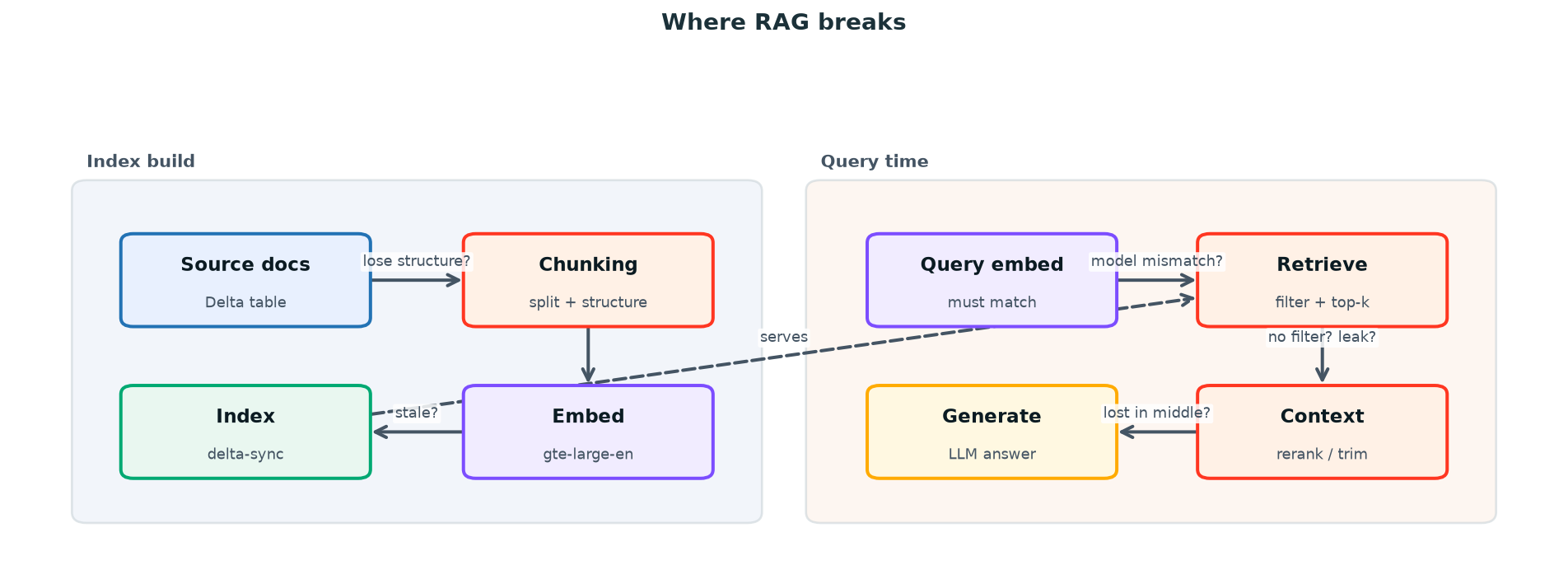
Pitfall 1: Chunking Like You’re Slicing Bread
Chunking is the most ignored, highest-leverage knob in the whole pipeline. The lazy default is a fixed 1000-character window with zero overlap, applied to everything from API reference pages to legal contracts. It feels reasonable. It is not.
Two failure shapes show up.
Chunks too big: You embed a 4,000-token wall of text, the embedding becomes an average of six unrelated topics, and cosine similarity goes mushy — every query is sort of close to everything.
Chunks too small: You split mid-sentence, the retriever returns ...the maximum is, and the model confidently invents the rest. The worst version is splitting on raw character count straight through a table or a code block, so the header lands in chunk 7 and the values land in chunk 8, and neither is useful alone.
Fix it by chunking on structure first and size second. Split on headings and paragraph boundaries, keep tables and code blocks intact as their own chunks, and add a modest overlap so a thought that straddles a boundary survives in at least one chunk. Match the chunk size to your embedding model's real context window — databricks-gte-large-en handles 8,192 tokens, databricks-bge-large-en only 512, so a 1,000-token chunk silently truncates under bge and you embed half a paragraph.
from langchain_text_splitters import RecursiveCharacterTextSplitter

# Split on structure first (headings, paragraphs, lines), size second.
# Tokens, not characters — match the embedding model's real window.
splitter = RecursiveCharacterTextSplitter(
    separators=["\n## ", "\n### ", "\n\n", "\n", ". ", " "],
    chunk_size=800,        # tokens, comfortably under gte-large-en's 8192
    chunk_overlap=120,     # ~15% overlap so straddling thoughts survive
    length_function=lambda t: len(tokenizer.encode(t)),
)

# Keep atomic blocks whole: don't let a table header and its rows split.
def chunk_doc(doc):
    chunks = []
    for block in split_into_blocks(doc):          # your structure-aware pass
        if block.kind in ("table", "code"):
            chunks.append(block.text)             # never split these
        else:
            chunks.extend(splitter.split_text(block.text))
return chunks|
Tip: There is no universal chunk size, but there is a universal debugging move: when an answer is wrong, read the retrieved chunks first. Half the time the model did its job, and the chunk was garbage. You can't fix that in the prompt. |
Pitfall 2: Embedding the Query and the Index With Different Brains
This one is subtle because nothing errors. You built the index six months ago with databricks-bge-large-en. Last sprint, someone wrote a new query path and reached for databricks-gte-large-en because it was top of mind. Both output 1024-dimensional vectors, so the dimensions match, the similarity_search call succeeds, and the results are quietly nonsense — you're comparing coordinates from two different vector spaces. Same dimension count, completely different geometry.
The cousin of this bug: you re-embed your corpus with a better model but only rebuild half the index, or you bump the embedding endpoint to a new version and forget the query side. Now your live queries are embedded with v2 and three-quarters of your index is still v1. Recall craters, and there's no exception to point at.
The cure is to stop letting the embedding model be an implicit choice scattered across the codebase. Pin it once, centrally, and — the cleanest option on Databricks — use a Delta Sync index with managed embeddings so Vector Search owns embedding generation for both the index and query_text lookups. You physically cannot mismatch them, because you never embed the query yourself.
from databricks.sdk import WorkspaceClient

w = WorkspaceClient()

# Managed-embedding Delta Sync index: Vector Search embeds BOTH the
# source column AND query_text with the SAME endpoint. Mismatch impossible.
EMBEDDING_ENDPOINT = "databricks-gte-large-en" # pin once, here, only here

w.vector_search_indexes.create_index(
name="prod.rag.kb_index",
endpoint_name="rag-endpoint",
primary_key="chunk_id",
index_type="DELTA_SYNC",
delta_sync_index_spec={
"source_table": "prod.rag.kb_chunks",
"embedding_source_columns": [
{"name": "content", "embedding_model_endpoint_name": EMBEDDING_ENDPOINT}
],
"pipeline_type": "TRIGGERED",
"columns_to_sync": ["chunk_id", "content", "doc_id", "tenant_id", "updated_at"],
},
)

# At query time you pass TEXT, never a vector. Same model embeds it server-side.
res = w.vector_search_indexes.query_index(
index_name="prod.rag.kb_index",
columns=["chunk_id", "content", "doc_id"],
query_text="What is the refund window?",
num_results=5,
)|
Watch Out: If you must use self-managed embeddings ( |
Pitfall 3: The Index That Never Updates (You Forgot Change Data Feed)
Symptom: You edit a document, the source Delta table clearly has the new text, you trigger a sync, the sync reports success — and the retriever still serves the old answer. People burn a full afternoon on this one. The endpoint is healthy, the index says ONLINE, nothing is red. It's just stale.
Root Cause: A Delta Sync index syncs incrementally off the source table's Change Data Feed. If CDF was never enabled on the table, there's no change stream for the sync pipeline to read, so it has nothing to apply. Depending on how the table was created, you either get a hard error at index-create time or, worse, a sync that completes against an empty changelog and updates nothing. Either way, stale results.
-- The fix is one table property. Enable it on the SOURCE table before
-- (or right after) you create the delta-sync index.
ALTER TABLE prod.rag.kb_chunks
  SET TBLPROPERTIES (delta.enableChangeDataFeed = true);

-- New tables: bake it in at creation so this never bites you.
CREATE TABLE prod.rag.kb_chunks (
  chunk_id   STRING,
  doc_id     STRING,
  tenant_id  STRING,
  content    STRING,
  updated_at TIMESTAMP
) TBLPROPERTIES (delta.enableChangeDataFeed = true);
After enabling CDF, trigger the sync explicitly if you're on a TRIGGERED pipeline — it does not auto-run on source writes. This is the other half of the staleness story. People assume TRIGGERED means "sync when the table changes." It means "sync when you call sync." If you need the index to track writes automatically, that's CONTINUOUS.
# TRIGGERED pipelines do NOT auto-sync. You call it, then poll until ready.
w.vector_search_indexes.sync_index(index_name="prod.rag.kb_index")

idx = w.vector_search_indexes.get_index(index_name="prod.rag.kb_index")
print(idx.status.ready, idx.status.indexed_row_count)
# If indexed_row_count never moves after edits -> check CDF on the source table.|
Pipeline type |
Sync Behavior |
Cost |
Use When |
|
TRIGGERED |
Syncs only when you call |
Lower — compute runs on demand |
Batch refreshes, nightly doc loads, cost-sensitive |
|
CONTINUOUS |
Auto-syncs as the source table changes |
Higher — pipeline always on |
Live freshness, docs that change through the day |
|
Note: CONTINUOUS indexes cannot be manually synced — calling |
Pitfall 4: Plausible-But-Wrong Context, No Filtering, and Cross-Tenant Leakage
Vector search always returns something. Ask about a product you don't sell, and you'll still get five neighbors back, ranked by similarity, looking authoritative. The model then dutifully grounds its answer in those five irrelevant chunks and produces a fluent, specific, completely wrong reply. This is the hallucination people blame on the LLM when the real culprit is retrieval handing it bad context with a straight face.
The dangerous version is multi-tenant. If your index holds documents for many customers and you query without a tenant filter, nearest-neighbor search does not care about ownership — it'll happily return tenant B's contract to tenant A because it's semantically close. That's not a quality bug, but a data-leak incident. I have seen this ship to production because the filter was "on the backlog."
Fix it on two fronts. First, always filter by the metadata that scopes the request — tenant, document type, recency — so the candidate set is correct before similarity even runs. Note the syntax differs by endpoint type: Standard endpoints take dict-style filters_json; Storage-optimized endpoints take SQL-like string filters via the databricks-vectorsearch client. Second, set a similarity floor: if the best match is below a threshold, treat it as "no relevant context found" and have the model say so instead of grounding on noise.
from databricks.vector_search.client import VectorSearchClient

vsc = VectorSearchClient()
index = vsc.get_index(endpoint_name="rag-endpoint", index_name="prod.rag.kb_index")

# Storage-Optimized endpoint: SQL-like string filters.
# tenant_id is NON-NEGOTIABLE — it scopes the candidate set before ANN runs.
resp = index.similarity_search(
query_text=user_query,
columns=["chunk_id", "content", "doc_id"],
num_results=8,
filters=f"tenant_id = '{tenant_id}' AND doc_type IN ('policy','faq')",
)
rows = resp["result"]["data_array"] # last column of each row is the score

# Similarity floor: refuse to ground on weak matches instead of hallucinating.
SIM_FLOOR = 0.72
grounded = [r for r in rows if r[-1] >= SIM_FLOOR]
if not grounded:
answer = "I don't have a document that answers that." # honest > fluent
else:
answer = generate(user_query, context=grounded)|
Watch Out: Never interpolate tenant scope into a filter string from raw user input — derive |
Pitfall 5: Stuffing the Whole Corpus Into the Context Window
Bigger context windows tempted everyone into a bad habit: "retrieval is fuzzy, so just send top-20 and let the model sort it out." Two things go wrong. You pay for — and wait on — thousands of tokens of mostly irrelevant text on every call. And you walk straight into lost-in-the-middle: models reliably attend to the start and end of a long context and skim the middle, so the one chunk that actually answered the question — sitting at position 11 of 20 — gets ignored. The right answer was in the prompt. The model never read it.
More retrieved chunks is not more knowledge; past a point it's more noise and worse recall of what matters. Retrieve a wider candidate set if you like, but then rerank and trim to a tight, high-precision few, and order them so the strongest land where the model actually looks.
# Retrieve wide, then rerank and KEEP FEW. Quality over volume.
candidates = index.similarity_search(
query_text=user_query, columns=["chunk_id", "content"],
num_results=20, filters=f"tenant_id = '{tenant_id}'",
)["result"]["data_array"]

reranked = reranker.rank(user_query, [c[1] for c in candidates]) # cross-encoder
top = reranked[:5] # trim hard

# Lost-in-the-middle hedge: put the strongest chunk LAST (nearest the question).
ordered = sorted(top, key=lambda c: c.score) # ascending -> best at end
context = "\n\n---\n\n".join(c.text for c in ordered)
prompt = f"Use only the context below.\n\n{context}\n\nQuestion: {user_query}"|
Tempting move |
What it actually does |
Do this instead |
|
Send top-20 chunks |
Lost-in-the-middle; high token cost; recall drops |
Retrieve wide, rerank, keep top 3–5 |
|
No reranking |
ANN order ≠ relevance order |
Cross-encoder rerank the candidate set |
|
Random chunk order |
Best chunk buried in the middle |
Put strongest chunk at the edges |
|
Raw chunk dump |
Model can't tell sources apart |
Delimit chunks; cite |
Pitfall 6: “We Never Measured It”
This is the one that actually kills projects. Every pitfall above is survivable if you can see it. The fatal mistake is shipping RAG with no evaluation harness, so quality becomes a matter of opinion, and the loudest anecdote wins. Someone says "it feels worse since the re-embed," someone else says "works for me," and there's no number to settle it. You can't improve what you refuse to measure.
On Databricks, the harness is mlflow.genai.evaluate() with built-in LLM-judge scorers. The two that matter most for RAG live exactly at the failure modes above: RetrievalGroundedness checks whether the answer is actually supported by the retrieved chunks (catches Pitfall 4's confident fiction), and RelevanceToQuery checks whether the answer addresses the question at all. Add Correctness when you have ground-truth expected_facts. These are real judges, not heuristics — they read the trace and reason about it.
import mlflow
from mlflow.entities import SpanType
from mlflow.genai.scorers import RetrievalGroundedness, RelevanceToQuery, Correctness

mlflow.set_tracking_uri("databricks")
mlflow.set_experiment("/Shared/rag-eval")

# RetrievalGroundedness needs a RETRIEVER span in the trace — so trace retrieval.
@mlflow.trace(span_type=SpanType.RETRIEVER)
def retrieve(query, tenant_id):
rows = index.similarity_search(
query_text=query, columns=["chunk_id", "content"],
num_results=5, filters=f"tenant_id = '{tenant_id}'",
)["result"]["data_array"]
return [{"page_content": r[1], "metadata": {"chunk_id": r[0]}} for r in rows]

@mlflow.trace
def rag_app(query, tenant_id):
docs = retrieve(query, tenant_id)
return {"response": generate(query, docs)}

# A small, curated eval set with ground truth beats a big unlabeled one.
eval_data = [
{"inputs": {"query": "What is the refund window?", "tenant_id": "acme"},
"expectations": {"expected_facts": ["Refunds are accepted within 30 days"]}},
{"inputs": {"query": "Do you support SSO?", "tenant_id": "acme"},
"expectations": {"expected_facts": ["SAML and OIDC single sign-on are supported"]}},
]

results = mlflow.genai.evaluate(
data=eval_data,
predict_fn=rag_app,
scorers=[RetrievalGroundedness(), RelevanceToQuery(), Correctness()],
)
print(results.metrics) # now "feels worse" becomes a number that moved
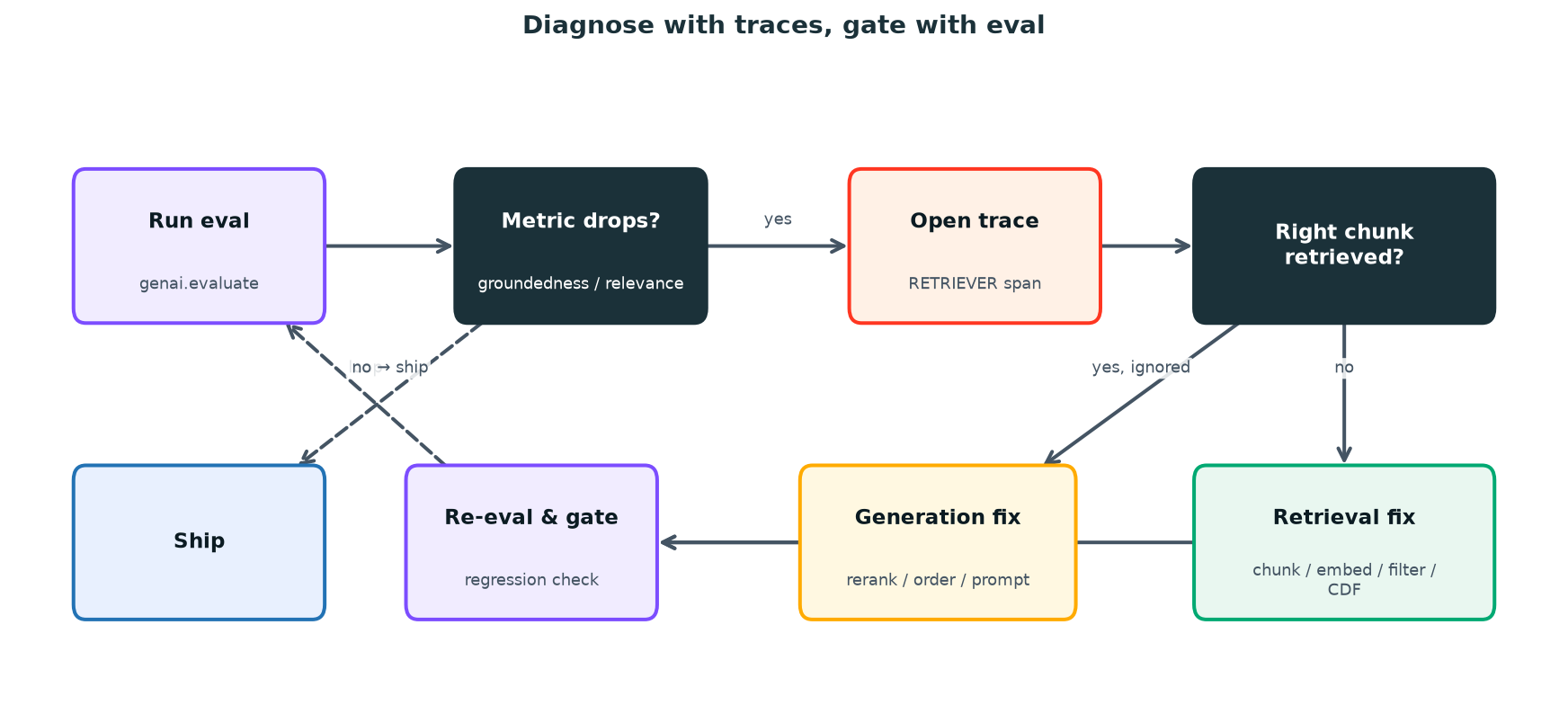
Run this on every change — new chunking strategy, new embedding model, new reranker — as a regression gate, not a one-time blessing. When a metric drops, MLflow Tracing tells you where: open the failing trace, look at the RETRIEVER span, and read what actually came back. The debugging loop is tight: bad answer → inspect retrieved chunks in the trace → was the right chunk even retrieved? If no, it's a retrieval problem (chunking, embedding, filter, staleness). If yes but the answer ignored it, it's a generation problem (context order, prompt, lost-in-the-middle).
|
Metric |
What it tells you |
How to get it |
|
Retrieval groundedness |
Is the answer supported by retrieved chunks? |
|
|
Relevance to query |
Does the answer address the question? |
|
|
Correctness |
Does it match known facts? |
|
|
Context recall |
Did retrieval find the chunk that holds the answer? |
Compare retrieved |
|
Context precision |
What fraction of retrieved chunks are relevant? |
Custom @scorer over the RETRIEVER span |
|
Retrieval latency |
Is the retrieve step the bottleneck? |
Span duration in the trace |
Pitfall 7: Treating Metadata and Governance as Someone Else’s Job
The last pitfall is architectural. Teams flatten everything into (chunk_id, content) and throw away the metadata — doc_id, tenant_id, doc_type, updated_at, source URL. Then they can't filter (Pitfall 4), can't cite sources, can't expire stale docs, and can't answer the auditor who asks "why did the model say that?" because there's no path back from an answer to the document it came from.
Carry metadata through the whole pipeline and put governance underneath it. Keep the source table in Unity Catalog's three-level namespace (catalog.schema.table), include the columns you need to filter and cite in columns_to_sync, stamp updated_at, and govern access on the source — the index inherits what the table exposes. The payoff compounds: the same tenant_id that prevents leakage also powers citations, recency filters, and lineage. Metadata is not overhead; it's the thing that makes retrieval auditable.
|
Pitfall |
Symptom |
Root Cause |
Fix |
|
Bad chunking |
Mushy similarity or truncated answers |
Fixed-size splits ignore structure/model window |
Structure-aware splitter, overlap, size to model |
|
Embedding mismatch |
Nonsense results, no error |
Query and index embedded by different models/versions |
Managed-embedding delta-sync; pin model centrally |
|
Index staleness |
Edits don't show up after sync |
CDF off; or TRIGGERED never synced |
|
|
Plausible-but-wrong/leakage |
Confident wrong answers; other tenant's data |
No metadata filter; no similarity floor |
Server-side tenant filter; similarity threshold |
|
Context overstuffing |
Slow, costly, ignores the right chunk |
Top-20 dump; lost-in-the-middle |
Rerank, trim to 3–5, order by edge position |
|
No evaluation |
"Feels worse" debates, silent drift |
Shipped with no eval harness |
|
|
Ignored metadata |
Can't filter, cite, or audit |
Flattened to id+text; no governance |
Carry metadata; govern source in Unity Catalog |
The Takeaway
None of these failure modes are exotic. They're the default outcome of treating RAG as plumbing — chunk however, embed whatever, sync if you remember, send a pile of context, and hope. The fix in every case is the same posture: make retrieval explicit and measurable. Chunk on structure. Pin one embedding model and let managed delta-sync enforce it.
Enable change data feed before you wonder why nothing updates. Filter by tenant server-side and refuse weak matches. Rerank and trim instead of dumping. And above all, wire up mlflow.genai.evaluate() with RetrievalGroundedness and RelevanceToQuery so "it got worse" becomes a number, and use MLflow Tracing to find out exactly which span betrayed you.
If you can't open a trace and read the chunks your model was handed, you're not debugging RAG — you're guessing.
Start small: stand up a Delta Sync index with managed embeddings, put twenty labeled questions behind mlflow.genai.evaluate(), and make that eval a gate on every change. The Databricks Vector Search and MLflow GenAI evaluation docs walk through both end-to-end. Build the harness before you build the features — your future self, staring at a confidently wrong answer at 4 p.m., will thank you.
Opinions expressed by DZone contributors are their own.