

Implementing Vector Search in Databricks
Vector search eases the natural language queries by numerical representations that can correlate meanings beyond literal words.
Join the DZone community and get the full member experience.
Join For FreeSearch has always been at the heart of analytics. Whether you’re tracking down the right transaction, filtering a customer record, or pulling a specific review, the default approach has traditionally been keyword search.
Keyword search is simple and effective when you know exactly what you’re looking for, but it quickly falls apart when the language is messy, ambiguous, or when meaning matters more than exact words. That’s where vector search changes the game. Instead of matching literal keywords, vector search relies on embeddings — high-dimensional numeric representations of text, images, or other unstructured content — that capture semantic meaning.
Two pieces of text that mean the same thing will have embeddings that are close to each other in vector space, even if they use completely different words.
For example:
-
A customer review that says “the delivery took forever” and another that says “shipping was slow” are semantically similar. A keyword-based search may miss that connection, but a vector search will surface both.
Until recently, implementing vector search meant stitching together multiple components: running embedding models in Python, storing vectors in an external vector database, syncing metadata, and writing custom APIs for retrieval. This was complex, brittle, and almost always lived outside the governed data warehouse, making governance, lineage, and compliance much harder.
Databricks brings native vector search into the Lakehouse. With a Python notebook and SQL commands, you can generate embeddings, build vector indexes, and perform semantic queries.
In this article, we’ll walk through the step-by-step implementation of vector search using the Bakehouse dataset. See how to embed and run customer reviews by building a vector search endpoint, building a search index, and running semantic queries. By the end, you’ll understand not only how to use vector search in Databricks.
Context
Bakehouse is a sample dataset provided in Databricks for a fictional bakery. It receives a rapidly growing volume of free‑form customer reviews across many franchises and dates. Because feedback is written in varied phrasing (synonyms, slang, typos, multi‑lingual hints), analysts relying on simple keyword filters struggle to consistently find semantically similar complaints (e.g., “refund not received,” “money didn’t come back,” “return pending”). As a result, root‑cause patterns like late deliveries, freshness issues, or refund friction are detected late, triage is manual and time‑consuming, and franchise‑level accountability is uneven.
We need a governed, low‑latency semantic search capability over the reviews so stakeholders can ask questions in natural language and slice results by franchise and time — without building custom NLP pipelines per use case.
Scope and Constraints
- Source of truth is
bakehouse.reviews.customer_feedback(columns:new_id,review,franchiseID,review_date, plus an existing embedding). - Must operate within Unity Catalog governance; results should be queryable from Databricks SQL.
- Latency targets appropriate for interactive analysis (top‑10 results in sub‑second to low‑second range depending on data scale).
Architecture Flow (High-Level)
Ingestion → Delta table (UC, CDF ON) →
Vector Search Endpoint → Delta Sync Index (embeddings computed from
review) → SQLvector_search()consumers
Core Components
- Delta table bakehouse.reviews.customer_feedback with new_id (PK), review (STRING), franchiseID, review_date (DATE).
- Vector Search endpoint: managed compute that hosts one or more indexes. Choose Standard (low‑latency) or Storage‑optimized (billion‑scale, lower $/vector, higher latency).
- Delta Sync Index (managed embeddings): computes embeddings from review using a hosted model (e.g., databricks-bge-large-en) and keeps in sync with table changes via CDF.
- Query: Databricks SQL vector_search(index => ..., query_text => ..., num_results => N).
Implementation
The goal is to enable product and ops teams to type natural‑language queries like “refund not received” and instantly find semantically similar reviews, while keeping results governed, low‑latency, and always fresh.
Step 1: Enable Change Data Feed
Required for STANDARD Vector Search endpoints so the index can sync incrementally.
ALTER TABLE bakehouse.reviews.customer_feedback

SET TBLPROPERTIES (delta.enableChangeDataFeed = true);
Step 2: Create/Ensure Endpoint and Delta Sync Index (Managed Embeddings)
Create a notebook and run the code below:
# If needed once per cluster:

%pip install -q databricks-vectorsearch

dbutils.library.restartPython()


from databricks.vector_search.client import VectorSearchClient


CATALOG = "bakehouse"

SCHEMA  = "reviews"

TABLE   = "customer_feedback"

SRC_FQN = f"{CATALOG}.{SCHEMA}.{TABLE}"


ENDPOINT_NAME = "bakehouse-vs-endpoint"

# Use a new index name so you can keep the old one around if you want

INDEX_FQN     = f"{CATALOG}.{SCHEMA}.customer_feedback_idx_v2"


PRIMARY_KEY   = "new_id"

TEXT_COL      = "review"


# Databricks-hosted embedding model endpoint (pay-per-token):

# See "Use foundation models" docs for supported endpoint names (e.g., databricks-bge-large-en / databricks-gte-large-en)

EMBEDDING_MODEL_ENDPOINT = "databricks-bge-large-en"


# 1) Prereq: Enable Change Data Feed on the source Delta table (required for STANDARD endpoints)

spark.sql(f"""

ALTER TABLE {SRC_FQN}

SET TBLPROPERTIES (delta.enableChangeDataFeed = true)

""")


# 2) Create/ensure a Vector Search endpoint

vsc = VectorSearchClient()

try:

   vsc.get_endpoint(ENDPOINT_NAME)

   print(f"Endpoint exists: {ENDPOINT_NAME}")

except Exception:

   print(f"Creating endpoint: {ENDPOINT_NAME}")

   vsc.create_endpoint(name=ENDPOINT_NAME, endpoint_type="STANDARD")

   vsc.create_endpoint_and_wait(name=ENDPOINT_NAME)

   print("Endpoint ONLINE.")


# (Optional) delete an old index with the same name

# try: vsc.delete_index(endpoint_name=ENDPOINT_NAME, index_name=INDEX_FQN); print("Deleted existing index"); except: pass


# 3) Create a Delta Sync index that COMPUTES embeddings from text

# Key: use embedding_source_column + embedding_model_endpoint_name

print(f"Creating index with computed embeddings: {INDEX_FQN}")

idx = vsc.create_delta_sync_index_and_wait(

   endpoint_name=ENDPOINT_NAME,

   index_name=INDEX_FQN,

   primary_key=PRIMARY_KEY,

   source_table_name=SRC_FQN,

   pipeline_type="TRIGGERED",                 # or "TRIGGERED" if you prefer manual syncs

   embedding_source_column=TEXT_COL,           # text column to embed

   embedding_model_endpoint_name=EMBEDDING_MODEL_ENDPOINT,

   # Optional: write back computed vectors+payload to a UC table for inspection

   # sync_computed_embeddings=True

)
print("Index ONLINE:", INDEX_FQN)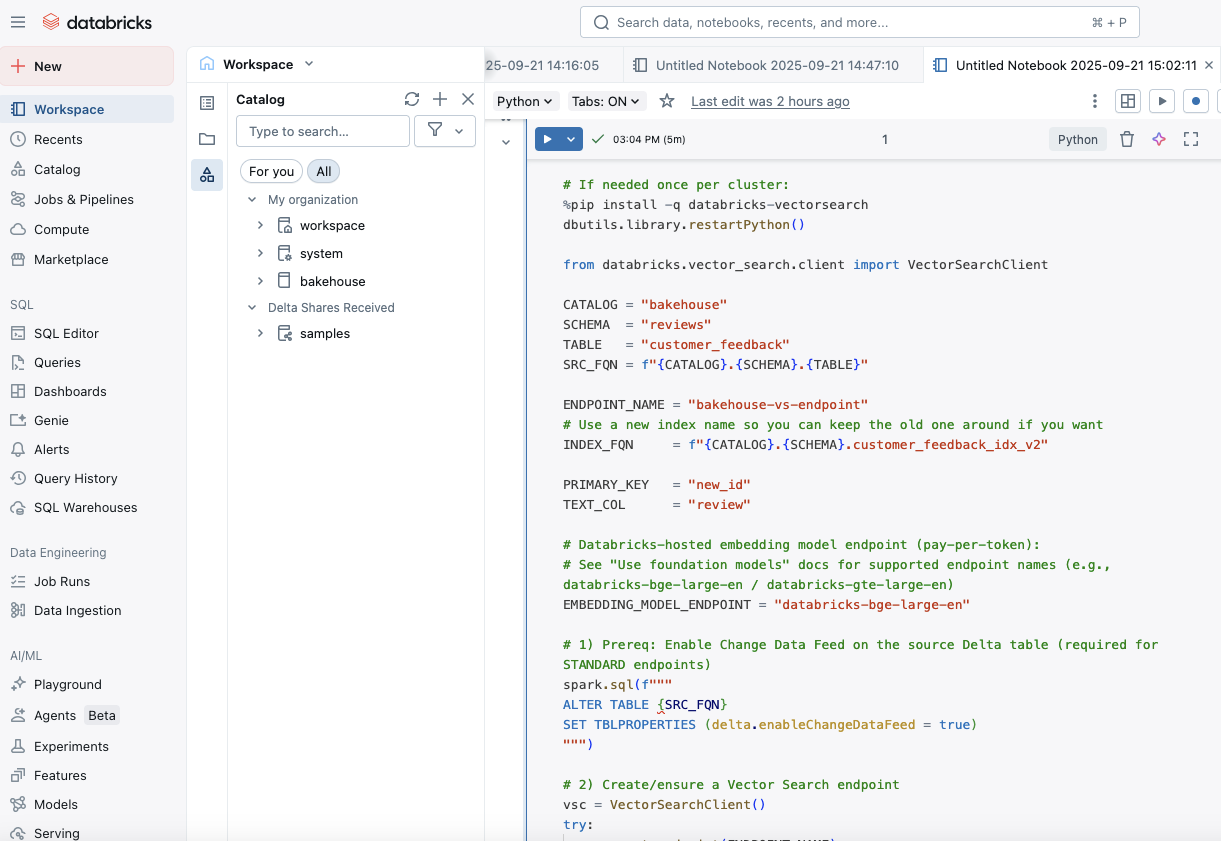
The code takes about 3–5 minutes to run, and it:
- Ensures a vector search endpoint exists
- Creates a Delta Sync Index that computes embeddings from reviews using a Databricks embedding model
- Uses TRIGGERED sync (manual) so you explicitly control refreshes
Step 3: Ensure Embedding and Vector Search Indexes Are Created
If you review the dataset bakehouse.reviews.customer_feedback, you will be able to see the newly created embedding column and index.
select * from bakehouse.reviews.customer_feedback limit 100;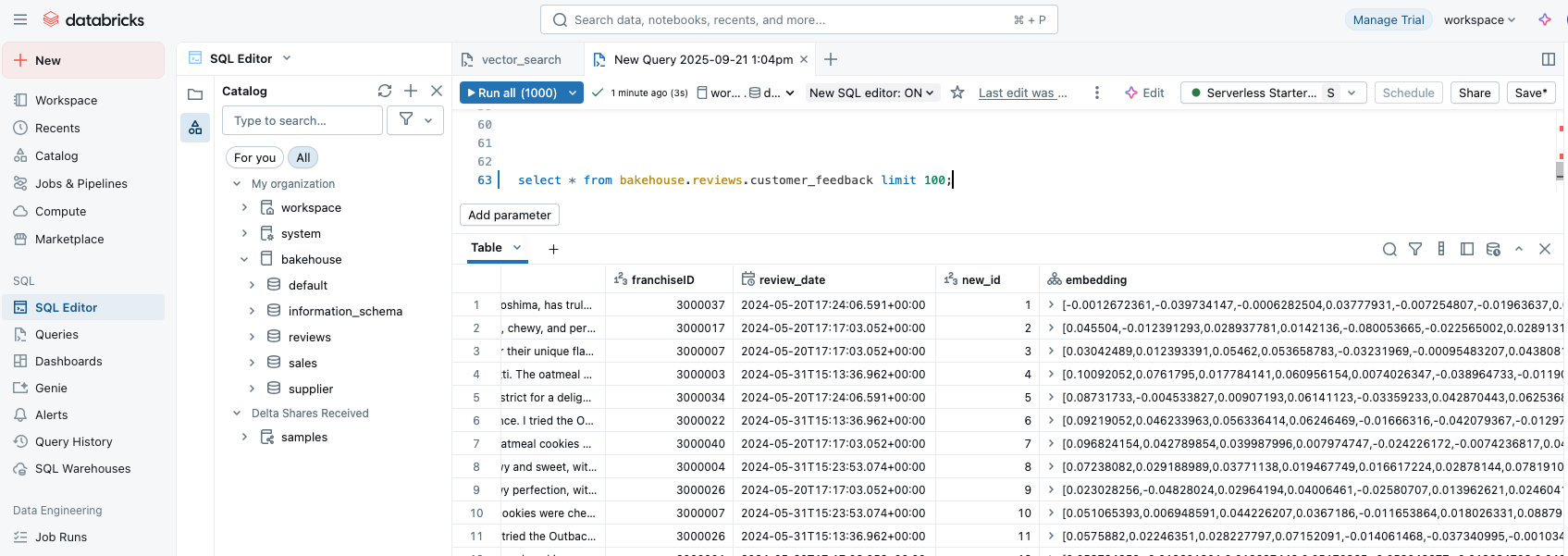
Step 4: Create Semantic Queries
1. Running a semantic query to check for refund issues:
SELECT new_id, review, franchiseID, review_date, score

FROM vector_search(

index => 'bakehouse.reviews.customer_feedback_idx_v2',

query_text => 'refund not received',

num_results => 10

)

ORDER BY score DESC;
2. Semantic query to check for delivery delays:
 SELECT new_id, review, franchiseID, review_date, search_score

 FROM vector_search(

   index        => 'bakehouse.reviews.customer_feedback_idx_v2',

   query_text   => 'delivery delays and late arrivals',

   num_results  => 50

 )
Through this implementation, we have turned the business teams into asking questions in natural language without the need for an ML pipeline.
Business can self-serve scenarios below:
- Refunds: Regional manager types “refund not received” and filters by franchiseID → sees spike patterns by date without waiting for a new ML labeler.
- Freshness: QA lead searches “stale bread, not fresh” → clusters issues to suppliers; opens targeted corrective actions.
- Delivery: Ops analyst queries “arrived late / delivery delay” → validates routing changes before committing budget.
We implemented semantic search on Bakehouse customer reviews by pairing a Unity Catalog Delta table with a Databricks Vector Search endpoint and a Delta Sync Index that computes embeddings directly from the review column (CDF on). This lets analysts query in plain English and instantly surface meaning-matched reviews across franchises and dates. The managed index removes the need to build and maintain one-off ML classifiers per use case, keeps results fresh via continuous/triggered sync, and preserves governance under UC.
To evolve this into RAG, use the same index as the retriever (top-K reviews by vector_search) and pass those snippets to an LLM served on Databricks with instructions to answer only from the retrieved text and cite new_id (e.g., [12345]). This adds concise, grounded summaries and recommendations on top of the search layer without changing your data or governance model.
Opinions expressed by DZone contributors are their own.
Comments